https://main--da--cc--adobecom.aem.live/cc-shared/assets/img/firefly.svg

Adobe Firefly. Create stunning content faster.

Generate and edit images, video, audio, and designs using top AI models from Adobe, Google, OpenAI, Kling AI, and more. Get started for free.

Create now

https://main--da-cc--adobecom.aem.page/cc-shared/ff-gallery-assets.json

base-offset=100px

parallax-distance=70px

Tablet-base-offset=350px

Tablet-parallax-distance=-250px

base-offset=160px

parallax-distance=10px

Tablet-base-offset=200px

Tablet-parallax-distance=-300px

base-offset=50px

parallax-distance=-80px

Tablet-base-offset=-80px

Tablet-parallax-distance=-550px

base-offset=-70px

parallax-distance=-130px

Tablet-base-offset=-450px

Tablet-parallax-distance=-50px

Try Firefly now, free.

Seamlessly generate and edit video and images.

| Google

| Open AI

| Kling
| Blackforestlabs

| Elevenlabs
| Topazlabs

| Lumaai

| Runway

FEATURES

Top Firefly features.

The industry-leading generative AI tools for images, video, audio, and vectors are in the Firefly app. View all features.

https://main--da-cc--adobecom.aem.page/cc-shared/fragments/products/firefly/editorial-carousel-firefly

https://main--da-cc--adobecom.aem.page/cc-shared/fragments/products/firefly/ff-ai-models

FLEXIBILITY

Firefly is for everyone.

From generating podcast thumbnails and graphics to prototyping complete brand campaigns, Firefly has the AI models and design tools you need to go from initial idea to final product.
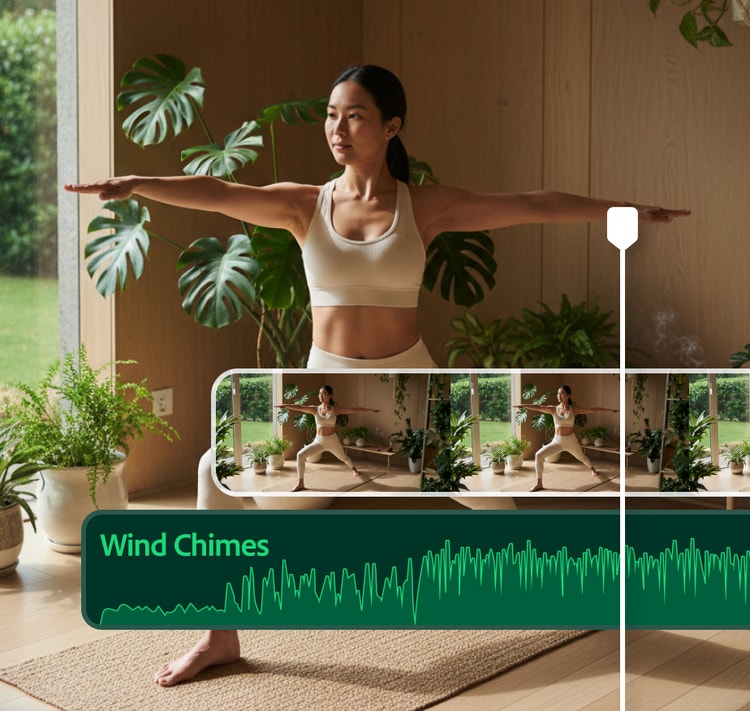
#FFF
AI sound effect generation concept showing a yoga pose in a plant-filled room with a waveform labeled ‘Wind Chimes’ overlayed on the image.

Content creators and video editors.

Generate sound effects, cinematic b-roll, and atmospheric layers like smoke, water, or lens flares. Translate videos into multiple languages without losing tone and timing.
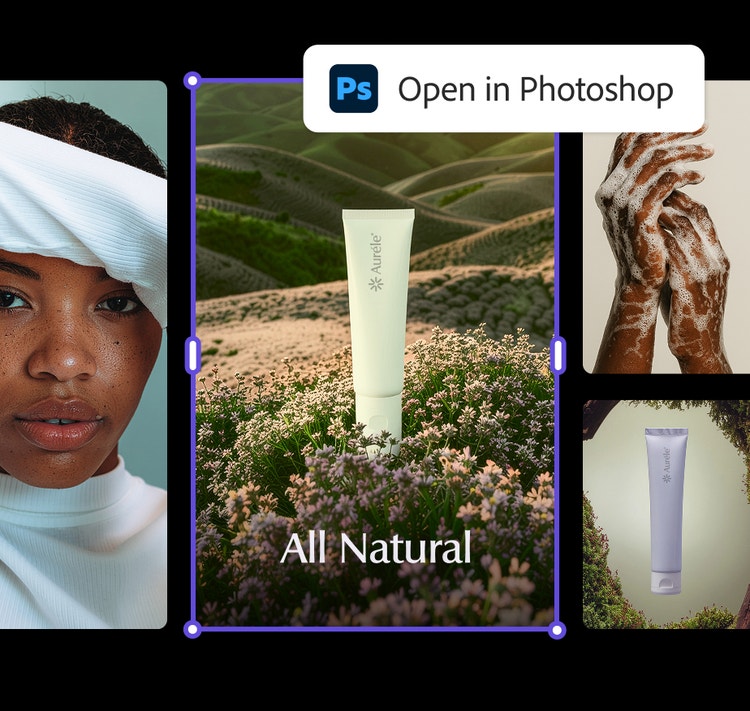
#FFF
AI-powered image editing concept showing natural skincare product in a floral meadow with design options and Photoshop integration.

Art directors and marketers.

Explore, organize, and edit ideas in Firefly Boards. Brainstorm, ideate, and iterate on projects, then bring your designs into Adobe Photoshop or Adobe Express for refining.
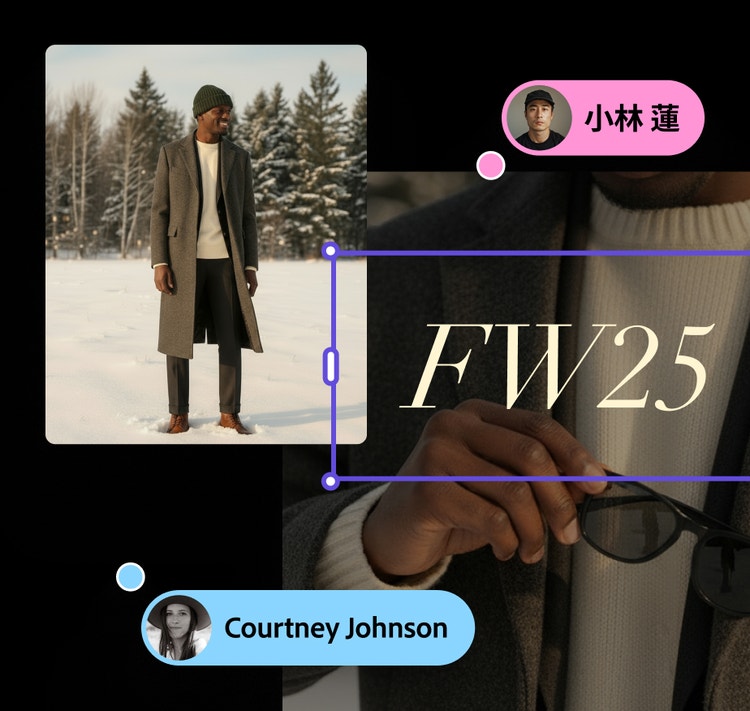
#FFF
Fashion mood board concept for FW25 featuring a person in a long coat standing in a snowy landscape, with collaborative design elements overlayed.

Design teams who collaborate.

Explore and create faster with teammates on an infinite canvas. Visualize, test, and align on ideas for mood boards, storyboards, brand identities, and mock-ups.

AI-generated image of a futuristic sports car on a sand dune at sunset, illustrating creativity and innovation in design.

“Adobe Firefly unleashed our creativity. It’s a magic machine that helps us play, explore, and innovate, without compromising speed or safety.”

Michael Meurer – Global Design Lead
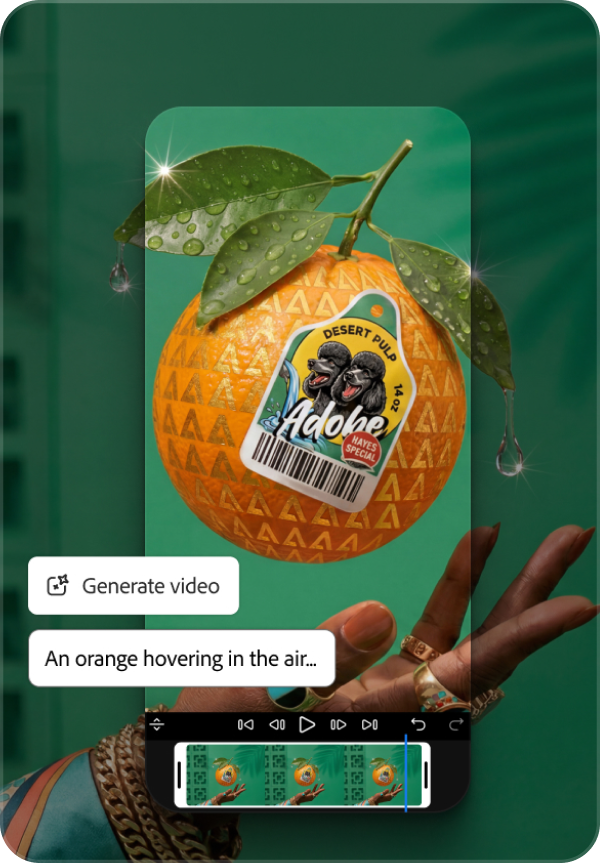
https://main--da-cc--adobecom.aem.page/cc-shared/fragments/products/firefly/segment-blade

https://main--da-cc--adobecom.aem.page/cc-shared/fragments/products/firefly/create-consistent-images-at-scale-aside

https://main--da-cc--adobecom.aem.page/cc-shared/fragments/products/firefly/drive-business-results-aside

Questions? We have answers.

What is {{Adobe Firefly}}?

Adobe Firefly is an AI-powered creative space that helps you create and edit images, videos, audio, and vector graphics from simple text prompts. Adobe Firefly supports the entire creative process, whether you’re ideating with mood boards or storyboards, generating new B-roll or visual concepts, editing your existing photos or video clips to match your vision, or stitching all your content together in a timeline. Adobe Firefly offers a spectrum of controls, from speedy generations and edits to precision editing so you can fine-tune your work. Users can access the Adobe Firefly web application on desktop and mobile or download the Firefly mobile app on iOS and Android.

What is generative AI?

Generative AI is a type of artificial intelligence that translates text prompts and other inputs into original creative content such as images, videos, audio, and documents. Adobe Firefly uses generative AI to help creators go from idea to finished asset faster, with over 20 controls for adjusting style, lighting, color, and composition. Built on over 40 years of Adobe creative technology, Adobe Firefly is designed to give creators precise control over their AI-generated results.

What is Adobe Firefly best for?

Adobe Firefly is best for generating production-quality images, videos, audio, and vectors from text prompts, as well as accelerating creative workflows across ideation, prototyping, and content production. It’s ideal when you need commercially safe AI outputs with precise creative control, deep integration with other Adobe apps, or multi-format content from a single platform. Common use cases include campaign asset creation, social media content, video B-roll and sound design, brand identity exploration, and concept mood boarding.

What can you create with Adobe Firefly?

You can create a wide range of creative content from text prompts with Adobe Firefly, including:

  • High-resolution images and vector graphics
  • Video clips from text or still images
  • Sound effects, soundtracks, and speech
  • Audio and video translations in over 20 languages

You can also use tools like Generative Fill, Generative Expand, and Prompt to Edit to refine your work, then bring results directly into Adobe Photoshop, Premiere, or Adobe Express for further editing.

What AI models are available in Adobe Firefly?

Adobe Firefly includes Adobe’s own commercially safe generative AI models for images, video, audio, and vectors, plus partner models from Google, OpenAI, ElevenLabs, Luma AI, Runway, and others. Explore a range of aesthetic styles and capabilities across text-to-image, text-to-video, and image-to-video workflows, all within a single app.

What is the best AI image and video generator?

The best AI image and video generator helps creators go from text prompt to polished, production-ready content quickly, with precise creative control and outputs that are safe for commercial use. Adobe Firefly makes this easy with intuitive features for turning text prompts into images and videos, turning images into videos, generating sound effects, and collaborating on Firefly Boards. Adobe Firefly has been used to generate over 18 billion assets globally, combining commercially safe Adobe models with top third-party models in one place.

How does Adobe Firefly compare to other AI image, video, and audio generators?

Adobe Firefly supports the entire creative process from ideation to production, allowing you to go from idea to finished output in a single space. With Adobe Firefly, you can access and experiment with a wide range of top AI image, video, and audio models in one place.

While some AI tools offer quick one-off generations, Adobe Firefly offers precision controls that allow users to fine-tune settings and prompts prior to generation as well as editing tools that refine existing or generated content to match your vision.

Creators focused on brand, marketing, or educational content can use commercially safe Adobe Firefly generative AI models with confidence. Adobe Firefly outputs also include built-in Content Credentials to provide transparency about how a file was created or edited and who was involved in the process.

What is Firefly Boards?

Firefly Boards is an AI powered visual workspace where you can brainstorm, organize, and iterate on ideas with teammates on an infinite canvas. You can generate and edit images and videos, then arrange concepts into mood boards or storyboards. Firefly Boards helps creative teams collaboratively visualize, test, and align on ideas before moving to final production.

Who would benefit most from using Adobe Firefly?

Adobe Firefly is built for designers, photographers, video editors, marketers, social media creators, and anyone who wants to turn ideas into high-quality content using AI. Creative professionals use Adobe Firefly to accelerate ideation and produce campaign-ready visuals, while creators generate and edit studio-quality images and videos for multiple social and content platforms

How do marketers use Adobe Firefly?

Marketers use Adobe Firefly to rapidly produce on-brand campaign visuals, social media graphics, video content, and localized assets across multiple languages and channels. Adobe Firefly integrates with Adobe GenStudio and Adobe Express, allowing teams to plan, create, and activate content at scale.

How can content creators use Adobe Firefly for social media?

Content creators use Adobe Firefly to quickly generate eye-catching images, video clips, thumbnails, and graphics optimized for social media platforms. You can produce scroll-stopping visuals from a text prompt, add motion and transitions to still images, and generate sound effects — all within the Adobe Firefly app.

Is Adobe Firefly commercially safe?

Adobe Firefly models are commercially safe. Adobe Firefly models are trained on licensed content from Adobe Stock and public domain content where copyright has expired, and Adobe does not train on users’ personal or generated content.

How does Adobe ensure responsible AI in Adobe Firefly?

Adobe performs internal testing on Adobe Firefly generative AI models to mitigate harmful biases and stereotypes and provides feedback mechanisms for users to report concerns. Adobe co-founded the Content Authenticity Initiative (CAI) in 2019, a coalition of over 3,300 members working to establish industry standards for content transparency. Adobe Firefly outputs include Content Credentials that indicate AI was used in the creation process

Does Adobe train Adobe Firefly on my personal content?

No, Adobe does not train Adobe Firefly models or partner models on any Creative Cloud subscribers’ personal content. The Adobe Firefly models are trained on licensed content and public domain content where copyright has expired. Adobe also offers Adobe Firefly Custom Models, which let you train on your own assets to generate content matching your unique brand, style, and design language. Learn more about Adobe Firefly Custom Models.

What languages can I use for prompts in Adobe Firefly?

Adobe Firefly accepts text prompts in over 100 languages, making it one of the most globally accessible creative AI tools available. For audio and video translation features, Adobe Firefly supports over 20 languages while preserving the original speaker’s voice and pitch. This multilingual support helps creators and businesses produce localized content for audiences worldwide.

What apps does Adobe Firefly work with?

Adobe Firefly works seamlessly with apps across the Adobe Creative Cloud ecosystem. You can bring generated content into Adobe Photoshop, Illustrator, Premiere, Lightroom, Adobe Express, and more for further editing and production.

Does Adobe Firefly work on mobile devices?

Yes, Adobe Firefly is available on mobile web and as a mobile app on both iOS and Android devices. Adobe Firefly on mobile lets you create on the go with features like Generate Image, Generate Video, Generate Sound Effects, and Generative Expand. Your Adobe Firefly creations sync automatically with your Adobe Creative Cloud account, allowing you to start on mobile and continue on the web.

What file formats can I export from Adobe Firefly?

Adobe Firefly lets you export generated images in standard formats like PNG and JPG, and generated videos in MP4.

Is Adobe Firefly free to use?

Yes, Adobe has a free plan that provides users with free daily generations to try Adobe Firefly. If you need more than what’s included in your plan, you will need a paid subscription to continue generating. Paid plans offer a range of access, generative credits, and perks. Reference Firefly plans to learn more.

What are generative credits in Adobe Firefly?
Generative credits are tokens you use to generate AI content across Adobe Firefly and Adobe Creative Cloud apps. Your Adobe Firefly or Creative Cloud paid plan includes a monthly allocation of credits that reset each billing cycle. Learn more about generative credits.

Adobe Firefly. Your AI-powered creative space.