Free printable timesheet template for employees.
Printable time sheets are easy to customize and use regardless of the type of time-tracking you need.

Daily and weekly timesheet template.
Your daily or weekly timesheet template should include more than just the hours worked — though that’s definitely an essential part of any timesheet.
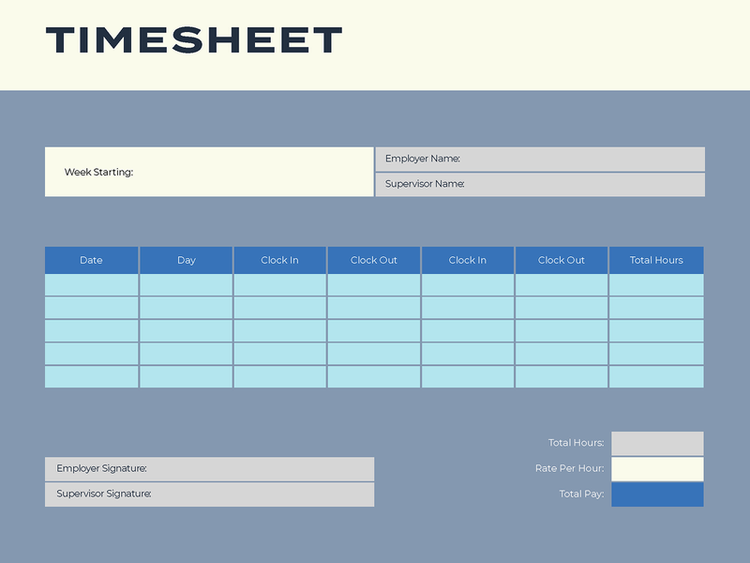
Here are some of the most important pieces of information to add to your employee time sheet template:
- Employee name
- Pay period
- Dates worked
- Hours worked
- Total hours for the pay period
Of course, this list isn’t exhaustive. You’re welcome to include more information if necessary to calculate payroll. For example, if you offer paid time off (PTO), you may also want to include that in your timesheet template.
For employees required to log their hours daily, a daily timesheet is perfect for tracking time, whether they work full-time, part-time, or shifts at various job sites. This format is ideal for submitting time records at the end of each day and includes sections to record overtime, vacation, lunch breaks, and sick leave.
If employee hours are calculated on a weekly basis, a weekly timesheet template works best. It’s suitable for both hourly and salaried employees who submit their timesheets once a week. With a dedicated row for each day, this type is particularly useful for workers who track time for a single shift each day.
Monthly timesheet template.
Freelancers who work on long-term projects or manage multiple clients often find monthly timesheets invaluable for organizing and reporting their hours. A monthly timesheet provides a comprehensive view of all hours worked within a given month, making it easier to bill clients accurately and track productivity. By consolidating daily or weekly time entries into a single document, freelancers can streamline their invoicing process and avoid errors, ensuring they are fairly compensated for their efforts. Additionally, a monthly timesheet helps freelancers monitor their work habits and identify opportunities to optimize their schedules and workflows.
Small businesses can also benefit from requiring employees to use monthly printable time sheets, particularly for tracking project-based or salaried work. Monthly timesheets offer a high-level overview of how employee time is distributed across tasks, projects, or clients, enabling managers to better assess resource allocation and project progress. They also simplify payroll processing by providing a clear record of hours worked, including overtime, vacation, and sick days. This level of detail can help small businesses stay organized, reduce administrative overhead, and ensure compliance with labor laws and company policies. Overall, monthly timesheets foster accountability and efficiency, benefiting both employees and employers.
If you need to make changes to your timesheet template, you can make minor edits, leave comments, or convert your PDF template to Excel for more extensive edits. Of course, if you choose to build your own timesheet template from scratch, you can save the document directly as a PDF or convert Word to PDF online — depending on which program you choose. Adobe Acrobat for business can help with all such document management needs.
How to use an employee time sheet.
Using a timesheet is a straightforward process that helps track hours worked and streamline payroll. Follow these steps to ensure accuracy and efficiency:
- Download the timesheet template and use a PDF editor or an online tool to fill it in. You can also simply print it out.
- Fill in essential details such as the employee’s name, manager’s name, company name, date, standard pay rate, and overtime pay rate.
- Employees or freelancers should record their work details, including the date, job or shift, clock-in and clock-out times (including breaks), and any additional hours for overtime, sick leave, holidays, or vacation.
- Before submitting the timesheet, you should sign the form to confirm the accuracy of the recorded information. Managers can then review the data, calculate total hours, and process payroll accordingly.
This method ensures timesheets are completed correctly and ready for efficient payroll processing.
Many businesses require employee timesheets to be approved by their direct supervisors. Rather than using printable time sheets, sign them with a pen, and scan them back into the computer for digital filing, you can keep the entire process digital.
You can quickly and easily sign PDFs and any business document without needing a printer. Simply upload the PDF timesheet you need to sign, select a signing option, drag your signature to the line, and download the completed form for filing. It’s the easiest way to approve timesheets without needing additional hardware or steps.
Pros and cons of printable time sheets.
Printable time sheets offer several advantages, making them a popular choice for businesses and freelancers alike. One of their main benefits is that they are often free or inexpensive to create, as they can be designed using basic spreadsheet software. For teams already familiar with spreadsheets, this type of employee time sheet comes with an easier learning curve, requiring minimal training. It also provides flexibility for exporting data into payroll software, simplifying the payroll process. Additionally, you can customize printable timesheets by adding tables, charts, or graphs for better reporting and analysis, which can be particularly useful for tracking productivity or project progress.
However, printable timesheets also have notable drawbacks. Since updates need to be made manually, they are more prone to human error, such as miscalculations or incorrect data entries. There’s also a risk of data loss if physical copies are misplaced or damaged, or if digital versions are not properly saved. Manual updates make this method more time-consuming, and verifying the accuracy of the recorded hours can be challenging. Moreover, printable timesheets lack the capability to track hours in real-time, which may lead to discrepancies or inefficiencies, particularly for businesses that require detailed and immediate reporting. While they are a simple solution, these limitations may pose challenges for larger teams or complex projects.
Frequently asked questions.
What is a timesheet used for?
Can I make my own timesheet template?
Should timesheets be submitted daily or weekly?
Keep exploring