Edit etiquette: Why in-document feedback is key to efficient collaboration
Key findings:
- Nearly two in five employees (38 percent) admit they purposefully delay delivering necessary feedback because they are concerned about the recipient's reaction.
- Three in five workers (58 percent) are regularly slowed down by receiving contradictory or conflicting feedback from multiple sources on the same projects.
- Gen Z employees are 100 percent more likely than the average worker to report that poor quality feedback has worsened their imposter syndrome.
- Poor quality feedback is crippling office efficiency, costing the equivalent of over nine full work days annually to process digital document feedback.
- Poor quality feedback is causing burnout for nearly half of workers (43 percent), and it has prompted one in seven (14 percent) to search for new employment.
- To ensure clarity and actionability, 57 percent of employees agree that feedback delivered directly within the document (via track changes or comments) is the most effective method.
Workplace collaboration today looks different from what it did even a few years ago, as remote and hybrid working has become commonplace for many businesses. As many teams rely more on digital tools, such as online PDF editors, to stay connected, the ability to receive precise feedback and edit PDFs has become essential to keeping projects on track. Preferences around communication, however, vary widely by role, generation, and industry, making it more difficult for employees to communicate effectively with each other.
To better understand how employees navigate this reality, we surveyed over 1,000 full-time employees to learn what effective feedback looks like to them. Their responses show where communication breaks down, what workers find most helpful, and how teams can use more precise, structured feedback across digital documents and other channels to improve collaboration.
The challenges of giving feedback
Giving feedback may seem straightforward, but many respondents say it carries far more pressure than one might realize.
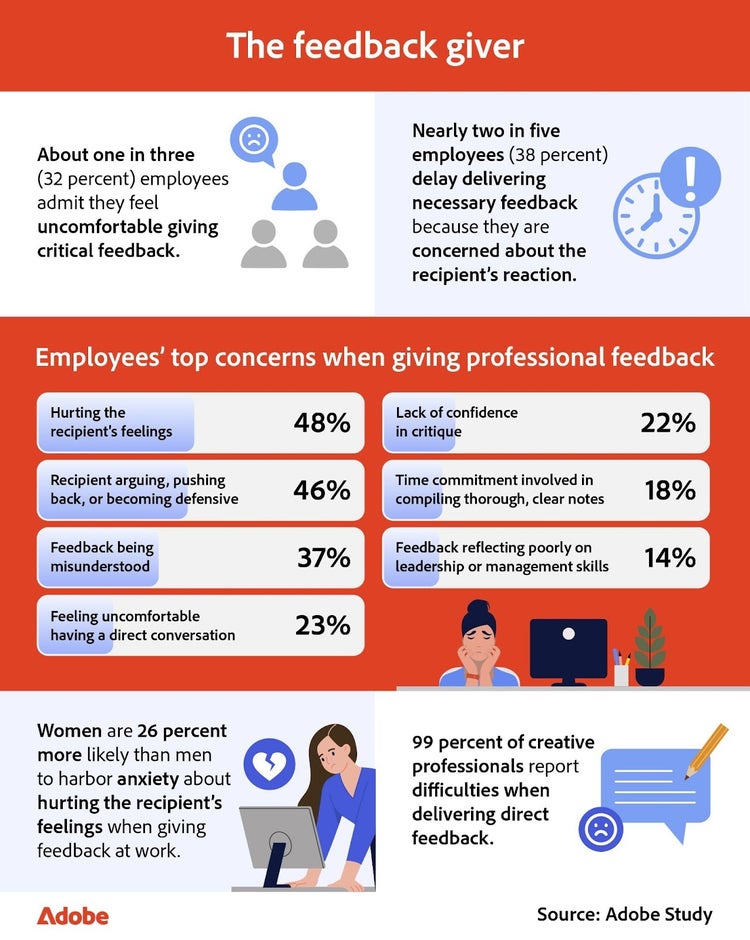
Giving feedback isn’t always easy, and many respondents say the pressure of getting it “right” often holds them back. About one in three employees surveyed admit they feel uncomfortable offering critical feedback, and nearly two in five delay sharing necessary notes because they worry about the recipient’s reaction.
This hesitation shows up in several ways. Respondents most often cite fear of hurting someone’s feelings (48 percent), followed closely by concern that the recipient will argue, push back, or become defensive (46 percent). Another 37 percent worry their comments may come across as unclear or be misunderstood. Remote employees surveyed feel this tension even more, as they are 9 percent more likely than on-site respondents to worry that their feedback might be met with defensiveness.
When respondents were asked which fields struggle most with giving feedback, the top answers included:
- Creative arts (99 percent)
- Healthcare (97 percent)
- Business (96 percent)
- Hospitality (95 percent)
- Technology (95 percent)
- Education (95 percent)
- Finance (93 percent)
- Public service/government (90 percent)
- Legal (86 percent)
Despite these obstacles, employees aren’t opposed to giving feedback; they want to do so in a constructive, respectful way.
Why feedback often falls flat
The feedback process doesn’t end when a comment is delivered. For many employees, that’s where the confusion begins.
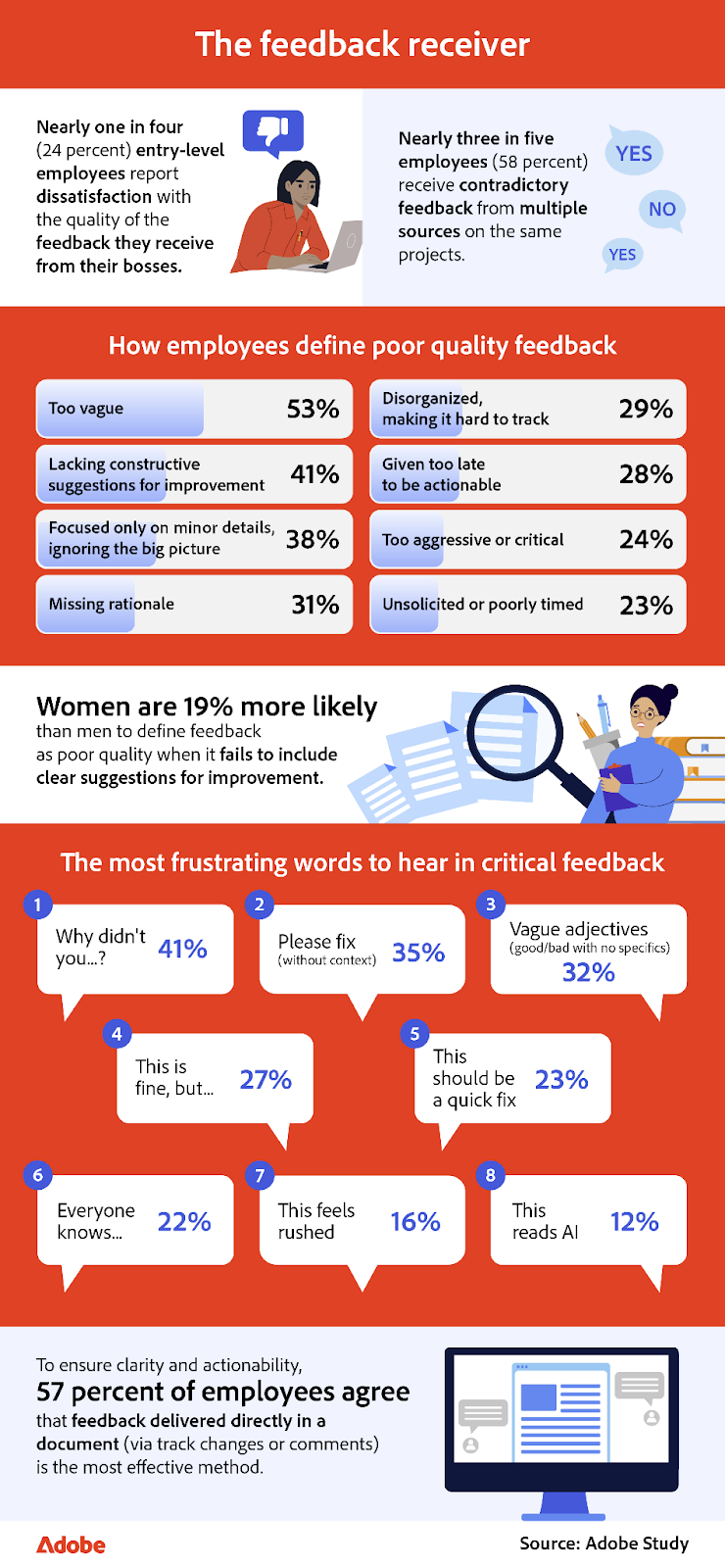
While managers often soften their feedback to avoid conflict, this anxiety backfires. Nearly one in four entry-level employees surveyed reports dissatisfaction with the clarity of the feedback they receive from their managers, compared to one in six employees overall who are unhappy with the quality of that managerial feedback.
Specific phrases heighten that frustration. Respondents cite “why didn’t you…” (41 percent) and “please fix” without context (35 percent) as some of the most discouraging comments to receive. Gen Z respondents feel this especially strongly and are 18 percent more likely than older generations to be bothered by feedback that says “please fix” but lacks explanation. Remote respondents face their own friction points, with 50 percent being more likely than on-site employees to feel frustrated when told their work “feels rushed,” a phrase that often leaves them unclear about the specific issue. However, the physical office presents its own challenges: on-site workers are 15 percent more likely than remote workers to receive contradictory feedback from multiple sources.
Respondents were asked what makes feedback helpful and actionable; the format mattered just as much as the message. The most effective methods include:
- Directly within the document (57 percent)
- A written summary via message (56 percent)
- A face-to-face discussion (53 percent)
- An annotated printout or physical document (19 percent)
- Verbal-only feedback in a team meeting (18 percent)
- A recorded video (11 percent)
Tools like Adobe Acrobat let teams add comments, highlights, and markups directly where changes are needed in real time, making it easier to edit PDFs without confusion or extra steps. Acrobat also allows users to convert PDFs when more extensive changes are required, ensuring feedback stays clear, actionable, and easy to implement.
Regardless of role, industry, or generation, respondents want feedback that’s clear and grounded in context, helping them feel supported and confident in what they’re delivering.
What happens when feedback falls short
When feedback misses the mark, employees often feel the strain long before management realizes something is wrong.
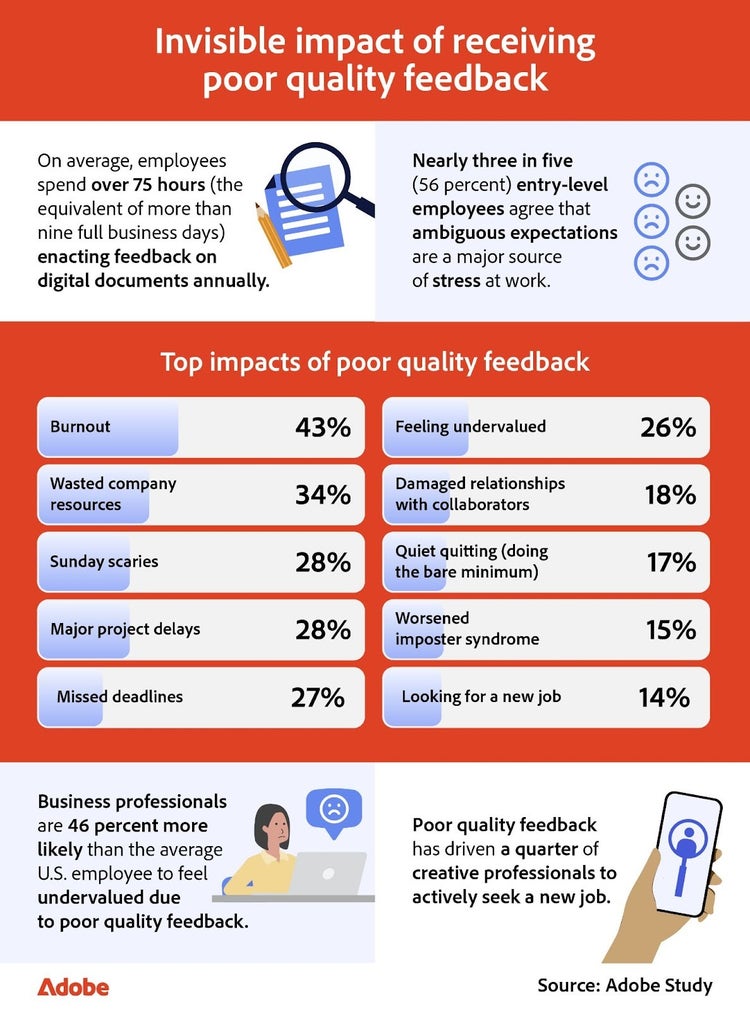
Most teams underestimate the cost of poor quality feedback. While only 18 percent of managers worry about the time it takes to give feedback, the downstream effect is costly. Surveyed employees spend more than 75 hours each year working through feedback on digital documents. With the average digital document going through three rounds of review before final approval, even small inefficiencies can add up quickly. Nearly three in five entry-level employees surveyed say ambiguous expectations add to their stress at work, further complicating an already time-consuming review process.
This inefficiency creates a hidden tax on talent, where the personal impact on employees is just as pronounced. Forty-three percent of respondents cite burnout as the main effect of receiving poor quality feedback. This toll is even heavier for distributed teams; remote employees are 21 percent more likely than on-site staff to link poor quality feedback directly to burnout and 38 percent more likely to quiet quit. For certain groups, the effects can be long-lasting.
Gen Z employees are twice as likely as the average worker to report that poor quality feedback worsens their imposter syndrome. This kind of experience can chip away at confidence early in someone’s career and add to mounting stress as the years go on. In the tech industry, one in five employees surveyed say poor quality feedback is pushing them toward quiet quitting or doing the bare minimum. Ultimately, transparent and timely feedback plays a silent but essential role in helping teams stay connected and confident in their work.
Using an online PDF editor to deliver clear, actionable feedback in real time can help reduce back-and-forth and rework while keeping projects moving. With tools like Adobe Acrobat, an online PDF editor, teams can add comments, edit PDFs, or even convert PDF to Word if a different file format is required. Bringing live comments, instant edits, and seamlessly updated versions into one place makes it easier for everyone to stay on the same page and avoid bottlenecks that can slow projects down and negatively impact morale.
Improving the way teams communicate
Clear, thoughtful feedback keeps projects moving and helps teams feel supported, aligned, and confident in their work. While the survey shows that many employees struggle with how and when to give feedback, a few simple practices can make the process easier and more effective for everyone involved.
Tips for offering better feedback
- Choose the right medium. Match the format to the message. Some notes are best delivered directly in a document, while others may require a conversation.
- Avoid empty criticism. Point out what needs to change and offer guidance on how to improve it.
- Watch your phrasing. Be specific and clear so your intent doesn't get lost.
- Be timely and organized. Share feedback while it’s still actionable and avoid scattered or contradictory notes.
Make the most of digital tools for collaboration
Tools like Adobe Acrobat can make this process smoother by consolidating comments, edits, and versions into a single location and providing teams with a more straightforward way to communicate. Whether you need to edit PDFs in an online PDF editor or convert PDFs to Word, Acrobat’s live-updating tools help reduce the back-and-forth that often slows teams down. When the right tools support the proper habits, feedback becomes less of a hurdle and more of a productive part of the creative process.
Methodology
To explore feedback preferences in the workplace, we surveyed 1,002 full-time employees across a variety of industries in the U.S. The data has a 95 percent confidence level and a low three percent margin of error. Because this exploratory research relied on self-reported data, respondents may have biases, and discrepancies may exist between their answers and their actual experiences.
Keep exploring