


The way you close an email matters just as much as how you begin it. A well-crafted professional email closing reinforces your message, sets clear expectations, and leaves recipients with a positive impression of you and your organization. Whether you're reaching out to a potential client, following up with a colleague, or responding to a job inquiry, understanding the different ways to end an email professionally can strengthen your communication and build better relationships. This guide covers the essential elements of a professional email closing, explores various styles for different contexts, and shows how AI tools can help you refine your email endings for maximum impact.
Why is it important to end an email professionally
The final lines of your email are often what recipients remember most. A strong professional email closing creates a lasting impression and reinforces the purpose of your entire message, ensuring your communication achieves its intended goal.
When you end an email professionally, you clarify your message and reinforce key points. A thoughtful closing statement can summarize your request, reiterate important information, or emphasize the action you need from the recipient. This clarity reduces misunderstandings and keeps everyone aligned on next steps.
Professional email endings also help create and maintain a professional environment. Just as you would introduce yourself in an email with care, your closing demonstrates respect for the recipient and establishes appropriate boundaries. This consistency in professionalism builds trust over time.
Clear closings set expectations for responses and follow-up actions. When you specify what you need and when you need it, recipients understand their responsibilities. This directness saves time for everyone involved and keeps projects moving forward efficiently.
Beyond individual messages, the way you professionally end an email builds and strengthens professional relationships. Expressing genuine appreciation, acknowledging contributions, or simply wishing someone well shows that you value the connection beyond the immediate transaction.
Finally, your email closing reflects your personal and organizational brand. Every message you send represents you and your company. A polished, appropriate ending demonstrates attention to detail and professionalism that recipients will associate with your work overall.
What to include in a professional email closing
A professional email closing should feel courteous, clear, and appropriate to the context of your communication. While the specific elements may vary based on your relationship with the recipient and the purpose of your message, most professional closings include four key components that work together to create a polished ending.
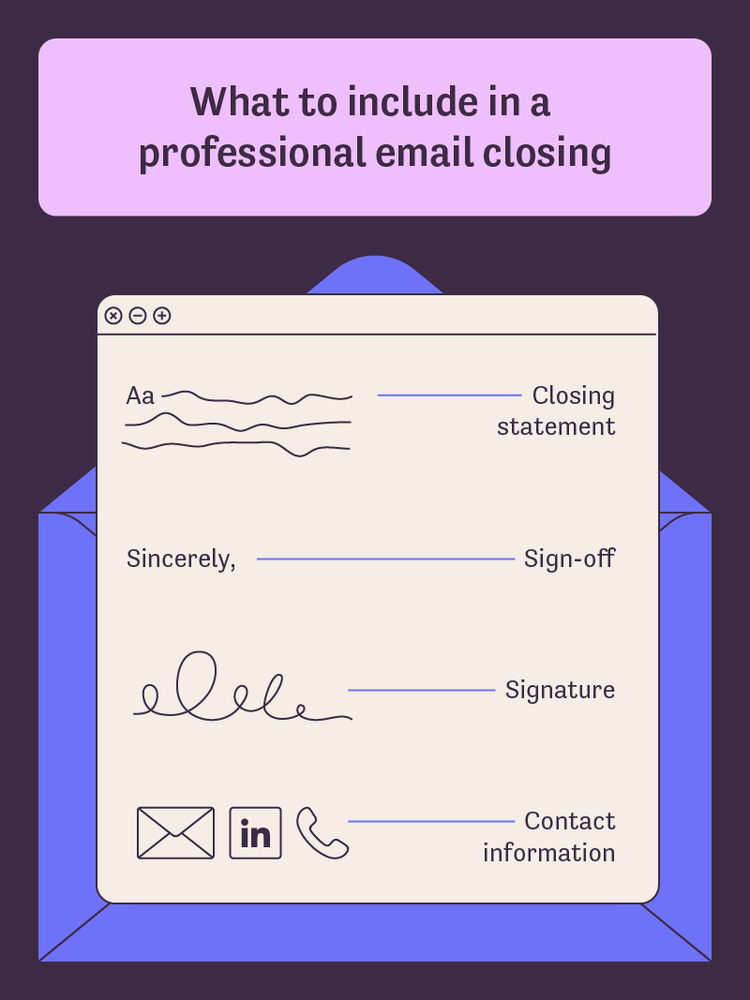
Closing statement
The closing statement is the sentence or two that wraps up your email before your sign-off. Its purpose is to summarize your intent, express appreciation, or set expectations for what comes next.
Keep your closing statement brief and aligned with the overall tone of your email. If you've written a formal request, your closing should maintain that formality. If your email has been conversational, an overly stiff closing will feel jarring. Avoid clichés like "Please don't hesitate to reach out" when a simpler "Let me know if you have questions" conveys the same meaning more naturally.
Sign-off
The sign-off is the formal farewell phrase that appears directly before your name. Common examples include "Best regards," "Sincerely," and "Thank you."
Choose your sign-off based on the formality level appropriate for your audience and situation. Consistency matters—if you've established a pattern with a particular contact, maintain it unless circumstances change. Your sign-off should feel like a natural extension of your message rather than an afterthought.
Signature
Your signature provides your name and professional identity. It helps recipients know exactly who sent the message and establishes your credentials.
Include your full name, job title, and company name at minimum. Keep formatting clean and readable, avoiding excessive fonts, colors, or images that may not display properly across different email clients. A well-crafted professional email signature reinforces your credibility without overwhelming the recipient.
Contact information
Contact information makes it easy for recipients to reach you through their preferred channel. This element is especially important for first-time contacts or external communications.
Include the contact methods most relevant to your work—typically phone number, email address, and professional social profiles like LinkedIn. Keep this information current and accurate, but don't overwhelm recipients with every possible way to reach you. Two or three options are usually sufficient.
Different ways to end an email professionally
The appropriate style for your email ending depends on several factors, including your relationship with the recipient, the purpose of your message, industry norms, and the tone you want to convey. Understanding these different ways to end an email professionally helps you choose the right approach for every situation.
Formal email closings
Formal closings are best reserved for first contact with someone new, communications with senior executives, official correspondence, or situations where you want to convey maximum respect and professionalism.
Examples of formal sign-offs include "Sincerely," "Respectfully," "With regards," and "With respect." These options carry a reserved, traditional tone that signals professionalism and appropriate deference.
When using formal closings, pair them with equally formal closing statements. A casual sentence followed by "Respectfully" creates an awkward mismatch. Formal closings work best when the entire email maintains consistent professionalism throughout.
Casual professional closings
Casual professional closings strike a balance between friendliness and appropriateness. They work well for colleagues you interact with regularly, established professional relationships, and ongoing correspondence where formality would feel stiff.
Examples include "Best," "Cheers," "Talk soon," "All the best," and "Thanks." These options convey warmth while remaining appropriate for workplace communication.
The key to casual professional closings is knowing your audience. What feels friendly to one recipient might seem too informal to another. When in doubt, err on the side of slightly more formal until you've established the relationship's tone.
Thank you closings
Thank you closings express gratitude and work particularly well after receiving assistance, completing collaborative projects, or any situation where you want to acknowledge someone's contribution.
Examples include "Thank you," "Many thanks," "With appreciation," "Thanks so much," and "I appreciate your help." These closings carry a gracious, warm tone that strengthens relationships.
Thank you closings are versatile and rarely inappropriate. Even in formal contexts, expressing genuine appreciation creates goodwill. However, reserve effusive thanks for situations that warrant it—overusing gratitude can diminish its impact.
Action-oriented closings
Action-oriented closings are ideal when you're expecting a response, setting deadlines, or requesting specific action from the recipient. They provide clarity about what happens next.
Examples include "Looking forward to your response," "Please let me know by Friday," "I'll follow up next week," and "Let me know your thoughts." These closings are direct and forward-looking, setting clear expectations.
When you need a response, don't be afraid to state that clearly. Vague closings like "Hope to hear from you" are less effective than specific requests. Action-oriented closings respect everyone's time by eliminating ambiguity about next steps.
How to end an email professionally
Crafting an effective email ending requires considering your context, audience, and purpose before selecting the specific elements. Following a systematic approach helps ensure your closings consistently hit the right note.
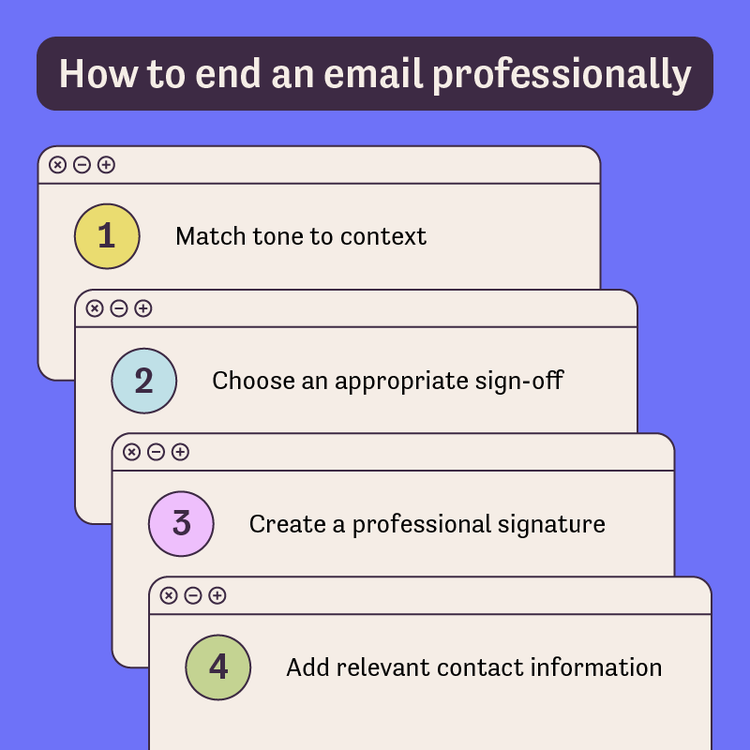
1. Match tone to context
Before writing your closing, assess the formality of your relationship with the recipient. Consider how well you know them, whether this is initial contact or ongoing correspondence, and what level of formality they've used with you.
Think about the email's subject matter as well. Sensitive topics like performance issues or contract negotiations typically warrant more formal closings than routine updates or casual check-ins.
Review previous correspondence patterns if available. If you've established a particular tone with someone, maintain consistency unless circumstances have changed significantly.
2. Choose an appropriate sign-off
Based on your assessment, select a sign-off that matches the formality level you've determined. For formal situations, choose traditional options like "Sincerely" or "Best regards." For established relationships, "Best" or "Thanks" often work well.
Maintain consistency within email threads. If you started a conversation with "Best regards," don't suddenly switch to "Cheers" in your third reply unless the tone has naturally shifted.
Avoid extremes—overly casual options like "Later" or overly stiff options like "I remain your humble servant" both feel out of place in modern professional communication.
3. Create a professional signature
Your signature should include essential identification elements: your full name, job title, and company or organization name. This information helps recipients understand who you are and your role.
Keep formatting clean and readable. Avoid excessive styling, multiple fonts, or large images that may not display properly across email clients. Simple, well-organized signatures look more professional than elaborate designs.
Consider mobile display compatibility. Many people read emails on phones where complex signatures can appear cluttered or broken. Test how your signature looks on different devices.
4. Add relevant contact information
Include your preferred contact methods so recipients can easily reach you. Phone numbers, email addresses, and professional social profiles like LinkedIn are common choices.
Keep all information current and accurate. Outdated phone numbers or broken links undermine your professionalism. Review your signature periodically to ensure everything is correct.
How to professionally end an email with AI
Artificial intelligence tools have transformed how professionals approach written communication. Generative AI tools can help you craft polished email closings quickly, ensuring your messages end on the right note every time.
AI assistants excel at refining language and suggesting improvements you might not have considered. Whether you need to adjust tone, find the perfect sign-off, or create a professional signature from scratch, these tools streamline the process significantly. The Acrobat AI Assistant is designed to help users craft polished email endings efficiently by providing intelligent suggestions and refinements tailored to your specific context.
1. Write or rewrite closing statements
AI can generate contextually appropriate closing sentences based on your email's content and purpose. This capability is particularly useful when you're unsure how to wrap up a complex message. With Acrobat AI Assistant, you can quickly transform a rough closing into a polished, professional statement.
Prompt example: "Rewrite this closing statement to sound more professional and concise: [paste your current closing]"
2. Suggest appropriate salutations
An AI assistant for your documents can recommend sign-offs based on the context and tone you specify. This helps when you're uncertain which level of formality is appropriate. Acrobat AI Assistant analyzes your content to suggest sign-offs that match your email's tone and purpose.
Prompt example: "Suggest three formal sign-offs appropriate for a job application follow-up email"
3. Refine tone and formality
AI tools can adjust your language to match your desired professionalism level. If your closing feels too casual or too stiff, Acrobat AI Assistant can help you find the right balance by suggesting alternative phrasings that better match your intended tone.
Prompt example: "Make this email closing more formal for a client communication: [paste your current closing]"
4. Generate signature variations
AI can create multiple signature options for different contexts, helping you develop appropriate signatures for various professional situations. Learning to write effective AI prompts makes these tools even more powerful. Acrobat AI Assistant can generate signature variations tailored to your role and industry.
Prompt example: "Create a professional email signature for a marketing manager that includes name, title, company, and LinkedIn profile"
Rather than spending time agonizing over the perfect closing, you can leverage Acrobat AI Assistant to quickly generate options that match your specific context and audience, then select or modify the suggestion that best fits your needs.
Frequently asked questions
End politely by expressing appreciation for the recipient's time or assistance, clearly stating any next steps, and choosing a warm but appropriate sign-off. Phrases like "Thank you for your consideration" or "I appreciate your help with this" show courtesy without being overly formal. Match your politeness level to the relationship—genuine warmth reads better than formulaic phrases.
The best sign-off depends on your context and relationship with the recipient. "Best regards" is widely considered a safe universal choice that works across most professional situations. For more formal contexts, "Sincerely" remains appropriate. For established colleagues, "Best" or "Thanks" often suffice. The key is matching your sign-off to the overall tone of your communication.
Good ending sentences either express appreciation, set clear expectations, or invite further communication. Action-oriented endings like "Please let me know if you need any additional information" work well for requests. Appreciative endings like "Thank you for taking the time to review this proposal" suit messages where you've asked for something. Choose based on what you want to happen next.
"Thanks" is appropriate for casual professional communications with colleagues you know well or in ongoing email threads where formality has naturally decreased. However, for first-time contacts, senior executives, or formal business correspondence, opt for "Thank you" or "Best regards" instead. Context determines appropriateness.
When you need a response, be direct about your expectations. Include a specific deadline if relevant: "Could you please confirm by Thursday?" or "I'd appreciate your feedback by end of week." Action-oriented closings like "Looking forward to your thoughts" or "Please let me know your decision" clearly signal that you're awaiting a reply.
You may also like
title
The best ways to end an email professionally
cardImageAltText
Professional composing an email on laptop showing closing section
cardImage
primaryTag
caas:content-type/article
Tags
caas:content-type/article,caas:products/acrobat,caas:topic/word-to-pdf,caas:topic/sign-pdf,caas:topic/grammar

