Content as a Service v2 - b2b - Wednesday, September 25, 2024 at 15:13


This guide explains how to use an AI SOP generator to create professional, consistent standard operating procedures for your organization.
You will learn the key benefits of AI-assisted documentation, discover which tools can help streamline your workflow, and follow a step-by-step process for generating SOPs using Acrobat AI Assistant. Whether you are building procedures from scratch or updating existing documentation, these techniques will help you produce high-quality results efficiently.
Standard operating procedures form the backbone of organizational consistency, but creating them has traditionally been a labor-intensive process. Writers spend hours researching, drafting, formatting, and revising documentation that teams depend on for training and compliance. An AI SOP generator addresses these challenges by automating much of the heavy lifting while maintaining the quality standards your organization requires.
When organizations adopt AI for standard operating procedures, they gain advantages that extend beyond simple time savings. The technology transforms documentation workflows at every level, from initial drafting through ongoing maintenance and updates.
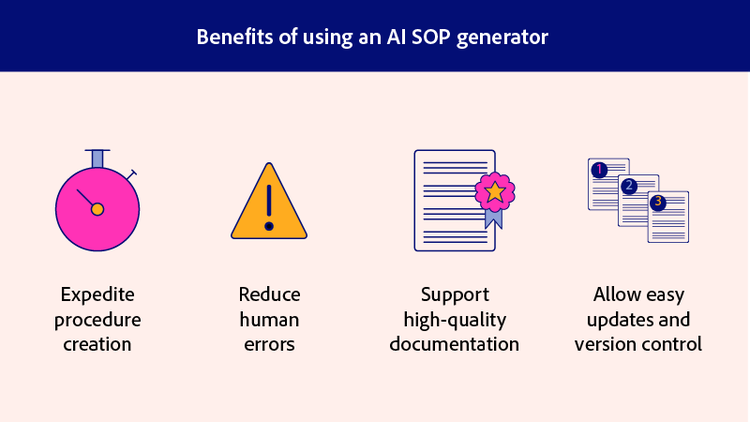
The most immediate advantage of using an AI SOP generator is the dramatic reduction in creation time. What once took days of drafting and revision can now be accomplished in hours or even minutes. AI tools analyze your input materials and generate structured content that follows established SOP formats automatically.
This acceleration directly improves operational efficiency across your documentation workflows. Teams can respond faster to process changes, onboard new employees more quickly, and keep pace with evolving compliance requirements without dedicating excessive resources to documentation tasks. The SOP AI approach means your organization stays agile while maintaining comprehensive procedure libraries.
Manual SOP creation introduces numerous opportunities for error. Writers may use inconsistent terminology, vary formatting between documents, or accidentally omit critical steps. AI SOP generators maintain uniformity by applying the same structural logic and language patterns across all generated content.
The technology catches formatting inconsistencies that human reviewers might miss during editing. When you establish a standard template and terminology set, AI tools enforce these standards automatically throughout every procedure they help create. This consistency proves especially valuable for organizations with multiple departments or locations that need aligned documentation. Using AI SOP tools ensures every document follows the same high standards.
Beyond speed and consistency, AI tools help ensure your SOPs meet professional standards. Generated content follows logical structures with clear headings, numbered steps, and appropriate detail levels. The AI understands how to break complex processes into digestible instructions that readers can follow easily.
High-quality documentation supports better training outcomes and stronger compliance adherence. When procedures are clearly written and well-organized, employees are more likely to follow them correctly. AI assistance helps you achieve this clarity without requiring every writer to be a technical documentation expert. The SOP AI approach democratizes professional documentation creation across your entire organization.
Digital SOPs created with AI tools are inherently easier to manage than traditional paper-based procedures. You can store them centrally, distribute them instantly, and track which versions team members are using. When processes change, AI can help you update existing procedures quickly rather than starting from scratch.
This flexibility means your documentation stays current with actual operations. Rather than letting outdated SOPs accumulate, you can revise them as needed using the same AI workflow that created them originally. The result is a living documentation system that evolves alongside your organization, keeping every team member aligned with current best practices.
Adobe Acrobat provides several AI-powered tools that work together to support SOP creation and management. These features are designed to help you work with existing documentation, extract relevant information, and generate new content based on your specific needs. Understanding what each tool offers allows you to build an efficient workflow for your procedure development process.
The following Acrobat AI tools are particularly useful for AI SOP work:
When you combine these tools, you create a complete AI SOP generator workflow. Start by summarizing existing documentation, use chat features to clarify specific details, then generate new procedures based on all the information you have gathered. This integrated approach ensures your SOPs are both accurate and efficiently produced, giving you the best of AI assistance with human oversight.
Now that you understand the available tools, let us walk through the practical process of creating an SOP using Acrobat AI Assistant. This workflow takes you from initial preparation through final export, ensuring you produce professional documentation that meets your organization’s standards.
Effective AI-generated SOPs start with good input. Before you begin working with AI Assistant, gather all relevant documentation that relates to the procedure you want to create. This might include existing process notes, training materials, compliance guidelines, or informal documentation that team members have created.
Upload these PDFs and documents to Acrobat so the AI has context for generating accurate content. The more relevant information you provide, the better your results will be. Take time to organize your materials logically, grouping related documents together so you can reference them efficiently during the generation process. Consider creating folders for different procedure categories to streamline your AI SOP workflow.
With your source materials uploaded, open PDF Spaces in Acrobat. Select the documents that contain information relevant to your SOP. The AI will use these as context when generating content, so choose materials that directly relate to the procedure you are documenting.
If you are creating an SOP for a manufacturing process, for example, select quality guidelines, equipment manuals, and any existing process documentation. This targeted selection helps the AI understand the scope and requirements of your specific procedure. The SOP AI functionality works best when it has comprehensive context about your particular situation.
The quality of your AI-generated SOP depends heavily on how you communicate with the AI Assistant tool. Craft specific prompts that include details about your procedure type, intended audience, and required format. Rather than asking for a generic SOP, specify that you need a step-by-step procedure for a particular task, written for employees with a certain skill level, following your organization’s standard template.
Learning to craft effective prompts is essential for getting useful results from any AI SOP generator. Include industry-specific terminology and reference the source documents you have uploaded so the AI draws from accurate information. The more specific your instructions, the more useful your generated content will be.
AI-generated content provides an excellent starting point, but it requires human review and refinement. Read through the generated SOP carefully, checking that each step accurately reflects the actual process. Verify terminology matches your organization’s standards and ensure the sequence of steps is correct.
Edit sections that need more detail or clearer language. Add any organization-specific information that the AI could not know, such as internal contact names, specific equipment model numbers, or location-specific details. This refinement step transforms good AI output into excellent final documentation that truly serves your team’s needs.
Once you have refined the content to your satisfaction, save your SOP as a PDF for distribution. The PDF format ensures consistent formatting across all devices and prevents accidental editing by end users. Share the document with stakeholders for review before final approval.
Collect feedback, make any necessary adjustments, and then distribute the finalized SOP through your organization’s standard channels. Store the source files so you can easily update the procedure in the future using the same AI-assisted workflow. This creates a sustainable system for ongoing documentation management.