The researcher’s guide to reading, annotating, and citing PDFs efficiently.
Know how to get what you need from a PDF.
Finding the right research system.
The right research system can make research more effective and help you uncover useful information, annotate and mark up PDFs, and save those notes so your first draft nearly writes itself.
That system should focus on two main tasks:
- Find and identify important information, ideas, data, and arguments.
- Efficiently organize that information for easy retrieval.
Read in the right order.
Experienced researchers almost never read articles from beginning to end. It’s time-consuming and often unnecessary. The purpose of reading an article is to get information — whether data, anecdotes, test results, or core ideas. UC Merced Library states that scholarly articles are organized like a reverse Oreo: The good stuff is on the outside. Rather than reading articles like a book, read to find the most important information first — or quickly determine that it’s not in the article.
Multiple research institutions recommend reading articles in the following order:
- Abstract: Always start with the abstract, often titled Background and Aims. The abstract summarizes the article’s main findings. Read the abstract first to find out what the article is about and whether it’s related to your own research question. However, reviewing the abstract should never replace reading the entire article.
- Introduction and conclusion: The introduction includes the thesis and key background information that explains what makes the study unique. The conclusion reinforces the article’s main findings and emphasizes the study’s importance, the strengths and weaknesses of its hypothesis and argument, and whether the results confirmed or challenged the original thesis. (The two libraries differ on which section to read first.)
Additional data sections may prove useful if they are included in the article:
- Results: Review charts and graphs that can help you better understand the conclusion as well as data points and information you will want to cite.
- Methods: Determine how reliable and how broadly applicable the study is and thus how strongly it supports or challenges your own ideas.
- Discussion & Limitations: Refer to the researcher’s interpretation of the results, which may contain useful data and quotes.
How to take research notes in a PDF.
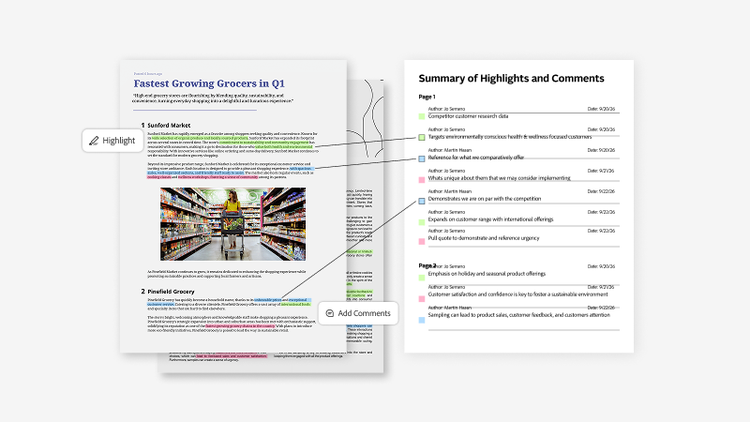
A highlight tells you where you stopped, not why. Notes you can use later are notes with words in them. PDF readers include annotation (or note-taking) tools to help you keep track of your research.
Common tools include:
- Text tools — highlight, underline, strikethrough
- Drawing tools — draw, lines, arrows, symbols, circles, rectangles
- Commenting tools — sticky notes, text comments, comment color
Open a free tool like Adobe Acrobat Reader and use the tools that work best for you to create your own research system.
- As you read, ask yourself questions like: Where do you agree or disagree? How does the article support or challenge your own ideas? How does it relate to other sources you’ve been reading?
- Consider color-coding your annotations by information type — claim, evidence, support, method, contradiction, or conclusion — or by how or where you’ll use them, such as one color for each supporting point in your writing. Whatever you’ll want later, type into the comment. The color tells you what kind of note it is, and the comment text is what you can actually take with you.
Be aware that document creators can lock a PDF against commenting. That single setting covers the whole markup layer, so if it’s off, highlights and drawing tools are disabled along with comments — not just the comment tool.
Resources to annotate.
Pay attention to these three resource types when documenting your research.
- Quotes. Highlight or mark up important phrases to use as quotations, and consider adding PDF comments to remember why the quote is important.
- Paraphrases. Putting the author’s ideas into your own words supports your understanding of the topic and improves retention. It’s also a great resource when you need to write down your own ideas.
- Summaries. Condensing a paragraph, section, or article into its main points helps you identify the most important ideas and have them ready when you use the author’s ideas, argument, or conclusions in your own writing.
Get your annotations back out.
Your annotations live inside the PDF. That’s fine for one source, but it’s a problem at 30, when what you need is every note in one place instead of scattered across files you’d have to reopen.
In Acrobat Reader, the comments panel is your index. It lists every highlight and note in the document, and clicking an entry jumps you to it, so your color coding becomes a map you can scan without paging through the file.
Getting the text out is manual, and that should change how you annotate. Acrobat Reader copies the text of a comment, not the passage under a highlight — so when you mark something you’ll want to quote or reference, type it, or your note about it, into the comment. The highlight shows you where, and the comment is what travels.
Work source by source. Keep your notes document open beside the PDF and move each comment across as you finish a reading session. You touch the source once, and the writing step becomes arranging material you already gathered rather than going back for it.
If you’d rather automate that process, Adobe Acrobat Pro can generate a comment summary as its own document. The Comments setting titled “Export All to Data File,” which Acrobat Reader offers, isn’t for this — it produces a Forms Data Format (FDF) file that you can’t read on its own. It’s meant for sending your document markup to someone who has the same PDF.
Acrobat Reader is the free app; Acrobat Pro is the paid one. If you’ve ever installed Acrobat, it likely replaced Reader on your machine — so check which one you have open before assuming a missing option is a limitation.
How to cite research sources.
When citing your sources, use the proper citation style as defined by your field of study:
- APA style — American Psychological Association; used in social and behavioral sciences, health care, and natural sciences
- MLA style — Modern Language Association; used in humanities education
- Chicago style — The Chicago Manual of Style, published by the University of Chicago Press; used primarily in publishing
Disciplines can use other citation styles, so ensure you know the proper style guide to use for your research and cite each source correctly.
A highlight you can’t explain later is a passage you’ll have to read again. Mark up your next source in Adobe Reader with the reasoning attached.
Frequently asked questions
What is an FDF file?
Should I annotate in a PDF reader or in my reference manager?
How do I know if I am using Acrobat Reader or Acrobat Pro?
Why can’t I highlight text in my PDF?
You may also like