ACROBAT | 6-MINUTE READ
What is a watermark and how to add one to PDF?
A watermark is a text or image showing ownership or confidentiality.


ACROBAT | 6-MINUTE READ
A watermark is a text or image showing ownership or confidentiality.

Adding a watermark to a PDF is a strategic enhancement to any document. By understanding the various types of watermarks and the reasons for using them, you can make informed decisions that benefit your documents.
Watermarks are valuable for intellectual property protection, confidentiality, or simply reinforcing your brand identity in today’s digital landscape. As you learn to create and implement watermarks effectively with tools such as Adobe Acrobat, you’ll find they can significantly improve how your documents are perceived and handled.
A watermark is a tool for protecting and marketing digital content. Typically, it consists of text or an image embedded in a document, signifying ownership and helping to prevent unauthorized use. If you add a watermark to PDF, you can mark ownership of the document, enhance the document’s security, and reinforce your branding.
You likely already encounter watermarks in various places, such as stock photography, product previews, e-books or scholarly articles for purchase, legal paperwork, and more. They have become increasingly common on social media as creators want to protect their creative content. By doing this, they ensure they receive credit if something becomes popular or goes viral, thanks to their watermark.
The following steps will guide you on how to create a watermark and how to edit PDFs to add one.
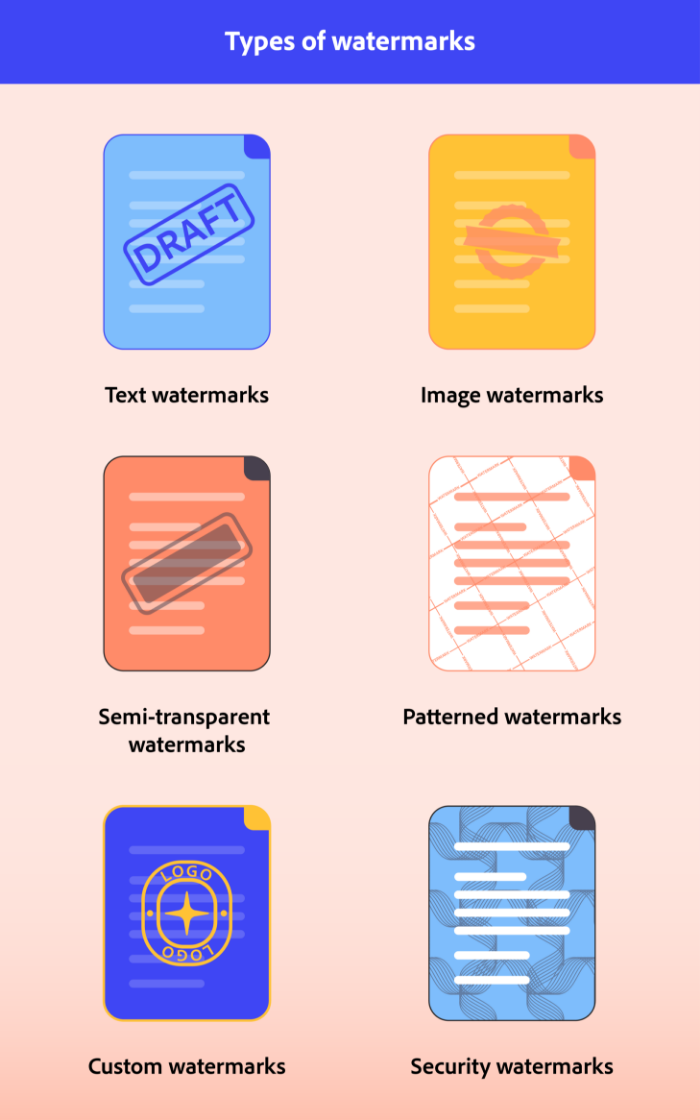
Choosing the correct type of watermark for your company or brand is important. There are different types of watermarks, each serving a unique and essential purpose:
Before you learn how to add a watermark to PDF documents, determine what type of watermark will be best for your specific needs. To help you make this decision, consider the following questions:
In these steps, you’ll learn various tools and methods for adding a watermark to a PDF, making this feature easy and quick to add to your documents. Now that you can answer the question of what is a watermark, if you need to label a document as confidential, prevent unauthorized use, or enhance your branding, a watermark is a simple and effective solution to protecting your document.
If you want to add a watermark to a PDF on Mac, the easiest way is to download PDF editing software like Acrobat. Follow these steps to add a watermark.
Launch Acrobat. In the navigation menu, select File > Open and select your PDF.
In the navigation menu, select Tools > Edit PDF.
Click Watermark. Use the menu to add a watermark to your PDF.
Now, you’re ready to pick the watermark for your PDF. Choose whether to use text or a visual image. Customize the appearance by adjusting the font, size, color, opacity, and watermark placement. You can preview how your watermark will look before applying it to ensure it meets your expectations and needs.
Once you’re happy with how the watermark looks on the PDF, follow the prompts and save your document with the watermark included in a secure spot. It’s also a good idea to keep a copy of the original document without the watermark in case you need to make changes later.
Now that you know what a watermark is, how to make one, and the steps to add one to a PDF, you should know a few reasons why it’s important to incorporate watermarks into your documents. They are essential to document management, enhance your document’s security, and increase professionalism. Here are 10 reasons you should add one to a PDF.

As digital documents become more common, understanding the importance of a watermark on a PDF is essential. Whether you’re a business professional or a designer, learning the importance of a watermark will help you make the most out of your PDF documents.
The purpose of a watermark is for marketing and protecting documents. You can mark ownership of the document, enhance the document’s security, and reinforce your branding.
An example of a watermark is a photographer’s transparent logo or name placed over a photo to indicate ownership and prevent unauthorized use. Another example of a watermark is the word Confidential, which is placed diagonally across a document to indicate sensitive information and as a signal to handle the document with care.
You can make a free custom watermark using tools such as Acrobat, which allows you to create text or images for use as a watermark. After you’ve created the watermark, you can add it to a PDF for free by using Acrobat and following the steps listed above.
To permanently watermark a PDF, follow the steps above to add your custom watermark to the document and then save the document in a safe spot on your computer. Once it’s been saved, that watermark is permanently on the document unless the original owner of the file wants to change or update it.


All Consent Allowed


