Filen måste vara JPEG (JPG), PNG eller WEBP och upp till 100 MB.
Genom att ladda upp en bild eller video godkänner du Adobes användningsvillkor och integritetspolicy och bekräftar att du är 18 år eller äldre.
Filstorleken är större än 100 MB
Kan inte behandla begäran
Vi kan inte bearbeta den här filtypen. Försök igen.
Endast en fil kan laddas upp åt gången.
Bilden är mindre än minimimåtten (512 × 512 pixlar). Ändra storlek och försök igen.
cgen
ff_source=adobe-com&ff_campaign=restore-photo
style
Dark, static links
Vem som helst kan återställa gamla foton online.
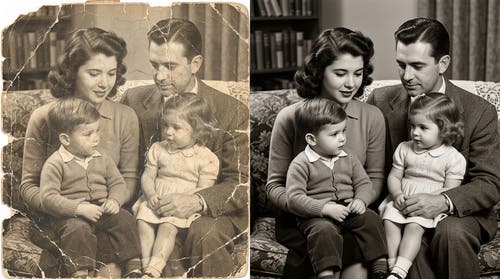
Reparera och återuppliva gamla, skadade eller lågupplösta bilder – utan retuschkunskaper. Med Adobes kostnadsfria AI-verktyg i Adobe Firefly kan du laga en sprucken familjebild, återge färgerna i ett bleknat vintage-foto eller reparera fysiska skador med Generativ fyllning. Firefly analyserar hela bildens sammanhang för att återskapa förlorade detaljer.
Ladda upp ett skadat foto och använd Generativ fyllning för att måla över sprickor, revor, vattenfläckar eller saknade områden. Firefly analyserar omgivande innehåll, textur och ton och använder den informationen för att automatiskt reparera fel. Du kan använda det på svartvita porträtt, sepia-tryck och färgfotografier.
Återuppliva blekta färger och återställ tonalt djup.
Årtionden av blekning berövar foton deras ursprungliga livfullhet. Fireflys AI-verktyg för restauration återställer färgdjup och tonal balans, och ger tillbaka varma hudtoner, rika bakgrunder och naturlig kontrast till tryck som blivit platta eller bleka över tid. Resultatet känns sant mot det ursprungliga ögonblicket, inte konstgjort förbättrat.
Skärp detaljer med realistiska resultat.
Gamla foton tappar ofta skärpa genom skanning, komprimering eller ålder. Firefly förbättrar upplösningen och återhämtar fina detaljer, inklusive ansiktsdrag, tygstruktur och bakgrundselement, med AI som förstår bildsammanhang. Lägg till ren, naturlig klarhet som håller vid större utskriftsstorlekar utan att det ser konstgjort ut.
Skicka restaurerade bilder till Photoshop på webben eller Adobe Express.
När bilden är återställd tar du den sömlöst vidare till Photoshop på webben eller Adobe Express. Justera färggradering, ta bort kvarvarande ojämnheter eller lägg enkelt till din bild i en mall för sociala medier och mer – allt inom Adobe Creative Cloud-ekosystemet. Icke-destruktiv redigering innebär att originalet alltid bevaras.
style
rounded-corners
Så här restaurerar du gamla bilder med Adobe Firefly.
Logga in på Adobe Firefly med ditt Adobe ID eller skapa ett kostnadsfritt konto. Öppna Firefly-bildredigeraren genom att klicka på knappen Redigera en bild.
Dra och släpp ditt foto, bläddra på din enhet eller i Adobe Creative Cloud-molnlagringen för att ladda upp bilden du vill återställa. Adobe Firefly accepterar JPEG-, PNG- och WEBP-filer upp till 100 MB.
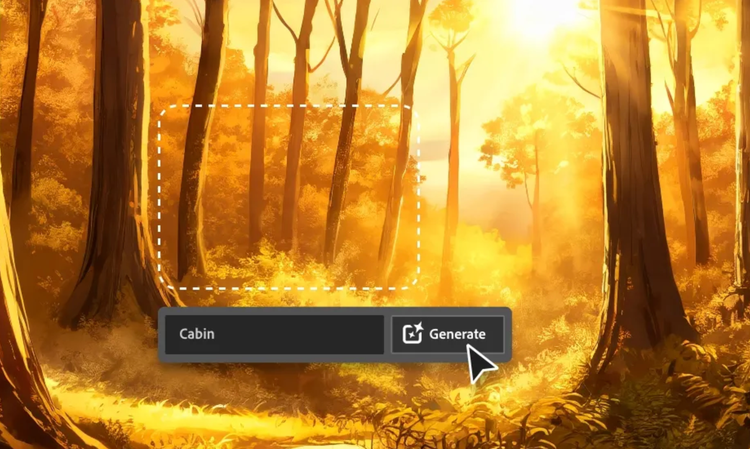
Använd penselverktyget för att måla över skadade områden, sprickor, revor, fläckar eller blekta delar. Välj sedan Generativ borttagning eller Generativ fyllning från menyn till vänster. Använd Generativ borttagning för att låta Firefly automatiskt reparera området, eller använd Generativ fyllning för att styra genereringen med en textprompt.
Klicka på Generera och se hur Adobe Firefly reparerar det markerade området med AI som läser omgivande innehåll, textur och ton – och använder den informationen för att automatiskt åtgärda fel. Granska resultaten och generera variationer vid behov.
Du kan med ett klick skicka din genererade bild till Photoshop på webben eller Adobe Express från Adobe Firefly, eller hämta din bild och fortsätta redigera med Creative Cloud-appar.
Varför använder du Adobe Firefly för AI-fotorestauration?
Fireflys bildredigeringsverktyg använder AI för att reparera och återuppliva gamla fotografier med resultat som ser naturliga ut, inte bearbetade. Läs mer om vad som gör Firefly unikt för bildrestaurering.
Firefly analyserar hela bilden, inte bara det skadade området, för att rekonstruera saknade detaljer på ett sätt som matchar omgivande ton, textur och ljussättning. Reparationerna smälter omärkligt in i originalet.
Icke-förstörande redigering
Din originalbild bevaras alltid i historikpanelen. Det icke-destruktiva arbetsflödet innebär att du kan experimentera med reparationer och restaureringar utan att skriva över originalfilen.
Byggd för professionella projekt
Använd tryggt restaurerade och förbättrade bilder i alla projekt. Firefly ingår i Adobe Creative Cloud och är en smidig väg från restaurering till slutresultat i Photoshop på webben, Adobe Express och mer därtill.
Resultat på bara några sekunder
Det som tidigare krävde timmar av noggrann manuell retuschering tar nu bara några sekunder. Måla det skadade området, klicka på Generera så hanterar Firefly rekonstruktionen automatiskt.
style
two up, s spacing top, l spacing bottom, show-2-desktop
Adobe Firefly fotorestauration kan hantera en mängd olika problem i skannade eller digitaliserade bilder, inklusive sprickor, revor, vattenfläckar, saknade områden, damm, repor, oskärpa, låg upplösning och färgblekning.
Traditionell retusch är en tidskrävande process som innebär manuell kloning, lappning och målning av skadade områden. Fotorestauration i Adobe Firefly automatiserar denna process genom att analysera hela bilden och intelligent rekonstruera skadade områden, vilket ger resultat på sekunder.
Nej. Återställningsverktygen i Adobe Firefly är icke-destruktiva och förbättrar din ursprungliga bild istället för att försämra den. När du reparerar eller förstärker ett foto i Adobe Firefly tillför AI skärpa och rekonstruerar detaljer istället för att bara sträcka eller komprimera befintliga pixlar. Din ursprungsfil bevaras alltid separat.
Ja. Adobe Firefly är utformat för professionella kreativa arbetsflöden. Du kan använda återställda foton i både personliga och professionella projekt. Granska Adobe Generative AI User Guidelines för fullständig information om användning.
Ja, du kan utforska AI-fotoreparation kostnadsfritt med Adobe Firefly. Med ett kostnadsfritt konto får du dagliga genereringar för att laga en sprucken familjebild, återge färgerna i ett bleknat vintage-foto eller reparera fysiska skador. Upptäck mer om att använda Adobe Firefly kostnadsfritt. En betald Plan finns tillgänglig för större volymer.
Dela den här sidan.
style
xxl spacing bottom, xl spacing top
Utforska fler Firefly-verktyg.
style
Show-4-desktop, s spacing top, xxl spacing bottom
background
#F0F0F7
Adobe Firefly
Nästa steg i utvecklingen av kreativ AI är här för alla dina idéer med verktyg för bilder, video, ljud och vektorgrafik.
You can control how Adobe websites use cookies and similar technologies by making choices below. But note that if you disable cookies and similar technologies entirely, Adobe websites may not function properly.
Cookies are small text files stored by your web browser when you use websites. There are also other technologies that can be used for similar purposes like HTML5 Local Storage and local shared objects, web beacons, and embedded scripts. These technologies help us do things like remembering you and your preferences when you return to our sites, measure how you use the website, conduct market research, and gather information about the ads you see and interact with.
You can make choices in the menu below about what cookies and other technologies you want us to use on Adobe sites when you visit them from this browser. You can always change those choices later by clicking on the Cookie Preferences link at the bottom of the page.
If enabled:
We can improve your experience by tailoring the site and the content to things we think might be of interest
We can better keep track of your preferences — like what language you prefer to use
We will better understand your likely interests so we can provide you more relevant Adobe ads and content on non-Adobe websites and in non-Adobe apps
It will help us improve the performance of our website and those of our partners who use the Adobe Experience Cloud
If disabled:
We won’t be able to remember you from session to session so the experience may not be tailored to your interests
You’ll still have access to the content of the site but certain features that depend on cookies may not function
You’ll still see ads, they just may not be as relevant to you
General information
You can control how Adobe websites use cookies and similar technologies by making choices below. But note that if you disable cookies and similar technologies entirely, Adobe websites may not function properly.
Cookies are small text files stored by your web browser when you use websites. There are also other technologies that can be used for similar purposes like HTML5 Local Storage, web beacons, and embedded scripts. These technologies help us do things like remembering you and your preferences when you return to our sites, measure how you use the website, conduct market research, and gather information about the ads you see and interact with.
You can make choices in the menu below about what cookies and other technologies you want us to use on Adobe sites when you visit them from this browser. You can always change those choices later by clicking on the Cookie Preferences link at the bottom of the page.
If enabled:
We can improve your experience by tailoring the site and the content to things we think might be of interest
We can better keep track of your preferences — like what language you prefer to use
We will better understand your likely interests so we can provide you more relevant Adobe ads and content on non-Adobe websites and in non-Adobe apps
It will help us improve the performance of our website and those of our partners who use the Adobe Experience Cloud
If disabled:
We won’t be able to remember you from session to session so the experience may not be tailored to your interests
We’ll still count your use of our site and services
You’ll still have access to the content of the site but certain features that depend on cookies may not function
You’ll still see ads, they just may not be as relevant to you
Operate the site and core servicesOperate site and measure engagement
Always active
These cookies are required, and they are used to enable the site and related services core functionality. Without them the site could not operate, so they cannot be disabled.
These cookies enable the site and related services’ core functionality and collect statistics about user engagement, such as counting active use to help us understand trends. These cookies cannot be disabled.
Measure performance
These cookies are used to analyze site usage to measure and improve performance. Without them Adobe cannot know what content is most valued and how often unique visitors return to the site, making it hard to improve information we offer to you.
These cookies are used to analyze site usage to measure and improve performance. Without them Adobe cannot know what content is most valued, making it hard to improve information we offer to you.
Extend functionality
These cookies are used to enhance the functionality of Adobe sites such as remembering your settings and preferences to deliver a personalized experience; for example, your username, your repeated visits, preferred language, your country, or any other saved preference.
Personalize advertising
These cookies are used to enable Adobe and our partners to serve ads more relevant to your interests. Without them you will still see ads, but they might not be as relevant to you.