


Free AI CV Maker
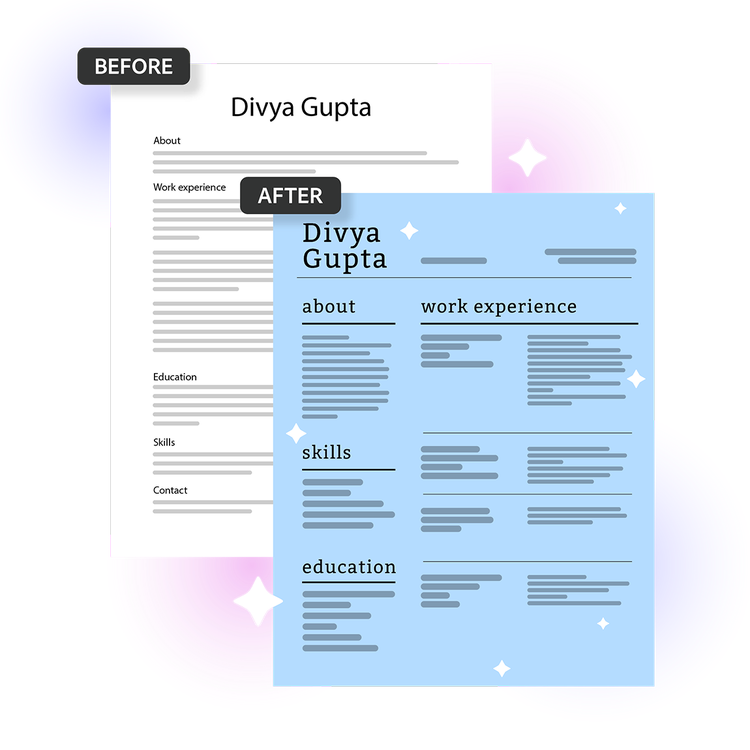
Don’t have a CV? Adobe Express can help you to create one.
How to use the AI CV builder
Just upload your existing CV, choose a template and let Acrobat handle the rest. Here’s more detail on how the tool works:
https://main--da-dc--adobecom.aem.page/dc-shared/assets/images/features/upload.svg

Upload your CV
Import your current CV into the AI builder and browse professionally designed templates. Then, choose an option that suits your occupation and style.
https://main--da-dc--adobecom.aem.page/dc-shared/assets/images/features/magic-wand.svg

Let Acrobat do the work
Acrobat AI works as a CV writer and checker. It transforms your content into a polished, professional CV without the hassle of manual formatting.
https://main--da-dc--adobecom.aem.page/dc-shared/assets/images/features/review.svg

Review and customise your CV
Review your newly generated CV and customise it to add your own personal touch. Try different fonts or colours that match your personal taste.
https://main--da-dc--adobecom.aem.page/dc-shared/assets/images/features/download.svg

Download and apply
Save your finished CV as a PDF and apply for jobs with confidence. No software or subscription required.
Why use AI to build your CV?
Artificial intelligence brings a range of benefits to the way we create. When it comes to CVs, there are various ways in which AI can help you build a document that best showcases your skills and experience.
Here are the main advantages of using an AI CV builder:

- Speeds up the application process. Don’t miss out on applying for your dream role due to time constraints. With an AI CV maker, you don’t need to manually update your CV for every role – just upload and let the tool do the rest.
- Reviews and edits your existing CV. Acrobat AI can quickly review, edit and refine your existing content to make it more suitable for the specific job you’re applying for.
- Elevates your CV design. The free AI CV builder can make your document more visually appealing to recruiters. Choose from a range of modern, professional templates and customise as required.
More ways to work with PDFs
Try our online tools to convert, compress and merge PDF files — Acrobat can do it all.

Try our free PDF to Word converter

Try our free JPG to PDF converter

Try our free Word to PDF conversion tool

Combine PDF files any time, anywhere
AI CV builder FAQs
An AI CV builder is an online tool that harnesses the power of AI to help you create, improve or redesign your CV, saving you the time and effort of manual work.
The Acrobat AI CV maker helps you create a professional resume in minutes using AI-powered formatting and customisable templates. Simply upload your document, choose a template, and Acrobat will organise your content into a polished layout you can tweak and download for free.
The AI CV builder from Acrobat combines professional design templates with Adobe Express tools so you can create a polished, professional CV.
Simply select a template and let the AI CV maker do the rest. Because it's connected to Adobe Express, you can also create matching career materials like portfolios, presentations and personal branding assets.
The Acrobat AI CV builder is best for job seekers who want a professionally designed CV without spending hours on formatting.
It's ideal for:
- First-time applicants
- Recent graduates
- Career changers
- Anyone re-entering the workforce who needs to put together a polished document quickly
- Professionals who want a visually distinctive CV that stands out from standard word-processor formats.
Adobe’s AI CV builder is well-suited for career changers because it gives you full control over how your experience is framed and which skills are emphasised. You can choose a template with a layout that highlights what matters most for your new field, making it easy to put transferable skills and relevant experience front and centre.
Get more tips to help with your career change.
Yes, the AI CV builder is free to use with no sign-in or credit card required. It includes core CV creation and editing features, including access to templates and basic design tools.
To unlock additional templates, design assets and advanced features, consider an Adobe Express Premium plan.
Yes, nowadays a great deal of employers and recruiters use AI and Applicant Tracking Systems (ATS) to scan, filter, and rank CVs for different job roles. This is especially common for high-volume positions to make the candidate selection process more efficient and manageable.
These AI tools are used to help recruiters quickly identify candidates who have the skills outlined in the job description.
Apply for jobs faster with the free AI CV generator.
https://main--da-dc--adobecom.aem.page/dc-shared/assets/images/frictionless/icons/ai-summary.svg

Smart content mapping
Automatically organise your experience, skills and education into a polished professional layout. Make your CV easy for recruiters to scan.
https://main--da-dc--adobecom.aem.page/dc-shared/assets/images/frictionless/icons/protect-pdf.svg

Secure and private by design
Your file will be securely processed and automatically deleted unless you choose to sign in and save it. Rest assured, your personal details are well protected.
https://main--da-dc--adobecom.aem.page/dc-shared/assets/images/frictionless/icons/esign-template.svg

Polished, professional templates
Use the AI CV builder to convert your resume into one of the professionally designed templates available, Showcase your skills and expertise in a more visually appealing way.

Start with your existing CV.
There’s no need to manually enter your information. Simply upload your current CV and watch Acrobat quickly enhance and transform it into a polished new document.
https://main--da-dc--adobecom.aem.page/dc-shared/assets/images/frictionless/icons/download-pdf.svg

Download as a PDF in a seconds.
Download a PDF-version of your shiny new CV in seconds. Then you’re ready to upload your document for future job applications – without messing with the formatting.
https://main--da-dc--adobecom.aem.page/dc-shared/assets/images/frictionless/icons/credit-card.svg

No credit card required
Just upload, customise and go. No subscription is required to get started with the free AI CV builder. Just create your CV online, then save and share.
Use Acrobat tools for free
- Sign in to try 25+ tools, like convert or compress
- Add comments, fill in forms and sign PDFs for free
- Store your files online to access from any device


