Standard poster sizes: How to choose the right one.
Craft posters that fit your space perfectly.




Designing a poster is more than just the text and images you add to it. Other factors like size and dimension play a key role too. Choosing the right poster measurements can make a huge difference to your end product – influencing the way audiences view and interpret your content.
Ready to learn more about poster sizes? Continue reading this helpful guide by Adobe Express to discover the typical dimensions of a poster to help you select the best poster size for your work or personal project.
Key takeaways.
- Choosing the right poster size is essential to ensure your design works well on your chosen platform, whether it’s print or digital.
- The best posters start with clear objectives, targeted designs, and thoughtful placement.
- Aim to balance visuals, suitable poster size, readability and colour choice to create a poster that stands out to your target audience.
Common poster dimensions for different uses.
When creating a poster, choosing the right size is one of the first and most important decisions. Different projects and locations call for different poster dimensions. If you’re designing a poster for a shop window, a small A3 or A2 size often works well. For high-traffic areas, like event venues or conference halls, larger formats like A1 or A0 are more eye-catching and can help convey messages clearly.
Standard UK poster sizes often follow the ISO 216 A-series system, ranging from A4 at 210 × 297 mm through A3, A2, A1, and finally A0 at 841 × 1189 mm. There are also US sizing standards, such as the tabloid size at 11 × 17 inches. A 24 × 36inch poster is especially popular for movie posters, while a 27 × 40-inch size is the industry standard for movie posters in the United States of America.
Understanding the common dimensions can help you choose the right poster size for your content and ensure you find the right balance between visibility, content layout, and printing costs. You can use Adobe Express to create posters of all different sizes. It’s easy to adjust your poster size, layout, colours, fonts, and text and then send your poster off to print.
recipe
How to pick the best poster size for your needs.
Choosing the best poster size depends on where your poster will be displayed, how much information it contains, and how far away viewers will be. A good rule of thumb is that the larger the distance between the viewer and the poster, the larger the poster should be. For indoor environments like offices, smaller posters such as A3 or A2 are often ideal. For outdoor advertising or large indoor areas, consider A1 or A0 sizes to maximise visibility.
Also, think about the content density. Posters with minimal text and bold visuals can still make a strong impact at smaller sizes. If your poster needs to include detailed information, charts, or fine print, a larger format will help keep everything readable.
There are multiple uses for posters within a business context, so it's best to think about what message you want your poster to relay and whether it needs to inform, educate, empower, or advertise. Explore conference poster design templates and awareness poster templates for more ideas.
With Adobe Express, you can quickly resize your designs or start from templates that match your project, giving you the flexibility to create posters that fit any space and purpose. Then, send your posters straight to print. Start editing printable poster templates now.
recipe
Digital vs. print: Poster size guidelines.
When designing a poster, it is important to plan for where and how it will be seen. Digital posters and printed posters require slightly different sizing and resolution considerations. Here is a quick guide:
1. Set the correct resolution.
For print posters, use a resolution of 300 DPI (dots per inch) to ensure sharp quality. For digital posters, 72 DPI is usually enough. Learn more about digital vs. print design.
2. Pick the right dimensions.
Printed posters must match standard sizes like A3, A2, A1, or A0 to avoid expensive custom printing. Digital posters can use screen-friendly dimensions, like 1080 × 1920 pixels. It’s easy to resize your poster, regardless of whether you’re designing a friend’s poster, a green poster, a coffee poster, or an anime poster.
3. Check file formats.
For print, save your file as a high-quality PDF or TIFF. For digital use, JPEG or PNG formats are usually preferred for quick loading and sharing. Adobe Express lets you download your posters in various formats, should you wish to share them digitally. Got the wrong format? Use the Adobe Express features to convert to JPG, PNG, or SVG.
4. Mind colour settings.
Choosing the correct colour mode for your poster is key to ensuring it looks its best once completed. There are two main options you can choose from – RGB and CMYK. The main difference between the two is what they’re used for. RGB is primarily used for digital designs on mediums such as websites, TV or mobiles, while CMYK is best suited to print projects like physical posters, flyers and t-shirts.
Use CMYK colour settings for print posters and RGB for digital posters to get the best colour accuracy. Learn more about colour modes and consistency, and then explore hundreds of free poster templates to begin working on your poster design.
recipe
How to print posters in custom sizes.
https://www.youtube.com/watch?v=PNsuwdBnGAM
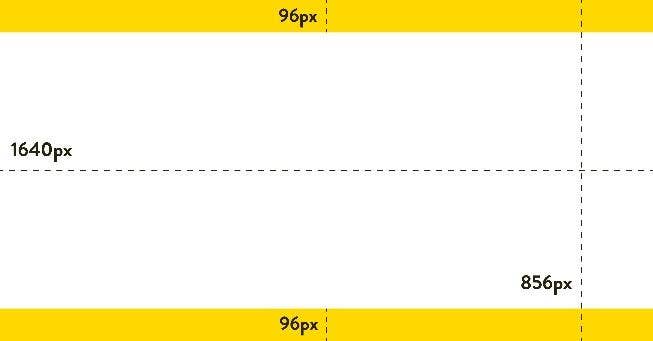
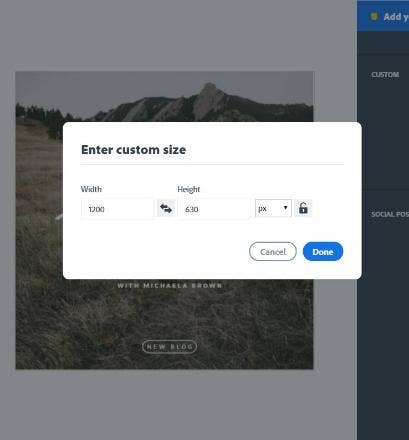
Sometimes you need a poster that does not fit the standard dimensions. Whether it is a unique frame size, a small event board, or a large installation, printing custom-sized posters is easy with a few key steps. If you’re printing at home, check to see which size options you can apply to your printer. If printing through Adobe Express, you can apply your own custom dimensions and submit your poster to print.
If you’re printing at home, you’ll need to check that your bleed margins are set up correctly to ensure nothing important gets trimmed off during printing. Always work in high resolution (at least 300 DPI) to keep the quality sharp, no matter the size.
To save yourself time, you can always go straight to the design and print services offered by Adobe Express. Enter custom dimensions when you start your design to tailor your poster exactly to your project requirements without stress. You can also design and print hoodies, business cards, brochures, cards, and invitations. Use the standard sizing suggested by Adobe Express or explore custom sizing options for your different designs.
How to resize posters without losing quality.

Tips for designing a digital poster.
If you’re designing a digital poster, you want it to be as visually appealing and engaging as possible to help you grab and keep your audience’s attention. Adobe Express can help you do this, not only through our innovative tools but also with a few top tips to help you make the best design decisions.
Here are our top tips for designing a digital poster:
Define your main goal.
What’s the goal of creating this poster? What key message are you trying to communicate? Whether it’s to market a product, promote an event or simply raise awareness on an important topic, identify these key factors and let the answers influence every decision you make for your digital poster design.
Choose your target audience.
Another key factor that should drive every decision you make for your poster is the target audience. Spend some time thinking about who you want your content to attract or inform, then tailor your design features to this specific audience.
Think about placement.
Decide the best place for your poster to be displayed online. Will it be on a website, digital billboard or social media? Or all of the above? You don’t have to go with just one option. Often, promoting your content on a range of platforms works well as part of a broader multimedia strategy. Just remember, the different mediums you choose may require varying poster dimensions.
Prioritise readability.
This involves looking at aspects such as font choice, size and contrast with background colours. Go for clear, legible fonts, suitable text sizes, and ensure the contrast is strong enough to make the text stand out. All this works together to help you create a poster that’s easy for your audience to read across different formats and viewpoints.
Use high-quality imagery/graphics.
It’s important to use high-quality images with high-resolution to avoid pixelation that can affect the visual appeal of your poster. The last thing you want is to upload digital content of poor quality, as it won’t show your brand in the best light. You should also ensure that you include images and graphics that are relevant to your target audience and purpose to help boost engagement.
Choose an effective colour palette.
Opt for colours that align with your brand and the mood you’re trying to create, or the message you’re trying to communicate. For example, greens can convey nature and relaxation, while red can suggest caution and call for attention. To reduce visual clutter, it’s best to limit your colour palette to two to four primary colours and consider accessibility to ensure your colour poster is legible to those with vision deficiencies.
Keep it concise.
Posters are mainly created for visual engagement, but it’s still a good idea to include some text. Aim to keep written context clear and concise, so that you can communicate with audiences quickly and effectively. Use punchy headlines, short phrases, keywords and bullets that are easy to scan and digest.
Test on different screens.
Last, but not least, always check how your poster looks on different devices, including desktops, tablets, and mobile phones, as well as different screen sizes and resolutions. This way, you can ensure your design remains clear and visually appealing in all formats.
Discover more you might like.
You might also like...