How to Write Meeting Agenda with AI
Creating effective meeting agendas no longer requires hours of planning and drafting. AI tools can help you build structured, purposeful agendas in minutes, transforming scattered meetings into focused, productive sessions.
A well-structured meeting agenda keeps discussions on track and ensures every participant knows what to expect. AI tools can streamline the agenda creation process from drafting to distribution.
With the right generative AI tools, you can quickly build, share, and refine agendas for any type of meeting.
What is a meeting agenda?
A meeting agenda is a structured outline that guides discussion and keeps meetings focused on their intended purpose. It serves as a roadmap for participants, detailing what topics will be covered, who will lead each section, and how much time is allocated for discussion. Without an agenda, meetings often drift off-topic, run over time, and leave attendees wondering what was actually accomplished.
Understanding how to write an agenda for a meeting starts with recognizing that different meeting types require different approaches. A casual team check-in calls for a lighter touch than a formal quarterly review. The agenda structure should match the meeting's purpose, audience, and complexity.
What to include in a meeting agenda
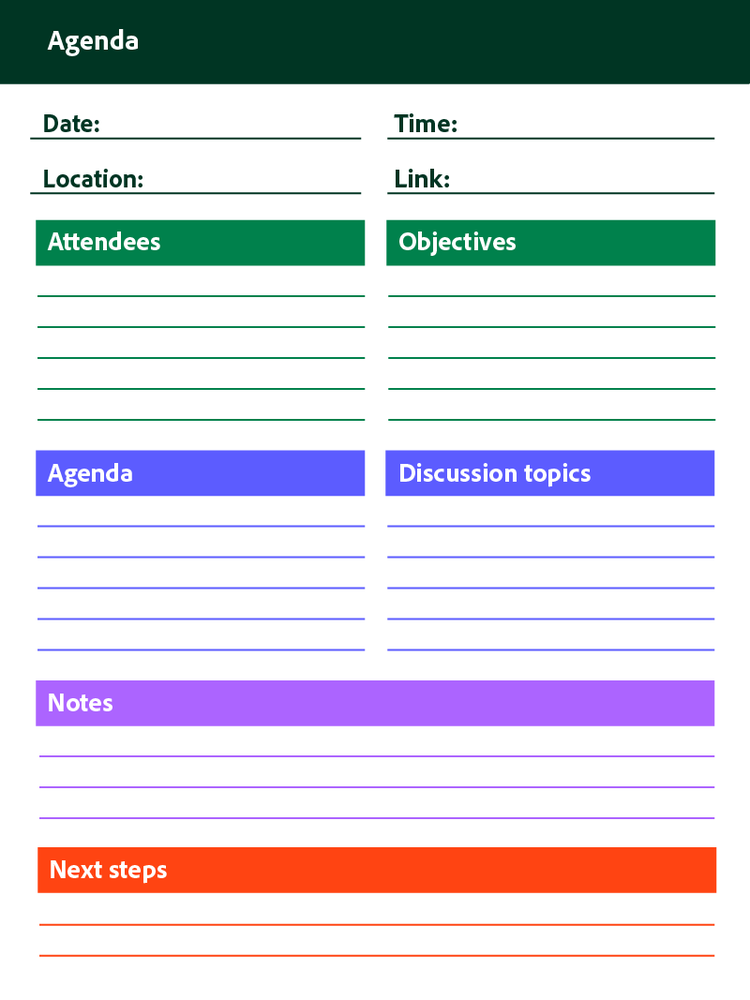
Effective agendas share common essential elements regardless of meeting type. Including these components ensures participants arrive prepared and discussions stay productive.
Every meeting agenda should contain the following key components:
- Date, time, and location, including virtual meeting links for remote participants
- List of attendees and their roles in the meeting
- Meeting objectives and desired outcomes stated clearly upfront
- Agenda items with allocated time for each discussion topic
- Discussion topics with assigned presenters or owners responsible for leading each section
- Space for notes and action items to capture decisions and next steps
- Reference to how outcomes will be documented after the meeting concludes
Board meetings
Board meetings represent the most formal type of business gathering, requiring structured agendas with specific protocols and governance considerations. These meetings typically cover financial reviews, strategic decisions, compliance matters, and organizational oversight. The agenda must follow parliamentary procedures and often includes items like approval of previous minutes, committee reports, and formal motions.
Board agendas require careful attention to legal and regulatory requirements. Each item typically needs supporting documentation distributed in advance, giving board members time to review materials before discussion.
Team sync meetings
Regular team check-ins focus on status updates, alignment, and removing blockers that slow progress. These agendas tend to be shorter and more flexible than formal meetings, often following a consistent format that team members come to expect. A typical team sync might include a quick round-robin of updates, discussion of immediate priorities, and identification of any obstacles requiring attention.
The key to effective team sync agendas is brevity. Keeping these meetings to 15–30 minutes respects everyone's time while maintaining regular communication cadence.
Project kickoff meetings
Initial project meetings set expectations, roles, and timelines for new initiatives. The agenda should introduce team members, outline project scope, establish milestones, and clarify communication protocols. These meetings lay the foundation for everything that follows, making a thorough agenda essential for project success.
Kickoff agendas often include time for questions and concerns, allowing team members to raise issues before work begins. This upfront investment in clarity prevents misunderstandings and scope creep later in the project lifecycle.
One-on-one meetings
Individual meetings between managers and team members serve different purposes than group gatherings. These agendas focus on feedback, career development, personal goals, and relationship building. The format is typically more conversational, but having an agenda ensures important topics get addressed rather than lost in casual conversation.
One-on-one agendas work best when both parties contribute items. This shared ownership encourages open dialogue and ensures the meeting serves the employee's needs alongside organizational objectives.
Meeting agenda examples
Real examples demonstrate how agenda structures adapt to different purposes and audiences.
Example 1: Project kickoff agenda
Website Redesign Project Kickoff | October 16, 2024 | 2:00 PM – 3:00 PM
- Welcome and introductions (10 minutes) — Project Manager
- Project overview and objectives (15 minutes) — Project Sponsor
- Roles and responsibilities review (10 minutes) — Project Manager
- Timeline and milestone walkthrough (15 minutes) — Project Manager
- Questions, concerns, and discussion (10 minutes) — All participants
This kickoff structure ensures everyone understands the project scope and their role before work begins.
Example 2: One-on-one meeting agenda
Manager-Employee Check-in | October 17, 2024 | 3:00 PM – 3:30 PM
- Personal check-in and wins (5 minutes) — Employee
- Progress on current projects (10 minutes) — Employee
- Challenges and support needed (8 minutes) — Both
- Career development discussion (5 minutes) — Both
- Action items and next steps (2 minutes) — Manager
This format balances operational updates with personal development, ensuring meaningful conversation in a short timeframe.
AI prompt examples:
Prompt Input Example 1:
"Create a 30-minute team sync agenda for a marketing team of 6 people. We need to cover campaign updates, upcoming deadlines, and resource allocation."
Sample Output:
Marketing Team Weekly Sync | Monday, October 14 | 10:00 AM – 10:30 AM
- Quick wins and blockers round-robin (10 minutes) — All team members
- Campaign performance updates (8 minutes) — Campaign leads
- Upcoming priorities and deadlines (7 minutes) — Team lead
- Open discussion and questions (5 minutes) — All
Prompt Input Example 2:
"Generate a board meeting agenda for a nonprofit organization. The meeting is 90 minutes and needs to cover Q3 financials, updates on strategic initiatives, and board member nominations."
Sample Output:
Quarterly Board Meeting | October 15, 2024 | 9:00 AM – 10:30 AM
- Call to order and roll call (5 minutes) — Board Chair
- Approval of previous meeting minutes (5 minutes) — Board Secretary
- Q3 Financial report and review (20 minutes) — CFO
- Committee updates (15 minutes)
- Finance Committee
- Governance Committee
- Nominating Committee
- Strategic initiative progress report (15 minutes) — CEO
- New business items (15 minutes) — All members
- Executive session (10 minutes) — Board members only
- Adjournment (5 minutes) — Board Chair
How to write meeting agenda with AI
Artificial intelligence tools have transformed how professionals create meeting agendas. Using AI saves time, ensures consistency across recurring meetings, suggests relevant topics based on context, and reduces the administrative burden of meeting preparation. These approaches help teams focus on substance rather than formatting.
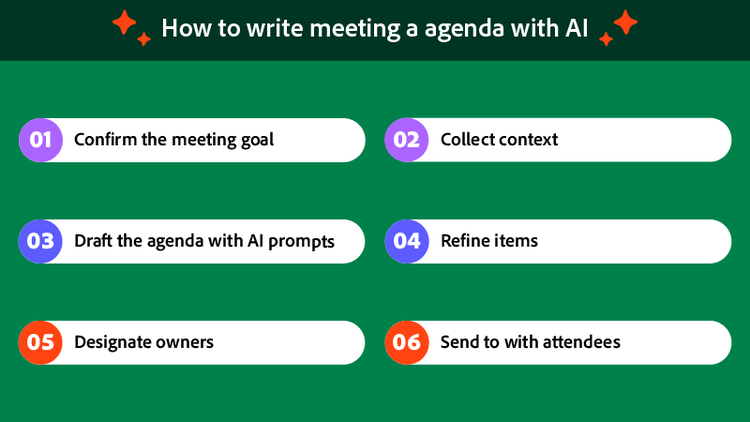
1. Clarify the meeting goal and outcomes
Before engaging any AI tool, define what the meeting should accomplish. Identify specific decisions that need to be made during the session. Consider what success looks like when the meeting ends and participants return to their work.
Clear objectives give AI better context for generating relevant agenda items. Vague goals produce vague agendas. Take five minutes to articulate exactly what you want to achieve, and the AI-generated content will be far more useful.
Ask yourself these questions: What problem are we solving? What decisions require group input? What information do attendees need to leave with? The answers shape everything that follows.
2. Gather context
Review notes from previous related meetings to identify ongoing discussions and unresolved items. Collect input from attendees on topics they want to address. Reference project documents or reports relevant to the upcoming discussion.
An AI meeting notes summarizer can quickly condense lengthy documents into key points, helping you identify what matters most for the agenda. This context-gathering step ensures your agenda builds on previous work rather than starting from scratch each time.
When gathering input from attendees, ask specific questions rather than open-ended requests. Instead of asking what someone wants to discuss, ask what decisions they need from this meeting or what blockers require group attention.
3. Use AI prompts to draft the agenda
Write clear prompts that include meeting type, attendees, duration, and objectives. The more specific your prompt, the better the AI output. Let AI generate an initial agenda structure and talking points based on your input.
Review and adjust the AI-generated content to match your specific needs. AI provides a strong starting point, but human judgment ensures the agenda reflects organizational priorities and interpersonal dynamics that algorithms cannot fully understand.
Effective prompts include details like the meeting's purpose, who will attend, how long the meeting will last, and what topics must be covered. AI tools work best when given concrete parameters rather than abstract requests.
4. Refine topics and timing
Prioritize items based on importance and urgency. Place critical decisions early in the agenda when attention is highest. Allocate realistic time blocks for each agenda item, considering how much discussion each topic typically generates.
Build in buffer time for discussion overflow. Meetings rarely follow schedules perfectly, and having flexibility prevents important items from getting cut when earlier discussions run long. A good rule is adding 10–15 percent buffer time to your total meeting length.
Consider the energy arc of your meeting. Start with engaging items that get people talking, place challenging discussions in the middle when focus peaks, and end with lighter topics or clear action items.
5. Assign owners
Designate a lead for each agenda item who will present information or facilitate discussion. Clarify who will speak during each section so participants can prepare appropriately. Ensure accountability for follow-up actions by naming specific individuals responsible for next steps.
Ownership creates accountability. When no one owns an agenda item, discussions meander without resolution. When someone specific is responsible, they prepare more thoroughly and drive toward outcomes.
Document owner assignments directly in the agenda so expectations are clear before the meeting begins. This transparency helps participants understand their roles and prepare accordingly.
6. Share with attendees
Distribute the agenda in advance, ideally 24–48 hours before the meeting. This lead time allows participants to review materials, prepare questions, and gather any information they need to contribute effectively.
Use collaborative document spaces where attendees can add comments, suggest additional topics, or flag concerns before the meeting begins. This collaborative approach surfaces issues early and makes meetings more productive.
When sharing agendas, convert Word documents to PDF to ensure consistent formatting across devices and platforms. PDF format preserves your careful layout regardless of what software recipients use to view the document.
Best practices for AI-assisted agenda creation:
- Use AI summarizers to condense past meeting notes into key points that inform your agenda context
- Leverage AI writing assistants to suggest agenda items based on patterns in previous discussions
- Turn meeting notes into action items automatically with AI-powered productivity tools that track commitments
- Use business document solutions for professional agenda formatting and distribution
- Consider Acrobat AI Assistant for document-based agenda preparation, review, and team collaboration
Frequently asked questions
How do you write a simple meeting agenda?
What are the 4 P's of a meeting agenda?
How do you start an agenda?
What is the best format for an agenda?
Can AI help with recurring meeting agendas?
How far in advance should you send a meeting agenda?
What should you do if the meeting runs off the agenda?
You may also like