ACROBAT | 7-MINUTE READ
VCF file: How to open, view, or edit.
VCF files simplify storing and sharing contact info across platforms.
ACROBAT | 7-MINUTE READ
VCF files simplify storing and sharing contact info across platforms.
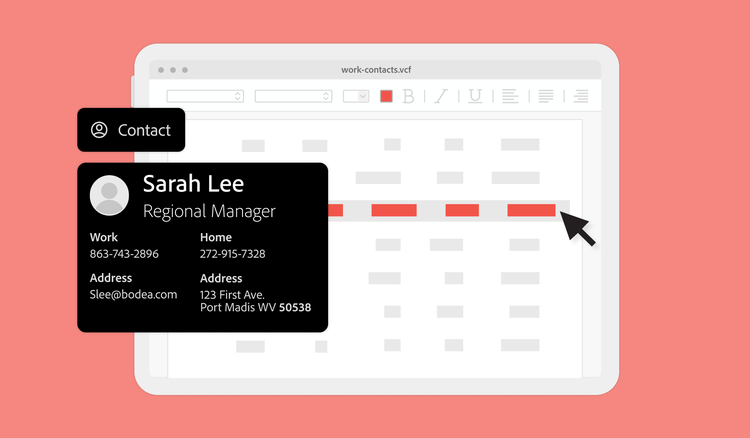
Fortunately, the days of memorizing someone’s contact information are over. However, email addresses, phone numbers, addresses, and other contact data still need to live somewhere in our digital files for easy access. That’s where VCF files come in.
Whether you rely on contact data at work or just need help streamlining your phone contacts, this guide will help you understand how to access and edit VCF files. Plus, discover how tools like Adobe Acrobat can save time by transforming VCFs into secure, universally compatible PDFs.
VCF stands for Virtual Contact File or vCard file. It’s a text-based file format that stores contact information such as:
VCF uses the vCard file system, which stores individual contact details in a small file that’s easy to exchange across platforms. Compatibility isn’t a concern; you can easily transfer data and open VCF files across various devices and apps. You don’t need to pick sides in the Windows versus Apple debate, either — VCF files are accessible through popular tools like Apple Contacts and Microsoft Outlook.
VCF files aren’t new. The Internet Mail Consortium developed this file format in 1996 to standardize the exchange of contact data. While the consortium initially designed VCFs for email, they’re still used in mobile apps and business contact management databases.
Thanks to the development of more complex contact database systems, VCF files can also integrate more customized contact information. With a few taps, you can track B2B prospect budgets at work or keep tabs on your loved ones’ favorite ice cream flavors.
Although the Virtual Contact File is the most common meaning of the .VCF extension, it’s worth noting that the abbreviation also refers to Variant Call Format, a specialized text file format used in genetics data processing. This use case is less prevalent, but it’s still good to know if you encounter VCF in a different context.
Aside from their accidental doppelganger, other document file types are similar to VCF files.
PDF is also a popular alternative to VCF files in some situations. VCF files are practical for managing contact details, but PDFs are the way to go when it comes to sharing, archiving, or printing contact data. They’re more universal, retain formatting, and have additional security features. Plus, tools like Acrobat give you access to time-saving features like e-signatures, annotations, and more.
VCF files are versatile for storing and sharing contact information. Whether you want to view, create, or edit a VCF file, here’s a comprehensive guide to get started.
You can use several ways to open the VCF file format, depending on your hardware and software.
The easiest way to open a .VCF file is with a contact management program like Microsoft Outlook for Windows, Apple Contacts on macOS, or Google Contacts in your Google account. To open the VCF file, upload it to your app to access the contact details.
If you don’t have a contact management application, you can use file viewers like GroupDocs and Docx2doc.
Use the file manager on your phone to search for the file and open it using an app that supports the format, such as Contacts VCF on Android or MobileTrans on iOS.
If none of the other methods work, you can always view the VCF file as raw text. It won’t be easy to sift through, but you can find someone’s phone number or email in a pinch without special software.
If you need to send the information in a VCF file to other users, consider formats like PDF. Acrobat shares contact details in a polished, printable format that ensures compatibility across all devices without specialized software. Use the free online Acrobat PDF converter to quickly convert files, hassle-free.
The easiest way to create a VCF file is to go into your contact management solution and export a contact’s data. The file will download to your device with the .VCF extension.
If you don’t have an existing contact, the most basic way to create a VCF file is to open a plain text file (TXT) and use code tags to turn it into a VCF. It should look something like this:
BEGIN:VCARD
VERSION:3.0
N:Lastname;Firstname;;;
FN:Firstname Lastname
TEL:TYPE=CELL:123-456-7890
EMAIL:email@example.com
END:VCARD
Alternatively, you can use online conversion tools to convert data from other formats, like CSV, into a VCF tool. Conversion makes it much easier to manage the raw data by pulling the information into a more robust viewing setup with other applications.
If conversion doesn’t work, use dedicated editors that make it simple to create and edit .VCF files. Some great free options include SysTools vCard viewer and Turgs vCard viewer for Windows and MacUncle .VCF file viewer for Mac.
You can edit a VCF using several different methods, such as:
The VCF format is versatile for managing contact information across devices. Like any file type, it has its strengths and limitations.
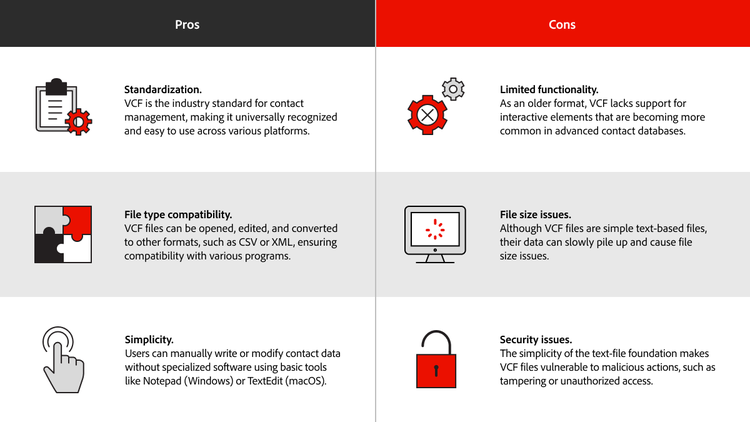
Use Acrobat to overcome the limitations of VCF files without compromising on convenience. PDFs improve security, allow you to combine multiple VCF files into a single document for sharing, and optimize storage.
By converting and managing your VCF files with Acrobat, you can elevate how you handle your contact data — securely, efficiently, and professionally. Convert, protect, and enhance VCF data and other file formats with Acrobat to take control of your data.
Yes. You can merge multiple VCF files into a single file using tools like CSV to VCF converters or command-line utilities. While one-off VCF files are useful for porting over individual contacts, merging files is helpful for consolidating contact lists from multiple sources.
VCF stands for Virtual Contact File. This tile type stores contact information like:
VCF files are very basic, so they don’t support built-in security features. If you need to encrypt or password-protect your contact information, convert the data into a PDF format.
Yes. First, you need to convert the VCF into CSV format. Then, you can import the CSV data into Excel for viewing or editing.
The best option is your contact management application:
To read the contents of a VCF file, open it with a text editor like Notepad. The data won’t be formatted in a visually pleasing way, but you’ll be able to read the raw VCF data with ease. Alternatively, you can also use a VCF-specific view like Turgs vCard Viewer.


