How to use AI to write a resume
Discover how AI can help you craft a professional, polished resume. Learn the steps, best practices, and tips for standing out to employers.

How to use AI to write a resume
Job seekers are turning to AI for resume help for several compelling reasons. First, AI saves significant time by generating initial drafts and suggesting improvements that would otherwise take hours to develop. For those facing writer's block or struggling to articulate their experience, AI provides a helpful starting point. These tools can also ensure professional formatting and structure, helping candidates present their qualifications in the most effective way possible.
Beyond basic content generation, AI excels at tailoring resumes to specific job descriptions. By analyzing job postings and identifying relevant keywords, AI helps candidates align their experience with what employers are seeking. This optimization can improve visibility in applicant tracking systems (ATS) and increase the chances of landing interviews. Whether you're new to the job market or an experienced professional looking to refresh your portfolio, leveraging resume writing fundamentals combined with AI assistance can help you create a standout document.
6 steps to create a resume with AI
Creating a resume with AI involves a structured approach that combines your unique experience with the power of intelligent tools. The process works best when you treat AI as a collaborative partner rather than a replacement for your own input. By following these steps, you can leverage AI to create a professional, tailored resume that accurately represents your qualifications.
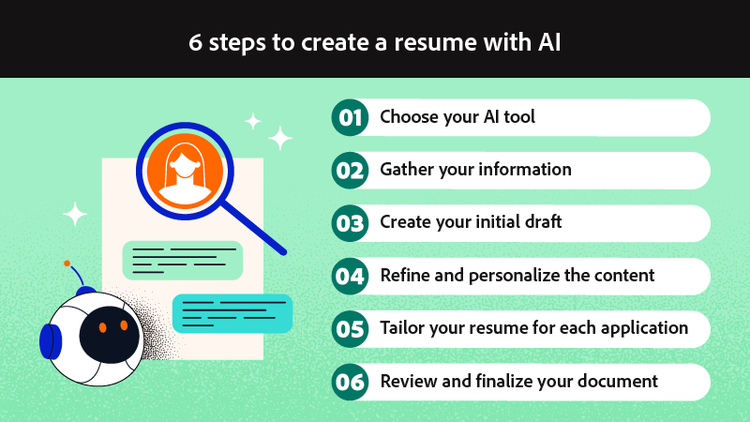
Step 1: Choose your AI tool
The first step is selecting the right AI tool for your needs. Options range from general-purpose AI assistants like ChatGPT to dedicated resume builders and integrated document tools. General AI assistants offer flexibility and can handle various prompts, while dedicated resume builders often include templates and formatting features. Some tools specialize in analyzing job descriptions and suggesting targeted improvements. Consider what matters most to you—whether that's content generation, formatting assistance, or keyword optimization—and choose accordingly.
Step 2: Gather your information
Before engaging with any AI tool, compile all the information you'll need. Start with your complete work history, including job titles, company names, dates of employment, and key responsibilities. List your skills, both technical and soft, along with any certifications, education credentials, or professional development courses. Most importantly, gather quantifiable achievements and metrics that demonstrate your impact—numbers like revenue generated, costs saved, or projects completed.
Also collect the job description for the position you're targeting. This document contains valuable keywords and requirements that AI can help you incorporate. Note specific phrases, required qualifications, and preferred skills mentioned in the posting.
Step 3: Create your initial draft
With your information ready, you can begin prompting AI to generate content. The key to effective AI prompts is specificity. Rather than asking AI to "write a resume," provide context about your target role, industry, experience level, and the specific section you want help with. For example, you might ask AI to "write a professional summary for a marketing manager with 8 years of experience in digital advertising, targeting a senior director role at a technology company."
Let AI help structure your experience and skills into clear, impactful bullet points. Request multiple variations if the first output doesn't quite capture your experience. Iterate on the content by providing feedback and asking for revisions until you have a solid foundation to work with.
Step 4: Refine and personalize the content
AI-generated content requires careful review and personalization. Read through every section to verify accuracy—AI may make assumptions or include generic phrases that don't reflect your actual experience. Add specific details that AI couldn't know, such as the names of proprietary systems you've used, unique projects you've led, or particular challenges you've overcome.
Ensure your authentic voice comes through in the final document. If something sounds too formal or doesn't match how you'd naturally describe your work, adjust the language. You can use tools that let you chat with your documents to review and refine your resume, asking questions about clarity, tone, and impact. This collaborative approach helps polish your document while maintaining accuracy.
Step 5: Tailor your resume for each application
One of AI's greatest strengths is helping customize resumes for specific opportunities. For each job application, use AI to analyze the job description and identify keywords you should incorporate. Ask AI to suggest ways to reframe your experience to better align with the role's requirements.
Adjust the emphasis of different sections based on what the employer values most. A role focused on leadership might warrant expanding your management experience, while a technical position might benefit from more detailed skills sections. This tailoring process significantly improves your chances of passing ATS screening and catching a recruiter's attention.
Step 6: Review and finalize your document
The final step involves thorough review and preparation for submission. Read your resume multiple times, checking for grammatical errors, typos, and inconsistencies. Verify that all dates, job titles, and company names are accurate. Ask a trusted friend or mentor to review your resume and provide feedback.
Best practices when using AI for resume writing
Maximizing the effectiveness of AI for resume writing requires a strategic approach. These best practices will help you get the most value from AI tools while ensuring your final document is professional, authentic, and tailored to your goals.

Start with a strong foundation of your own information and clear goals. AI performs best when given detailed, accurate input. Before you begin, know what role you're targeting, what achievements you want to highlight, and what tone you want to convey. The more context you provide, the better AI can assist you.
Use specific, detailed prompts rather than vague requests. Instead of asking AI to "improve this bullet point," try "make this bullet point more impactful by quantifying the result and using stronger action verbs." Specific prompts yield specific, useful results.
Always fact-check AI-generated content. AI can occasionally fabricate details or make assumptions that don't match your actual experience. Review every date, job title, achievement, and claim to ensure accuracy. Submitting a resume with false information can damage your professional reputation and disqualify you from consideration.
Maintain your authentic voice throughout the document. Recruiters and hiring managers read hundreds of resumes, and those with genuine personality stand out. If AI generates content that sounds robotic or generic, rewrite it in your own words while keeping the structural improvements.
Keep formatting clean and professional. While AI can help with content, you'll want to ensure the final document is visually appealing and easy to read. Use consistent fonts, clear section headings, and adequate white space. Sharing your resume in PDF format preserves formatting across different devices and systems.
Use AI for keyword optimization to improve ATS compatibility. Ask AI to identify relevant keywords from job descriptions and suggest natural ways to incorporate them into your resume. This optimization can significantly improve your visibility to recruiters using automated screening tools.
Pair your resume with a matching cover letter for maximum impact. An AI-assisted cover letter that complements your resume creates a cohesive application package. Acrobat AI Assistant can help with formatting and sharing your final documents, ensuring they look professional when they reach hiring managers.
Dos and don'ts of using AI for a resume
Understanding what to do and what to avoid when using AI for resume writing helps you navigate potential pitfalls while maximizing benefits. These guidelines build on the best practices above and address specific actions that can make or break your AI-assisted resume.
Dos:
- Do verify all dates, titles, and facts before submitting your resume. Cross-reference AI-generated content against your actual employment records and LinkedIn profile to ensure consistency and accuracy.
- Do customize your resume for each job application. Use AI to help tailor your content to specific job descriptions, incorporating relevant keywords and adjusting emphasis based on role requirements.
- Do add personal achievements and metrics that demonstrate your impact. AI can help structure these accomplishments, but the specific numbers and results must come from your actual experience.
- Do review for tone and authenticity. Read your resume aloud to ensure it sounds like you wrote it. Adjust any language that feels artificial or doesn't match your professional voice.
- Do use AI for proofreading and optimization. AI excels at catching grammatical errors, suggesting stronger action verbs, and identifying areas where your resume could be more impactful.
- Don't submit without thorough review. AI-generated content may contain errors, assumptions, or generic phrases that need correction. Always review every word before sending your resume to employers.
- Don't fabricate or exaggerate experience. AI might suggest impressive-sounding accomplishments that don't reflect your actual work. Never include false information, as this can lead to immediate disqualification or termination if discovered later.
- Don't use generic AI output without personalization. Unedited AI content often sounds formulaic and lacks the specific details that make resumes compelling. Take time to add your unique experiences and voice.
- Don't ignore formatting and readability. A wall of text or inconsistent formatting can undermine even the best content. Ensure your resume is visually organized and easy to scan quickly.
- Don't rely solely on AI without human judgment. AI is a powerful tool, but it cannot replace your understanding of your own career story, the nuances of your industry, or the specific culture of companies you're targeting.
Frequently asked questions
What is the best AI tool to write a resume?
Can I create my resume with AI?
Can employers detect AI resumes?
How do I make my AI-generated resume stand out?
Should I mention that I used AI to write my resume?
You may also like