ACROBAT | 6-MINUTE READ
How to write an address.
Learn the correct way to write an address for any situation.
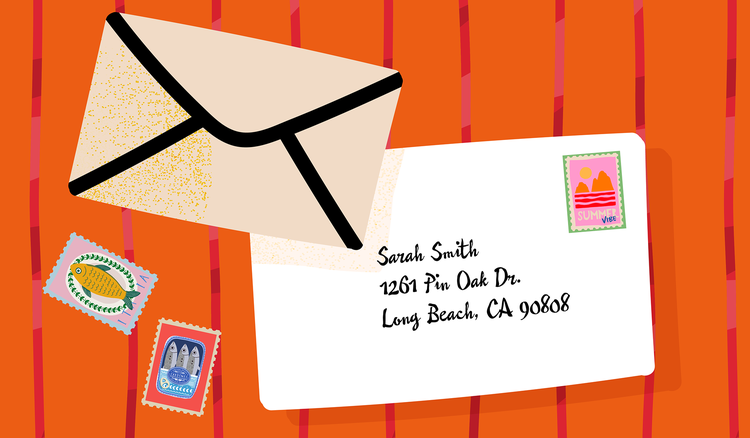
Writing an address is a task most of us do without a second thought. Whether we are typing it out or writing it by hand, it seems to be a simple and straightforward action. However, when you have to write an address formally, there are rules you must follow. Whether you are mailing a letter, shipping a package, or filling out a job or college application, the proper way to write an address can vary depending on the format and context. Writing the address incorrectly could mean a misdelivered letter, a returned envelope, or delays and missed opportunities.
This article will guide you through the correct formatting for writing an address in different situations, including how to write an address on a letter, how to write an address on an envelope, and how to write an address on one line. It will also show you how online tools from Adobe Acrobat can help you format, edit, and finalize any document that includes address fields. You’ll be ready to use the correct address formatting in the future, whether you’re applying for your dream role, sending a professional letter, or filling out a digital form.
How to write an address on a letter.
You may encounter many types of formal letters in your education and career. The most common categories of formal letters include a letter of interest, a reference letter, and a cover letter. Each of these letters requires the writer to follow a specific structure, and that structure begins with how you write an address.
Sender’s address
If you are the one sending the letter, this will be your address. If you are mailing a letter on behalf of a business or organization, use the organization’s address. Place the sender’s address in either the top-left or top-right corner of the letter, depending on the letter template or letterhead design.
Avery Jones
123 Main Street
Apartment 2B
New York, NY 10001
Date
Place the date one line below the sender’s address.
May 12, 2030
Recipient’s address
Two to four lines below the date, write the recipient’s address. The recipient address is left-aligned.
Hiring Manager
Company X
456 State Street
Suite 800
Los Angeles, CA 90005
Salutation
Below the address block, you can now begin the text of your formal letter. Begin with a formal greeting known as a salutation. Options include:
- To whom it may concern
- Greetings
- Dear Sir or Madam
- Dear Hiring Manager
- Dear Mrs. Lopez
Dear Customer Service Manager
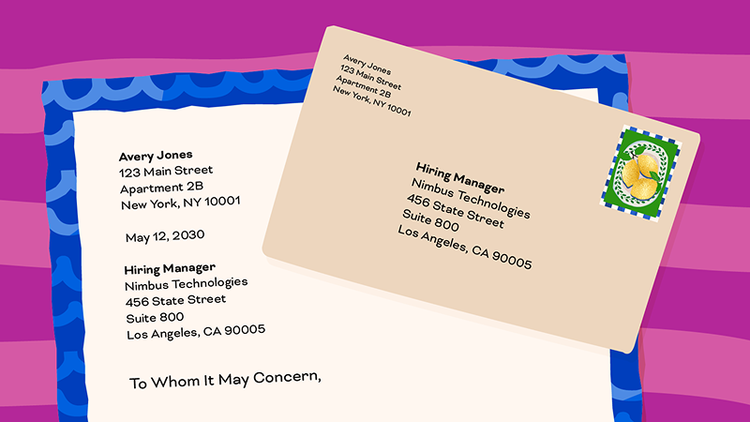
Use this address format when you are submitting a letter of recommendation or a reference letter, sending a formal job application letter, or mailing a business communication or government correspondence.
Although it may seem superfluous, using the correct address formatting matters. Incorrectly formatted addresses can create confusion about who the letter is for, reflect poorly on your professionalism and capabilities, and delay delivery or review of your materials.
If you need help getting started, be sure to check out this reference letter template from Acrobat to speed up your writing process and guide your formatting. If you draft your letter in a standard word processor like Microsoft Word, export it to PDF using the Word to PDF tool to ensure your formatting doesn’t change across devices.
How to write an address on an envelope.
Writing an address on an envelope may seem straightforward, but even slight errors can lead to mail getting lost or being delayed. Most postal services use automated systems that rely on standardized formatting to route mail to the proper location. Use this address format for personal letters, greeting cards, postcards, bills, mailing government documents, and shipping packages.
Recipient’s address
Begin by writing the recipient’s address on the envelope. This address is placed in the center of the envelope. Standard practice is to left-align text, but centered text is also acceptable in most cases.
Marie Kwan
789 Oak Lane
Dallas, TX 75051
Return address
The return address is the location where you would like the envelope returned if, for some reason, it can’t be delivered. This is typically the sender’s address or the address of the business or group mailing the letter. This address block is placed in the top left corner of the envelope.
Bradley Koy
489 Rose Avenue
Madison, WI 53001
Postage stamp
With both addresses in place, all that remains is to place the postage stamp in the upper right-hand corner of the envelope.
When addressing an envelope, use black or blue ink for clear reading. Write legibly in block letters. Always use print, not cursive, handwriting. Do not use punctuation unless it is required in an apartment or unit number.
If you don’t want to address your envelopes by hand, you can use a template and a free online PDF editor to fill out printable shipping labels or envelopes digitally.
How to write an address on one line.
There may be times when you are asked to fill out an address on a single line. This is common in online forms, application fields, or digital spreadsheets. You may also need to keep an address to one line when creating an email signature or including a shipping address in an invoice or contract. This format is concise and precise.
Street address
Begin by writing the street address. Include the house number, street name, and unit if applicable.
987 Canal Street, Suite 201
City, state, and ZIP code
Separate the city and state with a comma. The ZIP code follows the state abbreviation.
San Francisco, CA 94105
Country
Listing the country in the address is optional. It is usually only necessary when addressing something internationally or writing out multiple addresses in one place with multiple countries of origin.
Remember, one-line addresses must be clearly understood by the reader without relying on the line breaks in other address blocks. Misplaced commas or out-of-order phrasing can create confusion, especially in professional settings or international contexts.
If you’re managing bulk addresses in a database or spreadsheet, import them into a PDF for easy editing, clean presentation, and simple sharing.
Frequently asked questions.
How do I write an international address?
Can I abbreviate the words street, avenue, or apartment in a formal letter?
Yes, you can abbreviate common words like these when writing an address, but you must use the approved, standard abbreviations:
- Street (St)
- Avenue (Ave)
- Apartment (Apt)
- Boulevard (Blvd)
- Road (Rd)
- Suite (Ste)
- Building (Bldg)
- Drive (Dr)
- Place (Pl)
- Lane (Ln)
- Circle (Cir)
- Highway (Hwy)
- Post Office Box (PO Box)
- North (N)
- South (S)
- East (E)
- West (W)
Should I include an address in a resume?
What do I write in an online address form if I don’t have an apartment number?
What is the correct way to write an address with a P.O. Box?
A P.O. Box, or Post Office Box, is a secure, locked mailbox at a post office. Individuals or businesses can rent a PO Box to receive mail at a dedicated location outside of their personal address. If you are mailing something to a PO Box, replace the street address with the box number.
Jai Patel
P.O. Box 234
Springfield, IL 62704
Should I use uppercase or lowercase letters in my addresses?
Can I use abbreviations for states and provinces in an address?
How should I format an address in a digital signature or email footer?
If you choose to include an address in a digital signature or email footer, keep it concise. Do not use more than one or two short lines of text to avoid cluttering your message.
765 2nd Street, Suite 304, Seattle, WA 98039
mywebsite.com | (123) 456-7890
Keep Exploring
https://main--dc--adobecom.aem.live/dc-shared/fragments/seo-articles/acrobat-color-blade