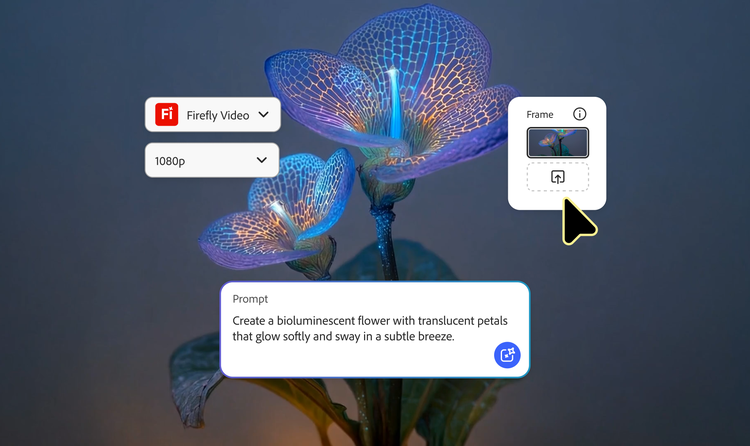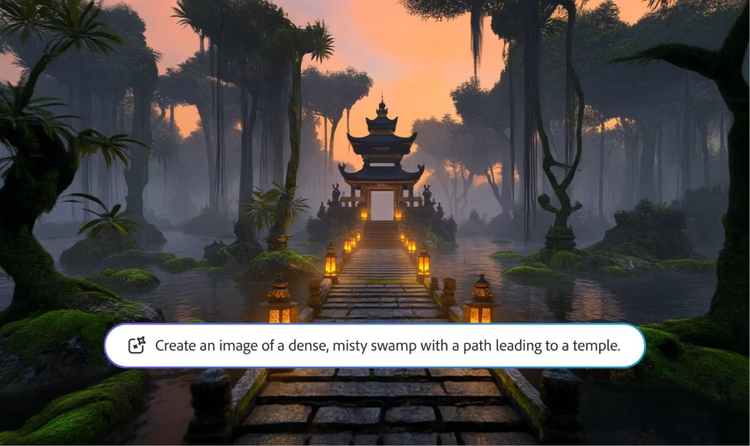
Präzise Content-Steuerung in Seedance 2.0 durch den Einsatz mehrerer Referenzen.
Kombiniere Bild-, Audio-, Video- und Textreferenzen in einem einzigen Generierungsprozess und bestimme den Stil, die Komposition und viele weitere Aspekte deines Videos ganz nach deinen Vorstellungen.
Gleichzeitige Audio- und Videogenerierung.
Mit Seedance AI generierst du Video-Frames direkt mit synchronisiertem Dialog und Soundeffekten. Eine Audio-Postproduktion ist nicht mehr nötig.
Konsistente Multi-Shot-Sequenzen mit Seedance 2.0.
Anstelle von Einzelclips erstellst du zusammenhängende Szenen mit durchgehend stabilen Figuren, Lichtverhältnissen und Umgebungen und erhältst so ein absolut stimmiges Gesamtbild.
Dynamische Bildgenerierung mit professioneller Kamerasteuerung in Seedance AI.
Begeistere dein Publikum durch kinoreife Kamerabewegungen – von „Orbit“-Fahrten über dramatische Enthüllungen bis hin zu rasanten Perspektiven wie Drohnen- oder Makroaufnahmen.
style
Static links
So verwendest du Seedance 2.0 in der Funktion „Video generieren“ in Adobe Firefly.
Befolge diese einfachen Schritten, um in Firefly mit dem Seedance-Partnermodell Videos zu erstellen und zu generieren.
Als Erstes musst du dich mit deiner Adobe-ID bei Adobe Firefly anmelden. Wenn du noch kein Konto hast, lege kostenlos ein neues an. Wähle dann Video generieren.
Wähle im Dropdown-Menü Modell die Option Seedance 2.0 oder Seedance 2.0 Fast aus.
Schreibe einen kurzen Prompt, der dein Video beschreibt. Du kannst auch ein Bild als ersten oder letzten Frame hochladen, um die Szene vorzugeben.
Klicke auf Generieren, um dein Video zu erstellen. Prüfe dann die Variationen und optimiere deinen Prompt oder lade bei Bedarf neue Referenzdateien hoch.
Wenn dir dein Video gefällt, kannst du es direkt herunterladen und teilen. Alternativ lässt es sich in Programmen wie Adobe Premiere öffnen, um Details zu perfektionieren oder es in ein größeres Projekt zu integrieren.
Was macht Seedance in Firefly zum idealen Tool für die KI-gestützte Videogenerierung?
Statt ständig zwischen verschiedenen Anwendungen hin- und herzuspringen, kannst du mit Seedance 2.0 eine Idee blitzschnell in ein fertiges Video verwandeln. Erstelle professionelle Videos aus mehreren Einstellungen mit synchronisiertem Audio sowie konsistenten Figuren, Produkten und Umgebungen.
Mit Seedance 2.0 steuerst du deine Generierungen durch eine Kombination aus Bild-, Video- und Audio-Referenzen direkt in Firefly – zusätzlich zum Text. Indem du deinen gewünschten Stil, die Bewegung und das Timing über multimodale Inputs definierst, verwandelst du bestehende Assets mit noch mehr Präzision und Kontrolle in strukturierte Videoszenen.
Erstellung konsistenter Multi-Shot-Sequenzen.
Schluss mit einzelnen, unzusammenhängenden Clips. Seedance AI generiert zusammenhängende Multi-Shot-Sequenzen und garantiert dir konsistente Figuren, Umgebungen und Lichtverhältnisse. Erstelle längere Storys mit fester Identität und perfekter Kontinuität – ganz einfach in einem einzigen Workflow.
Generierung von Audio und Video in einem Durchgang.
Erstelle in kürzester Zeit synchrone Dialoge, Soundeffekte und Hintergrundgeräusche für dein Video – inklusive integrierter Lippensynchronisation in acht Sprachen. Wenn du das Seedance AI-Modell zusammen mit dem Firefly Musikgenerator nutzt, kannst du komplette Videos produzieren und deinen gesamten Audio-Bedarf auf einer einzigen Plattform abdecken.
style
Three up, s spacing top, xxl spacing bottom, show-2-desktop
background
#FFF
Nahtlose Zusammenarbeit mit allen Programmen von Adobe Creative Cloud.
Sobald du ein Video mit Seedance 2.0 in Firefly erstellt hast, kannst du es an andere Programme von Creative Cloud senden, wie beispielsweise Adobe Premiere oder After Effects. So nutzt du es ganz einfach für weitere Videoprojekte oder verpasst ihm den letzten professionellen Schliff.
style
two up, s spacing top, l spacing bottom, show-2-desktop
Seedance 2.0 ist als Drittanbietermodell direkt in Adobe Firefly verfügbar und wurde speziell für mehrteilige, narrative Storytelling entwickelt. Du kannst Bilder, Videos und Audio als Input nutzen. Das Tool generiert den passenden Sound nativ dazu und sorgt für einen absolut stimmigen Look über verschiedene Einstellungen hinweg. Das Ergebnis sind Kinoreife, direkt einsatzbereite Sequenzen in einem einzigen Durchgang statt einzelner, isolierter Clips. Seedance 2.0 macht die Videoproduktion für Creator, Filmschaffende, Marketer und Agenturteams absolut mühelos – unabhängig vom jeweiligen Vorwissen.
Ja, du kannst Text-Prompts mit Bild-, Video- und Audio-Input kombinieren, um genau das Video zu erhalten, das du möchtest. Seedance 2.0 ist bei kostenpflichtigen Abos für Adobe Firefly verfügbar.
Ja, du kannst vorhandene Videoclips ändern und erweitern oder die von dir generierten Videos direkt in Adobe Firefly optimieren. In beiden Fällen bearbeitest du mit Text-Prompts und Referenzbildern oder -videos.
Seedance 2.0 und Seedance 2.0 Fast bieten dir dieselben Funktionen und Möglichkeiten, setzen aber andere Schwerpunkte: Während Seedance 2.0 auf maximale visuelle Wiedergabetreue und kinoreife Qualität abzielt, ist Seedance 2.0 Fast voll und ganz auf Schnelligkeit und rasche Anpassungen ausgelegt. In Adobe Firefly kannst du ganz einfach zwischen den beiden Modellen wechseln.
Ja, und das geht in Adobe Firefly in einem Durchgang. Seedance 2.0 bietet native Audiogenerierung und liefert dir synchrone Dialoge, Soundeffekte und Umgebungsgeräusche zu deinem Video in einer einzigen Generierung. Das Seedance AI-Modell bietet auch mehrsprachige Lippensynchronisation.
Mit Adobe kannst du Seedance 2.0 und andere Partnermodelle direkt in Adobe Firefly nutzen. Erfahre mehr über die einzelnen Modelle. Während das KI-Modell von Adobe Firefly für die kommerzielle Nutzung sicher ist, liegt es in deiner Verantwortung zu prüfen, ob ein Partnermodell wie Seedance 2.0 für dein Projekt geeignet ist. Adobe wird deine Inhalte niemals zum Trainieren eigener KI-Modelle oder der über Adobe Firefly genutzten Partnermodelle verwenden.
Ja, der Output von Seedance 2.0 ist perfekt auf professionelle kreative Workflows in Film, Werbung und Agenturen abgestimmt. Du kannst bis zu 15 Sekunden pro Shot in einer Auflösung von bis zu 4K generieren – und durch das Kombinieren mehrerer Shots ganz einfach längere Sequenzen erstellen.
Seedance unterstützt mehrsprachige Lippensynchronisation und Audiogenerierung in acht Sprachen:
Englisch
Chinesisch (einschließlich Mandarin und Kantonesisch)
Japanisch
Koreanisch
Spanisch
Französisch
Deutsch
Portugiesisch
Adobe Firefly trainiert niemals mit Kundeninhalt, sodass alles, was du erstellst, dir gehört. Adobe Firefly bietet außerdem eine intuitive Benutzeroberfläche, nahtlose Integration mit den Programmen von Adobe Creative Cloud wie Premiere und After Effects sowie Zugriff auf die umfassende Palette kreativer Tools und Adobe Stock zur Unterstützung deines kompletten kreativen Workflows.
Seite teilen.
style
xxxl spacing bottom
Weitere Firefly-Tools kennenlernen.
style
Show-4-desktop, s spacing top, xxl spacing bottom
background
#F0F0F7
title
Seedance 2.0 | KI-Videogenerator in Adobe Firefly
ContentType
Article
tags
Firefly, Partner models, Seedance 2.0
description
Generiere kinoreife KI-Videos mit Seedance 2.0 in Firefly. Verwandle Text, Bilder und Audio in packende Videos mit mehreren Einstellungen und synchronem Sound – basierend auf dem Videomodell der nächsten Generation von ByteDance.
cardImage
cardImageAltText
Adobe Firefly
Kreative KI hat das nächste Level erreicht: mit den neuesten Features für Bilder, Video, Audio und Vektorgrafiken.
You can control how Adobe websites use cookies and similar technologies by making choices below. But note that if you disable cookies and similar technologies entirely, Adobe websites may not function properly.
Cookies are small text files stored by your web browser when you use websites. There are also other technologies that can be used for similar purposes like HTML5 Local Storage and local shared objects, web beacons, and embedded scripts. These technologies help us do things like remembering you and your preferences when you return to our sites, measure how you use the website, conduct market research, and gather information about the ads you see and interact with.
You can make choices in the menu below about what cookies and other technologies you want us to use on Adobe sites when you visit them from this browser. You can always change those choices later by clicking on the Cookie Preferences link at the bottom of the page.
If enabled:
We can improve your experience by tailoring the site and the content to things we think might be of interest
We can better keep track of your preferences — like what language you prefer to use
We will better understand your likely interests so we can provide you more relevant Adobe ads and content on non-Adobe websites and in non-Adobe apps
It will help us improve the performance of our website and those of our partners who use the Adobe Experience Cloud
If disabled:
We won’t be able to remember you from session to session so the experience may not be tailored to your interests
You’ll still have access to the content of the site but certain features that depend on cookies may not function
You’ll still see ads, they just may not be as relevant to you
General information
You can control how Adobe websites use cookies and similar technologies by making choices below. But note that if you disable cookies and similar technologies entirely, Adobe websites may not function properly.
Cookies are small text files stored by your web browser when you use websites. There are also other technologies that can be used for similar purposes like HTML5 Local Storage, web beacons, and embedded scripts. These technologies help us do things like remembering you and your preferences when you return to our sites, measure how you use the website, conduct market research, and gather information about the ads you see and interact with.
You can make choices in the menu below about what cookies and other technologies you want us to use on Adobe sites when you visit them from this browser. You can always change those choices later by clicking on the Cookie Preferences link at the bottom of the page.
If enabled:
We can improve your experience by tailoring the site and the content to things we think might be of interest
We can better keep track of your preferences — like what language you prefer to use
We will better understand your likely interests so we can provide you more relevant Adobe ads and content on non-Adobe websites and in non-Adobe apps
It will help us improve the performance of our website and those of our partners who use the Adobe Experience Cloud
If disabled:
We won’t be able to remember you from session to session so the experience may not be tailored to your interests
We’ll still count your use of our site and services
You’ll still have access to the content of the site but certain features that depend on cookies may not function
You’ll still see ads, they just may not be as relevant to you
Operate the site and core servicesOperate site and measure engagement
Always active
These cookies are required, and they are used to enable the site and related services core functionality. Without them the site could not operate, so they cannot be disabled.
These cookies enable the site and related services’ core functionality and collect statistics about user engagement, such as counting active use to help us understand trends. These cookies cannot be disabled.
Measure performance
These cookies are used to analyze site usage to measure and improve performance. Without them Adobe cannot know what content is most valued and how often unique visitors return to the site, making it hard to improve information we offer to you.
These cookies are used to analyze site usage to measure and improve performance. Without them Adobe cannot know what content is most valued, making it hard to improve information we offer to you.
Extend functionality
These cookies are used to enhance the functionality of Adobe sites such as remembering your settings and preferences to deliver a personalized experience; for example, your username, your repeated visits, preferred language, your country, or any other saved preference.
Personalize advertising
These cookies are used to enable Adobe and our partners to serve ads more relevant to your interests. Without them you will still see ads, but they might not be as relevant to you.