
Student & teacher offer

Learn more

Creative Cloud Pro for students and teachers now ₹398.99/moincl. GST.

Learn more

Creative Cloud Pro for students and teachers now ₹398.99/moincl. GST.

Learn more

GRAPHIC DESIGN

UI/UX designer career in India: everything you need to know

UI/UX designers create digital experiences that are intuitive, accessible, and visually engaging. Whether you're a student, a career changer, or an aspiring designer, you can learn the skills, tools, and practical steps needed to start a UI/UX design career in India.
Explore Creative Cloud

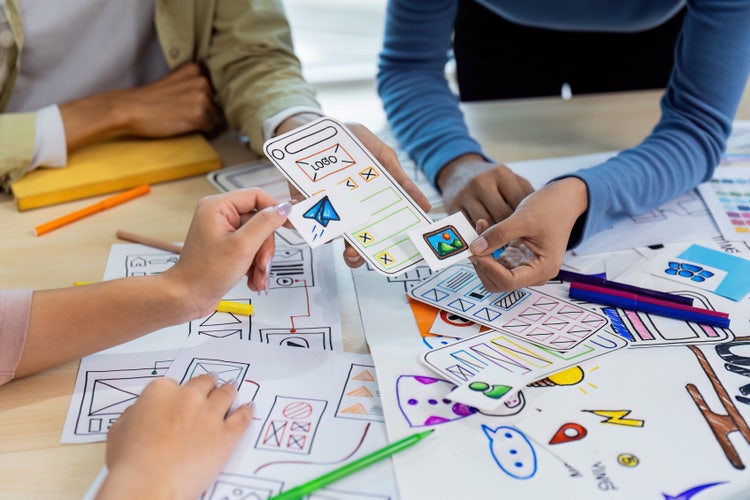
UI /UX designer team collaborating on mobile app wireframes with colourful paper prototypes and sketches.

Key takeaways:

  • UI/UX designers combine visual design, user research, and problem-solving to create better digital experiences.
  • Building strong foundations in design principles and UX methodologies is essential.
  • Industry tools such as Adobe Photoshop and Adobe Illustrator support UI/UX workflows.
  • Practical projects help develop real-world skills and strengthen your portfolio.
  • Employers value documented design processes and case studies over polished visuals alone.
  • India's growing digital economy and Digital India initiatives continue to increase demand for UI/UX professionals.
  • Continuous learning is important as design trends, accessibility standards, and AI tools evolve.

What is a UI/UX designer?

A UI/UX designer creates digital products that are both visually appealing and easy to use. They combine the principles of user interface (UI) design, which focuses on how a product looks, with user experience (UX) design, which focuses on how it works and how people interact with it. Together, UI and UX help create websites, mobile apps, software, and digital services that are intuitive, accessible, and enjoyable to use.

What does a UI/UX designer do?

UI/UX designers solve user problems, simplify workflows, and help businesses achieve their goals. They work throughout the product development process, collaborating with developers, product managers, marketers, and other stakeholders.

Core responsibilities include:
  • Conduct user research: UI/UX designers study user behaviour, needs, and pain points through user interviews, surveys, observations, analytics data, and competitor research. In India, user research often uncovers mobile-first usage patterns, regional-language preferences, and varying levels of digital literacy. It can also reveal differences in user expectations across Tier 1, Tier 2, Tier 3, and Tier 4 cities.
  • Create user personas: Designers use research findings to develop user personas that represent key audience segments. These personas typically capture users' goals, behaviours, motivations, challenges, language preferences, and device usage. Well-defined personas help teams design experiences that align with the needs of diverse user groups and support informed design decisions throughout the product development process.
  • Build wireframes: Wireframes are basic layouts that outline a product's structure before visual design begins. Designers use these to help define content hierarchy, navigation, user flows, and page layouts.
  • Design interactive prototypes: Prototypes turn wireframes into clickable experiences that simulate how a product will function. They allow teams to test ideas early, gather feedback, validate design decisions, and reduce development rework.
  • Perform usability testing: Usability testing evaluates how easily users can complete tasks within a product. This process helps designers identify friction points, improve accessibility, refine interactions, and enhance overall user experience.

Step-by-step guide to becoming a UI/UX designer.

UI/UX designer concept with wooden blocks spelling design on orange background.

1. Learn design and UX fundamentals.

Before specialising in UI/UX design, build a strong foundation in both visual design and user experience principles. These core skills will help you create products that are visually appealing, easy to use, and accessible to a wide range of users.

DESIGN SKILLS
UX SKILLS
Visual hierarchy: Organising content to guide users' attention to the most important elements.

Human-centred design: Designing solutions around users' needs, behaviours, and goals.

Typography: Choosing and combining fonts to improve readability and user experience.

Information architecture: Organising content and navigation so users can easily find what they need.

Colour theory: Using colour strategically to create contrast, communicate meaning, and strengthen brand identity.

User flows: Mapping the steps users take to complete tasks within a product.

Layout and spacing: Structuring content to improve clarity, consistency, and usability.

Accessibility: Creating inclusive experiences for people with different abilities and needs.

Responsive design: Designing interfaces that work seamlessly across different screen sizes and devices.

Design thinking: Applying a structured problem-solving process that includes empathising, defining, ideating, prototyping, and testing.

In India, these fundamentals often need to be applied across different languages, screen sizes, connectivity levels, and user confidence levels. For instance, responsive design may involve optimising for budget smartphones, while accessibility may include readable text sizes, clear form labels, language options, and simple error messages for first-time digital users.


2. Learn industry-standard design tools.

Becoming familiar with industry-standard tools makes it easier to create assets, collaborate with design teams, and build a portfolio that reflects real-world workflows.

  • Adobe Illustrator: Used to create scalable vector graphics, including custom icons, logos, illustrations, and other UI assets that remain sharp across all screen sizes.
  • Adobe Photoshop: Ideal for editing high-resolution images, creating textured visuals, and producing detailed raster assets for digital interfaces.
  • Adobe After Effects: Used to create motion graphics, animated micro-interactions, and polished screen transitions that enhance the user experience in apps and websites.


3. Develop practical UX skills through projects.

Start with projects such as redesigning the onboarding flow for apps like PhonePe, Paytm, or Zomato, improving the user experience of government platforms such as DigiLocker, UMANG, or IRCTC, or creating a streamlined e-commerce checkout experience inspired by Flipkart, Myntra, or Blinkit.

You can also design a travel or food delivery app tailored to Indian users or a regional tourist app for high-traffic destinations like Agra, Delhi, or Goa. As you work on these projects, document your research, personas, wireframes, prototypes, usability testing, and final designs. Strong case studies demonstrate your problem-solving abilities and can significantly strengthen your UI/UX portfolio.


4. Build a portfolio that shows your process.

Employers and clients want to understand how you identify user problems, evaluate solutions, and make design decisions throughout a project. Showing your process highlights your problem-solving skills and ability to create user-centred experiences.

For each project, include key stages such as user research, personas, user journeys, wireframes, UI mock-ups, interactive prototypes, and the rationale behind your design decisions. Conclude with the final outcome, explaining how your solution addressed user needs or improved the overall experience. Clear, well-documented case studies can often have a greater impact than visually impressive designs alone.


5. Keep learning and growing.

UI/UX design is a rapidly evolving field, so continuous learning is essential. As you gain experience, consider expanding your skills through specialised courses, workshops, bootcamps, and certifications. In India, aspiring designers can pursue formal design education at institutions such as National Institute of Design (NID), Pearl Academy, and MIT Institute of Design, while flexible online options are available through platforms such as Adobe Certified Professional and other UI/UX bootcamps.

Why choose a career as a UI/UX designer?

  • High demand across industries: UI/UX designers are needed in technology, e-commerce, fintech, healthcare, edtech, and other sectors as organisations prioritise digital experiences.
  • Creative and analytical work: The role combines visual design, research, critical thinking, and user-centred problem-solving.
  • Remote and global opportunities: Many companies hire UI/UX designers for remote, freelance, and international roles, expanding career possibilities beyond local markets.
  • Strong career progression: Designers can advance into roles such as Product Designer, UX Researcher, Design Manager, or Head of Design.
  • Real-world impact: UI/UX designers shape the apps, websites, and digital services people use every day, from online shopping and food delivery to banking and public services.
  • Growing opportunities across India: As digital adoption accelerates and initiatives such as Digital India continue to expand online access to services, demand for skilled UI/UX professionals is increasing across startups, enterprises, and the public sector.

UI/UX designer career path and progression.

UI/UX design offers a clear career path, with opportunities to specialise in user experience, product design, research, or design leadership. A junior designer may begin with wireframes and UI screens, then move into product design, UX research, design systems, or leadership roles as they gain experience across real user problems and business contexts.

Stage
Typical Focus
Junior UI/UX Designer
Learn workflows and contribute to projects
UI/UX Designer
Own features and collaborate with cross-functional teams
Senior UI/UX Designer
Lead research and design initiatives
Product Designer
Shape end-to-end product experiences
Design Lead / UX Manager
Manage teams and define design strategy

Common mistakes aspiring UI/UX designers should avoid.

Being aware of common mistakes can help you build stronger skills, create better user experiences, and develop a more effective portfolio.

  • Focusing only on aesthetics: Attractive UI libraries are important, but successful designs must also be intuitive, functional, and aligned with user needs.
  • Skipping user research: Jumping straight into high-fidelity designs without researching user behaviours, pain points, and goals can lead to solutions that look good but fail to solve real problems.
  • Copying designs without understanding users: Taking inspiration from platforms such as Dribbble is common, but simply replicating visual trends without understanding the target audience often results in poor user experiences.
  • Overlooking trust signals: Payment, document upload, healthcare, and education flows often need reassurance through clear confirmations, secure-looking interfaces, transparent fees, and helpful error messages.
  • Skipping accessibility in public-use products: Accessibility is especially important for digital services that need to serve diverse users. Indian UI/UX guidance highlights accessible forms, text alternatives, keyboard navigation, language support, and assistive technology compatibility.
  • Designing only for English-speaking urban users: India's digital audience includes users across languages, regions, and comfort levels with technology. Consider language options, simple labels, and familiar interaction patterns.

Frequently asked questions.

More resources


Learn more
