Ever wonder what a talented person can do with some of the less common features in Photoshop? Egyptian artist Amr Elshamy spun a mountain range into a series of “Round Things” illustrations using the Polar Coordinates distortion filter. Here’s how he created the image Adobe selected to feature on the Photoshop 2017 splash screen.
Published
Transcript not available
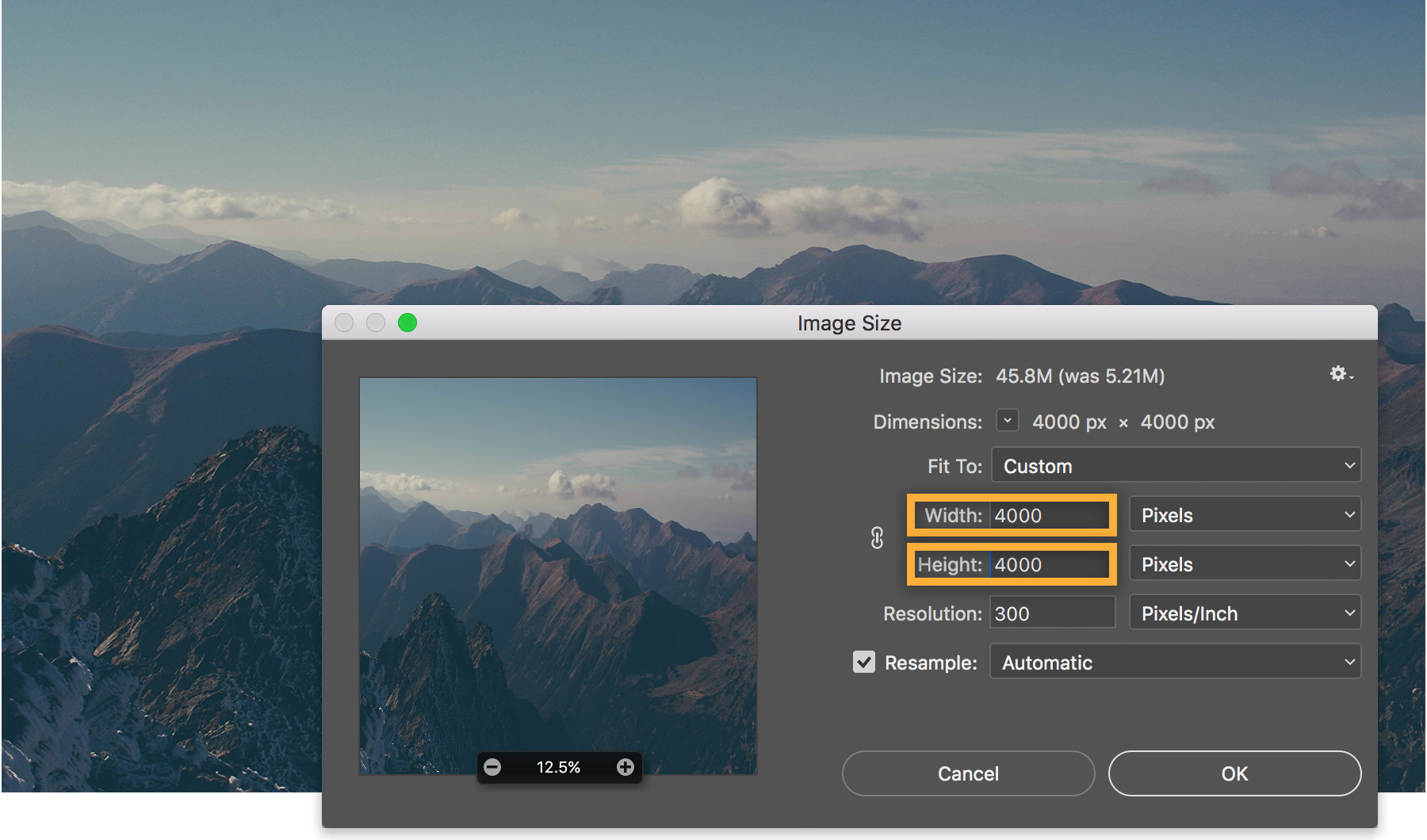
1 Square the composition
Amr emphasizes the symmetry of the composition by making the image a square. He chooses Image > Image Size, deselects Constrain Aspect Ratio, and sets the Width and Height values to 4000 each.
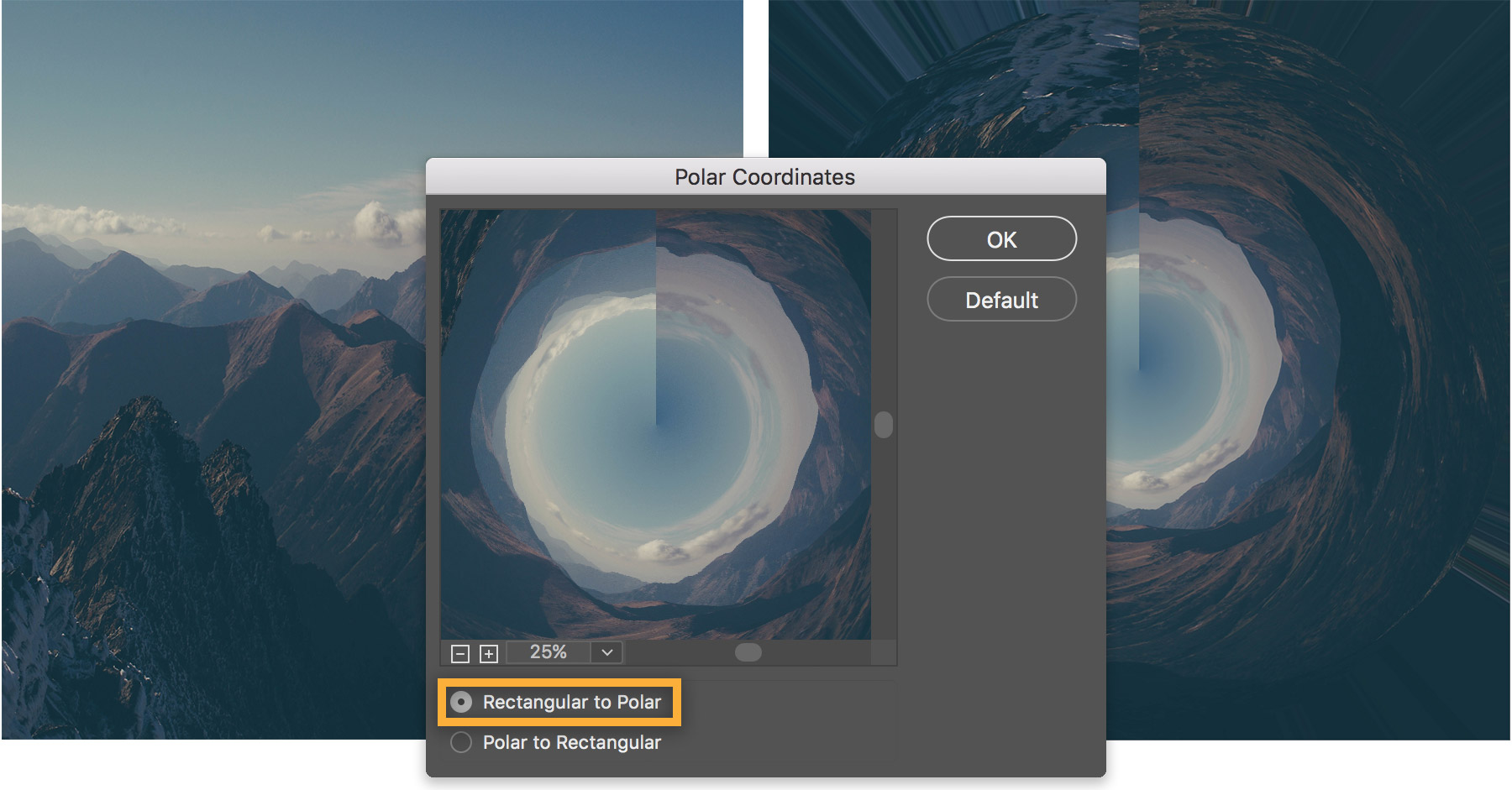
2 Spin it around
Amr then distorts the image to create the circular shape. To do so, he uses the tools in the Distort filter (Filter > Distort > Polar Coordinates) and selects Rectangular to Polar.
3 Make it seamless
To blend the seam at the center, Amr reaches for the Healing Brush. He defines the source area next to the seam (Alt+click in Windows; Option+click in macOS), then drags over it.
Tip: The Clone tool, Patch tool, and Smudge tool can also be helpful for cleanup.
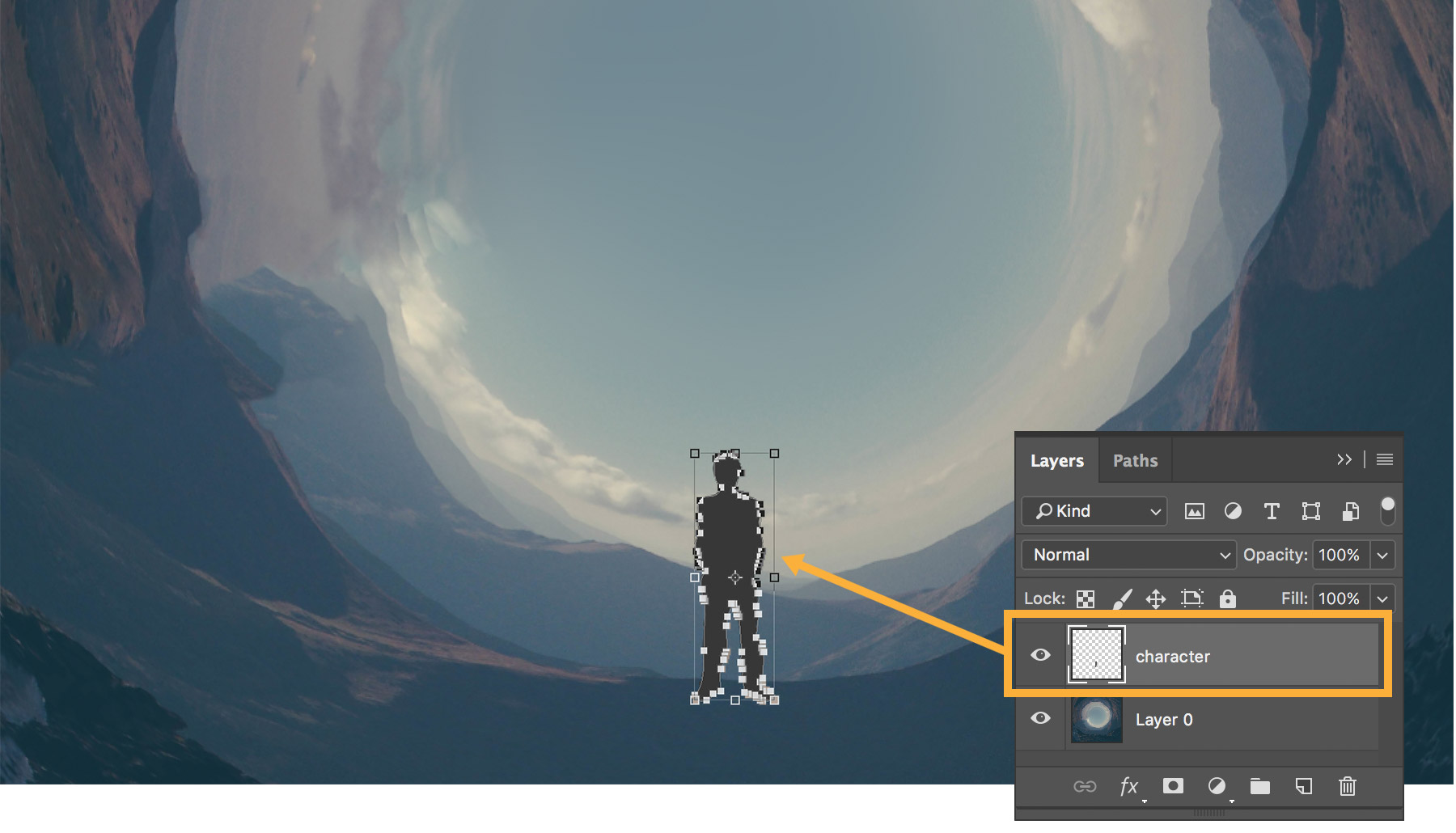
4
Bring in the main character
To add a story to the illustration, Amr uses the Pen tool to trace the silhouette of a figure in another image. He uses Transform > Scale to resize the figure, then places it into the illustration.
5 Complete the scene
Lastly, Amr adjusts the contrast and color balance to add more drama to the scene. To see more of his work, including other “Round Things” compositions, view his projects on Behance.
About Amr Elshamy:
Amr Elshamy’s dreams are vivid and filled with stories of monsters, magical worlds, lions walking in the streets, evil robots, and flying whales. He takes notes about his dreams for inspiration, and keeps his camera and props close. Then, he uses Photoshop to bring his dreams to life.
When Amr bought a boxed version of Photoshop 12 years ago, he wasn’t exactly sure what the product did. A photographer friend showed him the basics and from then on, it was all trial and error. Amr struggled with pressure from others to put aside his art and pursue traditional work. But he never completely let go and now, as a self-taught photographer, visual artist, and filmmaker, Amr gets to fulfill his passion and immerse himself in the life of an artist.
You can control how Adobe websites use cookies and similar technologies by making choices below. But note that if you disable cookies and similar technologies entirely, Adobe websites may not function properly.
Cookies are small text files stored by your web browser when you use websites. There are also other technologies that can be used for similar purposes like HTML5 Local Storage and local shared objects, web beacons, and embedded scripts. These technologies help us do things like remembering you and your preferences when you return to our sites, measure how you use the website, conduct market research, and gather information about the ads you see and interact with.
You can make choices in the menu below about what cookies and other technologies you want us to use on Adobe sites when you visit them from this browser. You can always change those choices later by clicking on the Cookie Preferences link at the bottom of the page.
If enabled:
We can improve your experience by tailoring the site and the content to things we think might be of interest
We can better keep track of your preferences — like what language you prefer to use
We will better understand your likely interests so we can provide you more relevant Adobe ads and content on non-Adobe websites and in non-Adobe apps
It will help us improve the performance of our website and those of our partners who use the Adobe Experience Cloud
If disabled:
We won’t be able to remember you from session to session so the experience may not be tailored to your interests
You’ll still have access to the content of the site but certain features that depend on cookies may not function
You’ll still see ads, they just may not be as relevant to you
General information
You can control how Adobe websites use cookies and similar technologies by making choices below. But note that if you disable cookies and similar technologies entirely, Adobe websites may not function properly.
Cookies are small text files stored by your web browser when you use websites. There are also other technologies that can be used for similar purposes like HTML5 Local Storage, web beacons, and embedded scripts. These technologies help us do things like remembering you and your preferences when you return to our sites, measure how you use the website, conduct market research, and gather information about the ads you see and interact with.
You can make choices in the menu below about what cookies and other technologies you want us to use on Adobe sites when you visit them from this browser. You can always change those choices later by clicking on the Cookie Preferences link at the bottom of the page.
If enabled:
We can improve your experience by tailoring the site and the content to things we think might be of interest
We can better keep track of your preferences — like what language you prefer to use
We will better understand your likely interests so we can provide you more relevant Adobe ads and content on non-Adobe websites and in non-Adobe apps
It will help us improve the performance of our website and those of our partners who use the Adobe Experience Cloud
If disabled:
We won’t be able to remember you from session to session so the experience may not be tailored to your interests
We’ll still count your use of our site and services
You’ll still have access to the content of the site but certain features that depend on cookies may not function
You’ll still see ads, they just may not be as relevant to you
Operate the site and core servicesOperate site and measure engagement
Always active
These cookies are required, and they are used to enable the site and related services core functionality. Without them the site could not operate, so they cannot be disabled.
These cookies enable the site and related services’ core functionality and collect statistics about user engagement, such as counting active use to help us understand trends. These cookies cannot be disabled.
Measure performance
These cookies are used to analyze site usage to measure and improve performance. Without them Adobe cannot know what content is most valued and how often unique visitors return to the site, making it hard to improve information we offer to you.
These cookies are used to analyze site usage to measure and improve performance. Without them Adobe cannot know what content is most valued, making it hard to improve information we offer to you.
Extend functionality
These cookies are used to enhance the functionality of Adobe sites such as remembering your settings and preferences to deliver a personalized experience; for example, your username, your repeated visits, preferred language, your country, or any other saved preference.
Personalize advertising
These cookies are used to enable Adobe and our partners to serve ads more relevant to your interests. Without them you will still see ads, but they might not be as relevant to you.
Personalize advertising
These cookies are used to enable Adobe and our partners to serve ads more relevant to your interests. Without them you will still see ads, but they might not be as relevant to you.