Quickly improve image quality.
Save time using generative upscale with Topaz Gigapixel, now including powerful 4x upscaling. Easily crop into images without losing detail, and recover clarity in low-resolution photos.

Get to know the tools and features you can use to make your photos amazing anywhere you are.
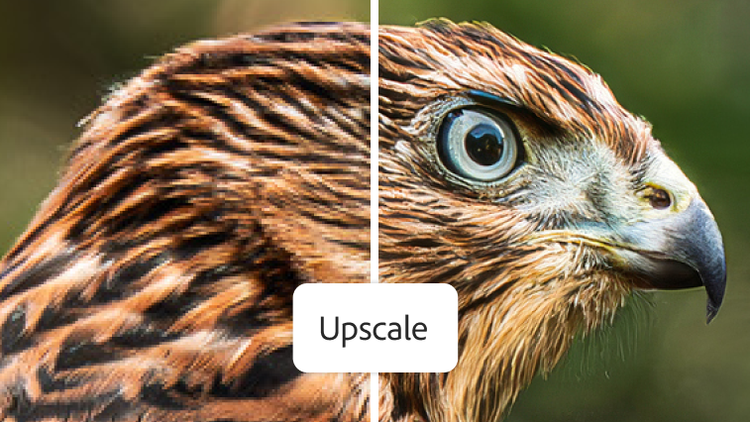
Save time using generative upscale with Topaz Gigapixel, now including powerful 4x upscaling. Easily crop into images without losing detail, and recover clarity in low-resolution photos.

New AI-powered Assisted Culling supercharges the selection process by intelligently filtering your photos around image quality, grouping similar shots, and more.

Go from a quick touch-up to a full glow-up with Quick Actions. Easily retouch skin, remove blemishes, whiten teeth, and more.

New Dust Removal quickly recognizes and removes sensor dust from your photos with incredible precision.

Instantly create a stunning portrait effect in any photo with Lens Blur, powered by AI. Use new one-tap presets to easily focus on your subject and blur out everything else.

Use a more streamlined toolbar that includes Presets, Crop, Edit, and other frequently used tools, organize photos from the top bar, and more.

Adaptive Presets use AI to quickly search for and find the best filter for your image. Choose from portrait, sky, and subject presets for the perfect look.

Make distractions vanish without leaving a trace with new Generative Remove. Powered by Adobe Firefly generative AI.

Get just the right frame and angle for your image with the Crop tool. Flip, straighten, add a border, and more.

Correct bowed or tilted photos with the Geometry panel. Use the Auto option for a quick, natural-looking result in one step, or fine-tune your edit manually.

Select a person, animal, or even the sky in a single click. From there, it’s simple to edit selected areas so you can create exactly the photo you want.

Instantly create a stunning portrait effect in any photo with Lens Blur, powered by AI. Use new one-tap presets to easily focus on your subject and blur out everything else.

Merge multiple photos in a single step to create a stunning panorama and see a preview before the final image is created.

Use precise slider controls in the Light panel to adjust exposure, shadows, and more. Plus, refine brightness and contrast with Point Curve.

Fine-tune hue, saturation, and luminance with Point Color and edit parts of your photo without impacting the rest.

Select a hue in your image and use the Color Mixer sliders to alter its look across the whole photo.

Use the Texture, Dehaze, and Clarity sliders in the Effects panel to smooth out or increase texture; eliminate or accentuate haze, mist, or smoke; and soften or sharpen edges.

Apply edits to one photo on desktop or mobile, and then copy and paste them to multiple images. Save time by adjusting settings, including exposure, contrast, and color, just once.

Pack more megapixels into your photos with one click. Use Super Resolution on desktop to enlarge low-res images for print and increase the quality of cropped photos with super crisp results.

Remove distortion from images with AI-powered Denoise, available in Lightroom on desktop. Quickly enhance photos taken with high ISO settings or low-light settings without losing detail.

Use Raw Details on desktop to enhance your photos and produce improved color, defined edges, and fewer artifacts for making large prints.

Group images into albums and folders that you can share from Lightroom and invite friends to make their own edits.

Machine learning in Adobe Sensei recognizes content in your images on desktop and mobile to find shots from a recent trip, or even of specific people, whether you’ve added keywords or not.

Use cloud storage to save your photos to a library that’s accessible on any device, and then use it to post online or share with friends.

Work with industry-standard formats like AVIF and JPEG XL, which offer higher quality at smaller file sizes. Edit, save, and export HDR photos, and capture and edit them directly on mobile.

Share your work and get inspired by the work of others. Upload your images to the Discover feed, see how other creators edit their images, explore and download presets, and more.

£11.99/moincl. VATAnnual, billed monthly
Edit photos wherever you are – with straightforward controls to adjust exposure, colour and more.
Take your best photos further with editing tools built for desktop.
Tutorials, fonts, templates and more
1TB of cloud storage
250 monthly generative credits
Lightroom for mobile, desktop and web, plus Lightroom Classic.

£19.97/moincl. VATAnnual, billed monthly
Edit photos wherever you are – with straightforward controls for exposure, colour and more
Bring out the best in your photos with editing tools built for desktop
Create stunning images, rich graphics and incredible artwork
Tutorials, fonts, templates and more
1TB of cloud storage
1,000 monthly generative credits
Lightroom for mobile, desktop and web, plus Lightroom Classic and Photoshop.

Edit photos wherever you are – with straightforward controls for exposure, colour and more
20+ apps for photography, design and video
Unlimited access to standard creative AI image and vector features, including Text to Image and Generative Fill
4,000 monthly generative credits for premium creative AI video and audio features, including Text to Video.
Unlimited access to Firefly Boards for exploring ideas and developing storyboards
Access to non-Adobe Generative AI models in Firefly
Adobe Express Premium, Frame.io for Creative Cloud, tutorials, fonts, templates and 100GB of cloud storage
Join a global community of over 7 million Creative Cloud Pro subscribers. Save 50% for the first 3 months on the full version of Lightroom, plus Adobe Firefly creative AI. Pay £32.66/moincl. VAT for the first 3 months and £66.49/moincl. VAT thereafter. New subscribers only.
£16.24/moincl. VATAnnual, billed monthly
Edit photos wherever you are – with straightforward controls for exposure, colour and more
20+ photo, graphic design and video apps including Lightroom
Unlimited access to standard creative AI image and vector features, including Text to Image and Generative Fill
4,000 monthly generative credits for premium creative AI video and audio features such as Text to Video
Access to industry-leading AI models from Adobe, Google, OpenAI and more
Unlimited access to Firefly Boards for exploring ideas and developing storyboards
Access to non-Adobe generative AI models in Firefly
Adobe Express Premium, Frame.io for Creative Cloud, tutorials, fonts, templates and 100GB of cloud storage
Save 75% on 20+ apps, including Lightroom, plus Adobe Firefly creative AI for images, video and audio. Pay £16.24/moincl. VAT in the first year and £32.99/moincl. VAT thereafter.
£27.99/moper licenceexcl. VATAnnual, billed monthly
Edit photos wherever you are – with straightforward controls for exposure, colour and more
Produce standout social content, flyers, templates and more with Adobe Express, the all-in-one creative tool
Fonts, images, tutorials and more
250 monthly generative credits
1 TB of cloud storage
Exclusive business features
The full version of Lightroom, the Adobe Express Premium plan and exclusive business features – all in one.
£73.33/moper licenceexcl. VATAnnual, billed monthly
Edit photos wherever you are – with straightforward controls for exposure, colour and more
20+ apps for photography, design and video
Unlimited access to standard creative AI image and vector features, including Text to Image and Generative Fill
4,000 monthly generative credits for premium creative AI video and audio features, such as Text to video
Unlimited access to Firefly Boards for exploring ideas and developing storyboards
Access to non-Adobe generative AI models in Firefly
Adobe Express Premium, Frame.io for Creative Cloud, tutorials, fonts, templates and 100GB of cloud storage
20+ apps, including Lightroom and Firefly creative AI for images, video and audio – plus exclusive business features.
Learn to use the tools and features in Lightroom to create photos that look exactly the way you want.

Lightroom features

Lightroom features

Lightroom features

Lightroom features

Lightroom features

Lightroom features
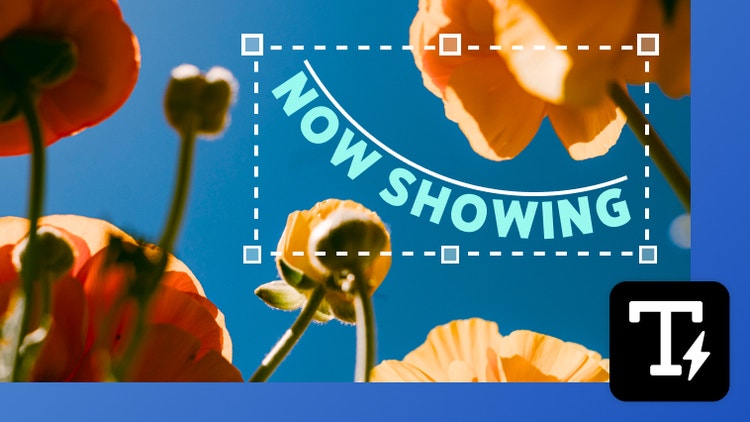
Create shaped, editable text directly in Photoshop without jumping into Illustrator. With Dynamic Text, your type automatically reflows as you adjust the shape, so you can find the right fit faster.

You can now easily bring Illustrator vectors into After Effects. Create keyframes for animation and bring complex artwork to life without losing fidelity or layer structure.
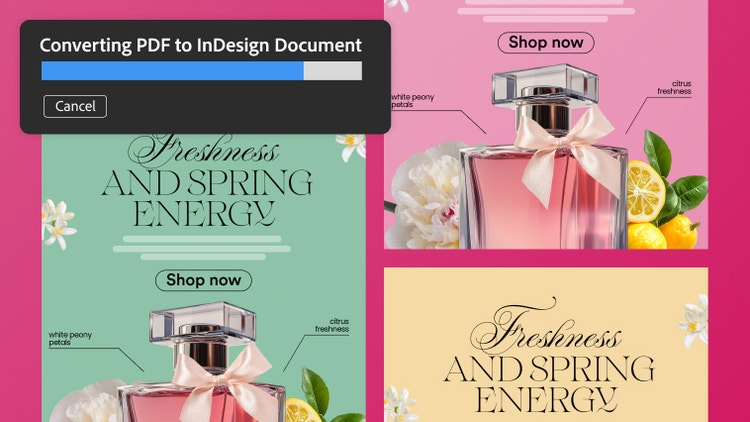
Turn PDFs into editable InDesign files while preserving everything in the original document. Retain tables, hyperlinks, fonts, and other elements, and fine-tune each piece in InDesign.