For certain animations, like web banners, it may be necessary to inject certain snippets of code or even entire code libraries within your published HTML in order to support various publishing platforms.
For certain animations, like web banners, it may be necessary to inject certain snippets of code or even entire code libraries within your publish HTML, in order to support various publishing platforms.
Here we have a basic web banner.
So, what we want to do is actually add to our publish HTML a little bit of JavaScript code.
In order to do this, we'll use HTML5 Canvas templates.
Using HTML5 Canvas templates to add custom code
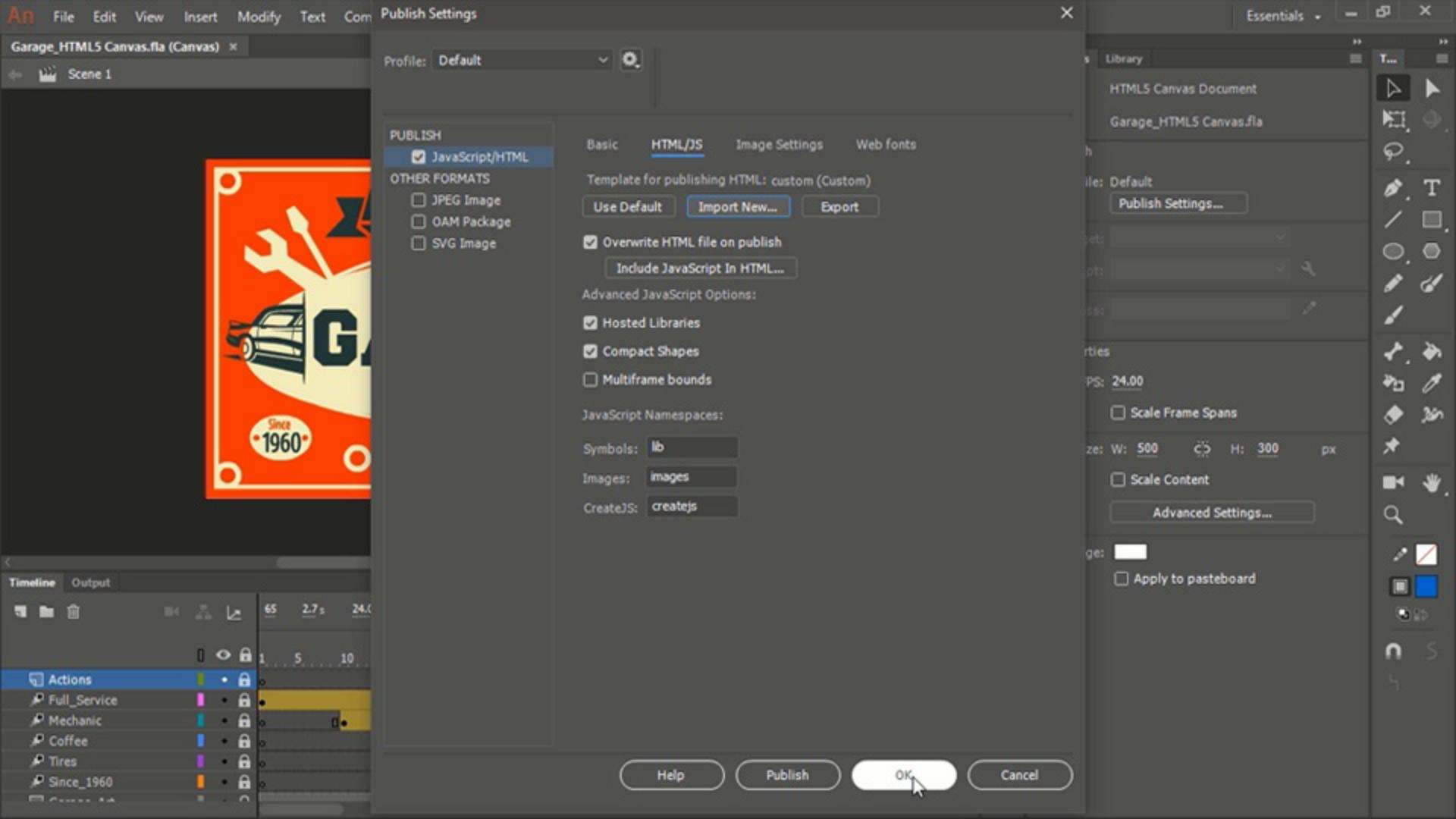
These can be found within the Publish Settings... for the document.
So, under JavaScript/HTML.
If we go to the HTML/JS tab We can see Template for publishing HTML is now set to the Default Template.
However, we are able to import a new template.
This would be a custom template that would have a bit of code inserted within the rest of the HTML, in order to comply with whatever specific ad network you are working with.
Now, of course, you're going to need somewhere to start and that's where this Export button comes in.
Exporting the default HTML template
If we click Export, we will be able to find an export destination here and give it a specific file name.
This is going to export as HTML.
And just click Save when you have located the desired destination If you then go ahead and locate that HTML from the destination and open it up in a code editor, you will be able to view and edit the content of that template.
Editing the HTML template and understanding tokens
So, as you can see in the notes, you have a number of different tokens here that are represented with the dollar sign.
You should only write your custom code wherever it is mentioned in comments So, for instance, on line 16 here.
Write your code here.
There is a note that all occurences of existing tokens are replaced by their appropriate values.
So, for instance, here is where the Create JS Library scripts are output - at line 18.
Blank lines are removed automatically, and you should remove any unnecessary comments before creating the template.
And if we scroll down, we can see that here is where the head ends, and the body begins.
Usually, you will need to place your code some place before the head ends especially if it is some sort of custom JavaScript library.
Once you have prepared your HTML5 template, using the instructions provided by your ad network you can then save this template
Importing and using a custom publish template
and going back to Animate, you can Import a new custom template.
So, here is our custom.html Let's go ahead and Open that.
So, now we see Template for publishing HTML is using a custom template.
Alright, now, whenever we publish it is going to use the custom template with our specific code, given to us by the ad network, in order to make our HTML5 ads compatible with their platform.
What you learned:
Set up code templates to publish to different platforms by setting up a custom HTML5 wrapper
Export the default template and make changes to the template
Import the updated template
Switch between the default template and custom templates
You can control how Adobe websites use cookies and similar technologies by making choices below. But note that if you disable cookies and similar technologies entirely, Adobe websites may not function properly.
Cookies are small text files stored by your web browser when you use websites. There are also other technologies that can be used for similar purposes like HTML5 Local Storage and local shared objects, web beacons, and embedded scripts. These technologies help us do things like remembering you and your preferences when you return to our sites, measure how you use the website, conduct market research, and gather information about the ads you see and interact with.
You can make choices in the menu below about what cookies and other technologies you want us to use on Adobe sites when you visit them from this browser. You can always change those choices later by clicking on the Cookie Preferences link at the bottom of the page.
If enabled:
We can improve your experience by tailoring the site and the content to things we think might be of interest
We can better keep track of your preferences — like what language you prefer to use
We will better understand your likely interests so we can provide you more relevant Adobe ads and content on non-Adobe websites and in non-Adobe apps
It will help us improve the performance of our website and those of our partners who use the Adobe Experience Cloud
If disabled:
We won’t be able to remember you from session to session so the experience may not be tailored to your interests
You’ll still have access to the content of the site but certain features that depend on cookies may not function
You’ll still see ads, they just may not be as relevant to you
General information
You can control how Adobe websites use cookies and similar technologies by making choices below. But note that if you disable cookies and similar technologies entirely, Adobe websites may not function properly.
Cookies are small text files stored by your web browser when you use websites. There are also other technologies that can be used for similar purposes like HTML5 Local Storage, web beacons, and embedded scripts. These technologies help us do things like remembering you and your preferences when you return to our sites, measure how you use the website, conduct market research, and gather information about the ads you see and interact with.
You can make choices in the menu below about what cookies and other technologies you want us to use on Adobe sites when you visit them from this browser. You can always change those choices later by clicking on the Cookie Preferences link at the bottom of the page.
If enabled:
We can improve your experience by tailoring the site and the content to things we think might be of interest
We can better keep track of your preferences — like what language you prefer to use
We will better understand your likely interests so we can provide you more relevant Adobe ads and content on non-Adobe websites and in non-Adobe apps
It will help us improve the performance of our website and those of our partners who use the Adobe Experience Cloud
If disabled:
We won’t be able to remember you from session to session so the experience may not be tailored to your interests
We’ll still count your use of our site and services
You’ll still have access to the content of the site but certain features that depend on cookies may not function
You’ll still see ads, they just may not be as relevant to you
Operate the site and core servicesOperate site and measure engagement
Always active
These cookies are required, and they are used to enable the site and related services core functionality. Without them the site could not operate, so they cannot be disabled.
These cookies enable the site and related services’ core functionality and collect statistics about user engagement, such as counting active use to help us understand trends. These cookies cannot be disabled.
Measure performance
These cookies are used to analyze site usage to measure and improve performance. Without them Adobe cannot know what content is most valued and how often unique visitors return to the site, making it hard to improve information we offer to you.
These cookies are used to analyze site usage to measure and improve performance. Without them Adobe cannot know what content is most valued, making it hard to improve information we offer to you.
Extend functionality
These cookies are used to enhance the functionality of Adobe sites such as remembering your settings and preferences to deliver a personalized experience; for example, your username, your repeated visits, preferred language, your country, or any other saved preference.
Personalize advertising
These cookies are used to enable Adobe and our partners to serve ads more relevant to your interests. Without them you will still see ads, but they might not be as relevant to you.
Personalize advertising
These cookies are used to enable Adobe and our partners to serve ads more relevant to your interests. Without them you will still see ads, but they might not be as relevant to you.