


Key findings:
- The universal blunder: 82% of all full-time workers admitted to making at least one document mistake in the past year, with typos (58%) and formatting glitches (31%) being the primary culprits.
- Workplace admin mistakes trigger hyper-vigilance in 84% of workers, with 60% of those people saying the resulting anxiety and extra double-checking lasts for more than a week after the mistake occurs.
- Nearly half of Gen Z workers experience anxiety over sent files at least once a week.
- Gen Z is 33% more likely to face formal disciplinary action for document mistakes than Millennials, despite being the generation most likely to use AI tools to prevent them (76%).
- Gen Z respondents are 38% more likely than older generations to ghost edit, fixing coworkers' mistakes in secret.
Mastering detail in a digital world
Document mistakes are a common and manageable part of modern workflows, but they can still cause lingering anxiety for workers.
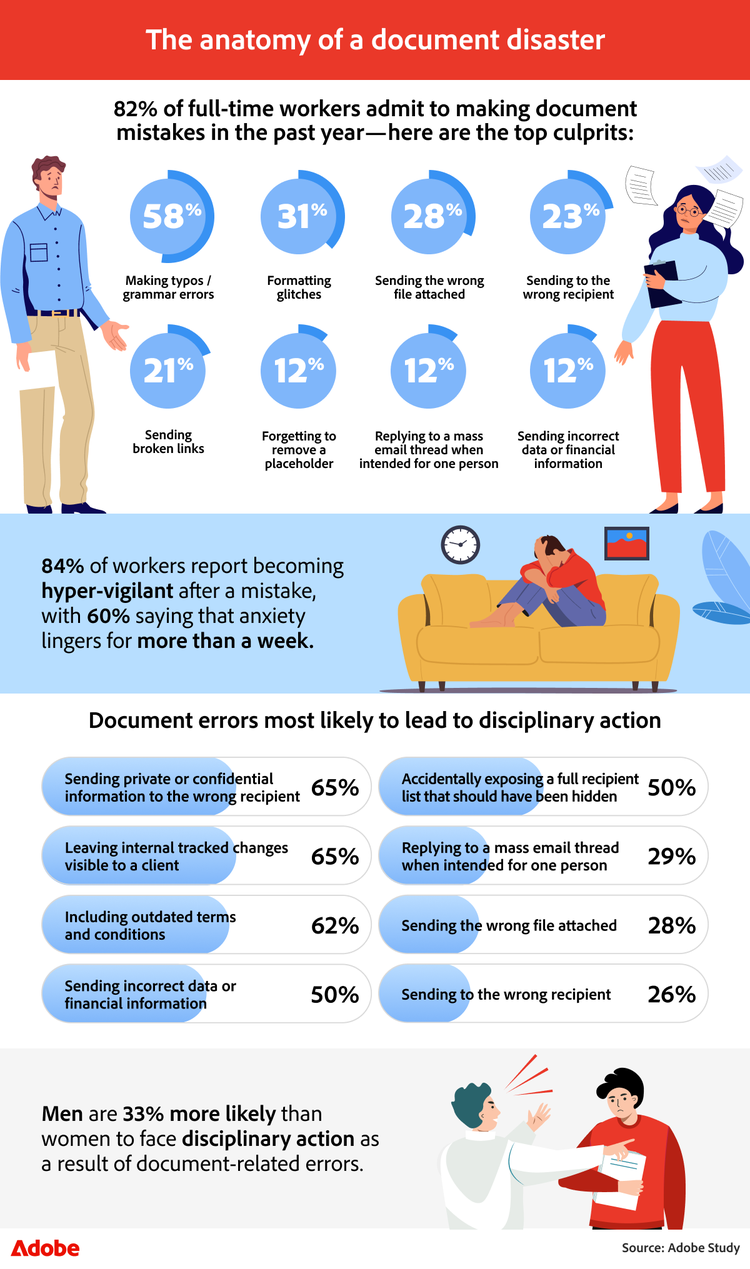
It’s no surprise that many workers report encountering small errors from time to time. Eighty-two percent of respondents say they made a document-related mistake in the past year, though the likelihood varies slightly depending on the work environment. Seventy-seven percent of remote employees surveyed report making a document error, the lowest share among work arrangements—including on-site (80%) and hybrid (90%)—suggesting location may influence how frequently these admin and document issues occur.
Document mistake rates also vary slightly across industries, according to respondents in our survey.
Industry
% that have made a document mistake in the past year
% that have received disciplinary action for their document mistake
Business and Management
89%
31%
Healthcare
88%
28%
Finance and Banking
87%
47%
Technology
87%
41%
Creative Arts/Design
85%
20%
Non-profit
84%
19%
Education
83%
17%
Public service/Government
77%
19%
How document mistakes lead to hyper-vigilance
When these mistakes occur, they can leave a lasting impression, but they can also encourage more careful, thoughtful work moving forward. Eighty-four percent of respondents say they become hyper-vigilant after making a document mistake, often double-checking files or communications more closely afterward. Among those who experience this heightened caution, 60% say the anxiety from the error lingers for more than a week after the mistake.
When and how employees report document errors
Many employees also appear hesitant to escalate document errors right away, especially when the issue feels small or easily fixable. In these cases, workers often rely on their own judgment to determine whether a mistake requires broader visibility. Across all reported document data errors, 39% of respondents say they would report a major document mistake to senior leadership immediately. Disclosure, however, varies by mistake type: 47% of respondents say financial data errors are reported immediately, making them 34% more likely to be disclosed right away than errors involving outdated terms and conditions.
Meanwhile, smaller document issues are often handled quietly. Forty-four percent of respondents say they would fix broken links or typos without formally reporting the mistake, suggesting that many employees see these errors as manageable in the moment.
Even when resolved quickly, document errors can add up, but having the right systems in place can make them far easier to manage and prevent altogether. For teams managing multiple attachments or revisions, using tools that allow employees to merge PDF documents or combine PDF files into a single, organized file can help reduce version confusion before sharing.
Send files without the scare
The pressure around document mistakes doesn't always end once a file is shared. Without the right tools and workflows, the moment after sending a document can bring lingering anxiety, second-guessing, and extra checking behaviors that follow workers throughout the day.
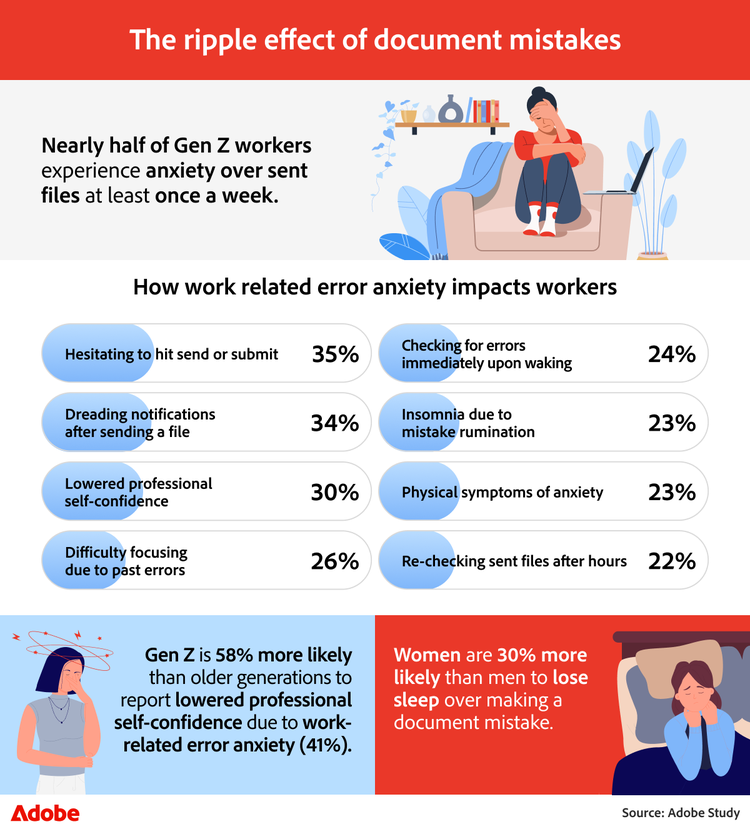
It’s common for workers to double-check themselves after sending a document, especially when accuracy matters. Nearly half of Gen Z respondents (49%) say they experience anxiety over sent files at least once a week, the highest rate among generations surveyed. For many workers who regularly review or edit documents using tools like a PDF editor, the moment after sending a file can bring second-guessing about formatting, attachments, or overlooked details.
Document anxiety by generation
Weekly document-related anxiety from sent files by generation:
- Gen Z: 49%
- Millennials: 35%
- Gen X: 32%
- Baby Boomers: 20%
How send anxiety shows up at work
For many respondents, that anxiety affects how they approach everyday tasks. Some delay hitting send or submit long after reviewing a file, while others feel a pit in their stomach when a recipient's notification appears after sending a document. For some, the experience can also affect their confidence or focus, leading them to second-guess their work or mentally replay past document mistakes.
This hesitation appears especially strong in certain industries. The most common ways work-related error anxiety impacts workers vary by field:
- Finance and banking: Procrastination before hitting send (48%)
- Food and beverage: Physical symptoms of anxiety (46%)
- Non-profit: Procrastination before hitting send (43%)
- Technology: Procrastination before hitting send (42%)
- Education: Procrastination before hitting send (41%)
- Creative arts/design: Feeling a pit in the stomach after sending a file (39%)
- Business and management: Procrastination before hitting send (39%)
- Healthcare: Lowered professional self-confidence (36%)
- Public service/government: Lowered professional self-confidence (35%)
Healthcare workers also stand out for follow-up behavior, with 20% of respondents in that field saying they log into work on the weekends to correct document or data errors.
The mistakes that weigh heaviest on workers
Some document mistakes carry more emotional weight than others. Eighty-three percent of respondents say they feel more personal responsibility when a document mistake is theirs alone rather than a team error. Surveyed respondents also believe that certain errors are much more likely to trigger a mental replay or even lead to job loss.
Document error
Trigger mental replay
Perceived to lead to job loss
Sending private or confidential information to the wrong recipient
41%
47%
Sending incorrect data or financial information
14%
16%
Sending a document to the wrong recipient
10%
7%
After-hours checking and notification habits
When document anxiety lingers, it can also lead to extra checking behaviors. Twenty-four percent of respondents say they check work notifications immediately upon waking, specifically to look for reports of document errors. In comparison, 22% say they log in after hours during the workweek to re-check sent files. In many cases, the ability to quickly review or correct a document can help reduce that stress. Tools such as an online PDF editor allow teams to update files, fix formatting issues, and correct errors without having to restart a document from scratch.
Your new sidekick for error-free work
As digital workflows evolve, many employees are proactively adopting new tools and strategies to reduce document mistakes and work more confidently.
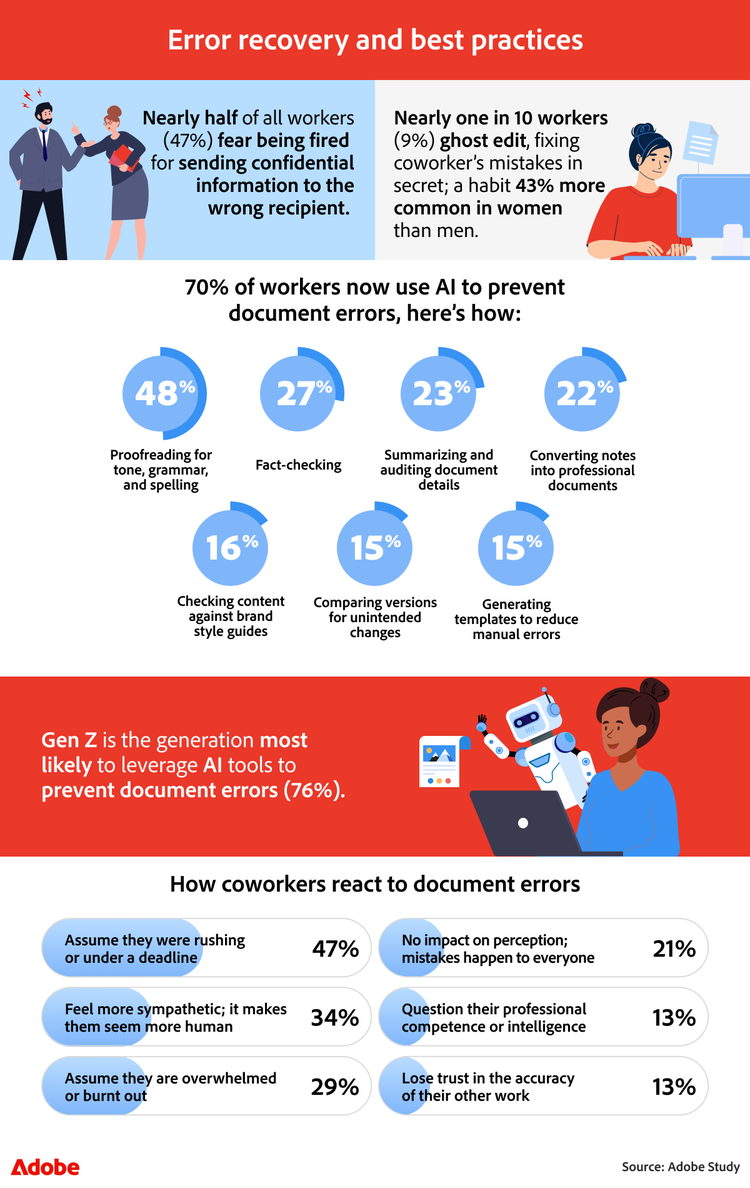
Since document errors have become so common, many employees are actively seeking ways to prevent them. Seventy percent of respondents say they now use AI tools to help reduce document errors, highlighting a growing focus on prevention and confidence in everyday document workflows. Among those surveyed, 48% say they use AI to proofread text for tone, grammar, or professional spelling. At the same time, 27% use it to fact-check specific data points, dates, or citations within reports. Others say they rely on AI to summarize long documents (23%) or convert rough notes into more polished document formats (22%).
AI adoption across work environments and generations
Adoption of these tools varies by work environment and generation. Eighty percent of hybrid workers say they use AI to help prevent document errors, making them 21% more likely than both remote and fully on-site respondents to do so. Gen Z respondents also appear especially likely to rely on these tools, with 76% saying they use AI to help prevent document mistakes.
Even with these precautions, some concern about document error remains. Forty-seven percent say they worry about being fired for sending confidential information to the wrong recipient, highlighting the pressure employees feel when handling sensitive documents or data.
That concern may explain why workers often adopt quiet workarounds when mistakes appear, especially when the issue feels easy to fix at the moment. In these situations, employees may prioritize speed and resolution over formal escalation.
The rise of ‘ghost editing’ in the workplace
Nearly one in 10 respondents (9%) say they have ghost edited a coworker’s document in secret, correcting a mistake without alerting the colleague. According to the survey, this behavior is 43% more common among women than among men, and Gen Z respondents are 38% more likely than older generations to ghost edit mistakes for colleagues.
Coworkers are more understanding than you think
At the same time, coworkers often appear more empathetic toward document mistakes than employees might expect. Many respondents indicate that they see these errors through a lens of workload and time pressure rather than carelessness.
Forty-seven percent of respondents say they assume a colleague was rushing or under pressure to meet a deadline when they notice a document error. In contrast, 34% say mistakes make coworkers seem more relatable or human. Another 29% say they assume the colleague may be overwhelmed or experiencing burnout.
That sense of empathy is even more pronounced among younger workers. Gen Z respondents are 39% more likely than older generations to say they feel sympathetic toward coworkers who make document mistakes, and 50% more likely to assume the error happened because the person was overwhelmed.
Perceived vs. actual consequences of document mistakes
Even with this empathy, there can still be a gap between how employees perceive the consequences of mistakes and how they are actually handled.
The findings suggest a disconnect between what entry-level workers fear and what leadership respondents say actually warrants disciplinary action for document mistakes.
Mistake
Entry level
Director
Sending private or confidential information to the wrong recipient
37% formal review
28% written warning
Leaving internal tracked changes visible to a client
34% written warning
31% written warning
Including outdated terms and conditions
36% formal review
31% formal review
Sending incorrect data or financial information.
33% written warning
31% verbal warning
Accidentally exposing a full recipient list that should have been hidden.
29% verbal warning
26% verbal warning
Replying to a mass email thread when intended for one person.
39% verbal warning
33% verbal warning
Sending the wrong file attached
52% verbal warning
49% verbal warning
Sending to the wrong recipient
46% verbal warning
41% no action
Making typos / grammar errors
48% verbal warning
69% no action
Formatting glitches
46% verbal warning
64% no action
Features workers want most to reduce document stress
Many respondents say having more flexibility to fix errors after sending would further improve their confidence when sharing documents. Workers say the following features would help reduce stress after discovering a document mistake:
- A universal recall or undo send button that works across communication platforms (61%)
- The ability to edit text directly within a shared PDF without having to resend a new file (44%)
- Automated alerts that flag placeholder text or empty attachments before a file can be sent (37%)
- A clean view that automatically removes internal comments and tracked changes upon export (27%)
- Replacing a file behind a shared link so the recipient never sees the original version (25%)
- A version control dashboard that clearly identifies the final version for all collaborators (24%)
In many cases, the ability to make quick corrections can reduce the ripple effects of a document mistake. Tools such as an online PDF editor offer features that let teams merge PDF files or combine PDF documents to help streamline multiple attachments into a single, organized file before sending, reducing the risk of version confusion and helping employees feel more confident when sharing documents.
How to avoid document mistakes with Adobe Acrobat
While document and administrative mistakes are common, tools like Adobe Acrobat make it easier to catch issues early, make quick updates, and share documents with confidence. Here are a few ways employees can reduce document mistakes using Adobe Acrobat tools:
1. Review files before sending with Adobe Acrobat
Before sharing a document, reviewing it in a dedicated PDF editor can help catch common issues like typos, formatting glitches, or leftover placeholder text. An online PDF editor lets users proofread content, adjust formatting, and make quick edits without recreating the file from scratch.
2. Use Adobe Acrobat to fix mistakes quickly
If an issue is discovered after a document has already been created, Adobe Acrobat makes it simple to update text, correct formatting, or remove sensitive information directly within the file. This allows teams to quickly resolve document errors without creating multiple versions of the same document.
3. Combine files to avoid sending the wrong attachment
Sending the wrong attachment is one of the most common document mistakes. Instead of attaching multiple documents separately, teams can merge PDF files or combine them into a single, organized file. Knowing how to combine PDF files before sending can help prevent version confusion and reduce the risk of sharing the wrong document.
4. Keep documents organized with clear versions
Maintaining clear file versions can prevent outdated documents from being shared. Using tools that allow teams to organize, edit, and manage PDFs in one place makes it easier to confirm that the correct version of a document is ready to send.
5. Make quick corrections without restarting the document
When mistakes do happen, being able to edit a document quickly can help reduce delays and workplace stress. Tools like Adobe Acrobat's PDF editor allow users to update files, fix formatting issues, and finalize documents without rebuilding them from scratch.
From document anxiety to accuracy
Document and administrative mistakes may be common, but they don’t have to impact confidence or workflow. Our findings show that while employees often worry about the impact of a document error, many of these issues can be prevented or quickly corrected with the right tools.
Using solutions like Adobe Acrobat’s PDF editor can help teams review files, fix mistakes quickly, and organize documents more confidently. Whether you need to update text, correct formatting, or merge PDF files to avoid sending the wrong attachment, the right document tools can make sharing work simpler and more reliable. Explore Adobe Acrobat to edit, organize, and share PDFs with confidence. With the right tools in place, teams can spend less time worrying about small errors and more time focusing on meaningful work.
Methodology
To explore how workplace mistakes affect employees, we surveyed 1,015 full-time employees across a range of industries in the U.S. The data has a 95% confidence level and a low 3% margin of error. Because this exploratory research relied on self-reported data, respondents may have biases, and discrepancies may exist between their answers and their actual experiences.

