


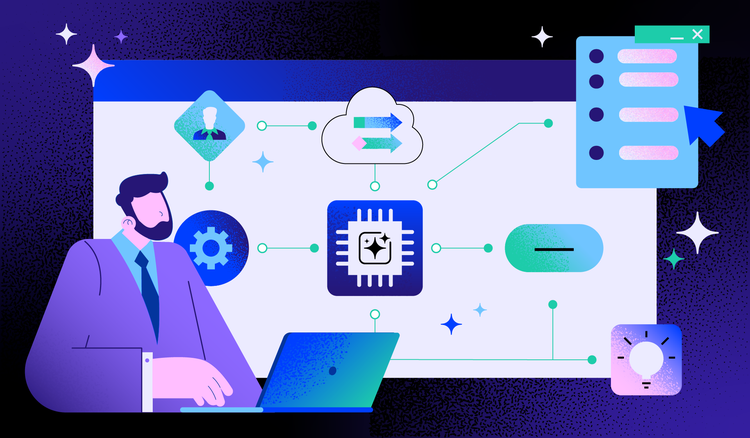
From drafting emails to analyzing complex datasets, artificial intelligence is transforming how we approach everyday work. What once required hours of manual effort can now happen in moments, freeing professionals to focus on creative problem-solving and strategic thinking. But behind these individual AI tools lies a more powerful concept: the AI workflow.
What is an AI workflow?
AI is everywhere in today's workplace. Professionals use it to generate first drafts of documents, summarize lengthy reports, extract key data points from spreadsheets, and even manage their calendars. These individual applications are impressive on their own, but the real transformation happens when AI capabilities connect to form complete automated processes.
So what exactly is an AI workflow? At its core, an AI workflow is a sequence of automated tasks powered by artificial intelligence that work together to complete a process. Unlike traditional automation that follows rigid, pre-programmed rules, AI workflows can adapt, learn, and make decisions based on the data they encounter.
Think of a digital workflow as a series of connected steps that move work from one stage to the next. An AI workflow takes this concept further by embedding intelligence at each stage. Instead of simply passing information along a predetermined path, AI workflows analyze content, recognize patterns, and determine the best course of action based on context.
The distinction between traditional workflows and AI-enhanced workflows is significant:
- Traditional automation excels at repetitive tasks with clear rules—if this happens, then do that
- AI workflows handle ambiguity and interpret unstructured data like handwritten notes or natural language requests
- These intelligent systems make judgment calls based on a combination of learned patterns and instructional datasets
- AI workflows improve their performance over time through continuous learning
This intelligence transforms workflows from simple task runners into adaptive systems that genuinely assist humans to complete tasks.
Key characteristics of AI workflows
What sets AI workflows apart from conventional automation? Several defining features distinguish these intelligent systems and make them particularly valuable for modern businesses.
Intelligence and adaptability
AI workflows leverage machine learning to understand context and make informed decisions. Rather than following a fixed script, these systems recognize patterns in data and adjust their behavior accordingly. When an AI workflow encounters a document, for example, it can identify the document type, extract relevant information, and route it appropriately — without explicit programming for each scenario.
This adaptability extends to handling exceptions. When something unexpected occurs, AI workflows can often determine the best response based on similar situations they have encountered before, reducing the need for constant human oversight.
Automation at scale
The power of workflow automation multiplies when AI is involved. These systems excel at processing large volumes of data quickly and consistently. Tasks that would take a team of people days to complete can happen in hours or minutes, with the AI maintaining the same level of attention to detail throughout.
This scalability makes AI workflows particularly valuable for organizations dealing with high-volume processes like:
- Invoice processing and accounts payable
- Customer inquiry management
- Document review and classification
- Data validation and entry
Integration capabilities
Modern AI workflows connect seamlessly across multiple platforms and tools. They can pull data from one system, process it using AI capabilities, and push results to another application—all automatically. This cross-platform functionality eliminates the data silos that often slow down business processes.
Whether integrating with customer relationship management systems, enterprise resource planning software, or cloud storage platforms, AI workflows serve as intelligent bridges between the tools organizations already use.
Continuous learning and improvement
Perhaps the most distinctive characteristic of AI workflows is their ability to get better over time. Through feedback loops and ongoing exposure to new data, these systems refine their decision-making and become more accurate. An AI workflow that processes customer requests, for instance, learns from each interaction which responses work best and adjusts its approach accordingly.
This self-optimization means that the value of AI workflows compounds over time, delivering increasingly better results without requiring manual updates or reprogramming.
How an AI workflow works
To understand why AI workflows are so effective, it helps to understand their mechanics. Most AI workflows follow a consistent pattern of stages that transform inputs into valuable outputs.
The AI workflow process typically unfolds across four main phases:
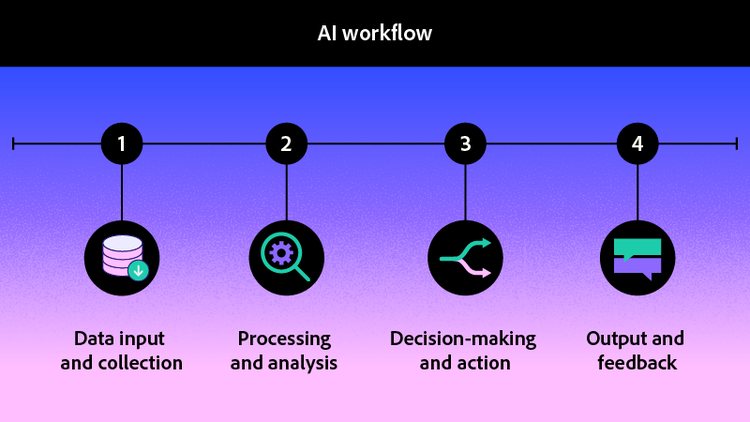
- Data input and collection. Every AI workflow begins with gathering information. This might involve receiving documents, pulling data from connected systems, monitoring for specific triggers, or accepting user requests. The AI system ingests this information regardless of format—structured data from databases, unstructured text from emails, or even images and audio files.
- Processing and analysis. Once data enters the workflow, AI technologies go to work. Natural language processing interprets text, machine learning algorithms identify patterns, and computer vision analyzes visual content. An AI-powered document assistant might read through a lengthy contract during this phase, identifying key terms, dates, and obligations without requiring line-by-line human review.
- Decision-making and action. Based on its analysis, the AI workflow determines what should happen next. This might mean categorizing a document, flagging an anomaly for human review, generating a response, or triggering another automated process. The intelligence here distinguishes AI workflows from simple automation—the system evaluates options and chooses the most appropriate action.
- Output and feedback. Finally, the workflow produces its results and captures information about the outcome. Outputs might include processed documents, updated records, notifications, or reports. The feedback component is crucial: by tracking what works and what does not, the system continuously improves its future performance.
Within these stages, AI agents often operate as specialized workers. These agents handle specific tasks within the larger workflow—one might focus on document classification while another handles data extraction. In agentic AI workflows, these agents can even collaborate, passing work between themselves and making collective decisions to complete complex processes.
Consider a practical example: an organization receives hundreds of invoices daily. An AI workflow automatically captures each invoice as it arrives, extracts vendor information and line items, matches the invoice against purchase orders, flags discrepancies for review, and routes approved invoices for payment. What once required a team working full days now happens automatically with reduced human involvement.
Common examples and use cases of AI workflows
The versatility of AI workflows means they appear across virtually every industry and function. From back-office operations to customer-facing interactions, organizations are finding creative ways to apply intelligent automation.
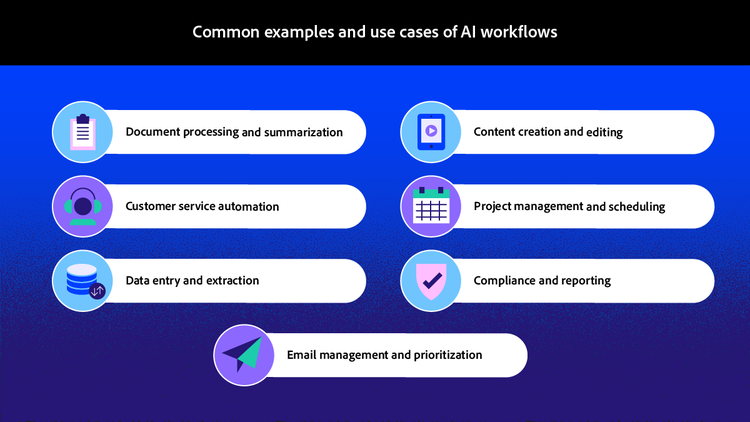
Document processing and summarization
One of the most common applications involves handling documents at scale. AI workflows can ingest contracts, reports, or research papers, extract key information, and generate concise summaries. An AI summary generator within a workflow might condense a fifty-page report into a one-page brief, highlighting the most critical findings and recommendations.
Customer service automation
AI workflows power sophisticated customer support systems that go beyond simple chatbots. These workflows understand customer intent, pull relevant information from knowledge bases, and either resolve issues automatically or route complex cases to appropriate human agents with full context already gathered.
Data entry and extraction
Manual data entry is error-prone and time-consuming. AI workflows can read incoming documents, extract structured data, validate it against existing records, and populate databases or forms automatically. This application is particularly valuable in industries like healthcare, finance, and legal services where accurate data capture is essential.
Email management and prioritization
For professionals drowning in email, AI workflows offer relief. These systems can:
- Categorize incoming messages by topic and urgency
- Identify items requiring immediate attention
- Draft preliminary responses for review
- Schedule follow-ups and reminders
- Learn individual preferences over time
Content creation and editing
AI workflows assist with generating and refining content across various formats. From drafting initial versions of marketing copy to proofreading technical documentation, these workflows accelerate content production while maintaining quality standards. Tools that leverage generative AI for documents can help teams produce polished materials faster than traditional methods allow.
Project management and scheduling
Effective time management becomes easier when AI workflows handle scheduling logistics. These systems can analyze team availability, project dependencies, and deadlines to suggest optimal timelines. They can also automatically adjust schedules when changes occur and send reminders at appropriate intervals.
Compliance and reporting
Regulatory requirements demand careful documentation and reporting. AI workflows can monitor activities for compliance issues, automatically generate required reports, and flag potential problems before they become violations. This proactive approach reduces risk while minimizing the administrative burden on compliance teams.
Each of these use cases demonstrates how AI workflows handle not just individual tasks but entire processes, connecting multiple steps into seamless automated sequences.
Benefits of an AI workflow
The adoption of AI workflows delivers measurable advantages that extend across organizational performance. Understanding these benefits helps clarify why so many businesses are prioritizing intelligent automation.
Increased efficiency and productivity
By automating routine tasks and accelerating complex processes, AI workflows free employees to focus on work that genuinely requires human consideration. Teams accomplish more, and projects move from initiation to completion faster than ever before.
Reduced human error
Manual processes inevitably introduce mistakes—typos in data entry, overlooked details in document review, and inconsistent application of rules. AI workflows apply the same standards consistently across every transaction, dramatically reducing error rates and the costly rework they require.
Cost savings
Efficiency gains translate directly to financial benefits. Organizations spend less on labor-intensive processes, reduce expenses associated with errors, and avoid the hidden costs of slow turnaround times. The initial investment in AI workflow implementation typically pays for itself through ongoing operational savings.
Scalability
AI workflows handle increased volume without proportional increases in resources. Whether processing ten documents or ten thousand, the workflow is expected to maintain consistent performance. This scalability proves especially valuable for growing organizations or those with seasonal demand fluctuations.
Better decision-making through data insights
AI workflows do not just complete tasks—they generate valuable data about how processes perform. This information enables leaders to:
- Identify bottlenecks in current processes
- Spot trends and patterns across operations
- Make informed decisions about improvement priorities
- Track performance metrics over time
Enhanced employee focus on high-value tasks
When AI handles routine work, employees can dedicate their attention to activities that leverage uniquely human capabilities: building relationships, solving novel problems, and thinking strategically. This shift often improves job satisfaction alongside productivity.
Faster turnaround times
Speed matters in competitive markets. AI workflows compress timelines by eliminating delays between process steps and handling tasks around the clock. Documents that once took days to process can be completed in minutes.
The combination of these benefits creates a compelling case for AI workflow adoption. Organizations using intelligent automation tools report significant improvements in both operational metrics and employee experience.
Frequently asked questions
The four stages of an AI workflow are data input, processing and analysis, decision-making, and output with feedback. During input, the system collects information from various sources including documents, databases, and user requests. Processing involves AI technologies analyzing and interpreting this data using natural language processing and machine learning. The decision-making stage determines appropriate actions based on the analysis. Finally, the output stage delivers results while capturing feedback to improve future performance and accuracy.
The 30% rule suggests that no more than 30% of work output should come directly from AI tools without human review or modification. This guideline emphasizes the importance of maintaining human oversight, quality control, and accountability in AI-assisted work. The principle recognizes that while AI excels at drafting, analyzing, and suggesting, human judgment remains essential for final decisions and ensuring outputs meet quality standards. Following this rule helps organizations balance efficiency gains with appropriate human involvement.
The best AI workflow automation depends on specific organizational needs rather than a one-size-fits-all solution. When evaluating options, consider integration capabilities with existing tools, ease of customization, security features, and the types of tasks you need to automate. For document-centric workflows, look for solutions that combine AI capabilities like summarization, data extraction, and intelligent routing with robust document management features. The most effective tools balance powerful automation with intuitive interfaces that teams can adopt without extensive technical training. Evaluate vendors based on your industry requirements, budget constraints, and scalability needs.
Begin by identifying repetitive, time-consuming processes that follow consistent patterns. Document your current workflows to understand each step and where bottlenecks occur. Start with a pilot project that has clear success metrics and manageable scope. Choose tools that integrate with your existing technology stack and provide adequate training resources. Monitor results closely during initial implementation and gather feedback from users to refine the workflow before scaling to other processes.
You may also like
title
What is an AI workflow and how does it work?
cardImageAltText
Abstract visualization of interconnected AI nodes representing automated workflow processes
cardImage
primaryTag
caas:content-type/article
Tags
caas:content-type/article,caas:products/acrobat,caas:topic/ai-chat-pdf,caas:topic/ai-assistant

