Content as a Service v2 - discover video collection - Thursday, September 12, 2024 at 16:05


JUMP TO SECTION
What is a jump cut in a screenplay?
[How to jump cut in Premiere.](#how-to-jump-cut-in-Adobe Premiere)
One of the most popular cuts and transitions in film, a jump cut abruptly brings you to a new position in a scene or completely changes the scene you’re viewing.
A jump cut in filmmaking is an edit to a single, sequential shot that makes the action appear to leap forward in time. This technique is among the most popular cuts and transitions. According to the textbook definition, a jump cut must break a continuous shot into two parts, causing the subject in the video to abruptly “jump” to a different position — hence the name.
After the cut, the subject may appear in a different position or attitude, or the camera position may be slightly different. This cut style is a significant departure from the standard conventions of continuity editing, which dictates that the camera angle should change by at least 30 degrees from one clip to the next. The jump cut ignores this rule.
Countless examples of jump cuts are in films, but a particularly well-known one is from 2001: A Space Odyssey. In that famous 1968 movie, Stanley Kubrick uses a jump cut to transition from a prehistoric bone being thrown into the air to a futuristic spacecraft, symbolizing the enormous leap in human evolution and technological progress.
Say you’re not just editing and directing a movie, but you’re writing the screenplay, too. The scene transitions that you envision are an essential part of the storytelling. A jump cut in a screenplay is like any other editing direction you’d write into your script.
While there’s some debate over the best way to write jump cuts into screenplays, the point is to clearly communicate your vision to everyone reading the script. You can do this in one of two ways:
Just remember that for a true jump cut, your camera angle can’t move by more than 30 degrees, if it moves at all.
In the early 1900s, filmmaker Georges Méliès discovered the jump cut and used it to portray magic tricks. With seamless cuts, Méliès made characters magically disappear and reappear.
Jump to 1959 and Jean-Luc Godard’s Breathless. Godard broke the rules with obvious jump cuts in the same sequence. During a driving scene, the camera angle remains the same, over the shoulder of the character Patricia in the passenger seat, but the scenery in the background changes abruptly.
The discontinuity disorients the viewer and draws attention to the film’s artificial nature. Some claim that the producer forced Godard to make drastic cuts to the film, so he cut it haphazardly out of spite, accidentally creating one of the most influential films of the French New Wave.
Since Godard, filmmakers have used jump cuts in countless creative ways. These cuts can use dramatic or comedic effects to show the passage of time as a character changes positions in a single shot. They can also use a single camera position to show a character covering a great distance without making the audience watch every step. Jump cuts in film can also portray the point of view of a disoriented or confused character without resorting to special effects or even less obvious video effects.


Today, if you want to see the very definition of a jump cut in action, look no further than YouTube. On that platform, it’s common for makers of talking-head videos to use jump cuts to skip awkward pauses or mistakes. Modern audiences are used to the technique, so you can make edits in post-production instead of trying to get one perfect take.
“People have little conversational fillers, or they’ll pause to think for a second, and no one wants to watch that, so you can cut those parts out and speed up the video,” says videographer Nick Cann.
But jump cuts aren’t just for YouTube. In marketing videos, jump cuts can add energy to the message. “A jump cut can fast-forward the vibe of a video and get the viewer’s heart rate up so they get excited and get a bit more involved,” Cann says. “There’s no wasted time, no quiet points.”
Depending on how they’re used, jump cuts can achieve certain story objectives and evoke a range of feelings in film viewers. For example, they can:
If you’re looking to surprise your viewers, take a lesson from Van Halen — you might as well jump. Just don’t overdo it. Footage that is too choppy becomes jarring and hard to watch. Like the match cut and the smash cut, the jump cut is a cinematic tool you should use only when there’s a good reason for it.
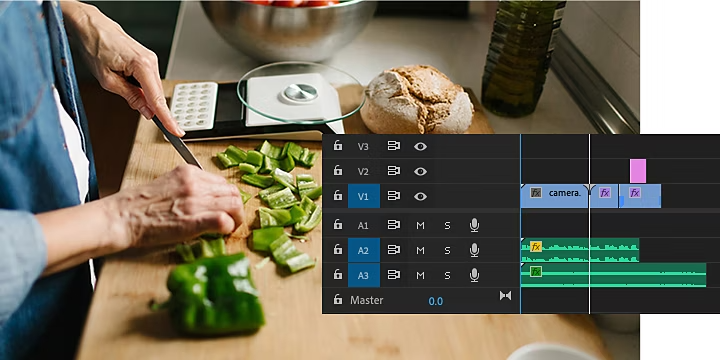

Create everything from social clips to feature films.
One way to make cuts is by clicking Command + K on a Mac or Control + K on a PC, which splits the clip at the frame your playhead is on. This shortcut is easy to use when you find a section you want to cut while scrubbing through your footage. To cut the audio tracks along with the video footage, click Shift + Command/Control + K.
To make cuts with the Razor tool, follow these steps.
1. Drop the video footage in your timeline.
2. Make sure you have the Snap setting on and your audio locked so that your clips can snap into place next to each other and your audio stays synced after you make a cut.
3. Click the Razor tool (or press C) and click the spot in your clip where you want to begin your cut.
4. Click the tool again and make a cut where you want to restart the action.
5. To select and delete segments with ease, use Alt/Option (depending on your operating system) + Delete to ripple close the space between clips as you make cuts.
6. To refine your cuts even further, zoom in on the timeline (tap the + key) and repeat your Razor work.
When you’re done editing video watch the new edit to ensure the jump cuts fit the tone of the overall film.
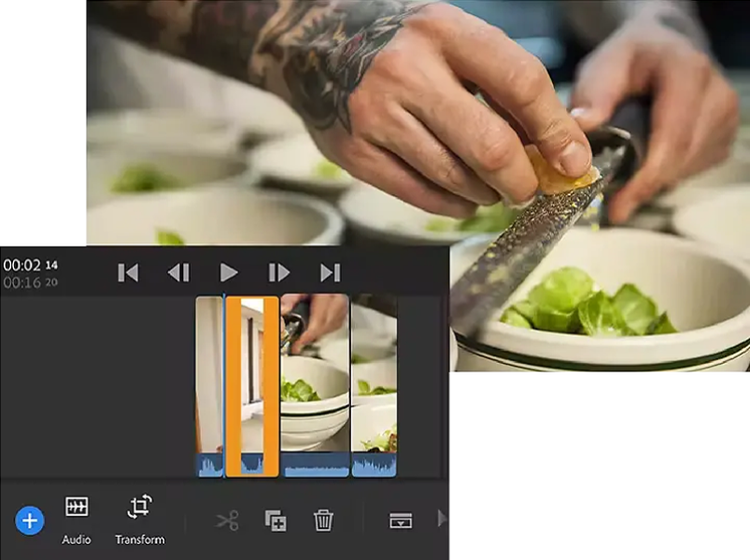
Filmmakers have developed many ways to edit out mistakes or awkward pauses without resorting to jump cuts. You can cut away to another scene by using B-roll or perhaps cross-cutting the two scenes.
For example, if you were filming a New York City story with two characters sitting and chatting on a bench in Central Park, you could cut to footage of a park scene during any lulls. Then, you can cut back to the conversation when the conversation picks back up.
Cross-cutting is a great technique for creating tension by showing two or more actions happening simultaneously in different locations. For example, in a thriller, you could alternate between showing a character about to make a crucial discovery and a villain preparing to take action, building suspense as both events unfold in parallel.
Jump cuts can be a great technique in film editing, but to use them effectively and intentionally, approaching them with purpose and attention to detail is important. Here are some tips for editing jump cuts to create impactful transitions that elevate your filmmaking:
The jump cut is a useful technique because it allows filmmakers to create a sense of time passing, build rhythm, and sometimes even disorient or surprise the audience. But it’s just one tool in your toolbox, and it’s important to know what else you can do with video editing.\ Now that you understand what jump cuts are and how to use them with precision, you can learn about video editing software that enables you to create other types of cuts and transitions. With Premiere, you can use jump cuts, add eye-catching effects and transitions, supercharge your workflow with AI, and much more.

₱580.16/moincl. VAT. Annual, billed monthly
Includes 100GB of cloud storage, Adobe Fonts, and Adobe Portfolio.
Join over 7 million Creative Cloud Pro subscribers worldwide. Save 25% for the first year on the full version of Adobe Premiere and 20+ apps plus Adobe Firefly creative AI. Pay ₱1,607.52/moincl. VAT for the first year and ₱2,144.80/moincl. VAT after that. New subscribers only. See terms | See what's included
Save 76% on 20+ Creative Cloud apps — including Adobe Premiere.
Save 30% for the first year on 20+ apps, including Acrobat, plus Adobe Firefly creative AI and exclusive business features. Valid for up to 9 license. Pay ₱3,942.54/moper licenseexcl. VAT for the first year and ₱5,633.00/moper licenseexcl. VAT after that. New subscribers only.
See terms