


Artificial intelligence is transforming how professionals approach everyday tasks. From automating repetitive processes to accelerating research, AI at work enables employees to focus on strategic, high-value work that drives business growth and innovation.
Benefits of using AI at work
Organizations across industries are rapidly adopting AI tools to enhance productivity and streamline operations. The shift toward AI-powered workflows reflects a broader recognition that automation can handle time-consuming tasks while freeing employees to focus on work requiring creativity, critical thinking, and human connection.
The ways to use AI at work continue to expand as technology evolves. Here are the primary benefits driving adoption:
- Streamlined workflows and process automation. AI eliminates manual bottlenecks by automating repetitive sequences, enabling teams to move faster through AI workflow automation that connects previously siloed tasks.
- Faster research and information retrieval. Instead of manually searching through documents and databases, AI can surface relevant information in seconds, dramatically reducing the time spent gathering data.
- Enhanced document creation and editing. AI assists with drafting, formatting, and refining documents, helping professionals produce polished materials more efficiently.
- Improved accuracy in repetitive tasks. Human error increases with fatigue and repetition. AI maintains consistent accuracy across thousands of similar operations without degradation in quality.
- Time savings on administrative work. Scheduling, data entry, email sorting, and other administrative tasks can be partially or fully automated, reclaiming hours each week.
- Better data analysis and insights. AI can process large datasets quickly, identifying patterns and trends that might take humans significantly longer to discover.
- Increased productivity across teams. When individual contributors work more efficiently, the cumulative effect multiplies across departments and projects.
How to use AI at work
Understanding where AI delivers the greatest value helps organizations implement tools strategically rather than adopting technology for its own sake. The most effective applications leverage AI’s strengths in pattern recognition, language processing, and data handling while preserving human oversight for nuanced decisions.
Using AI at work requires matching the right tools to specific tasks. The following work areas represent common applications where AI consistently delivers measurable productivity gains across industries and team sizes.
1. Document generation and creation
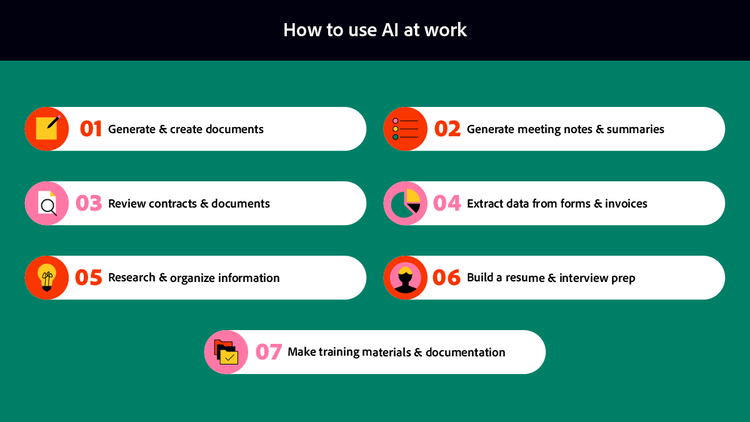
AI-powered document tools can draft initial versions of reports, proposals, and correspondence based on prompts or templates. These systems understand context and can maintain consistent formatting across lengthy documents. Professionals can chat with PDF files to ask questions about content, request summaries, or generate new sections based on existing material. The result is faster first drafts that require refinement rather than creation from scratch.
2. Meeting notes and summaries
Capturing everything discussed in meetings while actively participating presents a challenge for most professionals. AI tools can record, transcribe, and organize meeting content automatically. A meeting notes summarizer can distill hour-long discussions into concise action items and key decisions. Teams spend less time on post-meeting documentation and more time executing on decisions made.
3. Contract and document review
Legal and procurement teams often face backlogs of contracts requiring careful review. AI can analyze documents to identify key clauses, flag unusual terms, and highlight potential risks. Using contract review tools accelerates the initial assessment phase, allowing human reviewers to focus attention on genuinely complex provisions rather than routine language. The efficiency gains compound when processing high volumes of similar agreements.
4. Data extraction from forms and invoices
Manually transferring information from forms, invoices, and receipts into databases consumes significant time and introduces transcription errors. AI excels at pulling structured data from unstructured documents, recognizing fields and values across varying formats. Leveraging AI for data analysis reduces manual entry while improving accuracy. Finance, operations, and administrative teams benefit most directly from these extraction capabilities.
5. Knowledge management and research
Organizations accumulate vast document libraries containing institutional knowledge that becomes difficult to navigate. AI can organize, index, and search across these repositories to surface relevant information quickly. Creating collaborative document spaces allows teams to centralize materials while AI helps users find exactly what they need. New employees onboard faster, and experienced staff waste less time hunting for information they know exists somewhere.
6. Resume creation and interview preparation
Job seekers and human resources professionals alike benefit from AI assistance with career documents. AI can suggest improvements to resume formatting, recommend stronger language for accomplishments, and identify gaps in presentation. Candidates can also practice interview questions with AI feedback to refine their responses before actual interviews. HR teams use similar tools to create consistent job descriptions and evaluation criteria.
7. Training materials and documentation
Creating training content, standard operating procedures, and onboarding materials requires substantial effort to produce and maintain. AI can generate initial drafts of instructional content, ensuring consistency across documents while reducing the time subject matter experts spend writing. An audit of your onboarding process helps identify which existing materials need updates and which can be repurposed for new training needs.
Best practices for using AI at work
Implementing AI effectively requires more than selecting the right tools. Organizations that achieve the greatest productivity gains establish clear guidelines for responsible usage while empowering employees to experiment and learn. How to use AI at work responsibly depends on balancing efficiency with accountability.
Verify AI outputs before sharing or acting. AI systems can produce confident-sounding content that contains errors or outdated information. Always review generated text, data extractions, and summaries against source materials. Using generative AI assistants becomes more effective when users understand both capabilities and limitations.
Know when AI adds value versus when manual work is preferable. AI excels at processing large volumes of similar items, identifying patterns, and generating first drafts. Human judgment remains essential for sensitive communications, creative strategy, and situations requiring empathy or nuanced understanding. Match the approach to the task.
Integrate AI tools with existing workflows. Standalone AI applications create friction when they require users to switch contexts constantly. Establishing a document workflow management guide helps identify integration points where AI can enhance rather than disrupt your current processes.
Prioritize data security and privacy compliance. Before using AI tools with sensitive documents, understand where data is processed and stored. Ensure any AI applications meet your organization’s security requirements and relevant regulatory standards.
Train team members on effective usage. AI tools deliver better results when users understand how to craft effective prompts and interpret outputs. Invest time in helping colleagues develop these skills rather than assuming intuitive adoption.
Establish clear guidelines for AI-assisted work. Define expectations around disclosure, review requirements, and appropriate use cases. Clear policies reduce ambiguity and help employees feel confident about incorporating AI into their work.
Balance efficiency with quality control. Speed gains from AI should not come at the expense of accuracy or professionalism. Build review steps into AI-assisted workflows to catch errors before they reach clients, customers, or leadership.
Frequently asked questions
Most organizations now accept and even encourage AI usage for appropriate tasks. The key considerations involve transparency about AI assistance, compliance with company policies, and ensuring outputs meet quality standards. Check your employer’s guidelines and be prepared to disclose AI usage when asked, particularly for client-facing deliverables.
The 30% rule suggests that AI should contribute no more than roughly 30% of the final output for work requiring professional judgment. This guideline emphasizes that AI serves as an assistant rather than a replacement, with humans responsible for the majority of creative direction, critical thinking, and quality assurance. The specific percentage matters less than the principle of maintaining meaningful human involvement.
Responsible AI usage involves verifying outputs, being transparent about AI assistance, protecting sensitive data, and understanding tool limitations. Always review AI-generated content before sharing, attribute AI assistance when appropriate, and avoid using AI for tasks where errors could cause significant harm without adequate human oversight.
AI performs best on repetitive, high-volume tasks with clear patterns: data extraction, document summarization, initial drafts, scheduling, and information retrieval. Tasks requiring emotional intelligence, ethical judgment, creative vision, or complex stakeholder management benefit more from human attention, though AI can support these activities in limited ways.
Many AI applications now offer integrations with common business platforms, including document management systems, email clients, and productivity suites. Exploring business document solutions reveals options designed to work within existing technology ecosystems rather than requiring entirely new workflows.
Begin with a specific, low-risk task where you can evaluate AI performance without significant consequences. Document summarization and research assistance make excellent starting points. Experiment with prompts, compare AI outputs to manual work, and gradually expand usage as you develop confidence in the tools and your ability to guide them effectively.
You may also like
title
How to use AI at work in a responsible way
cardImageAltText
Professional using AI tools on laptop in modern office setting
cardImage
primaryTag
caas:content-type/article
Tags
caas:content-type/article,caas:products/acrobat,caas:topic/ai-chat-pdf,caas:topic/ai-assistant

