60 Selfie captions for every mood, moment, and mirror pic.
Selfie caption ideas for feeds, prints, and profile pics.
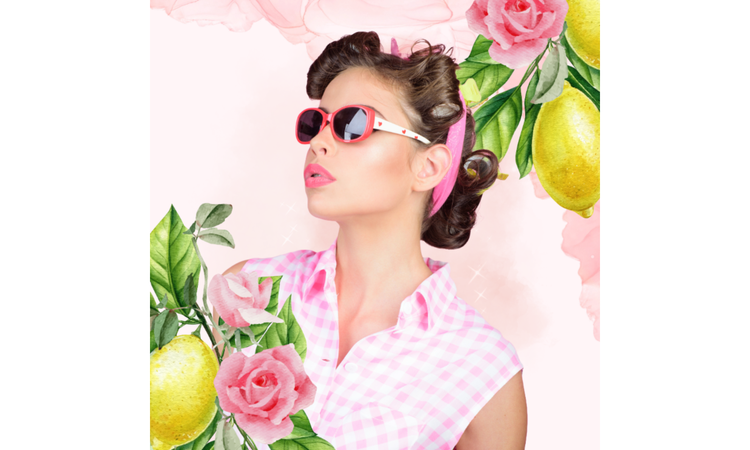




A caption that works in a text and one that works in a design.
A selfie caption you send in your group chat is usually short, just a phrase. But put that same line on a printed card or a poster using the same selfie photo, and it can suddenly look thin or rushed. Whether printed or digital, the format determines how a selfie caption comes across. That is the idea behind this list: selfie captions, sorted by mood, designed to hold up in a quick text and in a finished design you make in Adobe Express.
Match your mood with these selfie captions.
Selfie captions in this category have one job: stay out of the way. A short caption is often more natural than a joke or a long story. If the photo already says what you wanted it to say, one line is enough. That's why most of the captions below stay simple.
Adobe Express's profile picture maker handles that kind of reuse directly. Instagram wants a square, LinkedIn wants a circle, and normally that means cropping the same image by hand for each one. The tool resizes it automatically instead.
Sending the same photo to another person is a different job, so the card tool handles it differently. The image stays intact, and you build a small design around it, dropping in a caption or swapping the background without ever touching the photo file.
Before you set this as a new profile picture, run it through the photo editor first. A slight brightness boost and a touch more contrast make a plain phone photo more alive.
Give this one a poster treatment for your (or your favorite person’s) birthday. Center the selfie and keep the caption along the bottom third. Use a font that matches the party theme for a more uniform look.
If you're doing a montage, use a seamless grid to show different snippets of your day, like doing a GRWM video or running errands. Stick to a natural color filter across all the images to make the montage feel unified. Add a minimalist text font for the caption so it complements the imagery.
This is a good one for an Instagram collage. Make your best selfie the core photo. A simple border helps it stand out, especially on smaller screens. You can also add your caption directly to the design with a serif font if it fits the look.
recipe
Add a little sweetness with these cute selfie captions.
Cute selfie captions work best when they name something specific, like your new haircut. And as you're feeling beautiful (as you should), putting a handful of cute selfies highlighting your new 'do in a photo collage is the best type of selfie. You can play with the grid, like four symmetrical shots to showcase your hair from different angles. You can also take overlapping selfies featuring adorable graphics like bows and clips.
Cute selfie captions don't have to just be below your collage. Use a text-on-photo tool to add the words straight onto the image. Go for a rounder, script-style font, like Lobster or Pacifico, if you want something soft and girly. You can also try a typewriter-type font, like Courier Prime, for a more minimalistic look.
If you want your selfie and this caption to be your phone wallpaper, use the grid and spacing options to leave negative space where your phone's clock sits so it doesn't cover the words. An elegant serif like Baskerville works well here. If the text starts blending into the photo, add a light shadow to make it easier to read.
Use an enhancer tool to boost the highlights, contrast, and warmth of your photo to match the “glow” theme before adding your text. For the caption, use the color-dropper tool to sample a bright highlight color from your photo, like the sun catching your skin. Use Future or any clean, modern font so the text is seamlessly integrated into the lighting.
Use Instagram Story vertical templates to instantly position your selfie in a format optimized for mobile viewing. Try using a dynamic text animation preset on the caption, like a smooth typewriter effect or a soft fade-in, to catch your followers' eyes the moment they swipe onto your story.
Apply a dreamlike filter for effects to amplify the “soft” aesthetic of your selfie. To highlight your caption, place the text inside a blurred or semi-transparent shape container behind the words to ensure it remains readable over the stylized background textures.
recipe
Bring the humor with these funny selfie captions.
Funny selfie captions give you permission to not take the photo too seriously. These captions fit selfies with a weird expression, closed eyes, or accidental shots that are just funnier than embarrassing to share. A caption that admits what happened often beats trying to write a joke.
If a night out left you with more outtakes than usable shots, turning them into memes can be the funniest content. You can even make a flyer to round up your best bloopers for a group hangout. Neither option needs to look polished, since a slightly rough edit usually suits the joke better than a clean one.
Bring this caption to life by combining your outtakes into a quick, disordered video reel next to the final perfect photo. Use the tool's timeline feature to sync the caption's appearance, flashing it on screen with a bold color change right at the exact moment the "winning" shot finally reveals itself.
Instantly dial up the drama by using a blurring tool to soften your background into a cinematic blur, drawing all focus to your expression. For the text, select a bold, high-contrast block font and position it partially over the blurred area to create a striking 3D effect that makes the punchline pop.
Capitalize on the wide, landscape orientation of a banner by spreading your text across the entire width of your profile header. Use an ultra-modern, oversized sans-serif font for the text, and give the words a slight slant or metallic text effect to reinforce that high-confidence aesthetic.
Lean into the joke by using a multi-frame layout to showcase the “bad” angles alongside the ultimate winning shot. Place your caption at the center intersection of the grid lines, using an asymmetric text box design that visually anchors the layout and emphasizes the playful variety of your photos.
recipe
How to get more out of these selfie captions.

Post it right with these selfie captions for Instagram.
A caption on Instagram is doing two jobs at once. It has to read well at full size on a feed post, and it must still make sense when shrunk down to a thumbnail on someone's grid or search page. There's also the truncation problem: Instagram cuts captions after a line or two unless someone taps to expand them. Selfie captions for Instagram tend to work harder when they account for that, since a long caption competing with a small photo and a “more” button usually just disappears.
Two Adobe Express tools are built around that exact problem. Post templates come pre-sized to Instagram's actual ratios, a square for the main feed and a taller 4:5 crop for a portrait shot, so there's no guessing at dimensions before uploading.
For a day with more than one good shot, the collage tool combines several photos from the same day into a single Instagram-sized layout. You have grid options for two photos side by side or four in a square. One caption under one combined image saves you from writing nearly identical captions for nearly identical photos.
Use an image resizer to duplicate and automatically scale your photo into perfect dimensions for standard feeds, circular avatars, and Instagram stories all at once. When positioning your text across the different sizes, use the smart alignment guides to keep the caption perfectly centered below your face.
Adapt a promotional template by replacing the commercial retail headers with your ironic caption to create a humorous, high-impact "self-promo" story. Use the built-in flash or sticker overlay elements, like a mock "Swipe Up" or price tag graphic, to draw direct visual attention to your text punchline.
Turn your selfie into a physical asset, like stickers, by using this tool to add a distinct, thick white die-cut border around your silhouette. Curve your caption text along the top edge of the sticker outline using a playful, retro bubble font to create a personalized, collectible keepsake look.
Choose a template featuring bold, asymmetrical geometric frames to instantly give your photo high-fashion editorial looks for social media. Place the caption inside a sleek side-margin block using a stark contrast color like neon text over a dark background to guarantee it catches eyes while scrolling through a crowded feed.
Own the moment with these confidence selfie captions.
Some selfies don't need an excuse. You liked the photo, so you posted it. A confident caption doesn't need to soften the moment or explain why you posted the photo in the first place. It can be as direct as the picture itself.
That doesn't mean every caption has to sound serious or a humble brag. Short works. A little attitude works. The point is to stop writing around the photo. Adobe Express's Facebook post templates give confidence selfie captions room to breathe, short as they are: the layout is built so one blunt sentence doesn't get lost next to the photo or crowded out by extra space around it.
Frame your selfie to fit a compact, double-sided business card template, treating your personal brand with high-value styling. Place this caption on the reverse side of the card, using an elegant, oversized serif font set against a solid background to create a high-impact personal statement.
Translate your selfie into a wearable graphic style by overlaying the phrase directly onto a cropped or stylized version of your image. Position the text so it arches cleanly over or under the photo using a clean, bold streetwear font that ensures the message remains crisp and legible when printed on fabric.
Use the elongated, vertical canvas of a Pinterest maker by positioning your selfie in the upper half and placing the text boldly below it. Choose a thick sans-serif font and apply a bright color accent to the word "Bet" to instantly catch users' eyes while scrolling through an inspirational feed.
Use a minimalist layout to position your selfie like an editorial portrait at the top of a sleek, professional letter template. Place your caption using a crisp, high-end typewriter font, giving the words plenty of margins to make the statement feel deliberate and reflective.
Check yourself out with these mirror selfie captions.
Mirror selfie captions are a category of their own, mostly because a mirror selfie is rarely just about the face. It usually shows an outfit or your location. These mirror selfie captions work best when they nod to the process itself, as if an outfit check is happening in real time.
If you take a lot of these while getting ready, a photo grid lets you line up a few outfit options side by side before deciding on a favorite, and the comparison view alone can make that decision much easier. Once you land on the one you like, Adobe Express also supports ordering a print of the design, currently available for the US, UK, Australia, and Canada, including for mobile users.
Use a text effect to transform the letters of your caption into a literal visual element, typing in a prompt like “shattered liquid silver.” Overlay this styled text right across the glass surface of your mirror photo to create a striking, futuristic contrast between your realistic reflection and the digital typography.
A mirror selfie works well as a desktop wallpaper. Shift the photo to one side and keep the caption in the empty space. A clean, modern font is usually all it needs.
Use this mirror selfie caption on your birthday banner. Choose a large-format, festive layout and stretch your favorite candid mirror selfie across the frame. Apply a bold drop shadow to your text using a fun, oversized display font, ensuring the playful caption acts as a loud, energetic headline.
Put your sharpest, most celebratory mirror selfie on your graduation invitation to mark this milestone. Use a sophisticated, classic serif font for the caption, placing it directly above your portrait with fine gold or silver metallic borders to make the entire layout feel premium and commemorative.
How to use selfie captions that don't overexplain your mood or look.
Trying to justify a good hair day or a great OOTD with a long caption only dilutes the confidence of the shot. Keeping things brief lets your visual speak for itself.
- State it like a fact: Treat the caption as a closed case with absolutely nothing left to debate. By stating a quick, undeniable fact about the photo, you eliminate the need to provide context. This gives the post an effortless, high-confidence mark.
- Act as a detached observer: Write from the perspective of an outsider who just happened to stumble across your own photo. This layer of separation adds a playful, witty tone. It shows you take your style seriously but yourself entirely lightly.
- Timestamp the moment: Skip the backstory of the photo and just show the moment. Mention something the camera captured instead of explaining everything that happened before or after. The caption stays tied to the photo instead of competing with it.
- Point out the obvious: Look around the frame before you write anything. The weather, your outfit, the location, or even a half-finished meal can give you a caption. A caption tied to what's already in the frame feels more organic than a generic quote.
- Name the exact vibe: Write down three words that describe the photo, then keep only one. Use it to guide the caption instead of trying to fit every emotion into a single sentence. A focused caption is easier to read and easier to remember.
Turn your favorite selfie captions into a finished design with Adobe Express.
Matching your selfie to a memorable text is only half the fun. Adobe Express does the other half by turning clever, confident, cute, and witty selfie captions into design elements that elevate your feed. You don’t need to be a professional designer to make it work. Adobe Express's interface is intuitive, letting you drag and drop, tweak text effects, and sample colors directly from your photo with a zero learning curve.
If you aren’t in the mood to build a layout from scratch, you can instantly drop your image into thousands of ready-made, professionally styled templates. Whatever design you're vibing—bold, clean, minimalist, elegant, or funky, you have everything needed to make your post stand out faster and with less effort.
Discover more you might like.
You might also like...