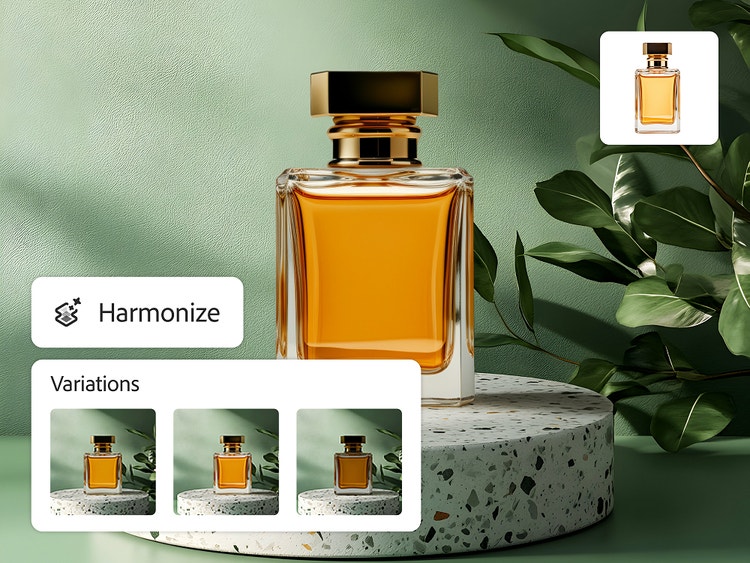
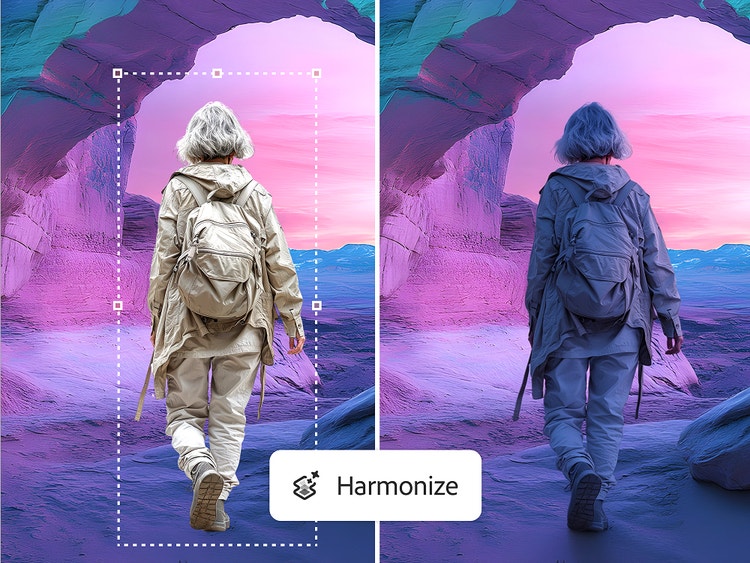
Blend images seamlessly with Harmonize in Photoshop. Now you can combine people and objects into any background instantly. Harmonize adjusts the subject’s lighting, shadows, colors, and reflections in a click.
Blend images seamlessly with Photoshop AI-powered tools.
The Photoshop AI image blender, Harmonize, uses AI to intelligently match lighting, shadows, color, and tone between your subject and background, so you can achieve natural-looking results, whether you're placing a product into a lifestyle scene or blending a person into a new environment.
style
Grid width 6
No more harsh edges or mismatched lighting.
Instead of cut-and-paste composites, use Harmonize, powered by generative AI, to soften harsh edges and correct lighting mismatches, so your blended images appear as if they were taken together. It’s perfect for marketing visuals, social content, or creative storytelling. Enhance your AI image editing.
Create consistent visuals across projects.
Combining multiple images while maintaining consistent shadows, lighting, and tone can be challenging. Harmonize makes it easy to create cohesive composites and AI-blended images for product catalogs, digital collages, or social media campaigns.
Generative composition with Harmonize.
Complex compositing can take hours to perfect. With AI-powered Harmonize, you can blend an image into a new background in seconds without time-consuming masking or manual color grading. Simply import and blend to speed up your creative workflow.
style
Static links
How to blend an image with Harmonize.
With Harmonize in Photoshop, it’s easy to match lighting, color, and tone between layers so your composite images look natural and cohesive. Whether you’re combining elements from different photos or blending a subject into a new background, Harmonize helps you create polished, professional results without complex manual adjustments.
Open Photoshop. Open or download the latest version of the Photoshop app to access the most current generative AI features. Harmonize is available in Photoshop on desktop, web, and mobile.
Upload your background and subject images. Import the background scene onto your canvas. Then, add each object or element you want to blend onto a separate layer and remove its background, so only the subject is visible.
Select Harmonize. Select the pixel layer of the element. In the Contextual Task Bar or the Options Bar > Layer, click Harmonize. If using Photoshop on the web, Harmonize is accessible through the Generative Actions menu.
Review the results. Select your preferred option from the three results or generate again to create more variations.
Preview the composite. Toggle between the before and after views to see your image seamlessly blended together.
Download or export your final image. When you’re happy with the AI image blender result, download or export your image for feedback, sharing, or further editing in Adobe Photoshop.
An AI image blender seamlessly integrates elements into a new background by adjusting shadows, lighting, color, and contextual details to create a natural-looking composite.
Harmonize analyzes your background scene and the elements you want to blend, then creates a composite with generative AI. Your added element will be recreated with intelligently masked color tones and lighting, and the background will also cast shadow or reflections to make a realistic composite scene.
Photoshop will intelligently mask and apply adjustments automatically to the element, creating a realistic composite with the background.
Photographs or realistic images work the best. Elements on a white or empty background with clearly defined edges also help produce seamless results, so the subject can be cleanly isolated to remove the background first, and then Harmonized into the scene.
Yes, the Harmonize feature is available on the Photoshop for iPhone app.
Harmonize does more than match the color tones of the scene. It also intelligently alters the area around the composited element to cast shadows into the scene, helping blend the assets together realistically.
Harmonize also produces three variations to choose from, or you can keep generating to get even more options.
Harmonize uses one standard generative credit per generation.
You can control how Adobe websites use cookies and similar technologies by making choices below. But note that if you disable cookies and similar technologies entirely, Adobe websites may not function properly.
Cookies are small text files stored by your web browser when you use websites. There are also other technologies that can be used for similar purposes like HTML5 Local Storage and local shared objects, web beacons, and embedded scripts. These technologies help us do things like remembering you and your preferences when you return to our sites, measure how you use the website, conduct market research, and gather information about the ads you see and interact with.
You can make choices in the menu below about what cookies and other technologies you want us to use on Adobe sites when you visit them from this browser. You can always change those choices later by clicking on the Cookie Preferences link at the bottom of the page.
If enabled:
We can improve your experience by tailoring the site and the content to things we think might be of interest
We can better keep track of your preferences — like what language you prefer to use
We will better understand your likely interests so we can provide you more relevant Adobe ads and content on non-Adobe websites and in non-Adobe apps
It will help us improve the performance of our website and those of our partners who use the Adobe Experience Cloud
If disabled:
We won’t be able to remember you from session to session so the experience may not be tailored to your interests
You’ll still have access to the content of the site but certain features that depend on cookies may not function
You’ll still see ads, they just may not be as relevant to you
General information
You can control how Adobe websites use cookies and similar technologies by making choices below. But note that if you disable cookies and similar technologies entirely, Adobe websites may not function properly.
Cookies are small text files stored by your web browser when you use websites. There are also other technologies that can be used for similar purposes like HTML5 Local Storage, web beacons, and embedded scripts. These technologies help us do things like remembering you and your preferences when you return to our sites, measure how you use the website, conduct market research, and gather information about the ads you see and interact with.
You can make choices in the menu below about what cookies and other technologies you want us to use on Adobe sites when you visit them from this browser. You can always change those choices later by clicking on the Cookie Preferences link at the bottom of the page.
If enabled:
We can improve your experience by tailoring the site and the content to things we think might be of interest
We can better keep track of your preferences — like what language you prefer to use
We will better understand your likely interests so we can provide you more relevant Adobe ads and content on non-Adobe websites and in non-Adobe apps
It will help us improve the performance of our website and those of our partners who use the Adobe Experience Cloud
If disabled:
We won’t be able to remember you from session to session so the experience may not be tailored to your interests
We’ll still count your use of our site and services
You’ll still have access to the content of the site but certain features that depend on cookies may not function
You’ll still see ads, they just may not be as relevant to you
Operate the site and core servicesOperate site and measure engagement
Always active
These cookies are required, and they are used to enable the site and related services core functionality. Without them the site could not operate, so they cannot be disabled.
These cookies enable the site and related services’ core functionality and collect statistics about user engagement, such as counting active use to help us understand trends. These cookies cannot be disabled.
Measure performance
These cookies are used to analyze site usage to measure and improve performance. Without them Adobe cannot know what content is most valued and how often unique visitors return to the site, making it hard to improve information we offer to you.
These cookies are used to analyze site usage to measure and improve performance. Without them Adobe cannot know what content is most valued, making it hard to improve information we offer to you.
Extend functionality
These cookies are used to enhance the functionality of Adobe sites such as remembering your settings and preferences to deliver a personalized experience; for example, your username, your repeated visits, preferred language, your country, or any other saved preference.
Personalize advertising
These cookies are used to enable Adobe and our partners to serve ads more relevant to your interests. Without them you will still see ads, but they might not be as relevant to you.