Create social videos with the CapCut alternative — Adobe Premiere on mobile.
Find out why creators around the world use the free app to make social videos that pop. Available now on iPhone and Android.
Scan the QR code to get the free app.
style
Light, l-button, s-gap
Get the free mobile video editing app that offers incredible speed on a precise, multi-track timeline.
Use Adobe Premiere on mobile, the CapCut alternative, to turn any idea into attention-grabbing content with powerful yet simple video editing tools.
Edit without distractions.
No watermarks, upsell pop-up ads, or clutter. The only time you pay is when you want to use generative AI credits. Enjoy a seamless editing experience that lets you stay focused on your content. (Gen AI credits are iOS only.)
Create with confidence.
Adobe doesn’t claim any ownership of your content, and we only train Adobe Firefly generative AI models on content where we have permission to do so.
Sound so good in seconds.
Easily smooth out dialogue and clean up background noise with Enhance Audio. Find trending tracks right inside the app, and use your own voice to create perfectly-timed sound effects.
style
Grid-width-12, Three up, xxl-spacing-bottom, xs-gap
Get more with Adobe Premiere on mobile, the CapCut alternative.
Check out this CapCut vs. Premiere comparison to find the best mobile video editor for your content.
style
grid width 8
background
#000
Adobe Premiere on mobile
CapCut
Frame-accurate controls and drag-and-drop overlays
Yes
No
Unlimited free auto-caption generation
Yes
No
CapCut limits auto-caption generations on its free tier.
No watermarks on your videos
Yes
No
Removable watermarks added unless you pay for the Pro plan.
Exclusive templates, effects, transitions, and title presets.
No
Import from Google Drive, Dropbox, iCloud, and more
Yes
No
Export to Premiere on desktop to edit with industry-standard tools
Yes
No
background
#000
style
Grid-width-10, static-links
background
#000
Why Adobe Premiere on mobile?
Video editing for everyone — The video editing app made for content creators, Premiere on mobile is powerful enough for any idea yet simple enough for anyone to use, making it the perfect choice to create studio-quality social videos on the go.
Straightforward pricing — You only pay if you choose to use generative AI credits.
Decades of creative leadership — The brand behind industry-standard apps like Premiere and Photoshop, Adobe is trusted by millions of creators worldwide.
ADOBE PREMIERE — OFFICIAL PARTNER OF YOUTUBE SHORTS
An easy new way to create YouTube Shorts.
Adobe Premiere on mobile offers a dedicated space for editing YouTube Shorts with exclusive templates, effects, transitions, and title presets. Remix templates from other creators and publish content directly to YouTube.
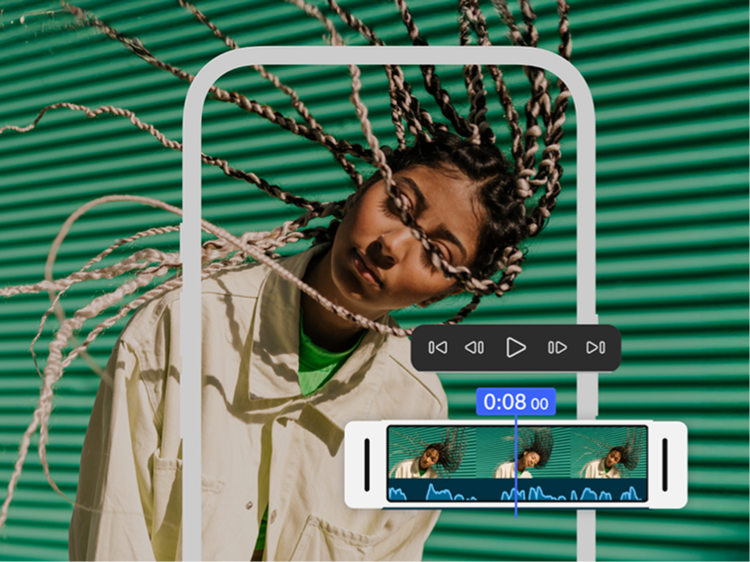
Adobe Premiere on mobile offers multi-track editing with frame-accurate controls and drag-and-drop overlays. The resizable timeline lays out tracks visually without collapsing them to give you a complete view of your project.
In Adobe Premiere, auto-captions are free and unlimited. CapCut limits auto-caption generations on its free tier, with additional styling available through its paid subscription.
No. Exports from Adobe Premiere are watermark-free, making it a great CapCut alternative. CapCut automatically adds a watermark to exported videos for users with free subscriptions. You’ll need to manually remove the watermarks or upgrade to a paid CapCut Pro subscription to get watermark-free output.
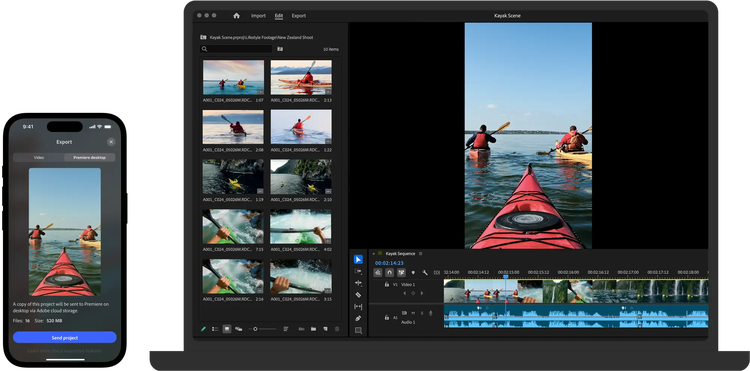
Adobe Premiere on mobile lets you export projects to Premiere on desktop to refine them using industry-standard video editing tools, making it a strong CapCut alternative.
Adobe only trains Firefly generative AI models on content where we have permission to do so.
Firefly output is safe for commercial use. Adobe Firefly generative AI models are trained on licensed content, such as Adobe Stock, and public domain content where copyright has expired.
With Premiere on mobile you only pay if you choose to use generative AI credits. When looking at CapCut vs. Premiere, it’s important to note that CapCut charges for many features like premium AI tools, auto-captioning, background removal, and watermark-free output. Gen AI credits are currently for iOS only.
Premiere on mobile is backed by Adobe’s decades-long reputation and consistent platform stability. It’s the clear choice if you want:
An app that’s free to download and use — you only pay if you need additional generative credits (Gen AI credits are currently for iOS only.)
Frame-accurate editing
Clean, watermark‑free exports
Commercially safe AI output
Peace of mind knowing that Adobe only trains Firefly generative AI models on content where we have permission to do so
Adobe Premiere on mobile is available for both iOS and Android. Some features may vary between platforms. Visit the Adobe Help Center to learn more.
Move seamlessly across the family of Adobe Premiere apps.
Kick off a project on mobile. Then pick up where you left off in the Premiere desktop app to polish it up with advanced tools and creative control.
You can control how Adobe websites use cookies and similar technologies by making choices below. But note that if you disable cookies and similar technologies entirely, Adobe websites may not function properly.
Cookies are small text files stored by your web browser when you use websites. There are also other technologies that can be used for similar purposes like HTML5 Local Storage and local shared objects, web beacons, and embedded scripts. These technologies help us do things like remembering you and your preferences when you return to our sites, measure how you use the website, conduct market research, and gather information about the ads you see and interact with.
You can make choices in the menu below about what cookies and other technologies you want us to use on Adobe sites when you visit them from this browser. You can always change those choices later by clicking on the Cookie Preferences link at the bottom of the page.
If enabled:
We can improve your experience by tailoring the site and the content to things we think might be of interest
We can better keep track of your preferences — like what language you prefer to use
We will better understand your likely interests so we can provide you more relevant Adobe ads and content on non-Adobe websites and in non-Adobe apps
It will help us improve the performance of our website and those of our partners who use the Adobe Experience Cloud
If disabled:
We won’t be able to remember you from session to session so the experience may not be tailored to your interests
You’ll still have access to the content of the site but certain features that depend on cookies may not function
You’ll still see ads, they just may not be as relevant to you
General information
You can control how Adobe websites use cookies and similar technologies by making choices below. But note that if you disable cookies and similar technologies entirely, Adobe websites may not function properly.
Cookies are small text files stored by your web browser when you use websites. There are also other technologies that can be used for similar purposes like HTML5 Local Storage, web beacons, and embedded scripts. These technologies help us do things like remembering you and your preferences when you return to our sites, measure how you use the website, conduct market research, and gather information about the ads you see and interact with.
You can make choices in the menu below about what cookies and other technologies you want us to use on Adobe sites when you visit them from this browser. You can always change those choices later by clicking on the Cookie Preferences link at the bottom of the page.
If enabled:
We can improve your experience by tailoring the site and the content to things we think might be of interest
We can better keep track of your preferences — like what language you prefer to use
We will better understand your likely interests so we can provide you more relevant Adobe ads and content on non-Adobe websites and in non-Adobe apps
It will help us improve the performance of our website and those of our partners who use the Adobe Experience Cloud
If disabled:
We won’t be able to remember you from session to session so the experience may not be tailored to your interests
We’ll still count your use of our site and services
You’ll still have access to the content of the site but certain features that depend on cookies may not function
You’ll still see ads, they just may not be as relevant to you
Operate the site and core servicesOperate site and measure engagement
Always active
These cookies are required, and they are used to enable the site and related services core functionality. Without them the site could not operate, so they cannot be disabled.
These cookies enable the site and related services’ core functionality and collect statistics about user engagement, such as counting active use to help us understand trends. These cookies cannot be disabled.
Measure performance
These cookies are used to analyze site usage to measure and improve performance. Without them Adobe cannot know what content is most valued and how often unique visitors return to the site, making it hard to improve information we offer to you.
These cookies are used to analyze site usage to measure and improve performance. Without them Adobe cannot know what content is most valued, making it hard to improve information we offer to you.
Extend functionality
These cookies are used to enhance the functionality of Adobe sites such as remembering your settings and preferences to deliver a personalized experience; for example, your username, your repeated visits, preferred language, your country, or any other saved preference.
Personalize advertising
These cookies are used to enable Adobe and our partners to serve ads more relevant to your interests. Without them you will still see ads, but they might not be as relevant to you.