Make your masterpiece with exclusive brush packs you can’t get anywhere else. Get textural raster brushes, including live brushes that bloom, blend, and smudge like the real thing, and vector brushes for creating art that scales and won’t pixelate.
Animate
Bring drawings to life with powerful motion tools.
Add movement to your illustrations in a few taps with dynamic but simple-to-use features. Create frame-by-frame animations, draw motion paths with a fingertip, and apply presets for instant movement.
Edit on mobile and desktop
Go from sketch to polished piece.
Built for the latest stylus and touch devices, including iPad and iPhone, your art goes where you go. Start a sketch wherever you are, then open it in Photoshop or Illustrator on desktop to finish it. Your changes sync automatically in Fresco.
style
no spacing
Explore Fresco features.
style
grid width 8
background
#f5f5f5
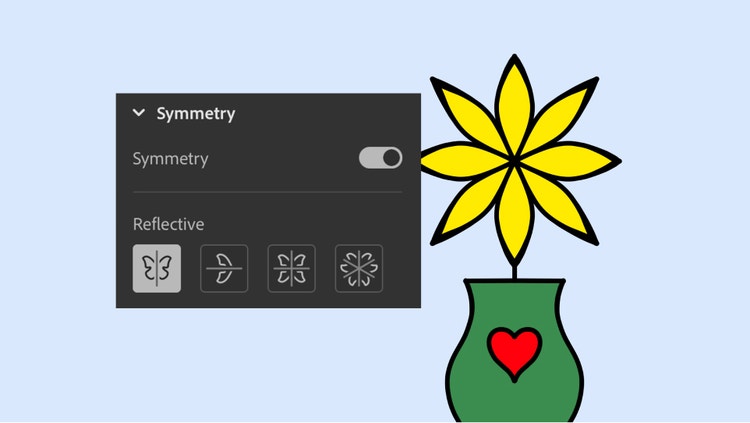
Draw perfectly symmetrical designs.
With Symmetry enabled, each stroke you make is mirrored on the opposite side for precisely balanced shapes, patterns, and more.
Color within the lines.
Keep illustrations neat with Paint Inside, which constrains color to enclosed areas of your drawing.
Trim intersecting strokes.
Easily tidy up overlapping lines by swiping over unwanted segments to remove them with vector trimming.
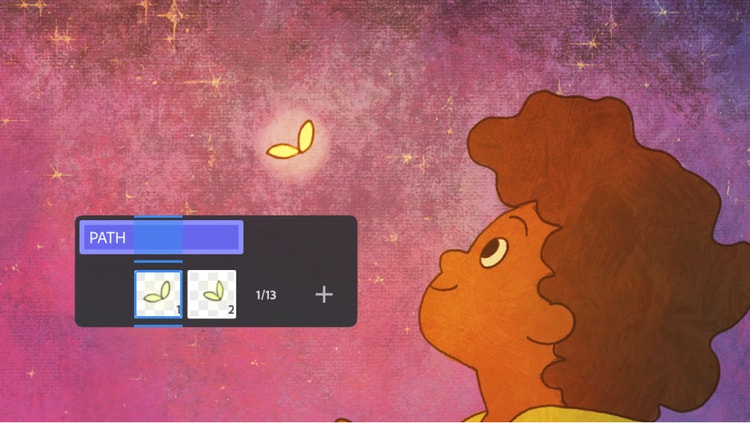
Create instant animations.
Apply one-tap motion presets to your drawings to make them bob, bounce, spin, and more.
Find the Creative Cloud plan that’s right for you.
Creative Cloud Pro
Save 50%
Regularly at 932,50SEK/moAlternatively at 466,16SEK/moincl. VAT. Annual, billed monthly
Join over 7 million Creative Cloud Pro subscribers worldwide. Save 50% for the first 3 months on the full version of Adobe Firefly and 20+ apps plus Adobe Firefly creative AI. Pay 466,16SEK/moincl. VAT for the first 3 months and 932,50SEK/moincl. VAT after that. New subscribers only. See terms | See what's included
Fresco is a free professional level painting and drawing app. Get unlimited layers, thousands of exclusive vector, raster, and live brushes, motion presets, and more– all in the same app. Download Fresco to get started.
No, Fresco does not have a layer limit. Add unlimited layers to build your perfect project and make non-destructive edits.
Fresco is a free drawing app for iPad and is compatible with Apple Pencil. Download it today to get started with professional level drawing tools, including thousands of brushes.
To add brushes in Fresco, open the pixel brushes panel and select Add Brushes at the bottom of the panel. Select Discover new brushes to add brush packs from Adobe, and select Import from files to add other brushes.
style
Static links, l spacing
background
#f5f5f5
Creativity. Fresco. The best things in life are free.
We made Fresco free so everyone can experience the joy of painting and drawing with bold, expressive brushes. Download the app today and see where your imagination draws you.
You can control how Adobe websites use cookies and similar technologies by making choices below. But note that if you disable cookies and similar technologies entirely, Adobe websites may not function properly.
Cookies are small text files stored by your web browser when you use websites. There are also other technologies that can be used for similar purposes like HTML5 Local Storage and local shared objects, web beacons, and embedded scripts. These technologies help us do things like remembering you and your preferences when you return to our sites, measure how you use the website, conduct market research, and gather information about the ads you see and interact with.
You can make choices in the menu below about what cookies and other technologies you want us to use on Adobe sites when you visit them from this browser. You can always change those choices later by clicking on the Cookie Preferences link at the bottom of the page.
If enabled:
We can improve your experience by tailoring the site and the content to things we think might be of interest
We can better keep track of your preferences — like what language you prefer to use
We will better understand your likely interests so we can provide you more relevant Adobe ads and content on non-Adobe websites and in non-Adobe apps
It will help us improve the performance of our website and those of our partners who use the Adobe Experience Cloud
If disabled:
We won’t be able to remember you from session to session so the experience may not be tailored to your interests
You’ll still have access to the content of the site but certain features that depend on cookies may not function
You’ll still see ads, they just may not be as relevant to you
General information
You can control how Adobe websites use cookies and similar technologies by making choices below. But note that if you disable cookies and similar technologies entirely, Adobe websites may not function properly.
Cookies are small text files stored by your web browser when you use websites. There are also other technologies that can be used for similar purposes like HTML5 Local Storage, web beacons, and embedded scripts. These technologies help us do things like remembering you and your preferences when you return to our sites, measure how you use the website, conduct market research, and gather information about the ads you see and interact with.
You can make choices in the menu below about what cookies and other technologies you want us to use on Adobe sites when you visit them from this browser. You can always change those choices later by clicking on the Cookie Preferences link at the bottom of the page.
If enabled:
We can improve your experience by tailoring the site and the content to things we think might be of interest
We can better keep track of your preferences — like what language you prefer to use
We will better understand your likely interests so we can provide you more relevant Adobe ads and content on non-Adobe websites and in non-Adobe apps
It will help us improve the performance of our website and those of our partners who use the Adobe Experience Cloud
If disabled:
We won’t be able to remember you from session to session so the experience may not be tailored to your interests
We’ll still count your use of our site and services
You’ll still have access to the content of the site but certain features that depend on cookies may not function
You’ll still see ads, they just may not be as relevant to you
Operate the site and core servicesOperate site and measure engagement
Always active
These cookies are required, and they are used to enable the site and related services core functionality. Without them the site could not operate, so they cannot be disabled.
These cookies enable the site and related services’ core functionality and collect statistics about user engagement, such as counting active use to help us understand trends. These cookies cannot be disabled.
Measure performance
These cookies are used to analyze site usage to measure and improve performance. Without them Adobe cannot know what content is most valued and how often unique visitors return to the site, making it hard to improve information we offer to you.
These cookies are used to analyze site usage to measure and improve performance. Without them Adobe cannot know what content is most valued, making it hard to improve information we offer to you.
Extend functionality
These cookies are used to enhance the functionality of Adobe sites such as remembering your settings and preferences to deliver a personalized experience; for example, your username, your repeated visits, preferred language, your country, or any other saved preference.
Personalize advertising
These cookies are used to enable Adobe and our partners to serve ads more relevant to your interests. Without them you will still see ads, but they might not be as relevant to you.