





Create stunning motion graphics. Animate a logo or character. Add eye-catching visual effects. With After Effects, you can add amazing motion to any video project.
Make a matte in seconds with AI. Dream up typographic designs that are flow-ier than ever. Create 3D shapes natively and stylize them with over 1,300 free textures. Discover what’s new — and keep your creativity in motion.
Animate still images and illustrations to create striking motion graphics. Add motion to text for cinematic title sequences and simple credit rolls. Work faster with presets or turn your unique vision into reality with power animation tools.
3D animations
Design dynamic 3D animations.
Bring depth to your visuals with a true 3D workspace inside After Effects. Create and combine shapes, apply Substance 3D materials, and perfect your lighting with dynamic shadows and realistic detail.
Visual effects
Create jaw-dropping effects.
Get inspired with a wide selection of built-in effects or customize your own. Make it storm. Add lasers. Or even pop a spinning UFO into a tracking shot. Turn any idea into an effect your audience will never forget.
style
m spacing
Explore After Effects features.
style
l spacing
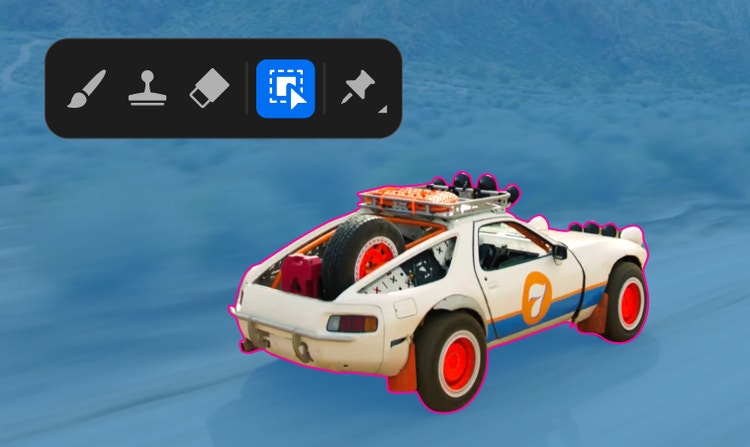
Make a matte in seconds with AI.
With new AI Object Matte, accurately isolate a moving subject with a simple hover and click. And quickly wrangle any stray pixels with new refinement brushes.
Mix 2D and 3D seamlessly.
Create, import, and animate 3D objects right alongside 2D graphics in a true 3D workspace made for motion designers.
Track elements as they move.
Follow the movement of any object in your clip. Replace the screens on mobile phones, add names to moving subjects, or surround a marching band with musical notes.
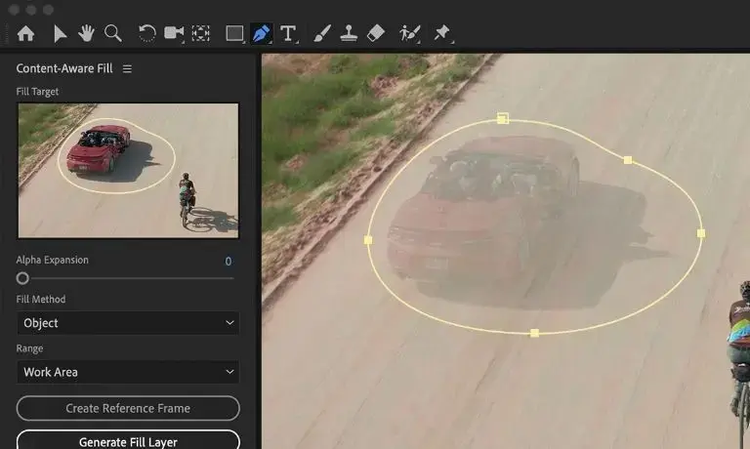
Remove what you don’t want.
Erase anything from an accidental boom mic to people in the background. Content-Aware Fill will fill in the gaps in every video frame so you’re left with clean, polished footage.
Swap out the background.
Place a character in a totally new environment. With powerful keying tools, you can replace backgrounds, apply visual effects, or add new elements to your scene.
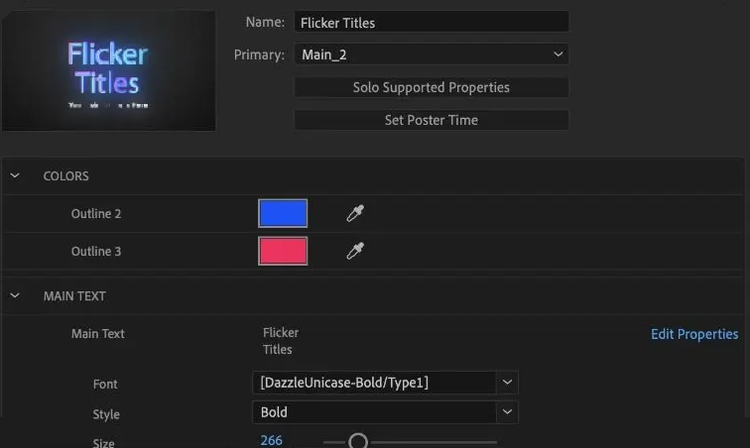
Create Motion Graphics templates.
Design and share customizable Motion Graphics templates like animated titles and lower thirds for instant use in Adobe Premiere.
Regularly at US$69.99/moAlternatively at US$34.99/moAnnual, billed monthly
See what’s included:
After Effects for creating cinematic visual effects and motion graphics like titles, intros, and transitions
20+ apps for photo, design, and video
Unlimited access to standard creative AI image and vector features like Text to Image and Generative Fill
4,000 monthly generative credits for premium creative AI video and audio features like Text to Video.
Unlimited access to Firefly Boards for exploring ideas and developing storyboards
Access to non-Adobe Generative AI models in Firefly
Adobe Express Premium, Frame.io for Creative Cloud, tutorials, fonts, templates, and 100GB of cloud storage
Join over 7 million Creative Cloud Pro subscribers worldwide. Save 50% for the first 3 months on the full version of After Effects, plus Adobe Firefly creative AI. Pay US$34.99/mo for the first 3 months and US$69.99/mo after that. New subscribers only.
Regularly at US$69.99/moAlternatively at US$19.99/moAnnual, billed monthly
See what’s included:
After Effects for creating cinematic visual effects and motion graphics like titles, intros, and transitions
20+ photo, graphic design, and video apps including After Effects
Unlimited access to standard creative AI image and vector features like Text to Image and Generative Fill
4,000 monthly generative credits for premium creative AI video and audio features like Text to Video
Access to industry-leading AI models from Adobe, Google, OpenAI, and more
Unlimited access to Firefly Boards for exploring ideas and developing storyboards
Access to non-Adobe generative AI models in Firefly
Adobe Express Premium, Frame.io for Creative Cloud, tutorials, fonts, templates, and 100GB of cloud storage
Save 71% on 20+ apps, including After Effects, plus Adobe Firefly creative AI for images, video, and audio. Pay US$19.99/mo the first year and US$39.99/mo after that.
After Effects is a motion design and visual effects software app. Animate text, graphics, illustrations, and more to create anything from a simple credit roll to an intricate title sequence. Composite to design stunning visual effects for film, TV, video, and the web. Learn more.
You can purchase After Effects on its own at US$22.99/mo for the Annual, billed monthly plan. However, many people use After Effects with other Creative Cloud apps like Premiere and Photoshop. You can get these apps and more as part of the Annual, billed monthly Creative Cloud Pro plan, which costs US$34.99/mo for individuals, US$19.99/mo for the first year for students who meet the eligibility requirement, and US$99.99/moper license for teams.
You can get a seven-day free trial of After Effects. This is the official, full version of the app so you can try it, check out all the tutorials, and get inspired by what you can do with motion design and visual effects software.
After Effects is designed to work seamlessly with other Creative Cloud apps to save time and make you more efficient. For Photoshop, you can easily import layered PSD files with layers intact. And when working with Premiere, you can import After Effects compositions via Adobe Dynamic link, which cuts out the need for intermediate rendering. Learn more.
If you’re looking to add motion to your designs, you can do anything imaginable with After Effects. We’ve got tutorials to help you learn step by step and an inspiring creative community at your fingertips.
We recommend editing video clips in a dedicated video editing app like Adobe Premiere. After Effects is a motion design and visual effects app. Premiere and After Effects are built to work seamlessly together to help you create any film or video project imaginable.
There are two ways you can render in After Effects. One way is to output your creative content via the Render Queue right inside the app. Or, you can render your content outside of After Effects via Adobe Media Encoder. Learn more about rendering in After Effects.
Adobe provides free training guides to help you master every feature in After Effects through our After Effects Training Portal, or directly within the app. For more in-depth training with a certified instructor, you can also access our Video Training Courses.
style
Static links, l spacing
After Effects
Your next move in motion design.
Create stunning motion graphics. Animate a logo or character. Add eye-catching visual effects. With After Effects you can add amazing motion to any video project.
For a fast and simple way to make video projects for free, try Adobe Express. Add captions, create quick and easy animations, design GIFs, and more. Resize videos in just a few cllicks to share across all your channels. Click below to get started.
You can control how Adobe websites use cookies and similar technologies by making choices below. But note that if you disable cookies and similar technologies entirely, Adobe websites may not function properly.
Cookies are small text files stored by your web browser when you use websites. There are also other technologies that can be used for similar purposes like HTML5 Local Storage and local shared objects, web beacons, and embedded scripts. These technologies help us do things like remembering you and your preferences when you return to our sites, measure how you use the website, conduct market research, and gather information about the ads you see and interact with.
You can make choices in the menu below about what cookies and other technologies you want us to use on Adobe sites when you visit them from this browser. You can always change those choices later by clicking on the Cookie Preferences link at the bottom of the page.
If enabled:
We can improve your experience by tailoring the site and the content to things we think might be of interest
We can better keep track of your preferences — like what language you prefer to use
We will better understand your likely interests so we can provide you more relevant Adobe ads and content on non-Adobe websites and in non-Adobe apps
It will help us improve the performance of our website and those of our partners who use the Adobe Experience Cloud
If disabled:
We won’t be able to remember you from session to session so the experience may not be tailored to your interests
You’ll still have access to the content of the site but certain features that depend on cookies may not function
You’ll still see ads, they just may not be as relevant to you
General information
You can control how Adobe websites use cookies and similar technologies by making choices below. But note that if you disable cookies and similar technologies entirely, Adobe websites may not function properly.
Cookies are small text files stored by your web browser when you use websites. There are also other technologies that can be used for similar purposes like HTML5 Local Storage, web beacons, and embedded scripts. These technologies help us do things like remembering you and your preferences when you return to our sites, measure how you use the website, conduct market research, and gather information about the ads you see and interact with.
You can make choices in the menu below about what cookies and other technologies you want us to use on Adobe sites when you visit them from this browser. You can always change those choices later by clicking on the Cookie Preferences link at the bottom of the page.
If enabled:
We can improve your experience by tailoring the site and the content to things we think might be of interest
We can better keep track of your preferences — like what language you prefer to use
We will better understand your likely interests so we can provide you more relevant Adobe ads and content on non-Adobe websites and in non-Adobe apps
It will help us improve the performance of our website and those of our partners who use the Adobe Experience Cloud
If disabled:
We won’t be able to remember you from session to session so the experience may not be tailored to your interests
We’ll still count your use of our site and services
You’ll still have access to the content of the site but certain features that depend on cookies may not function
You’ll still see ads, they just may not be as relevant to you
Operate the site and core servicesOperate site and measure engagement
Always active
These cookies are required, and they are used to enable the site and related services core functionality. Without them the site could not operate, so they cannot be disabled.
These cookies enable the site and related services’ core functionality and collect statistics about user engagement, such as counting active use to help us understand trends. These cookies cannot be disabled.
Measure performance
These cookies are used to analyze site usage to measure and improve performance. Without them Adobe cannot know what content is most valued and how often unique visitors return to the site, making it hard to improve information we offer to you.
These cookies are used to analyze site usage to measure and improve performance. Without them Adobe cannot know what content is most valued, making it hard to improve information we offer to you.
Extend functionality
These cookies are used to enhance the functionality of Adobe sites such as remembering your settings and preferences to deliver a personalized experience; for example, your username, your repeated visits, preferred language, your country, or any other saved preference.
Personalize advertising
These cookies are used to enable Adobe and our partners to serve ads more relevant to your interests. Without them you will still see ads, but they might not be as relevant to you.
