Get Photoshop Express, the mobile app made for all-in-one photo editing and sharing.
Scan the QR code to get the app.

Create and edit images that make an impression.
Photoshop Express gives you everything you need to quickly edit and transform images so they stand out on social and everywhere else. And with the option to add premium features, you can make advanced edits in a snap.

style
Grid width 10
Make color pop with Photoshop.
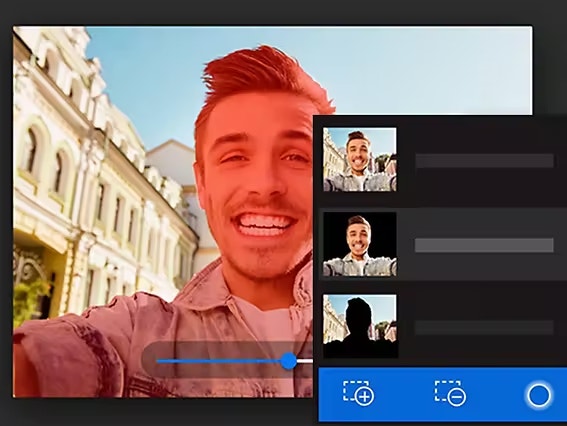
Polish your shots with intelligent tools that take care of complex tasks like cutouts, dehazing, retouching, and noise reduction. Make selective edits to two things at once to create eye-popping effects. And apply Fused Looks to change just the foreground or background of your image.
Edit, collage, and add makeup in-app.
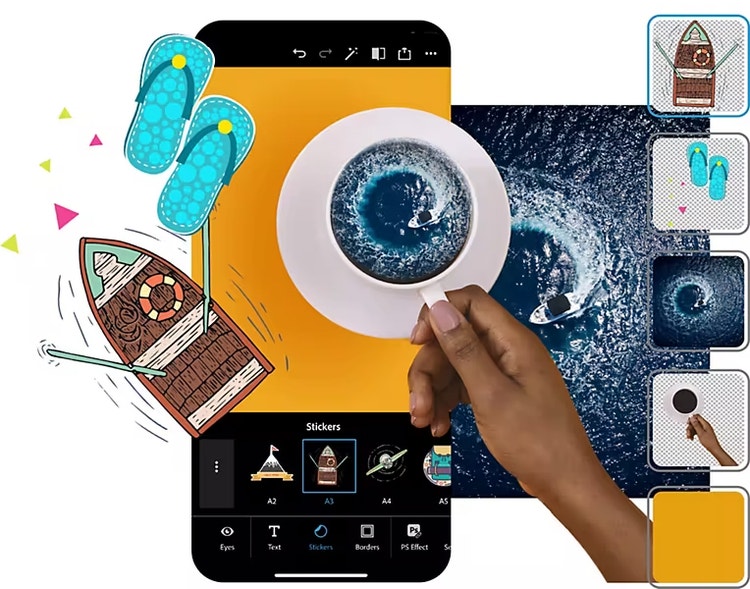
Create a scrapbook collage effect in seconds with our free automatic cutouts. Retouch photos with makeup transfer and skin smoothing presets. And make even more advanced healing edits with our premium features.
Discover your community.
Watch playbacks in the Discover feed to see how someone created a look you like, and then apply the same edits to your own photos. Post favorites directly to social media sites or messaging apps to inspire others.
Retouch for instant style.
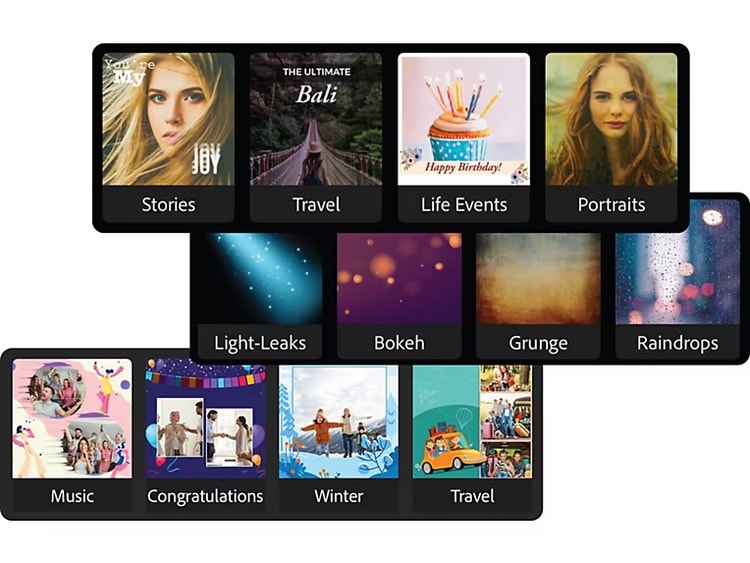
Choose from hundreds of themes and eye-catching effects that you can apply in an instant to express your creativity or amp up your message. Add more style to your images with borders, layouts, and backgrounds.
style
L spacing
Explore Photoshop Express features that make photo editing fun.
background
#001E36
Selective edits
Get more creative control with auto-masking.

Replace eyes
Open up closed eyes and remove discoloration.

Smart cuts
Create cutouts or masks for quick edits.

Intelligent themes
Choose from hundreds of styles to express yourself.

Custom sticker maker
Turn any photo into a personal sticker.

Face-aware liquify
Adjust features with subtle tweaks.

Advanced healing
Remove unwanted objects with smart corrections.

style
Three up, M spacing
background
#001E36
See all the features available in Photoshop Express.
While part of the Adobe Photoshop family, Photoshop Express is specifically built for mobile device photography. Its accessible interface enables photo collage edits and social network sharing.
Yes. You can send PSD files directly from your mobile device to Photoshop to access more advanced editing tools.
Yes, Photoshop Express is free to download. Get it on the Apple App Store, Google Play, or the Windows Store.
If Yes. Photoshop Express integrations allow you to pull your photos, selfies, HDR images, and more directly from Google Photos, Dropbox, and Facebook.
You can control how Adobe websites use cookies and similar technologies by making choices below. But note that if you disable cookies and similar technologies entirely, Adobe websites may not function properly.
Cookies are small text files stored by your web browser when you use websites. There are also other technologies that can be used for similar purposes like HTML5 Local Storage and local shared objects, web beacons, and embedded scripts. These technologies help us do things like remembering you and your preferences when you return to our sites, measure how you use the website, conduct market research, and gather information about the ads you see and interact with.
You can make choices in the menu below about what cookies and other technologies you want us to use on Adobe sites when you visit them from this browser. You can always change those choices later by clicking on the Cookie Preferences link at the bottom of the page.
If enabled:
We can improve your experience by tailoring the site and the content to things we think might be of interest
We can better keep track of your preferences — like what language you prefer to use
We will better understand your likely interests so we can provide you more relevant Adobe ads and content on non-Adobe websites and in non-Adobe apps
It will help us improve the performance of our website and those of our partners who use the Adobe Experience Cloud
If disabled:
We won’t be able to remember you from session to session so the experience may not be tailored to your interests
You’ll still have access to the content of the site but certain features that depend on cookies may not function
You’ll still see ads, they just may not be as relevant to you
General information
You can control how Adobe websites use cookies and similar technologies by making choices below. But note that if you disable cookies and similar technologies entirely, Adobe websites may not function properly.
Cookies are small text files stored by your web browser when you use websites. There are also other technologies that can be used for similar purposes like HTML5 Local Storage, web beacons, and embedded scripts. These technologies help us do things like remembering you and your preferences when you return to our sites, measure how you use the website, conduct market research, and gather information about the ads you see and interact with.
You can make choices in the menu below about what cookies and other technologies you want us to use on Adobe sites when you visit them from this browser. You can always change those choices later by clicking on the Cookie Preferences link at the bottom of the page.
If enabled:
We can improve your experience by tailoring the site and the content to things we think might be of interest
We can better keep track of your preferences — like what language you prefer to use
We will better understand your likely interests so we can provide you more relevant Adobe ads and content on non-Adobe websites and in non-Adobe apps
It will help us improve the performance of our website and those of our partners who use the Adobe Experience Cloud
If disabled:
We won’t be able to remember you from session to session so the experience may not be tailored to your interests
We’ll still count your use of our site and services
You’ll still have access to the content of the site but certain features that depend on cookies may not function
You’ll still see ads, they just may not be as relevant to you
Operate the site and core servicesOperate site and measure engagement
Always active
These cookies are required, and they are used to enable the site and related services core functionality. Without them the site could not operate, so they cannot be disabled.
These cookies enable the site and related services’ core functionality and collect statistics about user engagement, such as counting active use to help us understand trends. These cookies cannot be disabled.
Measure performance
These cookies are used to analyze site usage to measure and improve performance. Without them Adobe cannot know what content is most valued and how often unique visitors return to the site, making it hard to improve information we offer to you.
These cookies are used to analyze site usage to measure and improve performance. Without them Adobe cannot know what content is most valued, making it hard to improve information we offer to you.
Extend functionality
These cookies are used to enhance the functionality of Adobe sites such as remembering your settings and preferences to deliver a personalized experience; for example, your username, your repeated visits, preferred language, your country, or any other saved preference.
Personalize advertising
These cookies are used to enable Adobe and our partners to serve ads more relevant to your interests. Without them you will still see ads, but they might not be as relevant to you.