Adobe Acrobat

Excel to PDF converter

Drag and drop a Microsoft Excel file (XLSX or XLS) to use our Excel to PDF converter.

Excel to PDF converter

{{verb-widget-legal}}

Looking to convert from PDF to Excel? Try the PDF to Excel converter here.

PDF to Excel Converter

How to use Adobe Acrobat’s online Excel to PDF converter tool

Follow these simple steps to convert Excel to PDF online using Acrobat:
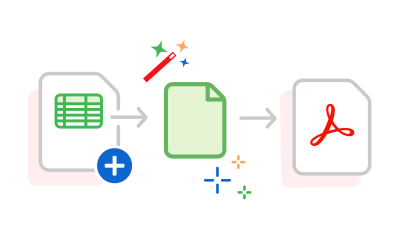
https://main--dc--adobecom.aem.page/dc-shared/assets/images/frictionless/how-to-images/excel-to-pdf-how-to.svg | A Microsoft Excel spreadsheet being converted to a PDF file

  1. Click the "Select a file” button above or drag and drop a file into the drop zone.
  2. Choose the Excel file (XLS or XLSX) you want to convert to PDF.
  3. Once you've uploaded the Excel sheet, Acrobat will automatically convert your Excel spreadsheet to a high-quality PDF file.
  4. Download your converted PDF or sign in to share it securely.

Explore more with our free converter

https://main--dc--adobecom.aem.page/dc-shared/assets/images/shared-images/frictionless/seo-icons/excel-pdf-converting.svg | A PDF and a spreadsheet with arrows showing the process of converting Excel to PDF

Convert Excel files to PDF online

Easily convert Excel files to PDF online using Adobe Acrobat. Keep your spreadsheet’s formatting intact after quick, secure conversion.

https://main--dc--adobecom.aem.page/dc-shared/assets/images/shared-images/frictionless/seo-icons/fast-pdf.svg | A clock graphic in grey and red representing how fast Excel to PDF conversions are.

Fast Excel to PDF conversion

With our online Excel to PDF converter, you can convert XLSX or XLS files to PDF in seconds. Drag and drop or upload your file easily.

https://main--dc--adobecom.aem.page/dc-shared/assets/images/shared-images/frictionless/seo-icons/document-reviews.svg | A PDF document with a comment icon showing easy shared reviews

Streamline XLS and XLSX document reviews

Once you've converted your XLS or XLSX document to a PDF, sign in to Acrobat to review, comment, and collaborate in real time with @mentions.

https://main--dc--adobecom.aem.page/dc-shared/assets/images/shared-images/frictionless/seo-icons/edit-excel.svg | A spreadsheet with a pen shows how you can edit your Excel file online

Edit Excel files online before conversion

Edit Excel spreadsheets online for free with Acrobat, then convert to PDF using Microsoft Excel for the web for quick, easy editing.

https://main--dc--adobecom.aem.page/dc-shared/assets/images/shared-images/frictionless/seo-icons/private-pdf.svg | A badge with a lock representing trusted PDF privacy

Keep your content private

Adobe values your privacy. If you don’t sign in, your Excel to PDF file will be deleted from our secure servers automatically after processing.

https://main--dc--adobecom.aem.page/dc-shared/assets/images/shared-images/frictionless/seo-icons/best-pdf.svg | A PDF showing that Adobe Acrobat online services offer the best Excel to PDF converter

A trusted Excel to PDF converter

Adobe’s Excel to PDF converter quickly and securely turns XLS/XLSX into PDFs while preserving your spreadsheet’s formatting.

#ffffff

Top use cases for Excel to PDF conversion

Convert Excel invoices and receipts to PDF

Convert Excel invoices, GST bills, or receipts to secure PDFs for easy sharing and preserving formatting.

Convert Excel reports and analysis for work

Convert Excel reports, trackers, or models to PDF for easy sharing, archiving, and printing without layout issues.

Digitise school and college spreadsheets

Convert marksheets, attendance, or logs from Excel to PDF for easy submission and consistent formatting.

Share household budgets and personal records

Convert budgets or expense sheets from Excel to PDF for easy sharing, archiving, and collaboration.

Save business plans and startup data in PDF

Convert business plans or inventory from Excel to PDF for investor, bank, or formal presentations.

Organise government forms and compliance data

Convert government forms or registers from Excel to PDF for secure sharing in official formats.

Questions? We have answers.

How can I convert Excel to PDF without downloading software?

The Acrobat online Excel to PDF converter tool allows you to convert Microsoft Excel to PDF directly online without the need to download any software to your device. You can access the online tool using any web browser and operating system, whether it's Mac, Windows or Linux. This makes it ideal for users who want a quick, cloud-based solution for converting XLS or XLSX to PDF files without installing additional applications.

If you need more advanced PDF tools, you can explore a free seven-day trial of Adobe Acrobat Pro, which gives access to:

  • PDF editing tools for text, images and layout
  • File compression to reduce PDF size
  • Tools to annotate documents with comments and highlights
  • Options to add headers, footers, or watermarks
  • File merging across Excel, Word, PowerPoint, and image formats (JPG, PNG, TIFF)
  • OCR (Optical Character Recognition) to convert scanned documents into editable text


These features can help you streamline your document workflows and repurpose existing content more efficiently.

How can I get the best results when using an Excel to PDF converter?

To convert Excel to PDF effectively:

  • Set the print area and add page breaks to control layout.
  • Use 'Fit to One Page' scaling for wide tables.
  • Choose Landscape orientation for wider spreadsheets.
  • Stick to standard fonts like Arial or Calibri.
  • Review in Print Preview before using the Excel to PDF converter to ensure a clean, professional result when converting XLSX to PDF or XLS to PDF.
What file types can I convert to PDF using the Excel to PDF converter?
The Excel to PDF converter supports a range of Microsoft Excel formats including XLS, XLSX, and CSV files. You can upload any of these to the tool and convert them into high-quality PDFs that retain the original layout and formatting. This flexibility ensures compatibility with older and newer versions of Excel spreadsheets.
Is the Excel to PDF converter online tool compatible with mobile devices?
Yes, the online Excel to PDF converter works across devices including smartphones and tablets. You can access the tool using any mobile web browser such as Chrome or Safari, and convert Excel files to PDF from your phone without installing any software. This makes it easy to manage documents on the go.
Can I convert Excel to PDF if my file contains charts or formulas?
Yes, you can convert Excel to PDF online even if your spreadsheet includes complex charts, pivot tables, or formulas. The tool preserves your file’s structure and formatting, ensuring that visual elements like graphs and embedded formulas appear clearly in the final PDF.
Will the converted PDF keep my Excel formatting and cell colours?
When you use the Excel to PDF converter, Adobe Acrobat retains your spreadsheet’s original formatting. This includes fonts, cell colours, borders, and table structures. Whether you are converting a financial report or a marksheet, your content will appear consistent in the PDF version.
Can I convert large Excel files to PDF online?
Yes, the Excel to PDF converter online supports large Excel files, including spreadsheets with multiple sheets, extensive data, and embedded charts. While upload times may vary based on file size and internet speed, Adobe Acrobat ensures that even complex XLS or XLSX files are accurately converted into high-quality PDFs with original formatting intact.
Is there a way to save Excel files as PDF files without my pages getting cut off?
Yes! To prevent text and parts of your pages from getting cut off, you can use page breaks and customise Excel settings such as orientation, page and sheet margins, and print area before saving your workbook as a PDF file. You can also explore other Acrobat online tools to organise and optimise your new document. These tools allow you to delete, rotate, reorder, extract, and insert PDF pages.
Can I customise the layout of the converted PDF?
Absolutely! Adobe Acrobat Pro lets you customise the converted PDFs such as adjusting the size, adding password protection, modifying the layout, and much more.
Can I convert a password-protected Excel file to PDF?
Yes. If you know the password, it is relatively easy to convert password-protected Excel files into a PDF. Simply insert the password to unlock the excel file, and use our Excel to PDF tool.
Can I convert multiple Excel files to PDF simultaneously?
Yes. Using the subscription version of Adobe Acrobat’s batch conversion feature, it is possible to convert multiple Excel files into PDF files at once. This way, you can save up plenty of time and effort.

More resources

Content as a Service v2 - compress-pdf - Wednesday 17 July 2024 at 11:51

Verb
excel-to-pdf

Try these Acrobat online tools

Convert from PDF

Convert to PDF

Reduce file size

Edit

Sign & Protect

Generative AI

Convert from PDF
Convert to PDF
Reduce file size
Edit
Sign & Protect
Generative AI