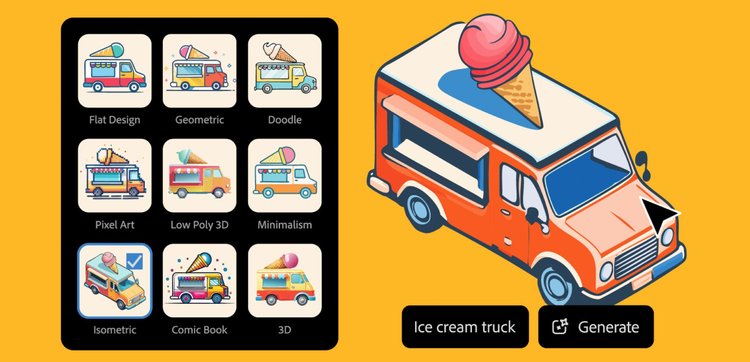
Imagine designing, editing, and scaling impressive icons faster than ever before. Now you can with Text to Vector Graphic, Illustrator’s AI vector generator powered by Adobe Firefly.
Take your icons to a more imaginative place, then build out your brand library quickly with the power of AI vector icon generator in Illustrator.
Keep colors crisp.
Create eye-catching icons using AI-generated vectors with color and detail controls that give you crisp colors and clean lines for stunning results.
Make a match.
Use Style Reference to match your color and style in a snap. AI Vector Icon Generator lets you create a cohesive look in less time.
Create detailed vectors that scale.
Generate customizable, scalable vector graphics with a simple description and Text to Vector Graphic, powered by Adobe Firefly.
Easily enhance your edits.
Streamline your workflow with endless editing and scalability capabilities. AI-generated vector icons allow you to save time without sacrificing precision.
style
Container
style
M spacing
How to generate icons with Illustrator.
Open Illustrator. If you don’t have an Illustrator subscription, sign up for a free trial. If you have Illustrator, make sure to update your app to get all the latest features like AI vector icon generator.
Locate the AI vector icon generator tools. Create a new project in Illustrator or open a pre-existing one. The Contextual Task Bar will appear at the bottom of your workspace, and settings will appear in the Properties panel. To open the AI vector icon generator panel, go to Window > Generate Vectors.
Generate your icon. Type a description like “giraffe head peeking at you” into the prompt field in the taskbar. Click Generate. Thumbnails of icon options will appear in the Properties panel. Select an option to view it on your canvas.
Fine-tune your results. Adjust the settings before you generate to get a specific outcome. Choose a Type to generate an icon. AI vector icon generator will automatically generate assets in the style of icons on your artboard unless you click the gear icon and toggle off “Match active artboard style.” Or, you can click the dropper icon to activate the Style Reference and select “Reference Images” to create icons in that style. Use a blank artboard to generate icons from only a text prompt.
Edit your icon. Once you’ve generated an icon you like, you can click Done in the taskbar and then perform quick edits like duplicating objects or recoloring. Select Recolor to open the Recolor panel, where you can adjust hues manually, or choose the Generative Recolor option to explore new color palettes with text prompts.
Go further. Open the Layers panel to select and edit individual parts of your icon. A generated icon is just the beginning — use the many precise editing tools in Illustrator to make your image your own.
style
grid width 8, Static links
background
#F5F5F5
Questions? We have answers.
Icons generated using Text to Vector Graphic are fully editable vectors. Once you generate an Icon, you can use any of the precise editing tools in Illustrator to create a logo, including Generative Recolor to explore new color palettes.
Icons generated using Text to Vector Graphic are fully editable vectors. Once you have edited your icon, go to View > Show Transparency Grid to create a transparent background. Then export your file as SVG, PNG, or your chosen file type.
You can control how Adobe websites use cookies and similar technologies by making choices below. But note that if you disable cookies and similar technologies entirely, Adobe websites may not function properly.
Cookies are small text files stored by your web browser when you use websites. There are also other technologies that can be used for similar purposes like HTML5 Local Storage and local shared objects, web beacons, and embedded scripts. These technologies help us do things like remembering you and your preferences when you return to our sites, measure how you use the website, conduct market research, and gather information about the ads you see and interact with.
You can make choices in the menu below about what cookies and other technologies you want us to use on Adobe sites when you visit them from this browser. You can always change those choices later by clicking on the Cookie Preferences link at the bottom of the page.
If enabled:
We can improve your experience by tailoring the site and the content to things we think might be of interest
We can better keep track of your preferences — like what language you prefer to use
We will better understand your likely interests so we can provide you more relevant Adobe ads and content on non-Adobe websites and in non-Adobe apps
It will help us improve the performance of our website and those of our partners who use the Adobe Experience Cloud
If disabled:
We won’t be able to remember you from session to session so the experience may not be tailored to your interests
You’ll still have access to the content of the site but certain features that depend on cookies may not function
You’ll still see ads, they just may not be as relevant to you
General information
You can control how Adobe websites use cookies and similar technologies by making choices below. But note that if you disable cookies and similar technologies entirely, Adobe websites may not function properly.
Cookies are small text files stored by your web browser when you use websites. There are also other technologies that can be used for similar purposes like HTML5 Local Storage, web beacons, and embedded scripts. These technologies help us do things like remembering you and your preferences when you return to our sites, measure how you use the website, conduct market research, and gather information about the ads you see and interact with.
You can make choices in the menu below about what cookies and other technologies you want us to use on Adobe sites when you visit them from this browser. You can always change those choices later by clicking on the Cookie Preferences link at the bottom of the page.
If enabled:
We can improve your experience by tailoring the site and the content to things we think might be of interest
We can better keep track of your preferences — like what language you prefer to use
We will better understand your likely interests so we can provide you more relevant Adobe ads and content on non-Adobe websites and in non-Adobe apps
It will help us improve the performance of our website and those of our partners who use the Adobe Experience Cloud
If disabled:
We won’t be able to remember you from session to session so the experience may not be tailored to your interests
We’ll still count your use of our site and services
You’ll still have access to the content of the site but certain features that depend on cookies may not function
You’ll still see ads, they just may not be as relevant to you
Operate the site and core servicesOperate site and measure engagement
Always active
These cookies are required, and they are used to enable the site and related services core functionality. Without them the site could not operate, so they cannot be disabled.
These cookies enable the site and related services’ core functionality and collect statistics about user engagement, such as counting active use to help us understand trends. These cookies cannot be disabled.
Measure performance
These cookies are used to analyze site usage to measure and improve performance. Without them Adobe cannot know what content is most valued and how often unique visitors return to the site, making it hard to improve information we offer to you.
These cookies are used to analyze site usage to measure and improve performance. Without them Adobe cannot know what content is most valued, making it hard to improve information we offer to you.
Extend functionality
These cookies are used to enhance the functionality of Adobe sites such as remembering your settings and preferences to deliver a personalized experience; for example, your username, your repeated visits, preferred language, your country, or any other saved preference.
Personalize advertising
These cookies are used to enable Adobe and our partners to serve ads more relevant to your interests. Without them you will still see ads, but they might not be as relevant to you.