Transform your story with customized transitions and effects.
Add professional polish to your videos with the advanced tools in Premiere. Choose from hundreds of effects and transitions, or use customizable templates for a unique look. Enjoy precise keyframing, title customization, and seamless Motion Graphics templates.
Elevate your videos using customized transitions, effects, title animations, and more built into Premiere.
Add transitions easily.
From zooms to wipes to light leaks, keep your story flowing with fresh, fully customizable transitions.
Apply built-in effects.
Add flair. Up the attitude. Or make it atmospheric. Premiere is packed with modern, cinematic effects. They're easy to tweak and tailor to your creative vision and GPU-accelerated for real-time performance.

Dial in your effects game.
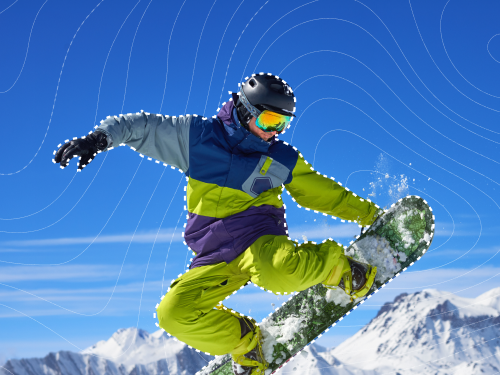
Create complex masks, composite text and graphics, and easily tackle precise effects with redesigned shape masks and new AI Object Mask.
Replace backgrounds and more.
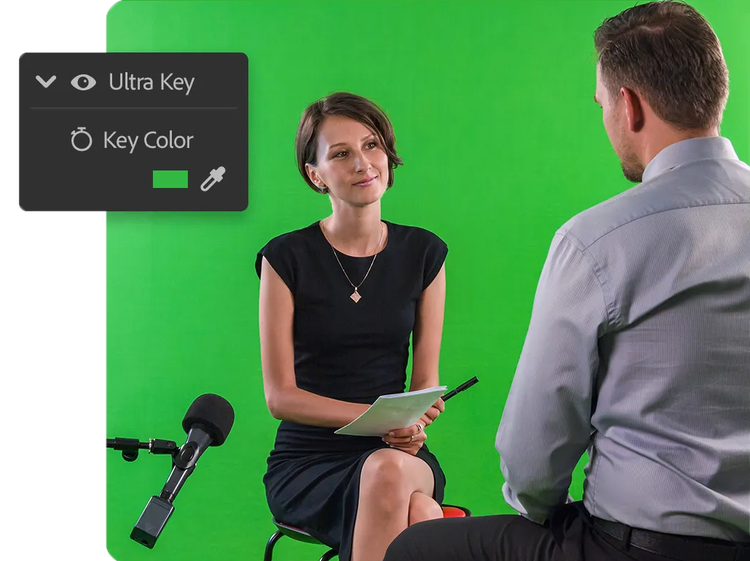
Use the advanced compositing and tracking tools in Premiere to replace green screens, combine multiple takes into one shot, or track objects with precision for targeted adjustments.
Easy animation tools for any video editor.
Bring your text and graphics to life. Simply drag and drop a transition or effect onto a clip you want to level up, then finetune every detail from speed to position in a flash.
Create advanced video effects.
Use Dynamic Link to send shots to Adobe After Effects and easily refine edges, add or remove objects, and more with Roto Brush. Your Premiere sequence will automatically update as you make changes in After Effects. Note: Requires subscription to After Effects
style
xxl spacing, static links
Questions? We have answers.
Yes, you can add video effects in Premiere by following these steps:
Open Premiere and create a new project.
Import media and add video to your timeline.
Click the Effects tab and search for an effect.
Drag the effect from the Effects panel onto the clip in the timeline.
In Adobe Premiere, you can find effects in the Effects panel at the top of the screen. To open the Effects panel, you can go to Window and select Effects.
Premiere has three main transition types: Audio transitions, Video transitions, and VR transitions. Each has transition variations to customize and choose from. The complete list of transitions in Premiere can be viewed under the Effects panel.
Which transition works best will depend on your project and style. Some of the most popular transitions in Adobe Premiere include J-cut, cross-dissolve, and seamless transitions. Other transitions you can try are cross zoom, dip to black, morph cut, flicker, overlays, digital whip pan, invert color flash, glitch transition, and more.
Yes, first, set your default transition duration in your Timeline and your default transition effects in the Effects panel. Then, press Shift+D to automatically apply the default transition effect to audio and video clips.

For video clips: Press Command+D (macOS) or Ctrl+D (Windows).
For audio clips: Press Shift+Command+D (macOS) or Shift+Ctrl+D (Windows).
Regularly at 79,30€/moAlternatively at 44,39€/moincl. VAT. Annual, billed monthly
Join over 7 million Creative Cloud Pro subscribers worldwide. Save 44% for the first year on the full version of Adobe Premiere and 20+ apps plus Adobe Firefly creative AI. Pay 44,39€/moincl. VAT for the first year and 79,30€/moincl. VAT after that. New subscribers only. See terms | See what's included
Speed up your video workflows with Adobe Firefly generative AI.
Visualize shots and effects ahead of the shoot, generate assets missed in production to complement your edit, and eliminate tedious tasks to stay focused on your creative ideas.

You can control how Adobe websites use cookies and similar technologies by making choices below. But note that if you disable cookies and similar technologies entirely, Adobe websites may not function properly.
Cookies are small text files stored by your web browser when you use websites. There are also other technologies that can be used for similar purposes like HTML5 Local Storage and local shared objects, web beacons, and embedded scripts. These technologies help us do things like remembering you and your preferences when you return to our sites, measure how you use the website, conduct market research, and gather information about the ads you see and interact with.
You can make choices in the menu below about what cookies and other technologies you want us to use on Adobe sites when you visit them from this browser. You can always change those choices later by clicking on the Cookie Preferences link at the bottom of the page.
If enabled:
We can improve your experience by tailoring the site and the content to things we think might be of interest
We can better keep track of your preferences — like what language you prefer to use
We will better understand your likely interests so we can provide you more relevant Adobe ads and content on non-Adobe websites and in non-Adobe apps
It will help us improve the performance of our website and those of our partners who use the Adobe Experience Cloud
If disabled:
We won’t be able to remember you from session to session so the experience may not be tailored to your interests
You’ll still have access to the content of the site but certain features that depend on cookies may not function
You’ll still see ads, they just may not be as relevant to you
General information
You can control how Adobe websites use cookies and similar technologies by making choices below. But note that if you disable cookies and similar technologies entirely, Adobe websites may not function properly.
Cookies are small text files stored by your web browser when you use websites. There are also other technologies that can be used for similar purposes like HTML5 Local Storage, web beacons, and embedded scripts. These technologies help us do things like remembering you and your preferences when you return to our sites, measure how you use the website, conduct market research, and gather information about the ads you see and interact with.
You can make choices in the menu below about what cookies and other technologies you want us to use on Adobe sites when you visit them from this browser. You can always change those choices later by clicking on the Cookie Preferences link at the bottom of the page.
If enabled:
We can improve your experience by tailoring the site and the content to things we think might be of interest
We can better keep track of your preferences — like what language you prefer to use
We will better understand your likely interests so we can provide you more relevant Adobe ads and content on non-Adobe websites and in non-Adobe apps
It will help us improve the performance of our website and those of our partners who use the Adobe Experience Cloud
If disabled:
We won’t be able to remember you from session to session so the experience may not be tailored to your interests
We’ll still count your use of our site and services
You’ll still have access to the content of the site but certain features that depend on cookies may not function
You’ll still see ads, they just may not be as relevant to you
Operate the site and core servicesOperate site and measure engagement
Always active
These cookies are required, and they are used to enable the site and related services core functionality. Without them the site could not operate, so they cannot be disabled.
These cookies enable the site and related services’ core functionality and collect statistics about user engagement, such as counting active use to help us understand trends. These cookies cannot be disabled.
Measure performance
These cookies are used to analyze site usage to measure and improve performance. Without them Adobe cannot know what content is most valued and how often unique visitors return to the site, making it hard to improve information we offer to you.
These cookies are used to analyze site usage to measure and improve performance. Without them Adobe cannot know what content is most valued, making it hard to improve information we offer to you.
Extend functionality
These cookies are used to enhance the functionality of Adobe sites such as remembering your settings and preferences to deliver a personalized experience; for example, your username, your repeated visits, preferred language, your country, or any other saved preference.
Personalize advertising
These cookies are used to enable Adobe and our partners to serve ads more relevant to your interests. Without them you will still see ads, but they might not be as relevant to you.