[Germán Benito]: Hey, I'm Germán Benito, [Lower third: "Germán Benito, gervisuals."] and in these five tutorials we are going to create this fantasy edit [Fantasy edit of a robed woman with a glowing staff flanked by two white doves in church ruins.
Text: "Photoshop & Adobe Firefly."] from scratch using Photoshop and Adobe Firefly.
[Cut back to Germán in studio.]
We are starting with the most important part: the background, because without a good background nothing works.
Let's do it!
This is the image I want to use as the background for our edit.
[Photo of ruined stone arches of a church under a bright blue sky.]
But before that I want to make a few changes to it.
To do that, we're going to the Adobe Firefly website
Transform your scene with Firefly
and select the option to Edit an image.
We upload the photo and describe what we want to create.
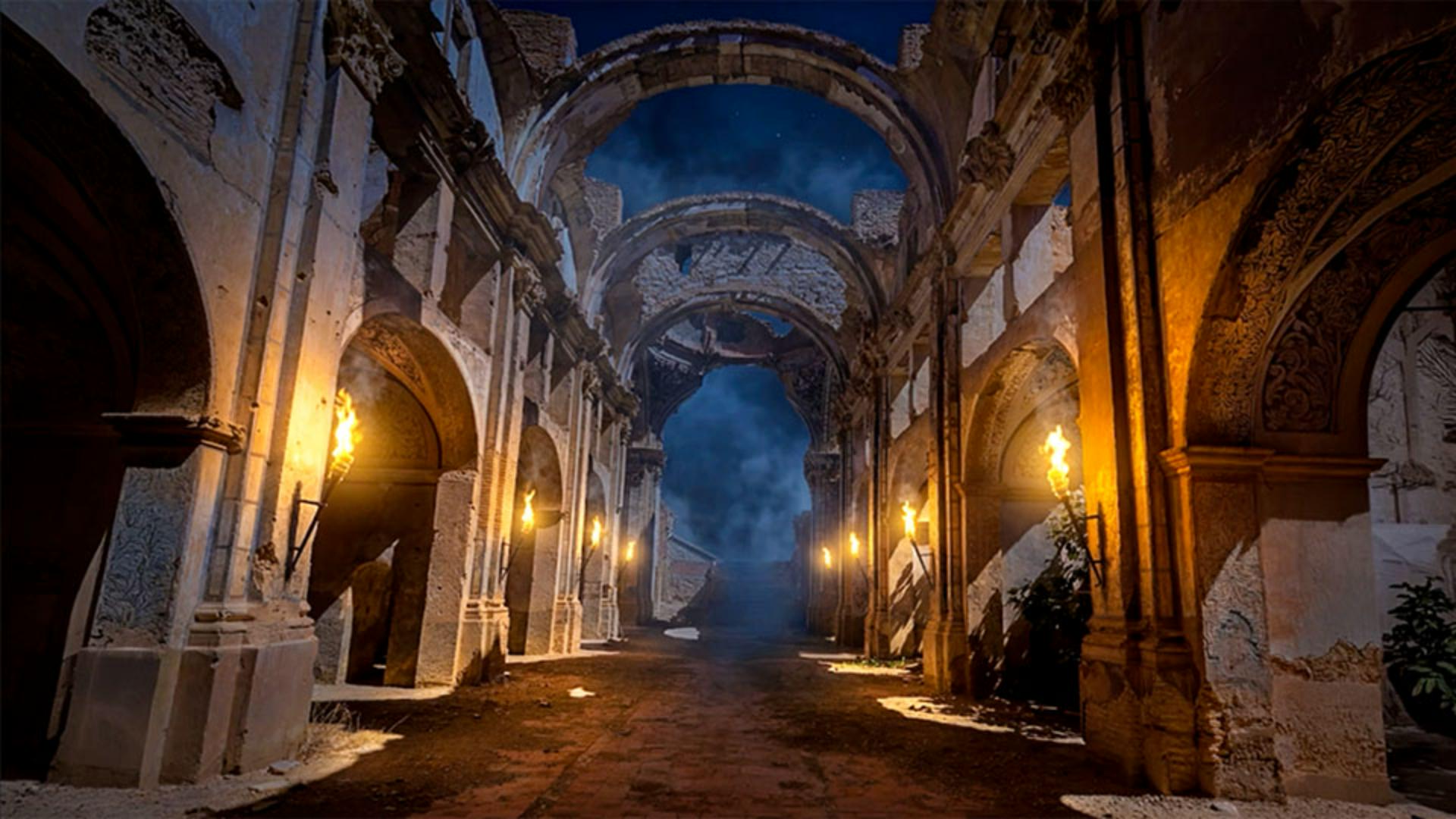
In this case, I want to transform this scene [Church ruins photo displays in the Firefly workspace.] into a nighttime environment with fog, a mysterious atmosphere, and torch lighting.
Out of all the models, I'm going to choose Gemini 3.1 (w/ Nano Banana 2) because it's currently one of the best-performing ones.
I'll keep the Aspect ratio at Landscape (4:3), which matches the original image, and I'll set the quality to 4K to get a high-resolution result.
I'm also enabling this option so Firefly can use Google references to improve the results even more.
We click Generate, [Progress bar fills.]
[Nighttime scene with wall torches and a distant figure generated.] and just look at what it created.
Honestly, it looks amazing.
So now we simply download it and open it in Photoshop.
The first thing I want to do is remove this person from the background.
For that, we'll use the Remove Tool.
We just paint over the area we want to remove, and Photoshop automatically gets rid of it.
Super simple.
Clean up and expand the canvas in Photoshop
Now I'm going to expand the canvas on the sides and also at the bottom, because I want more ground space for our character.
Without changing anything else, we click on Generative Expand, make sure the latest version of Firefly Fill & Expand is selected and hit Generate.
Photoshop gives us three different variations to choose from.
And honestly, look at this, it's incredible.
I'm going to keep the first one.
Add depth with custom lighting
And finally, I want to enhance the torch lighting a little bit more.
We create a new layer and paint a radial gradient from color to transparent.
I'm sampling a color directly from the flames.
[Orange gradient glows added over each torch flame.]
I'm painting soft light glows over each torch.
Once they're all done, we change the layer blend mode to Screen.
Look at the before and after.
Lower the Opacity slightly and our background is finished.
[Cut back to Germán in studio.]
The background is ready.
In the next video, we're creating our character and that's where Adobe Firefly starts doing some real magic.
Don't miss it.
Note: Stock assets provided are for practice purposes only. See terms.
What you’ll learn
Transform your scene with Firefly
Describe the mood you want, and Firefly changes the lighting, atmosphere, and time of day in your photo.
Clean up and expand the canvas in Photoshop
Remove distractions with a brush stroke, then expand the canvas with generative expand. Photoshop gives you several variations to choose from.
Add depth with custom lighting
To add atmosphere to your background, paint glowing highlights sampled from your scene's torches, then blend them in for warmer light.
You can control how Adobe websites use cookies and similar technologies by making choices below. But note that if you disable cookies and similar technologies entirely, Adobe websites may not function properly.
Cookies are small text files stored by your web browser when you use websites. There are also other technologies that can be used for similar purposes like HTML5 Local Storage and local shared objects, web beacons, and embedded scripts. These technologies help us do things like remembering you and your preferences when you return to our sites, measure how you use the website, conduct market research, and gather information about the ads you see and interact with.
You can make choices in the menu below about what cookies and other technologies you want us to use on Adobe sites when you visit them from this browser. You can always change those choices later by clicking on the Cookie Preferences link at the bottom of the page.
If enabled:
We can improve your experience by tailoring the site and the content to things we think might be of interest
We can better keep track of your preferences — like what language you prefer to use
We will better understand your likely interests so we can provide you more relevant Adobe ads and content on non-Adobe websites and in non-Adobe apps
It will help us improve the performance of our website and those of our partners who use the Adobe Experience Cloud
If disabled:
We won’t be able to remember you from session to session so the experience may not be tailored to your interests
You’ll still have access to the content of the site but certain features that depend on cookies may not function
You’ll still see ads, they just may not be as relevant to you
General information
You can control how Adobe websites use cookies and similar technologies by making choices below. But note that if you disable cookies and similar technologies entirely, Adobe websites may not function properly.
Cookies are small text files stored by your web browser when you use websites. There are also other technologies that can be used for similar purposes like HTML5 Local Storage, web beacons, and embedded scripts. These technologies help us do things like remembering you and your preferences when you return to our sites, measure how you use the website, conduct market research, and gather information about the ads you see and interact with.
You can make choices in the menu below about what cookies and other technologies you want us to use on Adobe sites when you visit them from this browser. You can always change those choices later by clicking on the Cookie Preferences link at the bottom of the page.
If enabled:
We can improve your experience by tailoring the site and the content to things we think might be of interest
We can better keep track of your preferences — like what language you prefer to use
We will better understand your likely interests so we can provide you more relevant Adobe ads and content on non-Adobe websites and in non-Adobe apps
It will help us improve the performance of our website and those of our partners who use the Adobe Experience Cloud
If disabled:
We won’t be able to remember you from session to session so the experience may not be tailored to your interests
We’ll still count your use of our site and services
You’ll still have access to the content of the site but certain features that depend on cookies may not function
You’ll still see ads, they just may not be as relevant to you
Operate the site and core servicesOperate site and measure engagement
Always active
These cookies are required, and they are used to enable the site and related services core functionality. Without them the site could not operate, so they cannot be disabled.
These cookies enable the site and related services’ core functionality and collect statistics about user engagement, such as counting active use to help us understand trends. These cookies cannot be disabled.
Measure performance
These cookies are used to analyze site usage to measure and improve performance. Without them Adobe cannot know what content is most valued and how often unique visitors return to the site, making it hard to improve information we offer to you.
These cookies are used to analyze site usage to measure and improve performance. Without them Adobe cannot know what content is most valued, making it hard to improve information we offer to you.
Extend functionality
These cookies are used to enhance the functionality of Adobe sites such as remembering your settings and preferences to deliver a personalized experience; for example, your username, your repeated visits, preferred language, your country, or any other saved preference.
Personalize advertising
These cookies are used to enable Adobe and our partners to serve ads more relevant to your interests. Without them you will still see ads, but they might not be as relevant to you.
Personalize advertising
These cookies are used to enable Adobe and our partners to serve ads more relevant to your interests. Without them you will still see ads, but they might not be as relevant to you.