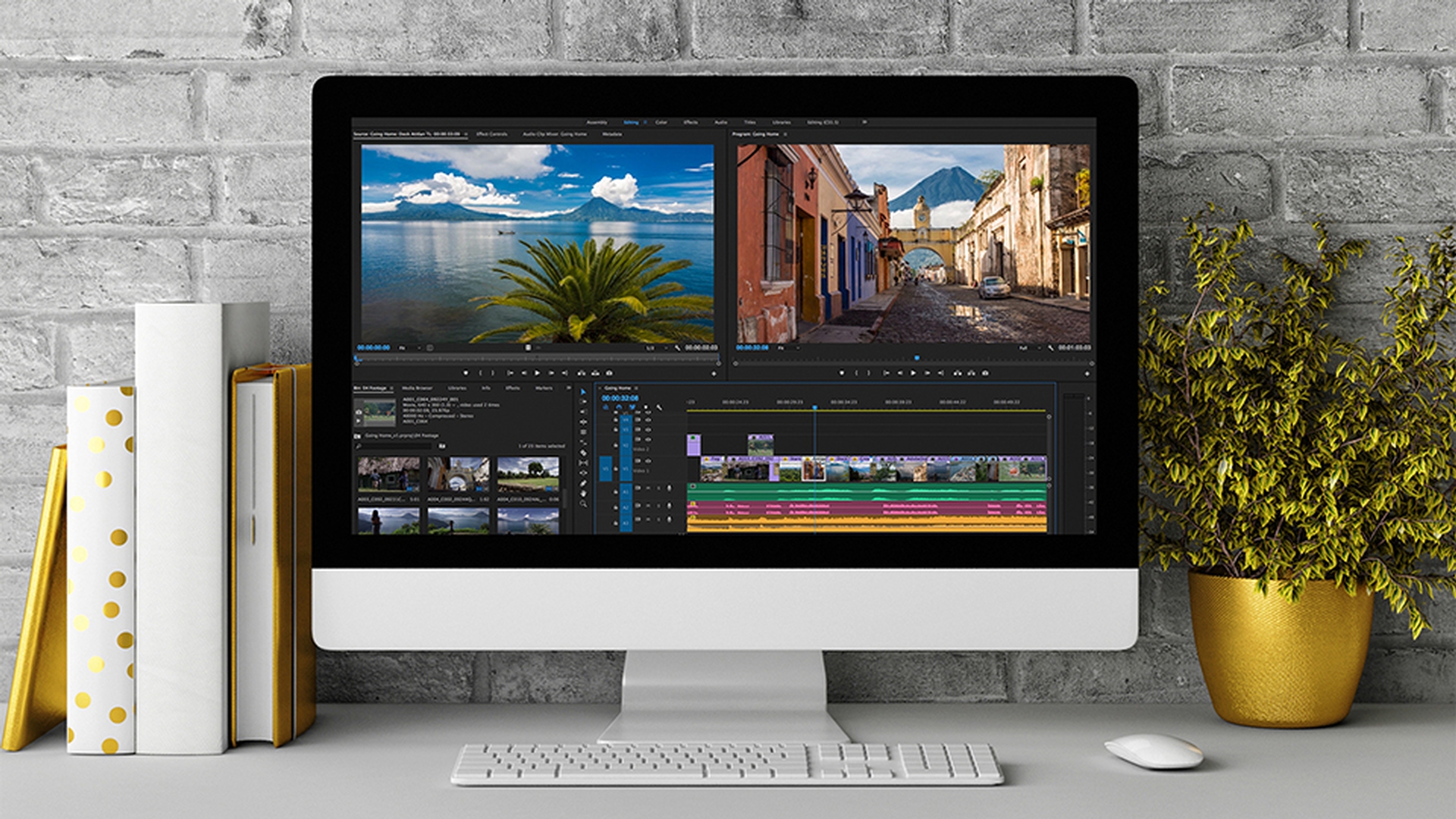
Let's take a look at the user interface of Adobe Premiere Pro CC.
The Project panel is the heart of your project;
Project panel
a place to store video, audio, graphic and title clips that you may decide to include in an edited sequence.
The Media Browser panel allows you to browse media
Media Browser
and choose items to import into your project.
Use the Timeline to build sequences from video,
Timeline
audio and graphics clips.
Waveforms appear on the audio clips, thumbnails appear on video clips.
The Source monitor allows you to view clips
Source monitor
to make creative choices about them, including making partial selections that you add to your sequence in the Timeline.
The Settings menu includes a number of options that change the way video and information are displayed.
You can also drag clips from the Project panel into the Timeline.
Clips are added to tracks; audio tracks all play together as a mix
Layered clips
while video tracks give you the ability to layer video clips on top of one another.
As you play your sequence in the Timeline you'll see in the program monitor here that clips on upper tracks appear in front of clips on lower tracks.
For example, this new title clip appears in front of the background video on the lower track.
You can zoom into the Timeline to make it easier to see precise adjustments.
Program monitor
The Program monitor is where you see the results of your work in the Timeline: Stamps, video clips, titles, transitions and so on.
The Program monitor shows you whatever the blue play head is currently positioned on in the Timeline.
Workspaces
Workspaces make it easier to access the panels you need for a particular purpose, both opening and closing panels and positioning and resizing them accordingly.
This is the Editing Workspace, which is ideal for viewing and adding clips to a sequence.
The Assembly Workspace includes a large Project panel so you can easily organize clips and add them to new sequences.
The Color Workspace gives access to additional tools and panels to perform color adjustment.
The Effects Workspace includes the Effects panel and Effect Controls panel to access, apply and adjust visual and audio effects.
The Audio Workspace includes audio mixes to make adjustments to your soundtrack.
The Titles Workspace includes tools you use to create new text and graphic clips.
So that's an overview of the user interface of Adobe Premiere Pro CC.