How Lexi Gunvaldson elevates the art of title sequencing.
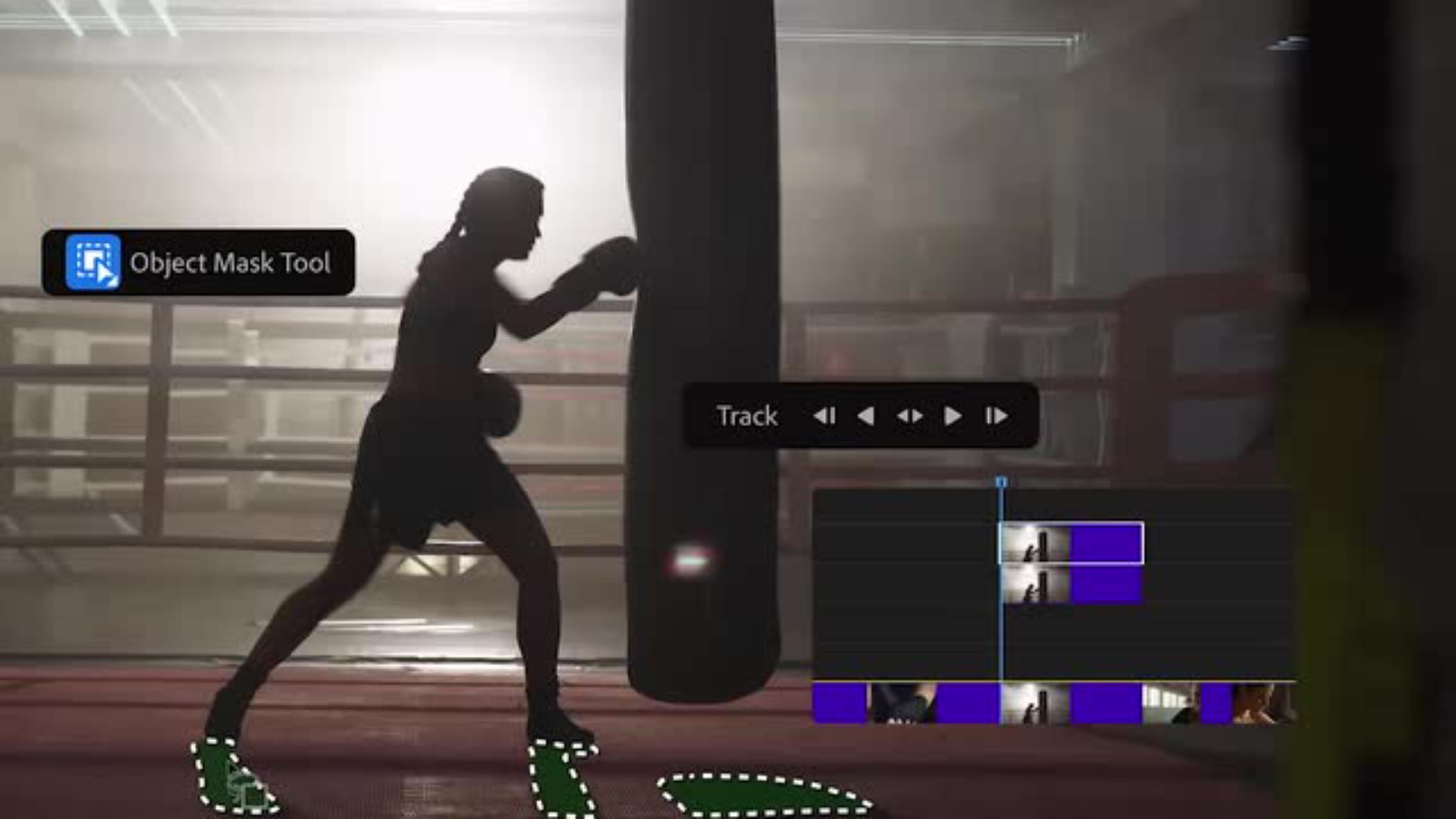
Lexi Gunvaldson of Imaginary Forces shares how she uses AI-powered Object Mask in Premiere to eliminate the tedious task of rotoscoping and create an action-packed pitch video.
Imaginary Forces is best known for our title sequences for television and film.
I think a good opening sequence sets you up for the story that you're about to watch.
Discovering the Object Mask tool in Premiere
When I opened up Premiere and I clicked on the Object Mask tool and I clicked on the subject for the first time, my first impression was literally amazement.
Disbelief.
Oh my God.
Creating layered masks and tracking subjects
The first step is selecting the objects that you want to live in front of the type.
So I'm going to duplicate the clip.
I'll select the boxer using the Object Mask tool.
So I'm going to track forward on the boxer.
I want to cut out her shadows because I think that would be kind of a fun thing to see above the type as well.
And then I duplicated it again.
So I have three layers.
I track the mask forward again and boom, it was done.
So the art director created the type for me in Photoshop,
Combining masked footage with title graphics
and I'm just going to bring that PSD into Premiere and sandwich it in between the layers that I've just created with the background.
It gives me the opportunity to try a lot of ideas really quickly so that we're not leaving any ideas on the table.
We know that we're giving them the best idea, because we were able to try everything in the amount of time that we had.
Bada bing bada boom!
“Rotoscoping is a seriously tedious task. To be able to do it in Premiere at my desktop quickly is insane.”
Step 1: Mask your subject.
Using AI-powered Object Mask, Lexi can isolate the elements she wants to integrate with the type. She started by selecting the boxer and tracking her forward to try out different movements.
Transcript not available
Step 2: Isolate the details.
Lexi added more objects to her mask, including the shadows and the boxing bag. After masking them forward she was ready to add the type.
Transcript not available
Step 3: Layer in the type.
Lexi had her art director create the titles in Photoshop, and then she brought them into Premiere. She sandwiched the type between the layers for a three-dimensional look.
Transcript not available
Step 4: Bring it all together.
Once the type was placed, Lexi adjusted the Opacity to make it look just right. “Object Mask gives me the opportunity to try a lot of things really quickly so that we're not leaving any ideas on the table."
You can control how Adobe websites use cookies and similar technologies by making choices below. But note that if you disable cookies and similar technologies entirely, Adobe websites may not function properly.
Cookies are small text files stored by your web browser when you use websites. There are also other technologies that can be used for similar purposes like HTML5 Local Storage and local shared objects, web beacons, and embedded scripts. These technologies help us do things like remembering you and your preferences when you return to our sites, measure how you use the website, conduct market research, and gather information about the ads you see and interact with.
You can make choices in the menu below about what cookies and other technologies you want us to use on Adobe sites when you visit them from this browser. You can always change those choices later by clicking on the Cookie Preferences link at the bottom of the page.
If enabled:
We can improve your experience by tailoring the site and the content to things we think might be of interest
We can better keep track of your preferences — like what language you prefer to use
We will better understand your likely interests so we can provide you more relevant Adobe ads and content on non-Adobe websites and in non-Adobe apps
It will help us improve the performance of our website and those of our partners who use the Adobe Experience Cloud
If disabled:
We won’t be able to remember you from session to session so the experience may not be tailored to your interests
You’ll still have access to the content of the site but certain features that depend on cookies may not function
You’ll still see ads, they just may not be as relevant to you
General information
You can control how Adobe websites use cookies and similar technologies by making choices below. But note that if you disable cookies and similar technologies entirely, Adobe websites may not function properly.
Cookies are small text files stored by your web browser when you use websites. There are also other technologies that can be used for similar purposes like HTML5 Local Storage, web beacons, and embedded scripts. These technologies help us do things like remembering you and your preferences when you return to our sites, measure how you use the website, conduct market research, and gather information about the ads you see and interact with.
You can make choices in the menu below about what cookies and other technologies you want us to use on Adobe sites when you visit them from this browser. You can always change those choices later by clicking on the Cookie Preferences link at the bottom of the page.
If enabled:
We can improve your experience by tailoring the site and the content to things we think might be of interest
We can better keep track of your preferences — like what language you prefer to use
We will better understand your likely interests so we can provide you more relevant Adobe ads and content on non-Adobe websites and in non-Adobe apps
It will help us improve the performance of our website and those of our partners who use the Adobe Experience Cloud
If disabled:
We won’t be able to remember you from session to session so the experience may not be tailored to your interests
We’ll still count your use of our site and services
You’ll still have access to the content of the site but certain features that depend on cookies may not function
You’ll still see ads, they just may not be as relevant to you
Operate the site and core servicesOperate site and measure engagement
Always active
These cookies are required, and they are used to enable the site and related services core functionality. Without them the site could not operate, so they cannot be disabled.
These cookies enable the site and related services’ core functionality and collect statistics about user engagement, such as counting active use to help us understand trends. These cookies cannot be disabled.
Measure performance
These cookies are used to analyze site usage to measure and improve performance. Without them Adobe cannot know what content is most valued and how often unique visitors return to the site, making it hard to improve information we offer to you.
These cookies are used to analyze site usage to measure and improve performance. Without them Adobe cannot know what content is most valued, making it hard to improve information we offer to you.
Extend functionality
These cookies are used to enhance the functionality of Adobe sites such as remembering your settings and preferences to deliver a personalized experience; for example, your username, your repeated visits, preferred language, your country, or any other saved preference.
Personalize advertising
These cookies are used to enable Adobe and our partners to serve ads more relevant to your interests. Without them you will still see ads, but they might not be as relevant to you.
Personalize advertising
These cookies are used to enable Adobe and our partners to serve ads more relevant to your interests. Without them you will still see ads, but they might not be as relevant to you.