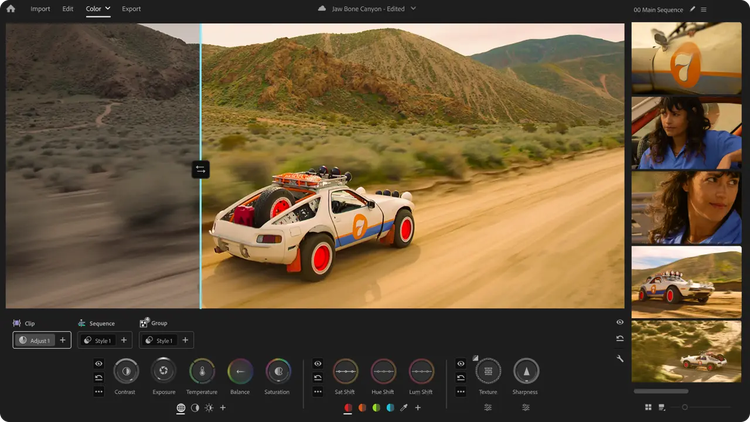
Quickly balance colors and match shots from different cameras to ensure consistency from scene to scene. Then use color grading tools to add drama, visual interest, and emotion to your story.
Experience a first-of-its-kind color grading system — purpose-built for editors — in Premiere (beta). Shape precisely, explore confidently, and push your look without ever leaving your edit.
Get a head start with color management so video looks great from the beginning.
With color management, your raw and log footage is normalized on import without LUTs, so you can drop footage from nearly any camera into Premiere and go from log to “looks great” instantly. Edit and color right away with great-looking footage and access the rich color data of your media.
Ensure color continuity from scene to scene.
Make basic corrections to exposure, white balance, and contrast in a snap with Auto Color. Preserve natural skin tones and automatically match color between shots with Color Match. Use Color Wheels to adjust shadows, midtones, and highlights, and see the difference side by side with Comparison View.
Use color to set the mood.
Natural and consistent color is just the beginning. Shape the mood of your project with tools to shift vibrance, saturation, and tint. Isolate a specific color, make precise changes to contrast, or apply a vignette to fade the edges of a clip and draw attention to a focal point.
Create a unique look.
Take advantage of Lumetri looks to emulate different film stock and give your footage a timeless cinematic look. Also, use Look Up Tables (LUTs) to create and save your own custom color grades to give your clips a unique, consistent style. Adapt your LUTs to look great with any RAW or encoded format.
Do even more with advanced color tools.
Easily edit advanced settings with Lumetri Color. Monitor color and luminance levels with total accuracy with hardware-accelerated Lumetri scopes like Vectorscope, Histogram, Parade, and Waveform.
style
L spacing
Questions? We have answers.
Color correction consists of correcting issues and balancing shots, so they look natural and unified. Color grading consists of adjusting color and contrast to serve a creative or stylistic choice.
Lumetri is the suite of professional-quality color grading and color correction tools that let you grade your footage directly on your editing timeline in Premiere.
Premiere lets you color correct videos whenever you want. Color correcting before editing can help you shape the mood and tone of your video from the start. Many video professionals choose to color correct clips in their timelines after they've finished editing.
Speed up your video workflows with Adobe Firefly generative AI.
Visualize shots and effects ahead of the shoot, generate assets missed in production to complement your edit, and eliminate tedious tasks to stay focused on your creative ideas.
You can control how Adobe websites use cookies and similar technologies by making choices below. But note that if you disable cookies and similar technologies entirely, Adobe websites may not function properly.
Cookies are small text files stored by your web browser when you use websites. There are also other technologies that can be used for similar purposes like HTML5 Local Storage and local shared objects, web beacons, and embedded scripts. These technologies help us do things like remembering you and your preferences when you return to our sites, measure how you use the website, conduct market research, and gather information about the ads you see and interact with.
You can make choices in the menu below about what cookies and other technologies you want us to use on Adobe sites when you visit them from this browser. You can always change those choices later by clicking on the Cookie Preferences link at the bottom of the page.
If enabled:
We can improve your experience by tailoring the site and the content to things we think might be of interest
We can better keep track of your preferences — like what language you prefer to use
We will better understand your likely interests so we can provide you more relevant Adobe ads and content on non-Adobe websites and in non-Adobe apps
It will help us improve the performance of our website and those of our partners who use the Adobe Experience Cloud
If disabled:
We won’t be able to remember you from session to session so the experience may not be tailored to your interests
You’ll still have access to the content of the site but certain features that depend on cookies may not function
You’ll still see ads, they just may not be as relevant to you
General information
You can control how Adobe websites use cookies and similar technologies by making choices below. But note that if you disable cookies and similar technologies entirely, Adobe websites may not function properly.
Cookies are small text files stored by your web browser when you use websites. There are also other technologies that can be used for similar purposes like HTML5 Local Storage, web beacons, and embedded scripts. These technologies help us do things like remembering you and your preferences when you return to our sites, measure how you use the website, conduct market research, and gather information about the ads you see and interact with.
You can make choices in the menu below about what cookies and other technologies you want us to use on Adobe sites when you visit them from this browser. You can always change those choices later by clicking on the Cookie Preferences link at the bottom of the page.
If enabled:
We can improve your experience by tailoring the site and the content to things we think might be of interest
We can better keep track of your preferences — like what language you prefer to use
We will better understand your likely interests so we can provide you more relevant Adobe ads and content on non-Adobe websites and in non-Adobe apps
It will help us improve the performance of our website and those of our partners who use the Adobe Experience Cloud
If disabled:
We won’t be able to remember you from session to session so the experience may not be tailored to your interests
We’ll still count your use of our site and services
You’ll still have access to the content of the site but certain features that depend on cookies may not function
You’ll still see ads, they just may not be as relevant to you
Operate the site and core servicesOperate site and measure engagement
Always active
These cookies are required, and they are used to enable the site and related services core functionality. Without them the site could not operate, so they cannot be disabled.
These cookies enable the site and related services’ core functionality and collect statistics about user engagement, such as counting active use to help us understand trends. These cookies cannot be disabled.
Measure performance
These cookies are used to analyze site usage to measure and improve performance. Without them Adobe cannot know what content is most valued and how often unique visitors return to the site, making it hard to improve information we offer to you.
These cookies are used to analyze site usage to measure and improve performance. Without them Adobe cannot know what content is most valued, making it hard to improve information we offer to you.
Extend functionality
These cookies are used to enhance the functionality of Adobe sites such as remembering your settings and preferences to deliver a personalized experience; for example, your username, your repeated visits, preferred language, your country, or any other saved preference.
Personalize advertising
These cookies are used to enable Adobe and our partners to serve ads more relevant to your interests. Without them you will still see ads, but they might not be as relevant to you.