The Adobe Product Improvement Program is designed to understand and anticipate customer needs in order to deliver world-class products and solutions. Participation in the program is by consent, and individuals can opt out at any time, per the instructions below.
System information, such as operating system, processor, and memory installed
Browser type and version
Adobe product information such as version
Adobe feature usage such as menu options or buttons selected
Device identifier
Please note that the information above is associated with your Adobe account and that Adobe requires some information for Activation purposes.
CS: CS5, CS5.5, CS6 desktop apps
CC Most pre-2014 release CC desktop apps, Muse CC (2014 release) 32-bit version.
Adobe Acrobat Standard/Pro 9, X, XI and Adobe Reader versions 9, X, XI, 2015, 2017, 2020 and DC
Adobe Photoshop Elements and Adobe Premiere Elements, Elements Organizer
Adobe Captivate
You can easily check if a product is participating by choosing Help. If you see Adobe Product Improvement Program, that product is participating in the program. Please note this program does not apply to the 2014 release of Creative Cloud desktop apps, To learn more about information collection related to these products, click here.
Information collected will be used to develop new features and improve Adobe products.
Adobe takes many precautions in protecting the information that is collected and transmitted. You can learn more about how we handle user information by reviewing Adobe’s Privacy Policy.
You choose to participate and allow Adobe to send usage data, associated with your Adobe account. Participation requires a small configuration file will be downloaded to your computer from time to time. The purpose of the file is to update the configuration of the data that is collected. If you are offline at any time, the data will be sent the next time you are online. This will not impact performance.
Additionally, for some Adobe products, you may receive a request within the product to participate in a brief two-question anonymous survey asking for feedback. Participation is optional, and separate from your participation the Adobe Product Improvement Program. Survey data will be returned directly to Adobe’s secure database for analysis by the responsible product team.
After Adobe products are installed, you will be presented with a dialog box asking if you would like to participate in the program. If you do not recall responding to this dialog box, follow these instructions:
Launch your Adobe product.
Choose Help > Adobe Product Improvement Program.
When the dialog box appears select either "Participate," "Allow" or "Yes," depending on the choice offered
To stop participating,
Choose Help > Adobe Product Improvement Program.
Select either "Do Not Participate," "Don't Allow" or "No," depending on the choice offered.
To join the program,
Choose Help > Adobe Product Improvement Program.
Select either "Participate," "Allow" or "Yes," depending on the choice offered.
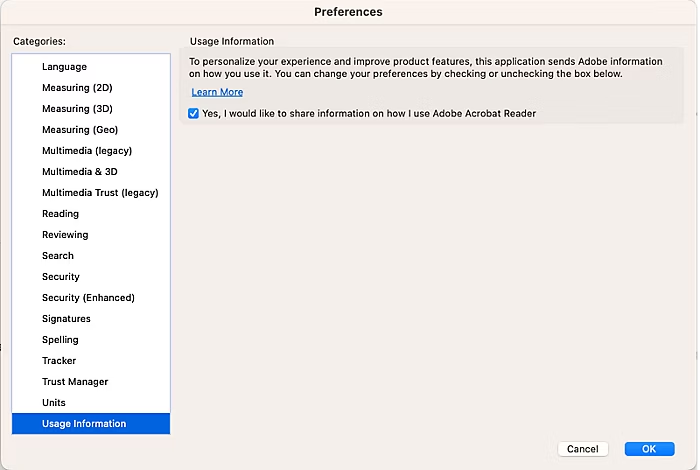
To stop participating in Reader DC,
Go to Preferences dialog > Usage Information
Uncheck the check box “Yes, I would like to share information on how I use Adobe Acrobat Reader”
Click ‘OK’ button
To join the program in Reader DC,
Go to Preferences dialog > Usage Information
Check the check box “Yes, I would like to share information on how I use Adobe Acrobat Reader”
Click ‘OK’ button
You will not receive any e-mail from Adobe regarding this program, regardless of whether you participate.
An Internet connection is required to participate in this program. However, you do not need to be connected all the time. When an Internet connection becomes available, the information is automatically transmitted with minimal impact to your connection.
No, the information cannot be displayed. This program is designed to work for millions of users without affecting their product use, so the data is sent automatically only after the product is closed. The data is also encoded so that it can be processed efficiently.
Information is collected as long as you use the product version for which you have agreed to participate or until you decide to stop participating in the program.
The optional demographic information helps us understand features used in your particular job, industry, and company size, so we can develop better workflows and features to suit your needs.
Diese Adobe-Website passt nicht zu deinem Standort.
Basierend auf deinem Standort empfehlen wir dir die Website für Deutschland. Dort findest du regionale Angebote und Preise.
You can control how Adobe websites use cookies and similar technologies by making choices below. But note that if you disable cookies and similar technologies entirely, Adobe websites may not function properly.
Cookies are small text files stored by your web browser when you use websites. There are also other technologies that can be used for similar purposes like HTML5 Local Storage and local shared objects, web beacons, and embedded scripts. These technologies help us do things like remembering you and your preferences when you return to our sites, measure how you use the website, conduct market research, and gather information about the ads you see and interact with.
You can make choices in the menu below about what cookies and other technologies you want us to use on Adobe sites when you visit them from this browser. You can always change those choices later by clicking on the Cookie Preferences link at the bottom of the page.
If enabled:
We can improve your experience by tailoring the site and the content to things we think might be of interest
We can better keep track of your preferences — like what language you prefer to use
We will better understand your likely interests so we can provide you more relevant Adobe ads and content on non-Adobe websites and in non-Adobe apps
It will help us improve the performance of our website and those of our partners who use the Adobe Experience Cloud
If disabled:
We won’t be able to remember you from session to session so the experience may not be tailored to your interests
You’ll still have access to the content of the site but certain features that depend on cookies may not function
You’ll still see ads, they just may not be as relevant to you
General information
You can control how Adobe websites use cookies and similar technologies by making choices below. But note that if you disable cookies and similar technologies entirely, Adobe websites may not function properly.
Cookies are small text files stored by your web browser when you use websites. There are also other technologies that can be used for similar purposes like HTML5 Local Storage, web beacons, and embedded scripts. These technologies help us do things like remembering you and your preferences when you return to our sites, measure how you use the website, conduct market research, and gather information about the ads you see and interact with.
You can make choices in the menu below about what cookies and other technologies you want us to use on Adobe sites when you visit them from this browser. You can always change those choices later by clicking on the Cookie Preferences link at the bottom of the page.
If enabled:
We can improve your experience by tailoring the site and the content to things we think might be of interest
We can better keep track of your preferences — like what language you prefer to use
We will better understand your likely interests so we can provide you more relevant Adobe ads and content on non-Adobe websites and in non-Adobe apps
It will help us improve the performance of our website and those of our partners who use the Adobe Experience Cloud
If disabled:
We won’t be able to remember you from session to session so the experience may not be tailored to your interests
We’ll still count your use of our site and services
You’ll still have access to the content of the site but certain features that depend on cookies may not function
You’ll still see ads, they just may not be as relevant to you
Operate the site and core servicesOperate site and measure engagement
Always active
These cookies are required, and they are used to enable the site and related services core functionality. Without them the site could not operate, so they cannot be disabled.
These cookies enable the site and related services’ core functionality and collect statistics about user engagement, such as counting active use to help us understand trends. These cookies cannot be disabled.
Measure performance
These cookies are used to analyze site usage to measure and improve performance. Without them Adobe cannot know what content is most valued and how often unique visitors return to the site, making it hard to improve information we offer to you.
These cookies are used to analyze site usage to measure and improve performance. Without them Adobe cannot know what content is most valued, making it hard to improve information we offer to you.
Extend functionality
These cookies are used to enhance the functionality of Adobe sites such as remembering your settings and preferences to deliver a personalized experience; for example, your username, your repeated visits, preferred language, your country, or any other saved preference.
Personalize advertising
These cookies are used to enable Adobe and our partners to serve ads more relevant to your interests. Without them you will still see ads, but they might not be as relevant to you.