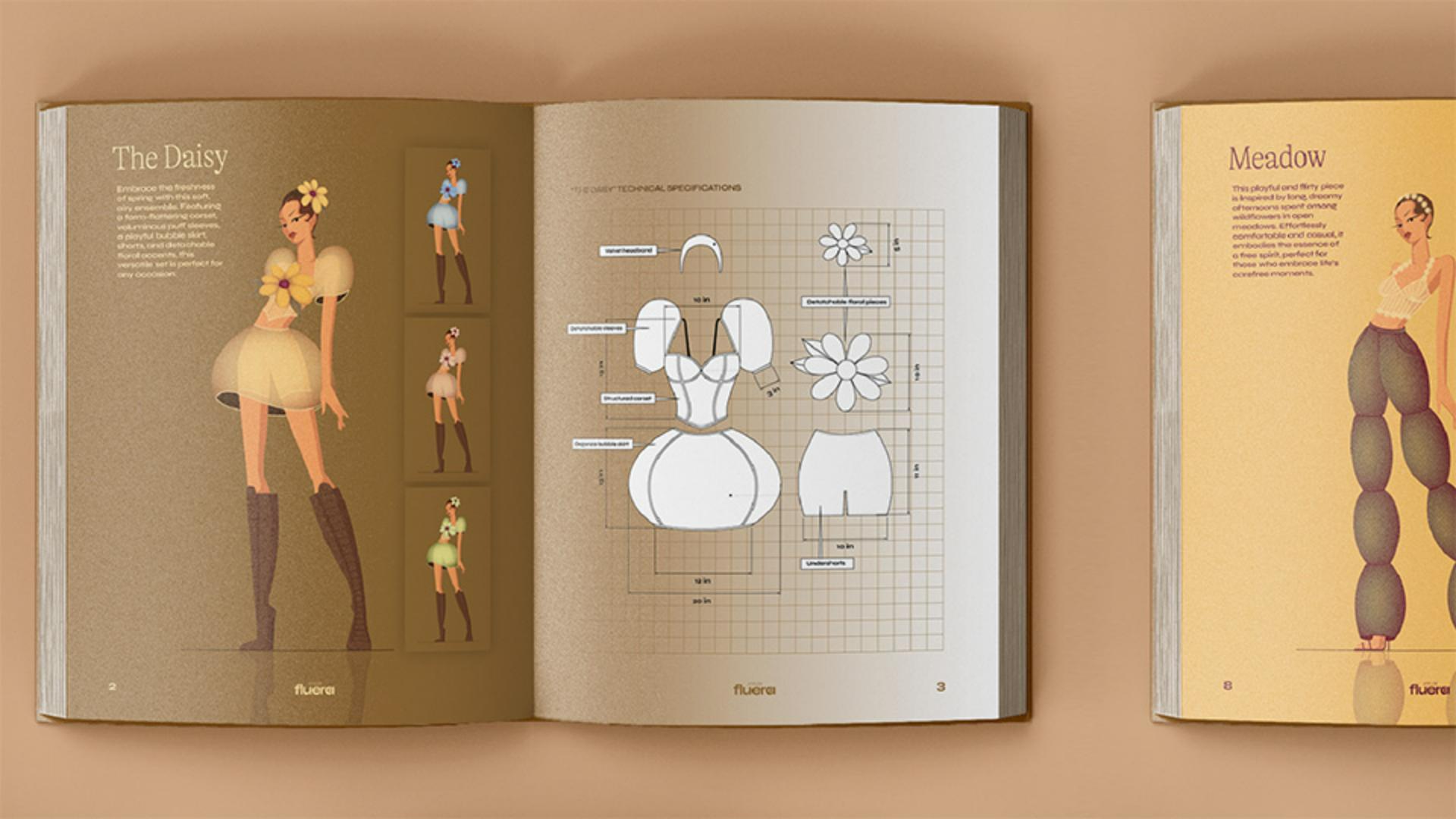
In this final tutorial, I'm going to walk you through the process of taking your illustrations and packaging them up into a lookbook.
So, the way that I've decided to lay this out is to have a large image of my illustration over on the left page of my spread, along with some descriptive text, and in this section here I want to have a few different colorways.
So, to create these color variations,
Creating colorways with recolor artwork
I'm going to lock all of the shapes of my base character.
Next, we're going to select the entire outfit, navigate to Edit, Edit Colors and then select Recolor Artwork...
Now when you see this Color Wheel, you can start to tweak the positioning of these different colors like so.
You can choose to have your colors linked as I have them here by making sure you have this Link icon selected, or if you unlink, you will have more control over individual colors.
And it's that easy.
So, I've gone ahead and tweaked all my colors in this composition to create a blue version, which I've added to my lookbook, in addition to this pink and green version too.
Designing technical specifications and flats
So on this side of the spread, I want to include detailed technical specifications of my outfit.
The reason why this is important is because our fashion illustration that we drew over here is a more artistic representation.
And in some cases, we may also want to make sure that we're communicating realistic proportions and dimensions in our design.
So, to create these, it's best to start with a base model with realistic proportions.
And then you essentially want to use a black stroke with a white fill and start creating very clean, accurate and symmetrical shapes and lines.
If you have certain pieces that are overlapping each other, you can pull them out over to the side to make sure that you're clearly showing each piece.
Once you're done, you can remove that base model altogether and you can create labels using simple shapes and the Text Tool like so.
You will also want to add dimensions too.
And luckily Illustrator makes that so easy for us.
You will find the Dimension Tool over in your Toolbar,
Adding accurate measurements with the dimension tool
and once you select it, navigate over to the Settings icon.
In here, you can go ahead and select your Units, the Precision, in other words, how many decimal values you want to see, as well as your Scale.
And you also have a range of options for styling all the lines as well as the text.
So now I'm going to select my Linear Dimension Tool and start marking out some of those main lengths and widths like so.
So here is what that will look like once I have all my dimensions applied, and I've also gone ahead and done the same for the rest of the outfits in the collection.
Finalizing and presenting the fashion lookbook
And now I have a finished fashion lookbook for Atelier Fluera, which I can send to my client and/or use as a portfolio piece.
So that's it.
You now have the tools and knowledge to go ahead and bring your fashion illustrations to life using Adobe Illustrator.
Happy illustrating.
What you’ll learn
Experiment with colorways
Discover creative possibilities by recoloring your designs while preserving tonal harmony.
Create accurate final drawings
Use dedicated tools and simple shapes to make precise drawings with measurements for professional-quality artwork.
Create a standout presentation
Polish your designs to ensure they’re ready for a lookbook or portfolio that leaves a lasting impression.
You can control how Adobe websites use cookies and similar technologies by making choices below. But note that if you disable cookies and similar technologies entirely, Adobe websites may not function properly.
Cookies are small text files stored by your web browser when you use websites. There are also other technologies that can be used for similar purposes like HTML5 Local Storage and local shared objects, web beacons, and embedded scripts. These technologies help us do things like remembering you and your preferences when you return to our sites, measure how you use the website, conduct market research, and gather information about the ads you see and interact with.
You can make choices in the menu below about what cookies and other technologies you want us to use on Adobe sites when you visit them from this browser. You can always change those choices later by clicking on the Cookie Preferences link at the bottom of the page.
If enabled:
We can improve your experience by tailoring the site and the content to things we think might be of interest
We can better keep track of your preferences — like what language you prefer to use
We will better understand your likely interests so we can provide you more relevant Adobe ads and content on non-Adobe websites and in non-Adobe apps
It will help us improve the performance of our website and those of our partners who use the Adobe Experience Cloud
If disabled:
We won’t be able to remember you from session to session so the experience may not be tailored to your interests
You’ll still have access to the content of the site but certain features that depend on cookies may not function
You’ll still see ads, they just may not be as relevant to you
General information
You can control how Adobe websites use cookies and similar technologies by making choices below. But note that if you disable cookies and similar technologies entirely, Adobe websites may not function properly.
Cookies are small text files stored by your web browser when you use websites. There are also other technologies that can be used for similar purposes like HTML5 Local Storage, web beacons, and embedded scripts. These technologies help us do things like remembering you and your preferences when you return to our sites, measure how you use the website, conduct market research, and gather information about the ads you see and interact with.
You can make choices in the menu below about what cookies and other technologies you want us to use on Adobe sites when you visit them from this browser. You can always change those choices later by clicking on the Cookie Preferences link at the bottom of the page.
If enabled:
We can improve your experience by tailoring the site and the content to things we think might be of interest
We can better keep track of your preferences — like what language you prefer to use
We will better understand your likely interests so we can provide you more relevant Adobe ads and content on non-Adobe websites and in non-Adobe apps
It will help us improve the performance of our website and those of our partners who use the Adobe Experience Cloud
If disabled:
We won’t be able to remember you from session to session so the experience may not be tailored to your interests
We’ll still count your use of our site and services
You’ll still have access to the content of the site but certain features that depend on cookies may not function
You’ll still see ads, they just may not be as relevant to you
Operate the site and core servicesOperate site and measure engagement
Always active
These cookies are required, and they are used to enable the site and related services core functionality. Without them the site could not operate, so they cannot be disabled.
These cookies enable the site and related services’ core functionality and collect statistics about user engagement, such as counting active use to help us understand trends. These cookies cannot be disabled.
Measure performance
These cookies are used to analyze site usage to measure and improve performance. Without them Adobe cannot know what content is most valued and how often unique visitors return to the site, making it hard to improve information we offer to you.
These cookies are used to analyze site usage to measure and improve performance. Without them Adobe cannot know what content is most valued, making it hard to improve information we offer to you.
Extend functionality
These cookies are used to enhance the functionality of Adobe sites such as remembering your settings and preferences to deliver a personalized experience; for example, your username, your repeated visits, preferred language, your country, or any other saved preference.
Personalize advertising
These cookies are used to enable Adobe and our partners to serve ads more relevant to your interests. Without them you will still see ads, but they might not be as relevant to you.
Personalize advertising
These cookies are used to enable Adobe and our partners to serve ads more relevant to your interests. Without them you will still see ads, but they might not be as relevant to you.