[Seán Duggan]: If you like to photograph landscapes and edit on your mobile device, you're going to love the AI-powered Scene Enhance Quick Actions in Lightroom on mobile that'll let you quickly adjust specific areas in a photo.
Hi, I'm Seán Duggan with the Adobe Learn team.
Let's take a look at the Scene Enhance feature that you can use to emphasize or de-emphasize different areas in a landscape scene, such as the sky, mountains, water, and more.
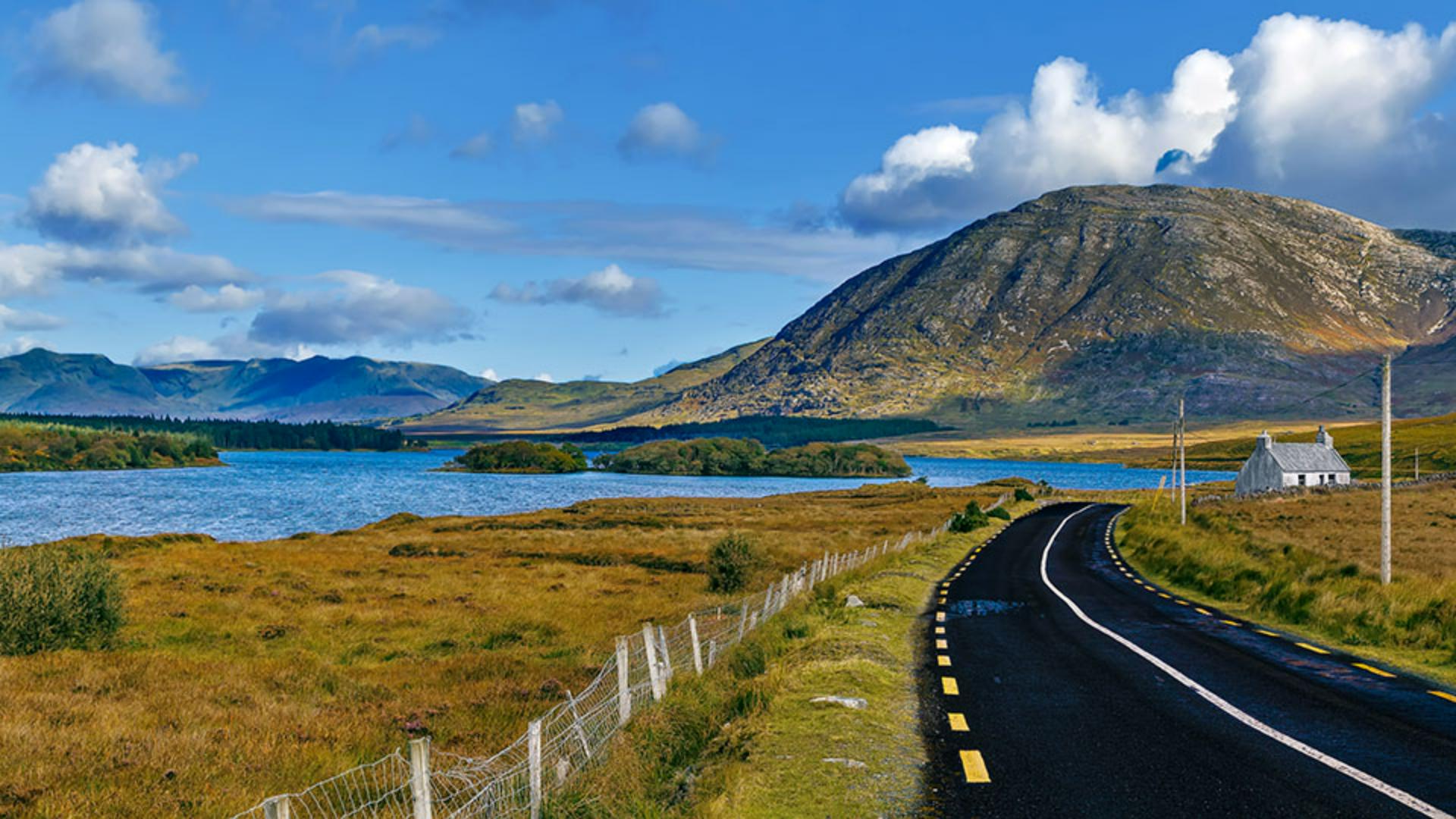
Let's get started with this image of a beautiful Irish landscape.
Here in the Edit screen,
Accessing scene enhance quick actions
I'll tap the Magic Wand to open the Quick Actions.
Lightroom will analyze the image to determine which Quick Actions to suggest for this photo.
If there was a person in this image, Quick Actions would suggest additional options that are relevant for that type of photo.
Next, I'll tap Scene and Lightroom will analyze the scene.
Right away it offers up several Presets that you can try.
When you select one of the Presets, you can use the Amount slider to either reduce or increase the strength of the effect.
And here's a quick tip: Tap the image so that you can see just the photo.
Then tap it again to bring back the controls.
I'll tap the thumbnail for None to get back to the original image.
I'll swipe up on the lower part of the screen.
Understanding detected scene areas
In addition to sliders for the Subject and the Background, you can see that Lightroom has detected several distinct areas in the scene.
For this image, it's found the Sky, Mountains, Vegetation, Water, Artificial Ground, and Natural Ground.
It even recognizes the house and provides a slider for Architecture.
With these controls, you can either emphasize or de-emphasize those specific areas.
I can enhance the Sky with more contrast and color saturation, or I can take it in the other direction.
I think I'll leave the Sky the way it was, so I'll double tap on the circular slider control to reset that.
That shortcut works with any slider in Lightroom on mobile.
Emphasizing mountains, water, and ground
With the Mountain, moving the slider to the left reduces the contrast, making it appear flat and dull.
And if I move the slider the other way, the contrast and the clarity are increased, which makes it more visually prominent in the scene.
So depending on the type of scene area, there are different adjustments being applied.
Next, I'll emphasize the Water by moving the slider to the right to enhance the blue.
I also want to explore some changes to the road which Lightroom has identified as Artificial Ground.
I'll move the slider to the right to boost the contrast and enhance the surface texture on the road.
There, that looks good.
If I press and hold on the image, you can see a before a view, and when I lift my finger, we see the after view showing the changes that I made to the mountain, the water, and the road.
The great thing about Quick Actions and Scene Enhance is that you can apply changes to specific parts of the image without having to make selections or do manual masking, because Lightroom is creating the masks for you.
Let me show you what I mean.
Exploring auto-generated masks from scene enhance
I'll tap the Checkmark in the lower right to apply the Scene Enhance changes.
In the lower row of icons, you can see that there's a dot below the Masking icon.
This means that there are now masks for this image.
I'll tap that icon to open the Masking controls.
On the right side, you can see the thumbnails for the three masks that were created when I applied Scene Enhance to the mountain, the water, and the road.
I can drag this tab at the bottom to expand the Masks panel, and you can see their names.
Since Lightroom has created masks for these areas, I can use them to apply other edits.
Refining scene masks with additional edits
For instance, I want the road to look much darker.
I'll tap the thumbnail for the Road mask, and then I'll go to the Light panel and I'll make some adjustments with the Exposure and Contrast sliders.
I'll also increase the Highlights to brighten the lines on the road.
Here we go.
That looks great.
And that's exactly what I had in mind.
I'll tap the Checkmark to apply that.
I'll press on the image to see the before view, and then release to see the after view with all the adjustments.
That's definitely an improvement.
I love having all these incredible possibilities for image processing right here on my phone.
Quick Actions and Scene Enhance in Lightroom on mobile have changed the way that I edit on the go because in addition to being very convenient, they're also really good.
I can go from an original photo to sharing an improved and polished version in no time.
Now it's your turn.
Check out these great features with some of your own photos.
Note: Stock assets provided are for practice purposes only. See terms.
What you’ll learn
Enhance specific areas in a landscape scene
Tap the magic wand icon to open the Quick Actions, then tap Scene. Lightroom will analyse your photo and provide a list of different elements in the scene such as Sky, Mountains, Water, Vegetation, Natural Ground, Artificial Ground, and even Architecture. Choose an element to modify and use the slider to emphasize or de-emphasize that part of the scene. In addition to elements that are specific to the image you’re working with, there are also options for the Subject and Background.
Take advantage of the masks created by Scene Enhance
When you enhance a landscape element in the scene, Lightroom creates a mask that you can use to apply further edits. Tap the circular Masking icon to open the Masks panel and view the masks that were created with Scene Enhance. Tap a mask to make it active and then apply additional changes.
You can control how Adobe websites use cookies and similar technologies by making choices below. But note that if you disable cookies and similar technologies entirely, Adobe websites may not function properly.
Cookies are small text files stored by your web browser when you use websites. There are also other technologies that can be used for similar purposes like HTML5 Local Storage and local shared objects, web beacons, and embedded scripts. These technologies help us do things like remembering you and your preferences when you return to our sites, measure how you use the website, conduct market research, and gather information about the ads you see and interact with.
You can make choices in the menu below about what cookies and other technologies you want us to use on Adobe sites when you visit them from this browser. You can always change those choices later by clicking on the Cookie Preferences link at the bottom of the page.
If enabled:
We can improve your experience by tailoring the site and the content to things we think might be of interest
We can better keep track of your preferences — like what language you prefer to use
We will better understand your likely interests so we can provide you more relevant Adobe ads and content on non-Adobe websites and in non-Adobe apps
It will help us improve the performance of our website and those of our partners who use the Adobe Experience Cloud
If disabled:
We won’t be able to remember you from session to session so the experience may not be tailored to your interests
You’ll still have access to the content of the site but certain features that depend on cookies may not function
You’ll still see ads, they just may not be as relevant to you
General information
You can control how Adobe websites use cookies and similar technologies by making choices below. But note that if you disable cookies and similar technologies entirely, Adobe websites may not function properly.
Cookies are small text files stored by your web browser when you use websites. There are also other technologies that can be used for similar purposes like HTML5 Local Storage, web beacons, and embedded scripts. These technologies help us do things like remembering you and your preferences when you return to our sites, measure how you use the website, conduct market research, and gather information about the ads you see and interact with.
You can make choices in the menu below about what cookies and other technologies you want us to use on Adobe sites when you visit them from this browser. You can always change those choices later by clicking on the Cookie Preferences link at the bottom of the page.
If enabled:
We can improve your experience by tailoring the site and the content to things we think might be of interest
We can better keep track of your preferences — like what language you prefer to use
We will better understand your likely interests so we can provide you more relevant Adobe ads and content on non-Adobe websites and in non-Adobe apps
It will help us improve the performance of our website and those of our partners who use the Adobe Experience Cloud
If disabled:
We won’t be able to remember you from session to session so the experience may not be tailored to your interests
We’ll still count your use of our site and services
You’ll still have access to the content of the site but certain features that depend on cookies may not function
You’ll still see ads, they just may not be as relevant to you
Operate the site and core servicesOperate site and measure engagement
Always active
These cookies are required, and they are used to enable the site and related services core functionality. Without them the site could not operate, so they cannot be disabled.
These cookies enable the site and related services’ core functionality and collect statistics about user engagement, such as counting active use to help us understand trends. These cookies cannot be disabled.
Measure performance
These cookies are used to analyze site usage to measure and improve performance. Without them Adobe cannot know what content is most valued and how often unique visitors return to the site, making it hard to improve information we offer to you.
These cookies are used to analyze site usage to measure and improve performance. Without them Adobe cannot know what content is most valued, making it hard to improve information we offer to you.
Extend functionality
These cookies are used to enhance the functionality of Adobe sites such as remembering your settings and preferences to deliver a personalized experience; for example, your username, your repeated visits, preferred language, your country, or any other saved preference.
Personalize advertising
These cookies are used to enable Adobe and our partners to serve ads more relevant to your interests. Without them you will still see ads, but they might not be as relevant to you.
Personalize advertising
These cookies are used to enable Adobe and our partners to serve ads more relevant to your interests. Without them you will still see ads, but they might not be as relevant to you.