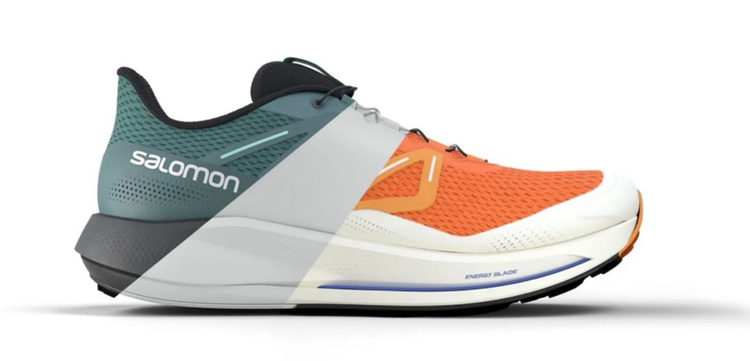
3D shoe design enhances the efficiency, precision, sustainability, and overall quality of footwear design and production. Learning how to design footwear in 3D is also a great way to break into the footwear industry and express your creativity in a unique field.
There are many benefits to designing footwear with 3D tools. Traditionally, every product was prototyped physically before being manufactured. Designers could sketch their ideas first, but the process was time-consuming and required them to make a lot of physical samples as well. Here are some of the main benefits of 3D shoe design in practice:
1. Precision: 3D design allows for high levels of precision in every design choice. Being able to visualize a product in three dimensions while still in the early phases of production allows for a heightened level of accuracy compared to a sketch.
2. Cost reduction: 3D shoe design reduces manufacturing costs by eliminating the need for multiple physical prototypes.
3. Sustainability: Manufacturers can reduce waste and contribute to sustainability efforts by optimizing shoe designs to minimize material usage while maintaining functionality and aesthetics.
4. Rapid prototyping: 3D shoe design is great for iterating on ideas quickly. Design choices are non-destructive by nature in 3D programs, so a designer can make changes quickly.
5. Collaboration: 3D design tools enable designers, manufacturers, and stakeholders to collaborate digitally. This makes it easy to review and modify designs to avoid any potential upsets during the manufacturing process.
6. Quality control: Thorough quality control can begin before a shoe is ever created through the precision and realism obtainable with 3D design tools.
Process of 3D shoe design.
If you’d like to explore the process of designing a shoe in 3D yourself, here’s an overview of the process.
1. Concepting phase: The first step to creating a shoe is identifying what kind of shoe you want to make through researching fashion trends and conducting audience and market analysis. This is the time to sketch ideas in 2D and start homing in on simple concepts.
2. 3D Modeling: Once you’ve settled on a direction, it’s time to take your ideas into a 3D modeling software and start creating. If you’re new to 3D design and would like to practice, check out our pre-modeled shoes in the Substance 3D Assets library. These are a great place to start learning.
3. Detailing and texturing: After you’ve finished modeling, the next step is to apply materials and textures onto it to mimic how the shoe would look in real life. With the help of the industry-leading texture painter, Substance 3D Painter, you can easily add details like stitching to your model.
4. Prototyping & production: Once you’ve settled on the perfect design, you’re ready to find a manufacturer, prepare the design for production, and see your idea come to life.
style
Center, grid width 8, static links
style
Center, grid width 8, l-spacing-top, two-up
Challenges of 3D shoe design.
Despite the clear benefits of 3D design, implementing a new software comes with many challenges. If you’re new to 3D design, you’ll experience a steep learning curve. 3D software is robust and usually involves thinking and approaching design tasks very differently than you might be used to.
This means becoming proficient with 3D software requires learning countless tools, memorizing short cuts, learning UI, and spending time to understand the software capabilities. You may feel your design abilities become limited by your knowledge of the software. Fortunately, this can be mitigated through practice and study with the help of online tools and tutorials.
Applications of 3D shoe design.
There are many applications to 3D shoe design, beyond actual production of a shoe. Having realistic 3D models of your products, like footwear, is beneficial in marketing and sales as well. In the world of online retail, highly realistic 3D images are a great way for potential customers to experience a product that they can’t view in person.
Software for making 3D shoe models.
As leaders in creative software, we recommend Adobe Substance 3D for all your 3D design needs. Our tools cover many aspects of a typical 3D pipeline, with enough flexibility to benefit someone looking to try 3D shoe design.
Types of 3D shoe design software.
1. Modeling: First things first, you’re going to need software to help you create the basic shape of the shoe. Substance 3D Modeler is a great solution with seamless interconnectivity with other Substance 3D apps.
2. Material Creation: We offer two powerful apps to assist in material creation, so you can give your shoe the perfect look.
Substance 3D Designer: An academy-award winning app that allows for powerful and dynamic material creation using a node-based workflow. This app has a steep learning curve but offers some of the most dynamic material creation available.
Substance 3D Sampler: Sampler allows you to create lifelike materials from a real-world photograph, allowing designers to streamline their creative process and also match real world materials you may be using for your shoe design as well.
3. Texture painting: Once you’ve got the materials, having a tool that helps you apply them to the model is the final step to making the perfect 3D shoe design. That’s where Substance 3D Painter comes in.
4. Rendering: Finally, you’ll need 3D software that allows you to render final images of your design so you can see each piece of footwear in context, create sales and marketing materials, or provide references to a manufacturer. Substance 3D Stager can make handling all these tasks a breeze.
Cost of software.
3D software can be expensive. For many new designers, this can be a barrier to entry into 3D design. That’s why we offer a single subscription that covers all the software you’ll need to succeed in 3D footwear design. Read more about our plans and offerings in our pricing guide.
Future of 3D shoe design.
The future of shoe design is likely to be shaped by a combination of technological advancements, changing consumer preferences, and sustainability considerations. 3D is sure to play a unique role in empowering the designers who imagine and create the shoes we will all be wearing for many years to come.
style
Center, grid width 8, static links
Image by Salomon.
Create detailed shoe designs with Adobe Substance 3D.
Now is a great time to explore a career in shoe design, and learning 3D tools is a powerful first step in preparing you for a long and successful career in a unique, continually changing industry.
style
Grid width 8, static links
style
M spacing
Frequently Asked Questions
Shoe designers use a variety of software based on personal preference and the companies they work for. Many designers have relied on Adobe products to meet both their 2D and 3D design needs in and out of the footwear industry.
While we can’t give legal advice regarding copyright laws and situations, and it’s always advisable to seek proper legal counsel, the short answer is that shoe designs can definitely be subject to copyright laws. Designers and brands also commonly seek further protection through establishing design patents and trademarks as well.
Anyone can get started with only a pencil and a piece of paper. Mastering shoe design is a combination of learning industry best practices, studying fashion trends, learning about the manufacturing process, and taking the time to gain experience using industry-standard tools that aid in professional-quality shoe design.
style
Grid width 8, static links
background
#f5f5f5
style
M spacing
background
#f5f5f5
Adobe Substance 3D
A toolset for creative 3D solutions. 30 days free, then 58,43€/moincl. VAT.
Designing shoes in 3D is how some of the biggest names in footwear are creating their products. Learn about 3D shoe design and the software you'll need.
You can control how Adobe websites use cookies and similar technologies by making choices below. But note that if you disable cookies and similar technologies entirely, Adobe websites may not function properly.
Cookies are small text files stored by your web browser when you use websites. There are also other technologies that can be used for similar purposes like HTML5 Local Storage and local shared objects, web beacons, and embedded scripts. These technologies help us do things like remembering you and your preferences when you return to our sites, measure how you use the website, conduct market research, and gather information about the ads you see and interact with.
You can make choices in the menu below about what cookies and other technologies you want us to use on Adobe sites when you visit them from this browser. You can always change those choices later by clicking on the Cookie Preferences link at the bottom of the page.
If enabled:
We can improve your experience by tailoring the site and the content to things we think might be of interest
We can better keep track of your preferences — like what language you prefer to use
We will better understand your likely interests so we can provide you more relevant Adobe ads and content on non-Adobe websites and in non-Adobe apps
It will help us improve the performance of our website and those of our partners who use the Adobe Experience Cloud
If disabled:
We won’t be able to remember you from session to session so the experience may not be tailored to your interests
You’ll still have access to the content of the site but certain features that depend on cookies may not function
You’ll still see ads, they just may not be as relevant to you
General information
You can control how Adobe websites use cookies and similar technologies by making choices below. But note that if you disable cookies and similar technologies entirely, Adobe websites may not function properly.
Cookies are small text files stored by your web browser when you use websites. There are also other technologies that can be used for similar purposes like HTML5 Local Storage, web beacons, and embedded scripts. These technologies help us do things like remembering you and your preferences when you return to our sites, measure how you use the website, conduct market research, and gather information about the ads you see and interact with.
You can make choices in the menu below about what cookies and other technologies you want us to use on Adobe sites when you visit them from this browser. You can always change those choices later by clicking on the Cookie Preferences link at the bottom of the page.
If enabled:
We can improve your experience by tailoring the site and the content to things we think might be of interest
We can better keep track of your preferences — like what language you prefer to use
We will better understand your likely interests so we can provide you more relevant Adobe ads and content on non-Adobe websites and in non-Adobe apps
It will help us improve the performance of our website and those of our partners who use the Adobe Experience Cloud
If disabled:
We won’t be able to remember you from session to session so the experience may not be tailored to your interests
We’ll still count your use of our site and services
You’ll still have access to the content of the site but certain features that depend on cookies may not function
You’ll still see ads, they just may not be as relevant to you
Operate the site and core servicesOperate site and measure engagement
Always active
These cookies are required, and they are used to enable the site and related services core functionality. Without them the site could not operate, so they cannot be disabled.
These cookies enable the site and related services’ core functionality and collect statistics about user engagement, such as counting active use to help us understand trends. These cookies cannot be disabled.
Measure performance
These cookies are used to analyze site usage to measure and improve performance. Without them Adobe cannot know what content is most valued and how often unique visitors return to the site, making it hard to improve information we offer to you.
These cookies are used to analyze site usage to measure and improve performance. Without them Adobe cannot know what content is most valued, making it hard to improve information we offer to you.
Extend functionality
These cookies are used to enhance the functionality of Adobe sites such as remembering your settings and preferences to deliver a personalized experience; for example, your username, your repeated visits, preferred language, your country, or any other saved preference.
Personalize advertising
These cookies are used to enable Adobe and our partners to serve ads more relevant to your interests. Without them you will still see ads, but they might not be as relevant to you.