Brand design philosophy and creative simplification
TRÜF is a brand identity and web design company.
And the name itself means a true fit for your brand.
We like to distill things down to their essence, that simplest form, and then add the shock paddles to it and see how we can give it a lot of energy.
Generative Shape Fill is a tool within Adobe Illustrator that enables you,
Understanding Generative Shape Fill in Illustrator
using prompts, to fill different shapes with editable vector objects.
There are tools that really improve your workflow, so that you can be free and open to creating.
Creating style-driven illustrations with AI prompts
I wanted to create an illustration that had a lot of negative space.
A cow came to mind.
I was able to take my composition, put it into Generative Shape Fill, point it as a style reference to my own work, add a few prompts and it would output something that was really interesting within my style.
And then I would repeat that process and it would give me something even stranger.
It added a sense of spontaneity, which I love.
It's really important to develop something that feels like you, and then use the tools to enhance that.
What I really enjoyed about that organic process
Using feedback loops to inspire creative discovery
was what I call this feedback loop, and it automatically reminded me of guitar feedback.
It's using the instruments and the amplifiers in a way to create an unexpected sound.
It's accidental.
It was discovery.
I found that a good metaphor for what I did with the Generative Shape Fill.
Developing a unique artistic voice with generative tools
I think you have to use your own experiences to develop your own style, and come up with something really creative and unique.
When I use Generative Shape Fill, and it threw me into different directions and down different avenues, that felt very human to me, regardless of the technology.
“I like to find those happy accidents that happen along the way and exploit them. Generative Shape Fill…sent me down alleyways that I wouldn't have necessarily thought of.”
Introduction
I'm Adam G, a designer, illustrator, artist, for TRÜF — a visual design agency in Los Angeles.
Building ideas through sketching and iteration
My process starts with the sketchbook.
I like to look at the thumbnails and the sloppiness of it all, and then I start to iterate.
And that gives me another layer of spontaneity.
Generative Shape Fill is a tool
Understanding Generative Shape Fill in Illustrator
within Adobe Illustrator that uses AI and enables you to fill shapes with prompts, and it gives you editable vector graphics within those shapes.
I did use Nano to generate some kind of
Exploring styles with AI-generated vector graphics
eyeball mid-century modern pattern stuff, because I found Nano to be a little bit more detailed and descriptive.
With the Firefly model, I could point it to a visual reference and say I want it to be in my style.
It would throw something back at me that I thought was really interesting.
It was adding to that iterative process that I like.
It wasn't about efficiency,
Using AI to discover new creative directions
it was about creating new pathways to explore.
Preserving artistic ownership with generative tools
When I finished the bull, it felt like a piece that represented me as an illustrator, as an artist.
It was my sketches, my ideas, my concepts, and Generative Shape Fill really came in and lent a helping hand, conceptually.
But when I look at the finished piece of art, it was all me.
Step 1: Start with a shape.
Adam is a brand designer who starts each concept with pen on paper. He likes to then redraw the basic shapes in Adobe Illustrator using the Shape and Pen tools — like he did to create this bull illustration.
Transcript not available
Step 2: Explore with new models.
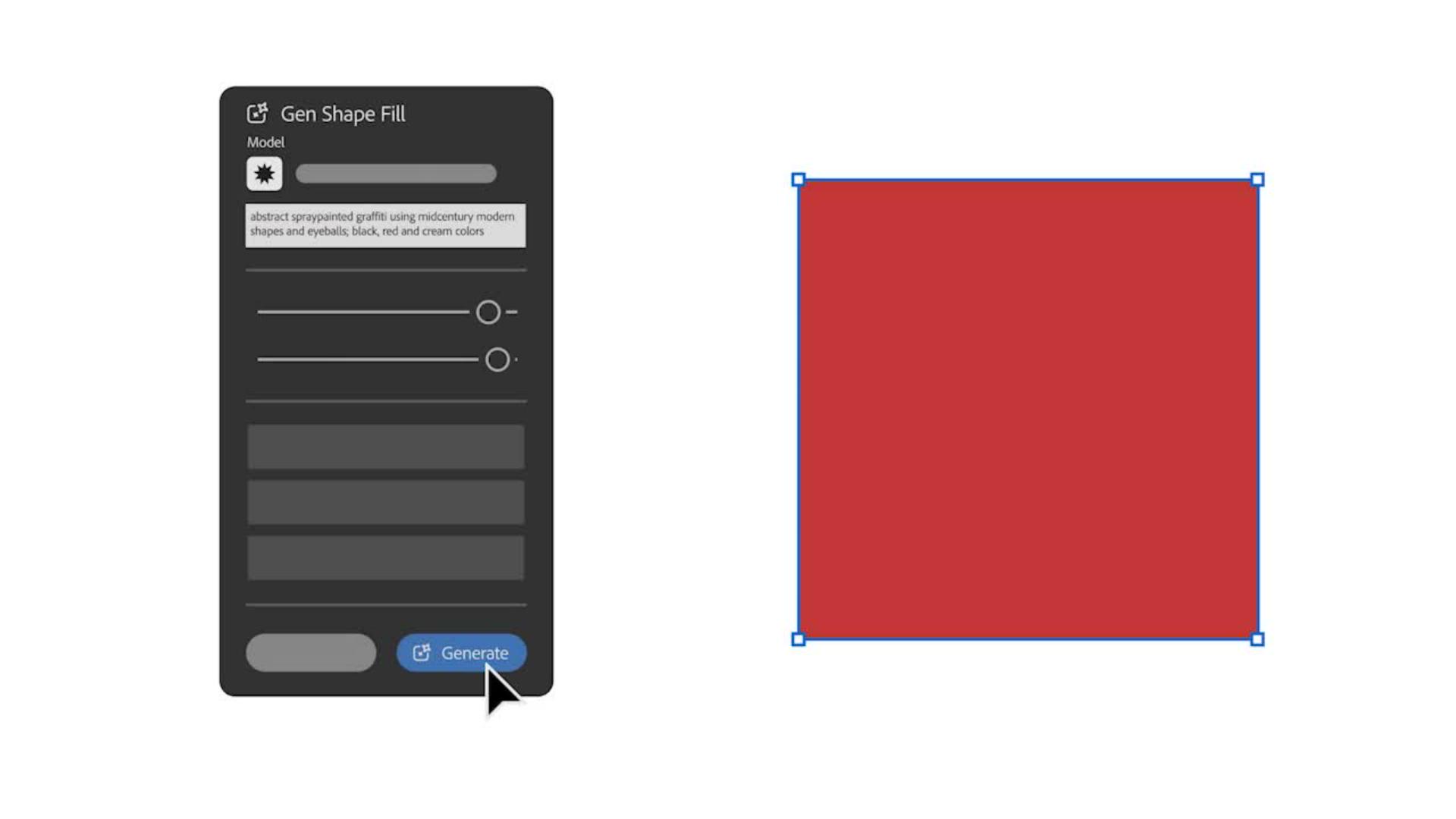
To explore your concepts, choose Generative Shape Fill in the Contextual Task Bar. For this design, Adam filled the square with a variety of mid-century modern styles and patterns using Nano Banana.
Transcript not available
Step 3: Remix the model.
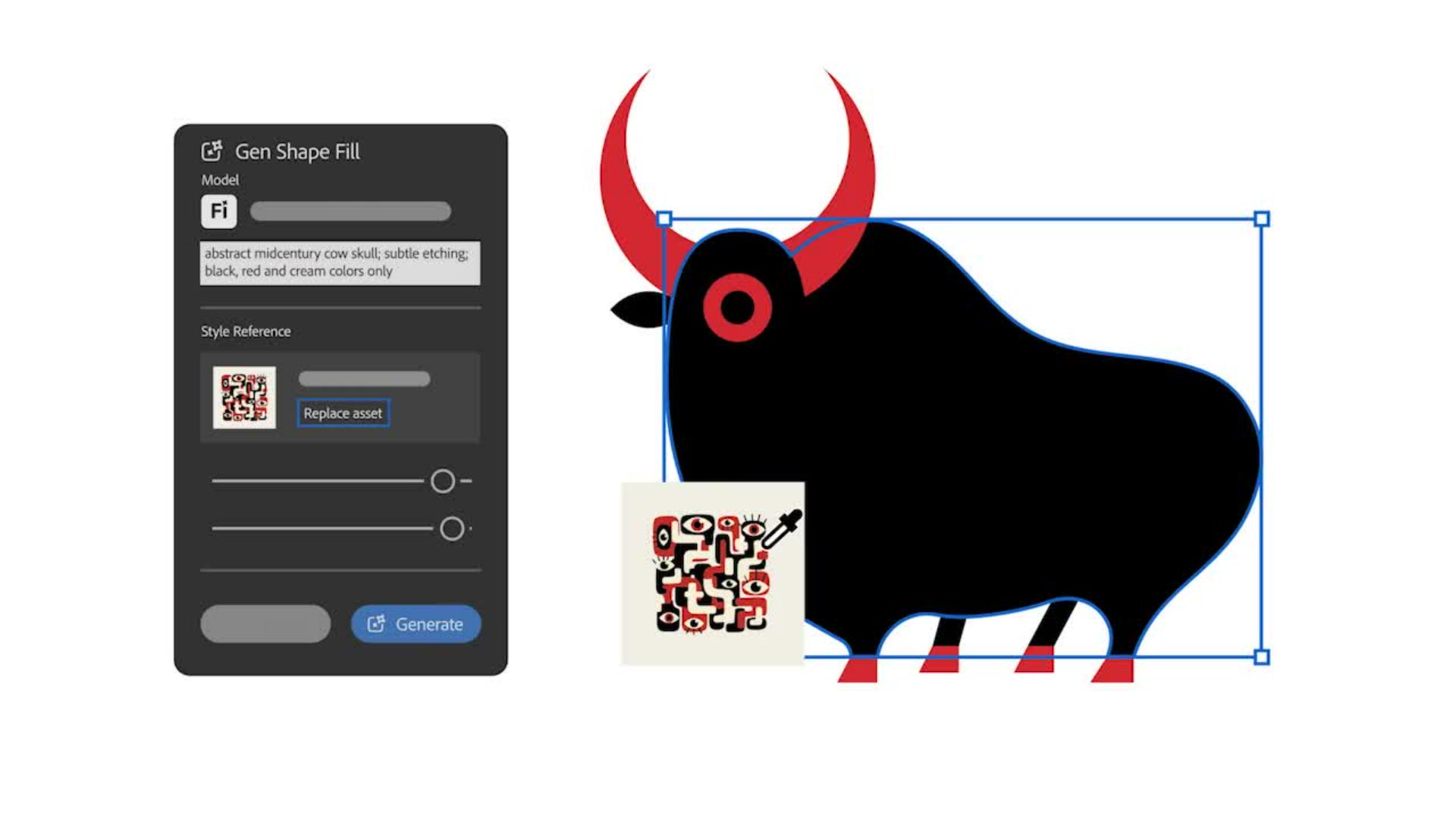
Using that graphic as a style reference image in the Generative Shape Fill dialog box, he switched to the Firefly model and created several iterations until he landed on the right look and feel.
Transcript not available
Step 4: Make it yours.
Finally, Adam tweaked the vector result by removing some elements he didn't need, cleaning up, reshaping, and drawing over parts to get to a final illustration that he felt truly represented his vision.
Unable to load video
Instruction by
Adam G
Try these tutorials with Illustrator
Create illustrations and other graphics with vectors.
You can control how Adobe websites use cookies and similar technologies by making choices below. But note that if you disable cookies and similar technologies entirely, Adobe websites may not function properly.
Cookies are small text files stored by your web browser when you use websites. There are also other technologies that can be used for similar purposes like HTML5 Local Storage and local shared objects, web beacons, and embedded scripts. These technologies help us do things like remembering you and your preferences when you return to our sites, measure how you use the website, conduct market research, and gather information about the ads you see and interact with.
You can make choices in the menu below about what cookies and other technologies you want us to use on Adobe sites when you visit them from this browser. You can always change those choices later by clicking on the Cookie Preferences link at the bottom of the page.
If enabled:
We can improve your experience by tailoring the site and the content to things we think might be of interest
We can better keep track of your preferences — like what language you prefer to use
We will better understand your likely interests so we can provide you more relevant Adobe ads and content on non-Adobe websites and in non-Adobe apps
It will help us improve the performance of our website and those of our partners who use the Adobe Experience Cloud
If disabled:
We won’t be able to remember you from session to session so the experience may not be tailored to your interests
You’ll still have access to the content of the site but certain features that depend on cookies may not function
You’ll still see ads, they just may not be as relevant to you
General information
You can control how Adobe websites use cookies and similar technologies by making choices below. But note that if you disable cookies and similar technologies entirely, Adobe websites may not function properly.
Cookies are small text files stored by your web browser when you use websites. There are also other technologies that can be used for similar purposes like HTML5 Local Storage, web beacons, and embedded scripts. These technologies help us do things like remembering you and your preferences when you return to our sites, measure how you use the website, conduct market research, and gather information about the ads you see and interact with.
You can make choices in the menu below about what cookies and other technologies you want us to use on Adobe sites when you visit them from this browser. You can always change those choices later by clicking on the Cookie Preferences link at the bottom of the page.
If enabled:
We can improve your experience by tailoring the site and the content to things we think might be of interest
We can better keep track of your preferences — like what language you prefer to use
We will better understand your likely interests so we can provide you more relevant Adobe ads and content on non-Adobe websites and in non-Adobe apps
It will help us improve the performance of our website and those of our partners who use the Adobe Experience Cloud
If disabled:
We won’t be able to remember you from session to session so the experience may not be tailored to your interests
We’ll still count your use of our site and services
You’ll still have access to the content of the site but certain features that depend on cookies may not function
You’ll still see ads, they just may not be as relevant to you
Operate the site and core servicesOperate site and measure engagement
Always active
These cookies are required, and they are used to enable the site and related services core functionality. Without them the site could not operate, so they cannot be disabled.
These cookies enable the site and related services’ core functionality and collect statistics about user engagement, such as counting active use to help us understand trends. These cookies cannot be disabled.
Measure performance
These cookies are used to analyze site usage to measure and improve performance. Without them Adobe cannot know what content is most valued and how often unique visitors return to the site, making it hard to improve information we offer to you.
These cookies are used to analyze site usage to measure and improve performance. Without them Adobe cannot know what content is most valued, making it hard to improve information we offer to you.
Extend functionality
These cookies are used to enhance the functionality of Adobe sites such as remembering your settings and preferences to deliver a personalized experience; for example, your username, your repeated visits, preferred language, your country, or any other saved preference.
Personalize advertising
These cookies are used to enable Adobe and our partners to serve ads more relevant to your interests. Without them you will still see ads, but they might not be as relevant to you.
Personalize advertising
These cookies are used to enable Adobe and our partners to serve ads more relevant to your interests. Without them you will still see ads, but they might not be as relevant to you.