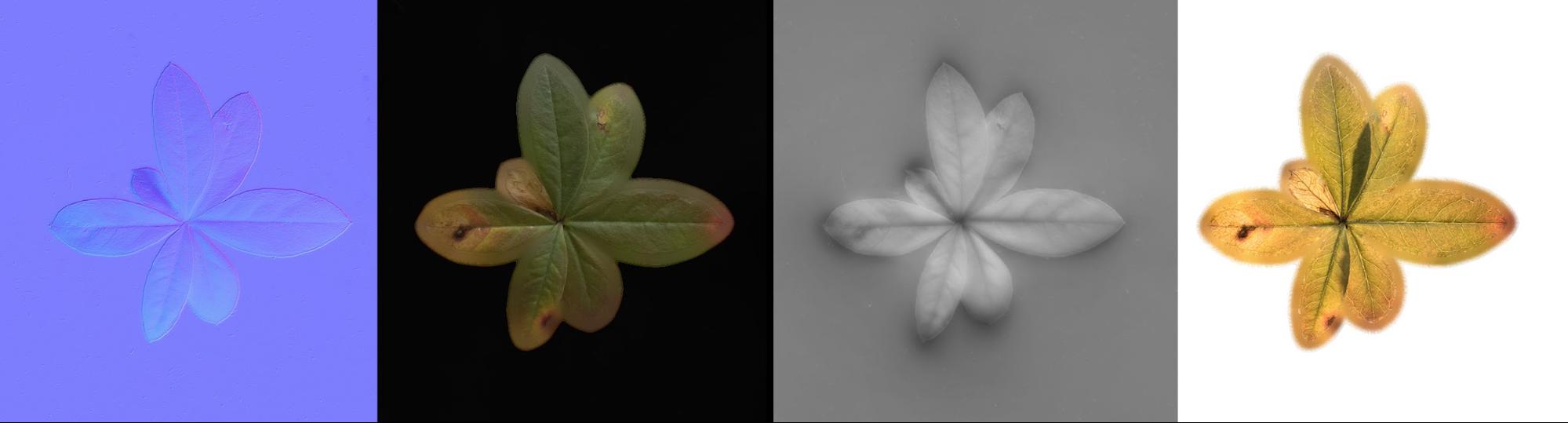


Art by Rens: Substance 3D Designer Scan Processing
One of the masters of photogrammetry tells us about his workflow!
To create the plants in my environments I don’t rely on photogrammetry. Instead, I use top-down photography to build my textures and create the models afterward. By constructing a rig with various light sources, I can take photos that each have a different light direction. These photos are then processed together using Designer’s multi-angle nodes.
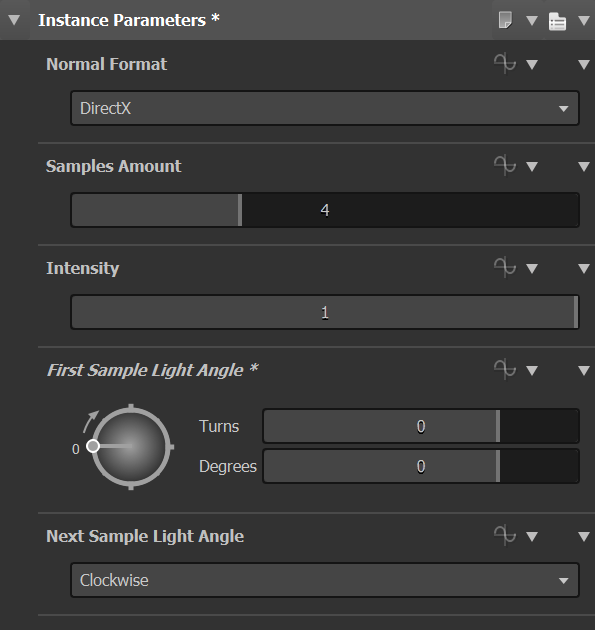
You can set the Multi-Angle to Normal node to your preference. In this example, I set it to have four light directions, meaning each image is 360 / 4 = 90 degrees from each other.
Having more images would produce a more accurate result. You could use eight samples, for instance, one photo at every 45 degrees.
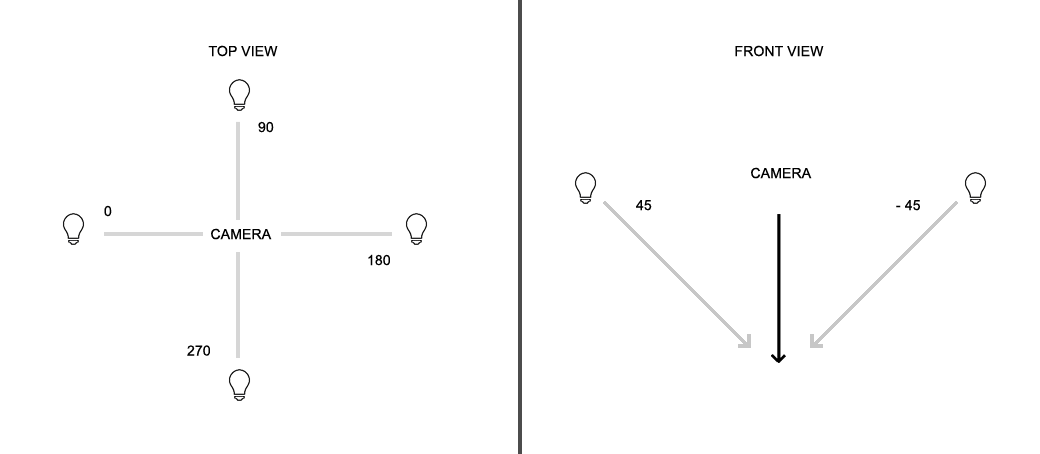
The settings in the image are set to Clockwise at 0 degrees with four samples. Looking down, it will start on the left side, followed by top, then right and then bottom.
I prefer to cast shadows at less than a 45-degree angle. This way shadows are neither too long nor too short.
Some things to consider include the strength of your light source, use of a point light versus a bar, and the temperature of the light.
If your lights are too strong, you run the chance of casting a hard shadow and overexposing the surface. By having very dark or bright spots, you run the risk of losing data. Therefore, when you test your lights, make sure the majority of your image information is in a medium range. One way to check for this is to open the levels editor in Photoshop and see if most values are in the middle.
Point lights shine light in a cone shape while a bar or tube light will behave much more directionally. Keep in mind that this will affect the shadows.
The color or temperature of the light will influence the values of the photo. Therefore make sure that all light sources are of the same type and temperature.
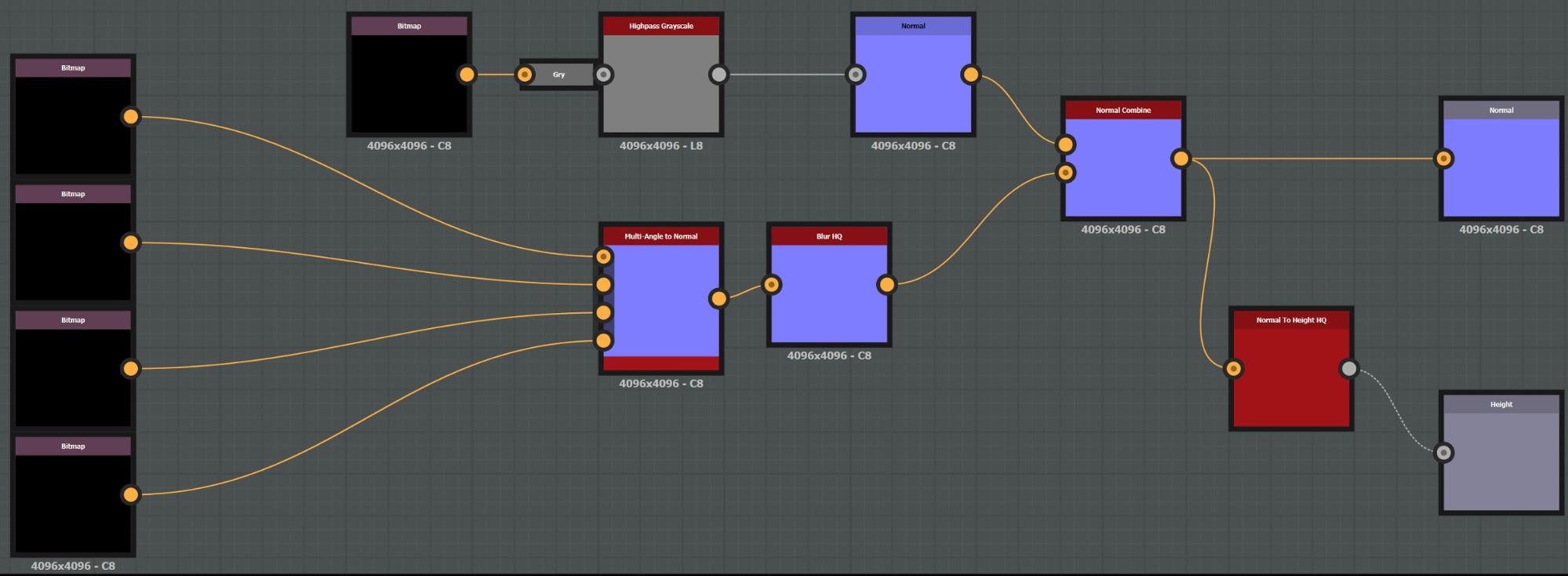
The image above uses four directions to create a normal using the Multi-Angle to Normal. It then applies a Blur High Quality with a minimal amount to reduce noise and avoid introducing too much small detail later on.
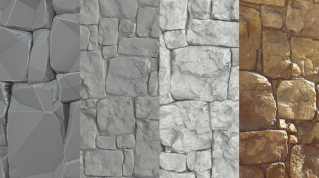
The Multi-Angle will not capture every detail that we see in the diffuse texture. Because of this, I filter a range of the diffuse and convert it to normal. The setup then combines the large shapes from the Multi-Angle with the high-frequency details from the diffuse. To create the height texture, it makes use of a Normal to Height HQ.
You can control how Adobe websites use cookies and similar technologies by making choices below. But note that if you disable cookies and similar technologies entirely, Adobe websites may not function properly.
Cookies are small text files stored by your web browser when you use websites. There are also other technologies that can be used for similar purposes like HTML5 Local Storage and local shared objects, web beacons, and embedded scripts. These technologies help us do things like remembering you and your preferences when you return to our sites, measure how you use the website, conduct market research, and gather information about the ads you see and interact with.
You can make choices in the menu below about what cookies and other technologies you want us to use on Adobe sites when you visit them from this browser. You can always change those choices later by clicking on the Cookie Preferences link at the bottom of the page.
If enabled:
We can improve your experience by tailoring the site and the content to things we think might be of interest
We can better keep track of your preferences — like what language you prefer to use
We will better understand your likely interests so we can provide you more relevant Adobe ads and content on non-Adobe websites and in non-Adobe apps
It will help us improve the performance of our website and those of our partners who use the Adobe Experience Cloud
If disabled:
We won’t be able to remember you from session to session so the experience may not be tailored to your interests
You’ll still have access to the content of the site but certain features that depend on cookies may not function
You’ll still see ads, they just may not be as relevant to you
General information
You can control how Adobe websites use cookies and similar technologies by making choices below. But note that if you disable cookies and similar technologies entirely, Adobe websites may not function properly.
Cookies are small text files stored by your web browser when you use websites. There are also other technologies that can be used for similar purposes like HTML5 Local Storage, web beacons, and embedded scripts. These technologies help us do things like remembering you and your preferences when you return to our sites, measure how you use the website, conduct market research, and gather information about the ads you see and interact with.
You can make choices in the menu below about what cookies and other technologies you want us to use on Adobe sites when you visit them from this browser. You can always change those choices later by clicking on the Cookie Preferences link at the bottom of the page.
If enabled:
We can improve your experience by tailoring the site and the content to things we think might be of interest
We can better keep track of your preferences — like what language you prefer to use
We will better understand your likely interests so we can provide you more relevant Adobe ads and content on non-Adobe websites and in non-Adobe apps
It will help us improve the performance of our website and those of our partners who use the Adobe Experience Cloud
If disabled:
We won’t be able to remember you from session to session so the experience may not be tailored to your interests
We’ll still count your use of our site and services
You’ll still have access to the content of the site but certain features that depend on cookies may not function
You’ll still see ads, they just may not be as relevant to you
Operate the site and core servicesOperate site and measure engagement
Always active
These cookies are required, and they are used to enable the site and related services core functionality. Without them the site could not operate, so they cannot be disabled.
These cookies enable the site and related services’ core functionality and collect statistics about user engagement, such as counting active use to help us understand trends. These cookies cannot be disabled.
Measure performance
These cookies are used to analyze site usage to measure and improve performance. Without them Adobe cannot know what content is most valued and how often unique visitors return to the site, making it hard to improve information we offer to you.
These cookies are used to analyze site usage to measure and improve performance. Without them Adobe cannot know what content is most valued, making it hard to improve information we offer to you.
Extend functionality
These cookies are used to enhance the functionality of Adobe sites such as remembering your settings and preferences to deliver a personalized experience; for example, your username, your repeated visits, preferred language, your country, or any other saved preference.
Personalize advertising
These cookies are used to enable Adobe and our partners to serve ads more relevant to your interests. Without them you will still see ads, but they might not be as relevant to you.
Personalize advertising
These cookies are used to enable Adobe and our partners to serve ads more relevant to your interests. Without them you will still see ads, but they might not be as relevant to you.