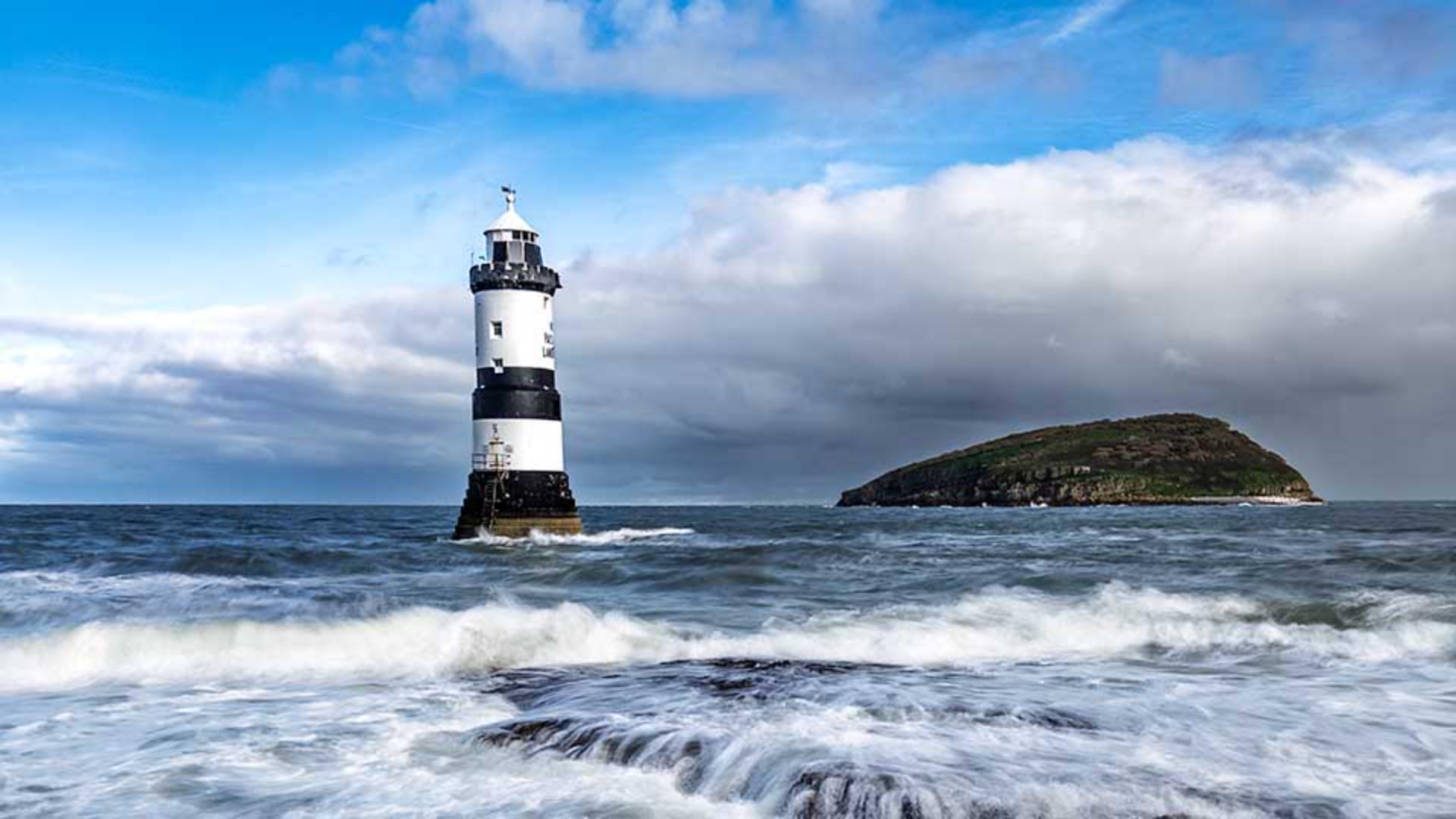
[Glyn Dewis]: The Landscape masking feature in Lightroom makes it possible to quickly isolate with one click and make adjustments to particular areas of an outdoor photograph.
Hi, I'm Glyn Dewis, and in this tutorial I'm going to show you the Landscape masking feature available in Lightroom, which can save you a ton of time because instead of having to use manual masking controls to isolate certain areas of a photograph that you want to adjust, Lightroom will do it for us.
I'll use this image here to show you just how useful and powerful the Landscape masking feature is.
But first of all,
Preparing the image with profile and crop
I'm going to go to the Edit section here on the right-hand side and change the Profile, which is at the default of Adobe Color.
And I'll use Adaptive Color to give this image the very best starting point.
I can also adjust the Amount to increase the overall effect to about there, which already looks great.
Next, I'll go to the Crop Tool on the right-hand side, and where we have Straighten, above it, we have Auto and I can simply click on this and Lightroom will automatically straighten the horizon for me, which was ever so slightly off.
Creating landscape masks automatically
Now we'll go to the Masking section again from the right-hand side of the screen, and when I do, we can see the option for Landscape.
So, I'll click on that.
When I do this, Lightroom analyzes the image to see exactly what elements there are.
And once it identifies them, it automatically creates the masks as we can see here.
For this image, Lightroom identifies that there are four distinct areas: Sky, Mountains, Architecture, and Water.
And you can see how it identifies each area indicated by this red overlay as I hover my cursor over each in this list.
Had there been other elements such as trees, grass, natural ground, and artificial ground, then Lightroom would have also identified them.
Now the next thing I will do is tick the checkboxes for each, and I'll leave this checkbox here ticked so that I have four separate masks, meaning I can make adjustments to each of them independently.
I then click Create.
You can now see each of these masks are available to me in the Masking panel.
I'll choose the Sky mask first,
Enhancing the sky and mountains
and in the Edit controls I'll go to the Dehaze control to emphasize the sky by dragging the slider to the right.
I'll also increase the Clarity, which will really help to bring out the shape and the detail in those great clouds.
Next I'll go to the Mountains mask, which also includes this rocky area in the foreground.
You can see as I hover over it how good the mask is to even recognize the area of rocks just visible above the water.
I'm going to reduce the Exposure on them a little, so that my eyes aren't drawn to the bright area, as the lighthouse is the main subject, but I'll also increase the Texture to really bring out the detail on the rock surface.
That looks great.
Now I want to give the lighthouse a little bit more presence,
Refining architecture and water details
so I'll go to the Architecture mask and I'll increase the Clarity quite a bit.
And you can see straight away the difference that makes.
That's working really well.
Lastly, we have the Water.
So, I click to select the mask.
And then in the Edit controls available to me I'll just reduce the Highlights a little.
And yes, I'll add some more Clarity to really emphasize those crashing waves.
Fantastic.
After a very short time,
Reviewing masking results with before and after
we've made some great adjustments to this image. and to see the difference each of these individual masks make, we can just click down on the Eye icon to the right-hand side of each to see before and after.
So, there's the Water, Architecture, Mountains and Sky.
And to see what the image was like before any masking adjustments were made, we can press and hold down on the Eye icon in the upper right of the Masking panel.
So, this is before and after.
That's the Landscape masking feature built into Lightroom, which as you can see with this example works incredibly well, isolating all those different areas of the photograph that we can then apply selective adjustments to.
This not only saves a lot of time, but actually gives you back more time to be creative.
So, have fun using these on your own images.
Note: Stock assets provided are for practice purposes only. See terms.
What you'll learn
Use AI-generated masks for landscape photos
Click the Masking tool on the right and select Landscape. Lightroom will analyse your image and use AI to detect the different scene elements that it can create masks for, including sky, mountains, water, vegetation, natural ground, artificial ground, and architecture.
Create separate masks
Select the different scene areas. When you select more than one landscape element, you have the option to create separate masks for each area. Click Create and your new masks will appear in the Masks panel so you can make adjustments to each specific area.
You can control how Adobe websites use cookies and similar technologies by making choices below. But note that if you disable cookies and similar technologies entirely, Adobe websites may not function properly.
Cookies are small text files stored by your web browser when you use websites. There are also other technologies that can be used for similar purposes like HTML5 Local Storage and local shared objects, web beacons, and embedded scripts. These technologies help us do things like remembering you and your preferences when you return to our sites, measure how you use the website, conduct market research, and gather information about the ads you see and interact with.
You can make choices in the menu below about what cookies and other technologies you want us to use on Adobe sites when you visit them from this browser. You can always change those choices later by clicking on the Cookie Preferences link at the bottom of the page.
If enabled:
We can improve your experience by tailoring the site and the content to things we think might be of interest
We can better keep track of your preferences — like what language you prefer to use
We will better understand your likely interests so we can provide you more relevant Adobe ads and content on non-Adobe websites and in non-Adobe apps
It will help us improve the performance of our website and those of our partners who use the Adobe Experience Cloud
If disabled:
We won’t be able to remember you from session to session so the experience may not be tailored to your interests
You’ll still have access to the content of the site but certain features that depend on cookies may not function
You’ll still see ads, they just may not be as relevant to you
General information
You can control how Adobe websites use cookies and similar technologies by making choices below. But note that if you disable cookies and similar technologies entirely, Adobe websites may not function properly.
Cookies are small text files stored by your web browser when you use websites. There are also other technologies that can be used for similar purposes like HTML5 Local Storage, web beacons, and embedded scripts. These technologies help us do things like remembering you and your preferences when you return to our sites, measure how you use the website, conduct market research, and gather information about the ads you see and interact with.
You can make choices in the menu below about what cookies and other technologies you want us to use on Adobe sites when you visit them from this browser. You can always change those choices later by clicking on the Cookie Preferences link at the bottom of the page.
If enabled:
We can improve your experience by tailoring the site and the content to things we think might be of interest
We can better keep track of your preferences — like what language you prefer to use
We will better understand your likely interests so we can provide you more relevant Adobe ads and content on non-Adobe websites and in non-Adobe apps
It will help us improve the performance of our website and those of our partners who use the Adobe Experience Cloud
If disabled:
We won’t be able to remember you from session to session so the experience may not be tailored to your interests
We’ll still count your use of our site and services
You’ll still have access to the content of the site but certain features that depend on cookies may not function
You’ll still see ads, they just may not be as relevant to you
Operate the site and core servicesOperate site and measure engagement
Always active
These cookies are required, and they are used to enable the site and related services core functionality. Without them the site could not operate, so they cannot be disabled.
These cookies enable the site and related services’ core functionality and collect statistics about user engagement, such as counting active use to help us understand trends. These cookies cannot be disabled.
Measure performance
These cookies are used to analyze site usage to measure and improve performance. Without them Adobe cannot know what content is most valued and how often unique visitors return to the site, making it hard to improve information we offer to you.
These cookies are used to analyze site usage to measure and improve performance. Without them Adobe cannot know what content is most valued, making it hard to improve information we offer to you.
Extend functionality
These cookies are used to enhance the functionality of Adobe sites such as remembering your settings and preferences to deliver a personalized experience; for example, your username, your repeated visits, preferred language, your country, or any other saved preference.
Personalize advertising
These cookies are used to enable Adobe and our partners to serve ads more relevant to your interests. Without them you will still see ads, but they might not be as relevant to you.
Personalize advertising
These cookies are used to enable Adobe and our partners to serve ads more relevant to your interests. Without them you will still see ads, but they might not be as relevant to you.