Today, games increasingly incorporate vast, complex 3D worlds. Players can move through cityscapes, or even across entire planets, with as much fluidity as in the real, physical world. Environments are immersive and breathtaking. Games are appreciated not only for their playability or compelling mechanics, but also for their sheer beauty.
The start of 3D game design
There’s some debate as to what was the first true 3D game. Some would award the title to 1980’s Battlezone, which used wireframe vector graphics to render 3D tanks — though the tanks themselves could only move in two dimensions. Others might give this title to 1996’s Quake, arguably the first game that featured levels composed of rooms on top of rooms, truly giving the player the possibility to move through a 3D space. There are as many candidates as there are definitions of true 3D, and so the discussion continues.
How times have changed.
And the characters within these games are deeper and more credible than ever, too. A great deal of effort goes into writing characters with plausible motivation and development. But just as in real life, a huge amount of detail is also conveyed by a character’s appearance: their facial expression; the style and cut of their clothes; the smoothness or ruggedness of their skin; whether their clothing is crisp and immaculate, or ragged and worn. The characters in today’s games are as detailed and beautiful as the world they inhabit.
The assembly of these visual elements makes for 3D games that are emotive, almost cinematic experiences. Today’s games are not yet quite as detailed as the real world — but they aren’t so far away.
This modern level of visual detail and complexity in 3D games is largely the result of the skill and commitment of the visual artists working in the sector today. But another vital component to the visual quality of games today is the ever-evolving sophistication of the software tools that are used to create these games.
This is where Adobe comes in.
The texturing solution of reference.
The Adobe Substance 3D toolset is the proven reference for texturing in the gaming industry; to date, it has been used in countless projects by smaller, independent studios, as well as in a wide range of AAA games created by industry titans such as Ubisoft, Electronic Arts, CD Project Red, and Naughty Dog.
style
Grid width 8, static links
“We chose Substance Painter for its ease of use and speed of iteration while being nondestructive, baking and painting all in one package, and the ability to customize the overall setup to match our in-game PBR-spec gloss shading method.”
— BRIAN BURNELL, RESPAWN ENTERTAINMENT
style
Grid width 6
Quite simply, the Substance 3D toolset can meet whatever texturing needs you may have. You can create textures from scratch using Substance 3D Designer, or from existing real-world references using Substance 3D Sampler. You can import existing textures from the Adobe content library, or from third-party sources. Substance 3D Painter lets you create smart materials as needed — allowing you to paint on characteristics such as edge abrasion or accumulated rust — and to apply your textures to 3D models or environments, and then to export your assets to any game engine within seconds.
style
Grid width 8, static links
“We used Substance Designer to create almost all our...tileable textures....Almost every...art asset in Forza Horizon 4 had some part of it run through Substance Designer or Substance Painter.”
— DON ARCETA, PLAYGROUND GAMES
style
Grid width 6
3D game creation for every workflow
There’s no single correct workflow for game production — every development studio has its own style of working, and its own preferred software tools. As such, the Substance 3D toolset integrates directly into all major 3D tools and game engines. Whether modeling with tools such as Modo, or 3ds Max or Maya by Autodesk, or whether working in game engines such as Unreal Engine or Unity, the Substance 3D integrations and plugins allow you to leverage the capabilities of the Substance 3D toolset directly within your application of choice.
style
Grid width 8, static links
“Overall, we felt that the Substance toolset helped us to ship the game in time, with good quality, and with a relatively small environment art team.”
— MIRO VESTERINEN, REMEDY ENTERTAINMENT
style
Grid width 6
The Substance 3D tools are pipeline agnostic by design. They feature extensive scripting and automation capabilities, support for custom shaders and output templates, and a collection of integrations into third-party 3D content creation tools. This permits the Substance apps and services to be integrated into any 3D game design workflow and pipeline.
style
Grid width 8, static links
“Thanks to Substance, with a small team of artists we were able to make the productivity rise, creating 1,500 materials to make the world of Ancient Greece back to life.”
— VINCENT DEROZIER, UBISOFT QUEBEC
style
Grid width 6
The largest game-ready 3D asset library.
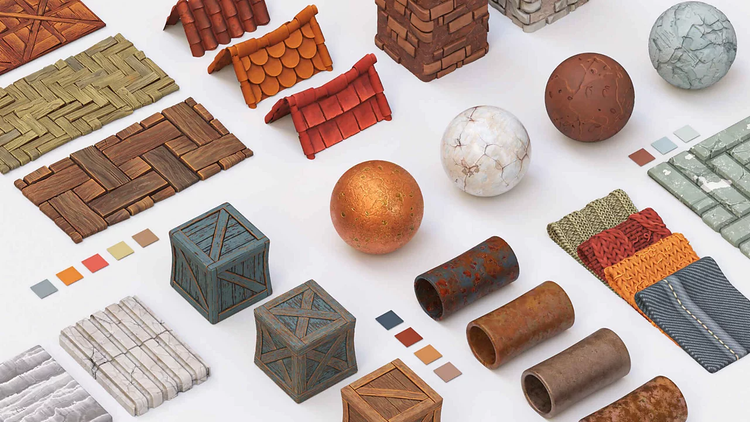
The Substance 3D asset library provides video game artists thousands of parametric materials. Each material is individually modifiable, allowing limitless variations overall. And downloadable node graphs allow 3D artists to see how these phenomenal materials are constructed, providing a valuable learning resource.
The library also includes more than 1,000 game-ready 3D models, each carefully curated to provide consistent topology and UVs throughout.
All assets in the 3D asset library are included as part of the Substance 3D subscriptions to download and modify as a component of any commercial project.
More than 3D game materials.
style
Grid width 8, static links
The Substance 3D toolset continues to evolve and improve, reaching beyond the remit of texturing applications. Substance 3D Modeler will open up new avenues for asset creation, both on desktop and in VR, and Substance 3D Stager allows artists to lay out and render high-quality 3D scenes, or their portfolios.
Interested in getting your company to use Substance 3D? Learn more.
style
Grid width 10, static links
style
M spacing
title
3D game design with Substance 3D.
cardImageAltText
3D game design with Substance 3D.
cardImage
ContentType
Article
Description
Use Adobe Substance 3D to create textures, and 3D assets, layouts, and high-quality 3D scenes both on desktop and in VR.
You can control how Adobe websites use cookies and similar technologies by making choices below. But note that if you disable cookies and similar technologies entirely, Adobe websites may not function properly.
Cookies are small text files stored by your web browser when you use websites. There are also other technologies that can be used for similar purposes like HTML5 Local Storage and local shared objects, web beacons, and embedded scripts. These technologies help us do things like remembering you and your preferences when you return to our sites, measure how you use the website, conduct market research, and gather information about the ads you see and interact with.
You can make choices in the menu below about what cookies and other technologies you want us to use on Adobe sites when you visit them from this browser. You can always change those choices later by clicking on the Cookie Preferences link at the bottom of the page.
If enabled:
We can improve your experience by tailoring the site and the content to things we think might be of interest
We can better keep track of your preferences — like what language you prefer to use
We will better understand your likely interests so we can provide you more relevant Adobe ads and content on non-Adobe websites and in non-Adobe apps
It will help us improve the performance of our website and those of our partners who use the Adobe Experience Cloud
If disabled:
We won’t be able to remember you from session to session so the experience may not be tailored to your interests
You’ll still have access to the content of the site but certain features that depend on cookies may not function
You’ll still see ads, they just may not be as relevant to you
General information
You can control how Adobe websites use cookies and similar technologies by making choices below. But note that if you disable cookies and similar technologies entirely, Adobe websites may not function properly.
Cookies are small text files stored by your web browser when you use websites. There are also other technologies that can be used for similar purposes like HTML5 Local Storage, web beacons, and embedded scripts. These technologies help us do things like remembering you and your preferences when you return to our sites, measure how you use the website, conduct market research, and gather information about the ads you see and interact with.
You can make choices in the menu below about what cookies and other technologies you want us to use on Adobe sites when you visit them from this browser. You can always change those choices later by clicking on the Cookie Preferences link at the bottom of the page.
If enabled:
We can improve your experience by tailoring the site and the content to things we think might be of interest
We can better keep track of your preferences — like what language you prefer to use
We will better understand your likely interests so we can provide you more relevant Adobe ads and content on non-Adobe websites and in non-Adobe apps
It will help us improve the performance of our website and those of our partners who use the Adobe Experience Cloud
If disabled:
We won’t be able to remember you from session to session so the experience may not be tailored to your interests
We’ll still count your use of our site and services
You’ll still have access to the content of the site but certain features that depend on cookies may not function
You’ll still see ads, they just may not be as relevant to you
Operate the site and core servicesOperate site and measure engagement
Always active
These cookies are required, and they are used to enable the site and related services core functionality. Without them the site could not operate, so they cannot be disabled.
These cookies enable the site and related services’ core functionality and collect statistics about user engagement, such as counting active use to help us understand trends. These cookies cannot be disabled.
Measure performance
These cookies are used to analyze site usage to measure and improve performance. Without them Adobe cannot know what content is most valued and how often unique visitors return to the site, making it hard to improve information we offer to you.
These cookies are used to analyze site usage to measure and improve performance. Without them Adobe cannot know what content is most valued, making it hard to improve information we offer to you.
Extend functionality
These cookies are used to enhance the functionality of Adobe sites such as remembering your settings and preferences to deliver a personalized experience; for example, your username, your repeated visits, preferred language, your country, or any other saved preference.
Personalize advertising
These cookies are used to enable Adobe and our partners to serve ads more relevant to your interests. Without them you will still see ads, but they might not be as relevant to you.