Introduction
To create your own 3D geometry, you'll need to learn 3D modeling.
With modeling, we mean all methods to create geometry.
We'll go over five main methods amongst many different approaches.
Overview of 3D modeling methods
These are polymodeling, sculpting, CAD modeling, scanning and procedural generation.
The best modeling method depends on how and where your 3D project will be used.
For example, you won't use the same method whether your project is intended for a digital environment or to be manufactured, or depending on how realistic or stylized it has to be.
The devices it will be viewed on also might affect your choice or the fact that it is interactive or not.
Polymodeling means you're in charge of creating all polygons edges,
Polymodeling and subdivision workflows
and vertices for your mesh.
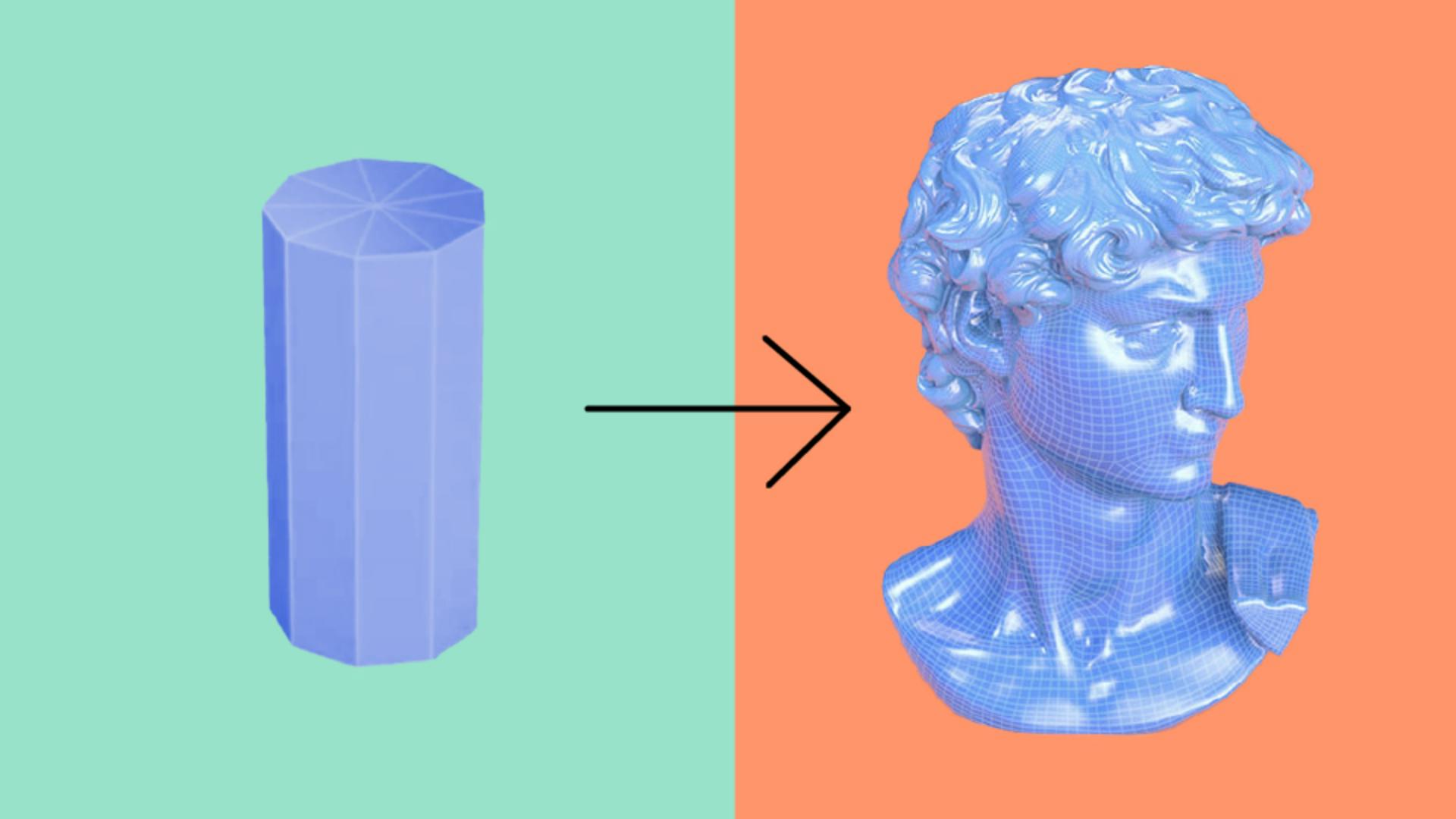
You start from basic shapes like a plane, box or cylinder, and then add edges to it, move parts of it around and extend the faces.
Polymodeling is very powerful and flexible, as there's a huge array of tools and methods to work on meshes.
Such flexibility also comes with downsides managing every single edge and face by yourself can be a lot of work, and if you're not careful, it's easy to break a mesh.
If you want to polymodel smooth, detailed meshes, placing tens of thousands of faces by hand doesn't make sense.
That's why you can apply a special process on meshes called subdivision that will make them smoother and denser.
Subdivision takes each quad face of a mesh divided into four new quads, while smoothing out and averaging the positions of the newly created vertices.
The initial mesh used as a base for subdivision is called a base mesh.
Subdividing your base mesh doesn't destroy it.
If you stay within your modeling package, you can always return to the base mesh to adjust it.
Because subdivision smooths everything out indiscriminately, modeling for subdivision means you'll have to manage hard and soft edges, or you risk your cubes turning into spheres.
Subdivision doesn't always play nice with triangles and N-gons the results are not as good as with quads.
There's a bit of an art to creating clean, efficient meshes for subdivision, and many techniques are valid even if you don't use subdivisions.
Subdivisions can also lead to complex meshes that are not easy to work on and can't be reversed once you export them to another application.
A tight grid-like structure with obvious loops of quads makes your meshes easier to read and work with in almost every step of the pipeline.
If you become good at polymodeling, you'll be able to turn even the most complicated shapes into efficient grids of quads.
If you want to add tiny details like skin pores, dents, or irregularities, polymodeling can be limiting.
So another form of modeling exists called sculpting.
Sculpting for organic and detailed forms
Sculpting doesn't require you to manage edges and vertices instead, it's like working with digital clay.
You use brushes and other tools to push and pull faces around, and detail can be added by subdividing meshes many times.
Sculpting is an excellent approach for many subject matters, and often it's a second step after you've made a simple base mesh with polymodeling.
Because you don't work with your geometry directly sculpting easily leads to very heavy meshes with millions of vertices.
For some use cases, that's fine, but for use in augmented reality or real-time video games, optimization work is needed.
We will come back to this later
CAD modeling and real‑world accuracy
Because CAD data designs will one day become real objects, they call for another modeling method that will alter designs in a more precise and accurate way.
With this method, you make use of techniques like extruding precise blueprints as geometry combining solid volumes, and designing smooth, sweeping surfaces.
CAD designs can sometimes be exported as meshes, or you can use specific software to do the mesh conversion for you.
Bearing in mind that once CAD is converted to mesh, there's no going back.
Sometimes you might want to do the opposite and bring a physical object from the real world into the virtual world of your computer screen.
You can also scan 3D objects as you would scan a sheet of paper.
Scanning isn't really modeling, but it's the perfect way to capture three dimensional things efficiently.
There are two main methods for scanning laser scanning and photogrammetry.
Laser scanning uses high-end laser measuring devices to capture millions of small points in 3D space, giving you very accurate clouds of points that can then be turned into meshes.
Photogrammetry works like your eyes and brain does.
The computer reconstructs a shape in 3D from a set of photographs at different angles.
Both methods result in fairly heavy meshes that almost always require extra processing.
Scanning and procedural geometry generation
The final frontier when it comes to creating geometry is where modeling, physics and programing start to blend together.
You might have noticed that 3D modeling can be a lot of manual work.
That's why solutions have been developed to generate your geometry.
These are complex methods that often involve defining a rule system with multiple operations and steps.
For example, you could use a physics simulation to generate a huge complex terrain mesh.
You could then take that train mesh and placed trees, rocks and other elements based on the slope and elevation of the tree.
Another good case for procedural geometry is to calculate the folds and draping of cloth over a mannequin.
If you use an existing 3D model that you just slightly want to customize, there are some simpler techniques to bend, twist and slice your models or deform them, and you'll find programs that let you modify meshes without having to use actual modeling techniques.
With a multitude of tools at your disposal you might get a bit lost, especially CAD modeling and simulations are not easy areas to get started in.
If you're new, 3D polymodeling is considered the staple skill of 3D with sculpting being a valuable extra skill to master.
You now understand 3D modeling.
In the next video, we'll look at the materials used to change the look of our models.