Introduction
We'll soon dive into texturing, but there's a prior optional step we should cover before baking.
You have the possibility to use details from the geometry to generate or enhance your material details.
You can figure those out by looking at your geometry.
The edges that stick out are more likely to get scratched, hidden parts and crevices are more likely to collect dirt, and the areas that face up might get discolored by the sun.
But instead of finding and painting them all by hand, you can calculate that information.
What baking is and why it matters
That is what we call baking.
This technique means you'll need to prepare a bit more.
Preparing meshes for baking with UVs and high-to-low poly workflows
Your meshes need an efficient, unique UV layout, and you can go even further by creating a high poly mesh with a lot of detail and smooth curves, as well as a simpler, less detailed low poly mesh.
Properly baking them can make the low poly indistinguishable from the high poly.
This technique, called high poly baking or baking from a mesh, is very common when a fast 3D performance is most important, like in video games.
Common bake types and what they are used for
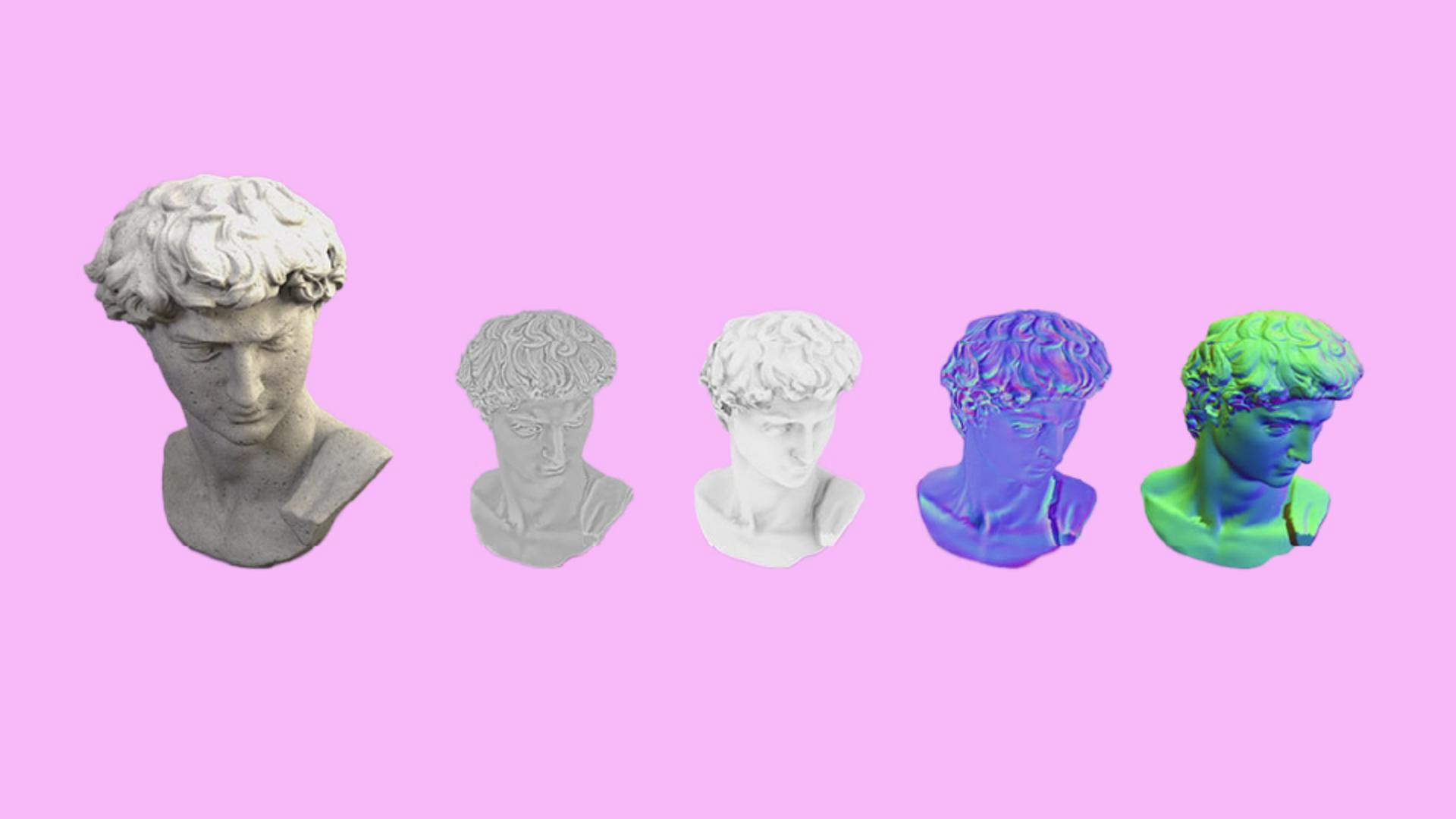
When baking, the results are not just one single bitmap texture, there are at least a dozen of different types of bakes.
The most common ones are curvature, ambient occlusion, normal maps, and world space maps.
Curvature maps come from an algorithm that determines which edges and corners of your mesh stick outwards, and which go inwards.
The result is gray for flat areas, white for outward edges, and black for inward ones.
You'll find programs that make good use of this information to help you add edgewear, dirt and other kinds of localized detail.
Another useful bake is ambient occlusion.
The algorithm calculates which parts of your geometry are more likely to be reached by a bright, uniform light.
Think of it like the kind of shadows you'd see on a cloudy day.
Ambient occlusion helps you to add dirt in some places, or even just adds a creative touch when making more stylized 3D projects.
Baking normals usually means tangent space normals, the type of bake that transforms the look of the surface of your mesh.
It's only used when transferring details from high poly to low poly.
Normals are the data that represents the direction your meshes' surface is facing.
The baking algorithm compares the surface normals between two meshes and stores the difference in a texture.
Using a normal map is a trick to make a low poly mesh look much more detailed than it really is.
Video games and other realistic interactive 3D projects make good use of this.
Baking world space data helps your texturing program understand your 3D geometry.
Even though you can easily see which parts of your mesh are facing up or down, and which part is left to right that info isn't available to texturing applications unless you bake it.
World space bake store the position and normal direction of your mesh into individual maps.
They let you automatically generate things like a gradient that fades from the top to the bottom, run a stripe from the front to the back, or fade colors out when they facing a certain direction.
Without these world space bakes, you'd have to paint all of those manually.
Baking can be done externally in major 3D packages,
Baking workflows and integration with texturing
but some texturing applications make the process as seamless as possible by letting you bake right inside the application.
That way, your bakes are tightly integrated and immediately usable when you start the texturing process.
Now that you understand why baking is important, we can start looking at the actual texturing step in the next video.