


Join the hunt.
Adobe recognizes that the global security research community plays a vital role in protecting our customers and maintaining trust in our brand. Our bug bounty program engages researchers worldwide to identify and report vulnerabilities. If you have discovered a security vulnerability in an Adobe product or service, we encourage you to report it as soon as possible.
Rewards and recognitions
Payout Guidelines
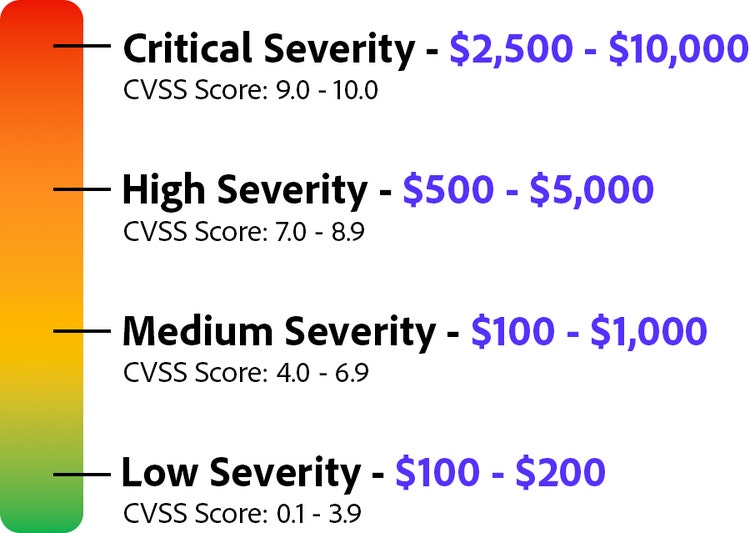
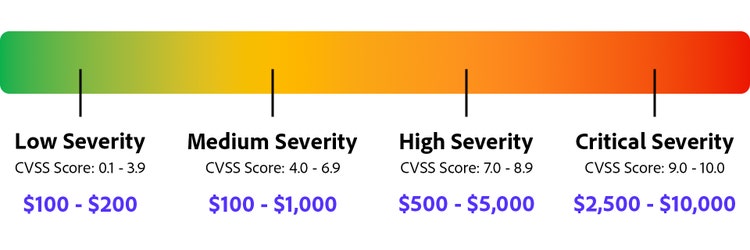
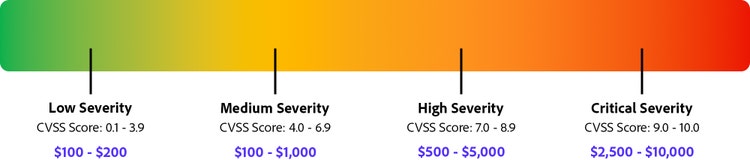
Adobe offers monetary rewards for valid security vulnerabilities reported through our public bug bounty program. The reward amounts are determined based on the severity, impact, and exploitability of the reported issue, with higher payouts for vulnerabilities that have the greatest security impact.
To learn more about our reward structure and eligible vulnerabilities, visit our program page.
Note: the graph below outlines the payout ranges across both tier 1 and 2 products by severity level.
Security Researcher Hall of Fame
In addition to monetary rewards, we honor top contributors in our Security Researcher Hall of Fame, which celebrates those who have made exceptional contributions to enhancing the security of Adobe’s products and services.
Acknowledgement
Adobe encourages the responsible disclosure of security vulnerabilities through the Product Security Incident Response Team (PSIRT).
To be eligible for this list, you must be the first person to responsibly disclose the issue and allow us a reasonable amount of time to address the issue before publishing the information.
Program scope
We welcome reports of security vulnerabilities that may affect the security or privacy of Adobe customers. To be eligible for a bounty, you must report security vulnerabilities in one or more of the following Adobe products and services, including but not limited to:


Reporting a vulnerability
All reports are reviewed and validated by HackerOne and Adobe’s product security teams. To help expedite our investigation and to speed payouts, please follow these guidelines:
- Provide clear, reproducible steps when submitting a vulnerability report, including the following details:
- Step-by-step instructions: Outline each step needed to reproduce the issue, from login (if applicable) to triggering the vulnerability.
- Specific URLs & endpoints: Provide exact affected locations where the issue occurs, including API endpoints.
- Expected vs. actual behavior: Clearly describe what should happen versus what actually happens due to the vulnerability.
- Screenshots & videos (if possible): Visual evidence helps clarify steps and impact.
- Payloads & code snippets: If injecting input (e.g., XSS, SQLi), include the exact payload used.
- Browser/environment details: Specify the OS, browser version, or tools used to reproduce the issue.
- Required pre-conditions: Note any necessary account permissions, configurations, or settings needed to trigger the vulnerability.
- Include a proof-of-concept (PoC) — preferably a video — with a dedicated “impact” section to help significantly speed up the review and validation process.
- Consolidate all affected hosts into a single report when the same vulnerability impacts multiple hosts within the same asset or domain. Bounties are awarded per unique vulnerability, not per affected host. If duplicate reports are submitted, only the first valid submission will be considered, while later reports will be marked as duplicates.
- Use PGP encryption for sensitive submissions.
- Please review our terms and conditions on our program page.
For a full list of reporting requirements, please review the Rules of Engagement on the program page.
Security Researcher Hall of Fame
Earn Hall of Fame points to climb the ranks and earn special recognition for your contributions.
What is the Security Researcher Hall of Fame?
The Security Researcher Hall of Fame initiative provides an opportunity to recognize and celebrate the most impactful security researchers who have demonstrated tremendous dedication to their craft and helped strengthen protections for our products, services, and customers.
We welcome all security researchers, from hobbyists to full-time ethical hackers, to participate in the Security Researcher Hall of Fame by submitting a report to the Adobe Bug Bounty Program.
How do I earn points?
Researcher points will be awarded for each valid submission to the Adobe Bug Bounty Program. Researcher points will accumulate for a final score calculated at the end of each testing period. To help ensure equal opportunity for all, researcher points will reset at the beginning of each testing period.
What is the scoring process?
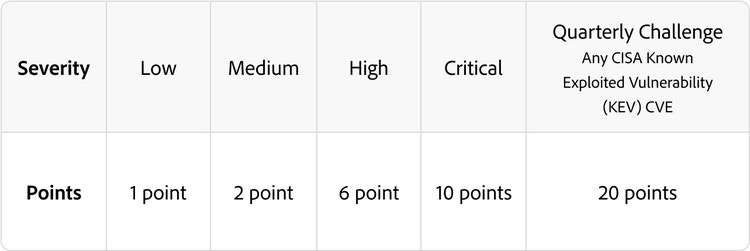
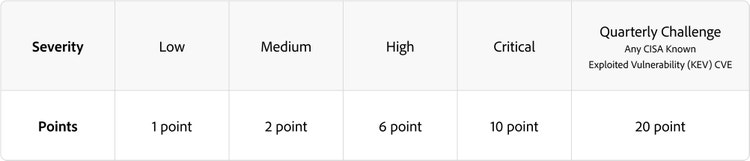
Any valid and unique submission reported to the Adobe Bug Bounty Program will be awarded Hall of Fame points based on the table below. Adobe's standard policy scope and exclusions apply.
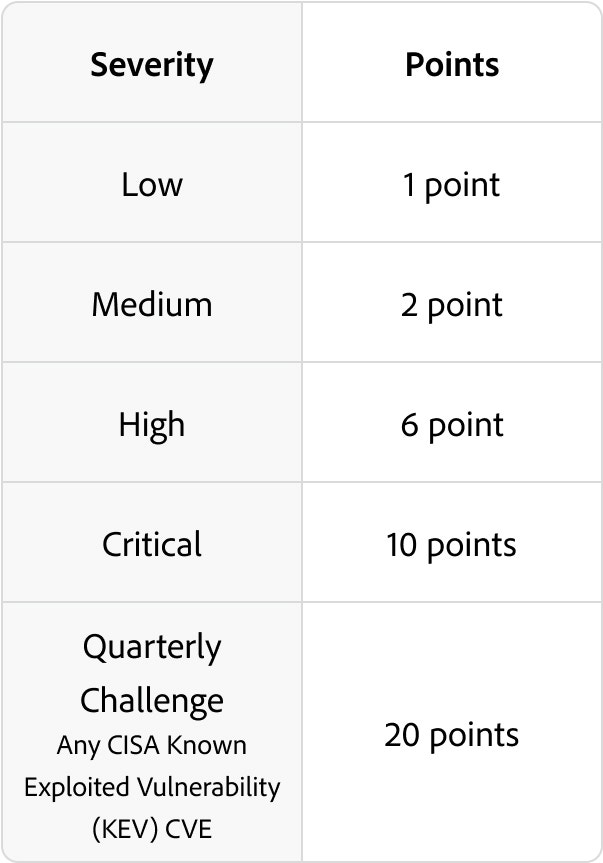
What is the testing period?
Each testing period lasts one year, starting every September and ending the next September. Announcements for Adobe's Top 10 researchers occur every October.
What are the rewards?
At the end of each testing period, total researcher points will be tallied for all participating researchers and the top ten point earners will be announced. In addition to being commemorated in the Hall of Fame initiative, each top ten researcher will be eligible to choose one of the following rewards:

12-month subscription to Adobe Creative Cloud
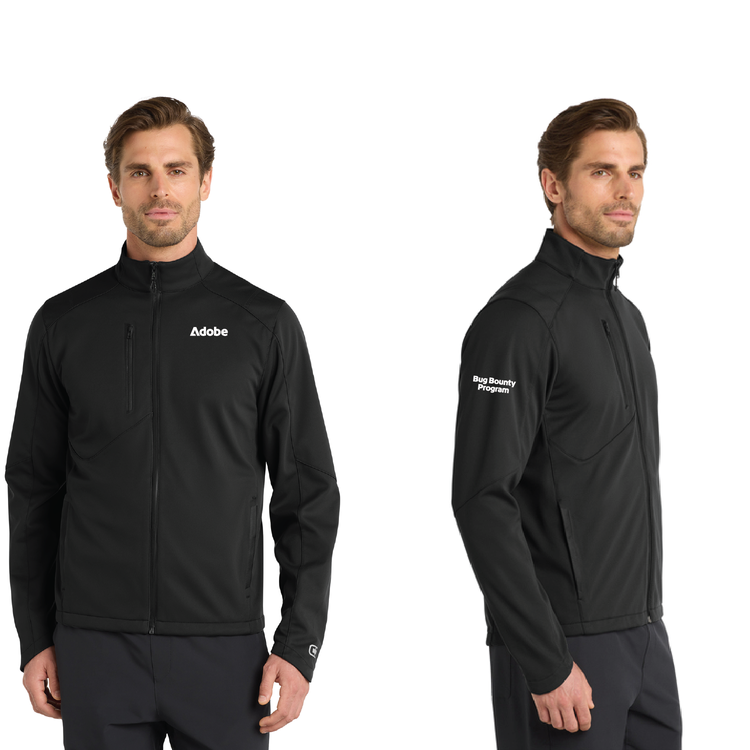
Black Jacket - OGIO Crux Soft Shell
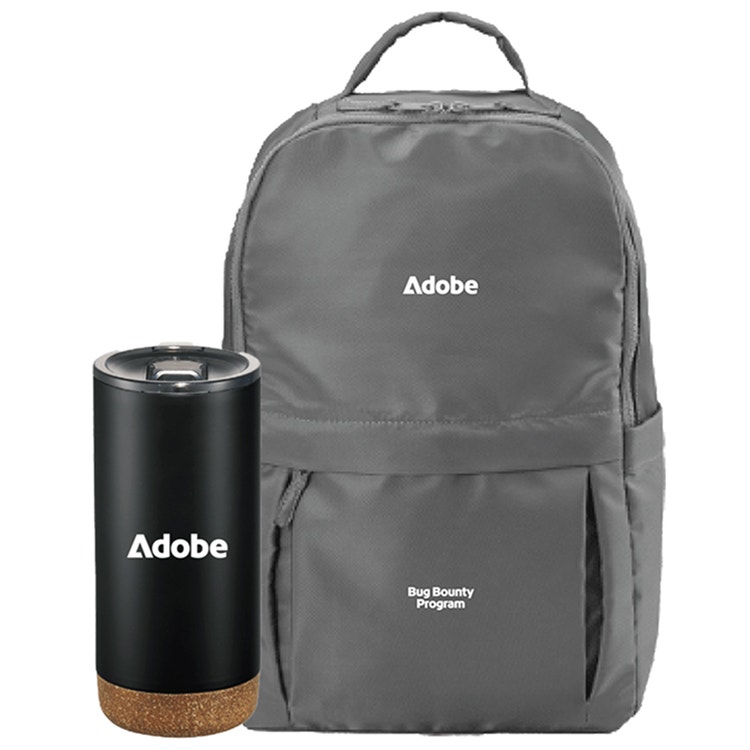
Daybreak Recycled 15" Laptop Backpack + Valhalla Copper Vacuum Insulated Tumbler 16oz
Security Researcher Hall of Fame Winners



Anonymous






Email Submissions
To submit a vulnerability report via email:
Please send your report to psirt@adobe.com, using the PGP key to encrypt your message. This email should only be utilized to report security vulnerabilities in Adobe products.
Key ID: D2B0918A
Fingerprint: BFC5 FFD3 296E 83A3 E777 7139 4140 9D28 D2B0 918A
Expiration Date: July 30, 2027
-----BEGIN PGP PUBLIC KEY BLOCK-----
mQINBGTGsXABEADX7ns+eA2Rdf5gNofoT+K4sKioSS9cjLJ7xoIAI7rVJouMmrWJ
H8M7j36y9PXbqAi8JeZGKp82oTyc57Og+jMS3JbXawq7Lr5ZsaLRxqBaWNpNy5em
6saSsQ9+e47ZFjRTfvgX+fxkqJzJwbIl/C0qWoWCUg7/qI8EKKNnYx0suppkC81a
yNPS5WEGFtlqrTJ/4GELZUzPAEhcGXthXua2SCV520XR4neV0im2rtwKEDvUxqoq
vC8/AGtRqVlQ+CqVnmR9TFa0Y3Z8MNEKSUngXwn1Z3uWNEFS7lc6Sv1upBaf0Q0T
wlVpwo+d63aMRgAWOEzVEzMvb+jKscA3UO+zcpHEOO0bTxueAJIhYu6AiaZJ7Rl/
Fywnx6IMOW21FRBFJyjiGDLcVetAMvMw5F1N65v7TpOorZxtOV1lCIvXh7x+sHMI
oIWBPp/X4QSBovpVTlAtfCIV9XtDdDYuFz3sVFgiHBeMIKx6S7gqiFYz16C/fG6o
oV91cjfdxoM9hOes7X1xHJb+2X4N/ZBbM1paW45E4eiB/O/j/oZ1VFeUkkVa4gRS
e6O4qgyn9xltK3l+f9l0vJyhcZKzqsFPe6EMjGqhtCiZZDxAOc9MZpxcT0eHojQT
ULUW7kSFORB8eJKqE1USYvcQqTpqsOHmH78UMOyM1igK7XtaPztuvbpbeQARAQAB
tB1BZG9iZSBQU0lSVCA8UFNJUlRAYWRvYmUuY29tPokCVAQTAQgAPhYhBL/F/9Mp
boOj53dxOUFAnSjSsJGKBQJkxrFwAhsDBQkHhh9jBQsJCAcCBhUKCQgLAgQWAgMB
Ah4BAheAAAoJEEFAnSjSsJGKlcwP/jHxor3TFfNZCmBkgwGedD9yKr4WAnvfB/4I
iH2juE0AI6DYyWzFu4oaDkqHsBdzC4GCSWW1hc3I5yJWzKd5U0yIYF87uAApp6QX
4RBQb9+b/k1+G5xJ5fP4oNpn7lWv8PLAE4Eid/f00sDPybube55aFuJXcX0qgzKF
+ITKHK4wl0oA24yHn+Hfmlz9XpSwaLZHluZX2+2qpxd1xSmo0JktpjuoFD94jdUH
cuQKDGPcN9gvpLHKp5dRHV3NfHjVEKQQh7bqV/yit7e7ghrC2TO4Dz0gPwtkiPyz
eM3a1RBSUQ2un2s01SHeZy0cLx2pxdU4w831mvs6sho9npaijkkpjitK6yQVAPAO
slARv1yQRtFpFolCsWAMxhG3Ax2GD9f7i9yEu/Bn531VNvWxuBY+/6C+rpbpsAuO
NPsmS2LLw6uYx3iZqdUqSp4sTGL/ITu8vwQIuTE/VU3BaVFOc4jpkMNkG4H0WsP9
plb3CRh1X4TYjd5KqZ/p5vStbvR4AKBjgERSMho7DU/fVfoo4lN68EDct1ZlAQrq
wMQI05m2hVOCWjCbi/pmgLiTnpLUG4vkJ/F6xb3zvB2gQ0Jf3XBqYRHGjOVOaRC3
yHq8ge+kNTEowQwClmTXDgJe9iwERyjNvX+2goEnySZbT4dVbsPWZLfkB1Go6WGg
Bsra2NLduQINBGTGsXABEADivf4pG/LeHS4kDMDzW0wO1Pr0+Z8V27aKjBk6/ezO
uVcsKnYhwXwXGdaWguKvcFQUzFMkoG4UcErYO+0qLUTwznu2Aztjei8MmpycijZO
8puSgK32FDItWhlInTR6c+HdwqqGlq6cXvykcfT9OBDzVotcNIkHWK1oKeLU1sf2
hygbUrBx9EGKl2IBz8Hd+JQQysEge17lX76jWSaEKoArzyf7FBPDGCEppOkko8Ey
lWMun+elAJ87JJhBhhUrAtQZDJ2rN8bd0EwglY3DOh6aoo+4o4M3vHq8z99w/nj2
/ma7sB1HnFrtDwmDwPmQlwJ7dAy0QUrkNsTma+/f4yyxwUWkeiReMIUYd7ICENWA
AFZ54Q7YAa+Ux0lrfOK4DGUJR1Owt9Uhcab9/KXRRLpAG/a4Fsorv4sLBFF8XllW
ixaH5OoK69mHgZSVlCeRFAHNgGcYnXu/Q7RxMCx2JGMBdEoKwBgE3h5+AxQpweUm
ZXSU9Fi9+Gz5oX5BL4r7/pd6qh2bMiytDF1Myeh6WtO3r6HPUFDE1rrgSR/jVlXL
i6sy+IFF+bm9AZAmwj1bBQmCGF21iBJOBmoPQEG1D2iH+BJTFtITw/duP887b7n4
cZRzDuvkqRWNifCqmQ9y9cAtXhocXb4ByaJibvF0pFAMeyESXmav0dLiA+9PjuC7
xwARAQABiQI8BBgBCAAmFiEEv8X/0ylug6Pnd3E5QUCdKNKwkYoFAmTGsXACGwwF
CQeGH2MACgkQQUCdKNKwkYpddBAAzd9dnukoL+qU/Lrs0uGCAE245G9Zt/ux3Jlc
j+ColRtB4V8koEIA4NnuY2h27DO7w6afaFLJ0MPSZYMkLJS+I7JSkA6VPNiE4e9W
d5gb0E5Yi82zp3BWIG4z01tZ686EKXJBqAIONcE5DDGIkJeb8xbh5iLUvojytKyh
vNsFCGbOXKtj65cdnsdMi8hEBkTZr5QA/yJ7WwNGv7/okHzvQtHuYcx5JVKZCJUN
VhuD77E3MjzBmxv1J40BlnsHp/qeSvOJRYJIdzLXMn5gYQ1IKexfUTMuygytn+9Z
autyo/+JJrYDgpIGDpcIfgFt6BAV4Nll27N/9Ws85kOaWl6WpjCvEt9lv0WQe/1t
RL/WLV4YHbyi28ERpKrweuPuM/8UkFN4083SzAjT42xv62JIUcOIRWdiUl/Yvbdf
x7gjm2R9wKKsmyczIc+RgJIvu/dTH1YBqK9BCKH+LjmOOgIPYj9AaSCtvBbAlO4g
psPwzNk9M7MLYA1/XG+1wU6mObY4h55z+T8+IL1591Z2ostMzHzeCb+tJdoZKKyO
mtcz4r3ZAfw65i+grNmLdRt1VLIRig5SM8N5WqQxy88RFRZbln/HGHJZS/5xGCt0
ia57kPz+8n5r1QVevFD29BPYnbLyp5aRfsyw9Zi+UYy2LG/taFnHMZDBCIy7On2d
tGSu6L4=
=3lzi
-----END PGP PUBLIC KEY BLOCK-----
