16 outstanding YouTube banner ideas.
Explore a selection of handpicked YouTube banner designs to get inspiration for building your very own.
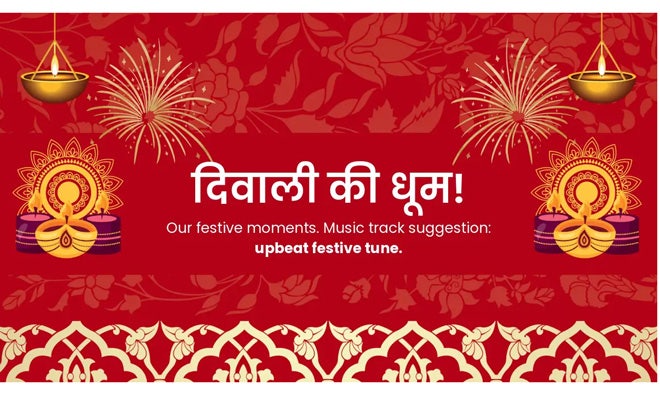
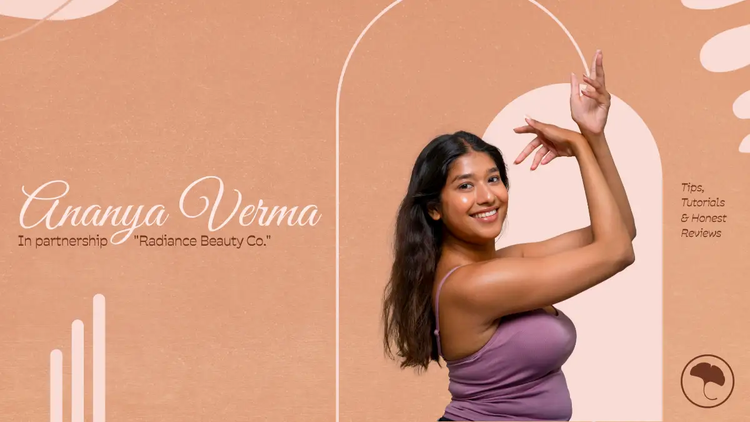
Feature your tagline or slogan in your YouTube banner.
Your YouTube banner is an excellent digital real estate piece to showcase what you think is important about your channel. Broadcast your brand’s tagline or slogan across your banner in an eye-catching way. Now that you know about font pairing, text styles and text effects, use these design elements to create magic with your tagline.
recipe
Use your YouTube banner space for updates.
It is likely that viewers are regularly coming to your page to find your latest video upload. So why not take advantage of the traffic? Use your banner as a space to provide updates or add a seasonal touch to your channel. Going off-line? Add that to your banner along with a return date, so viewers know when you’ll be back. Is it your channel’s birthday? Add a cake and candles to your banner for the week to make it celebratory. In this example, we see that Matte’s travel channel is focused on national parks.
recipe
Layer in shapes and colours to make a statement.
All the tools you need to make an impressive design are already right there at your fingertips. Here, we see how shapes, colour and placement can create something dynamic. The wiggly lines, scaled at a large size and used repetitively, communicate the ocean waves. Colour, font style and placement were all it took to make the line of copy into an interesting, graphic shape. The surfer image packs a ton of action into this design. As you craft your banner, think outside the box and try something unconventional.
recipe
Add a call to action to your YouTube banner.
Text certainly isn’t necessary on a YouTube banner, but it can be nice to add text to include information your viewers won’t find elsewhere on your channel. Here, Hobbyland is describing what their channel is about and encouraging viewers to subscribe. If you feature a call to action, keep the rest of your design simple in comparison.
recipe
YouTube banner text styles.
The word Insomnia here has been translated into graphic art simply by making slight adjustments. Spacing out the letters and using all-caps creates an ominous and expansive sentiment that resonates with the background’s space image. How can you style your text to fit your design? Perhaps by spacing out, stacking or colour-coding your letters? Maybe by playing with placement or negative space? How about size, repetition or angles? These are all ways to add more meaning to your words and make an impressive design.
recipe
Use type characters as shapes.
Here we see how brackets can be used to create a header text box. Enlarge your letters to show off their shapes and curves. Create boxes, frames, patterns or negative space with them. We also love this design to think outside the box, literally and stretch the brackets and type to overlay on both the image and the yellow square.
recipe
YouTube banner fonts.
When it comes to font pairings, a good rule to remember is opposites attract. If you want to have a bold, creative headline like Hong Kong, choose a secondary font that is the opposite - in this case, a neutral san serif font. Consider a primary font that resonates with your artwork. Here, the main font echoes the edgy, adventurous vibe we see in the photo. The secondary font, however, is there to communicate a message. So, if you choose a wild, handwritten primary font, pair it with a neutral serif or sans serif font. If you have a headline that’s a professional, san serif font, go for a secondary serif font for legibility.
recipe
Create outstanding text effects.
Take your copy to the next level with special text effects. Text effects are a great way to add impact to your design. With Adobe Express, you can choose Generate Text Effect such as cutout, as seen in the example below, outline, shadow or a combination of these effects. Generate Text effect is a dynamic tool for adding dimension to your YouTube banner.
recipe
How to make the most of these YouTube banner ideas.
Play with powerful imagery.
This photo of a live concert is, without doubt, stimulating and compelling. Upon the first impression, a viewer already has a pretty good idea of what this channel is about. The title and subtitle fill in any blanks. Photos can often make a viewer feel much more than text can, so use them to your advantage. Upload photos to Adobe Express from your computer, phone, social channels or Creative Cloud or browse through our stock photo selection for gorgeous images that you can place right into your designs.
recipe
Select images to match your YouTube channel.
If you have a specific brand or theme for your channel, curate your banner’s imagery to match. You can go full screen with your photos or drop them in frames or different layout options. You can even feature multiple images by using photo collages.
recipe
YouTube banner icons.
Build a beautiful graphic banner with icons alone. Search through our wide selection of icons to find the perfect fit for your banner. Get creative with your icons by playing around with the sizing. Scale-up an icon to take up the whole background or shrink them down to create a cohesive design. Play with colour and placement as well to make something unique.
recipe
Colour your YouTube banner with attention-grabbing hues.
Bright colours are one way to grab your viewer’s attention. You can also use contrasting colours, such as complementary colours on the colour wheel or a bright text against a dark background, or vice versa. Think about the intent behind your colours. This is a great example of colour theory because the green shade communicates the green intention behind the channel. Pink and green have been popular colour swatches recently, so given the ubiquity of these colours, they may resonate with your viewer as something familiar. Colour can communicate so much without saying anything at all.
recipe
Craft collages using text, photos and imagery.
Collaging is a great tool for featuring lots of content in a single design. This particular layout is an excellent example as there’s consistency between all the different sections - each is a single subject on bright colour background. Use other layout options to turn your canvas into a grid and create a cohesive design by mixing and matching photo and text boxes.
recipe
Play with panels and frames for your YouTube banner.
There are many ways to divide up the space in your design, such as collaging or using different layouts. Here, we see the shoe graphic expand through 3 different frames. An effect like this can be done by applying semi-transparent panels with different colours over an image and using white lines to indicate a break or frame in the design. Dimension is added with lines and text overlaying across the frame borders. This banner feels jam-packed with energy and action.
recipe
Use layers to transform your YouTube banner design.
Drop-in an image to your banner design. Add a filter. Place a second image on top and adjust the transparency so you can see the photo underneath. Add a shaped block, then overlay text on top. Now you’ve made a very dimensional banner design. Layering is a design element that creates depth and transforms something ordinary into something extraordinary. Let go of preconceived notions and experiment a little with layering different pieces to create something entirely new.
recipe
Design within the parameters.
YouTube banners are cropped differently depending on the device you view them on. Generally, the safe area is the banner’s middle rectangle, which is how it is presented on mobile and desktop. You want to make that your key focus and maintain a design that can be enjoyed on full screen, like on a TV. For this design, a full view shows the classic arcade game feel from the background texture.
When we crop it down to the safe area, we see the channel name and info in full and the fun icons used to design that spacey feel. Designing within the parameters will allow you to have an impressive banner when viewing on any device.