

Adobe Firefly
The next evolution of creative AI is here for all your ideas, with image, video, audio and vector tools.


Video aspect ratio vs resolution:What’s the difference?
Why choosing the right video aspect ratio matters
Most common video aspect ratios explained
Best video aspect ratios for your social media videos
How to create videos in any aspect ratio
Creating and adapting videos with Adobe
Video aspect ratio is one of the most important elements of video creation. Whether you’re uploading a long-form video to YouTube, creating short-form content for social media, or producing a cinematic brand video, choosing the right aspect ratio directly affects how your video looks and performs. A mismatch can lead to awkward cropping, black bars, or poor viewer engagement.
In this guide, we’ll explain what video aspect ratios are, why they’re important, and where each format is best used. We’ll also explore how creators, marketers, and businesses in India can efficiently create videos in any aspect ratio using tools like Adobe Firefly.
A video aspect ratio describes the proportional relationship between a video’s width and height. It is written as two numbers separated by a colon, in the format of X:Y (read as X by Y).
X represents the width and Y represents the height. This ratio determines the shape of your video frame, not its quality or resolution.
Video aspect ratio and resolution are closely related, but they are not the same thing. Aspect ratio defines the shape of the video frame, while resolution defines the number of pixels inside that frame. For example, a video with a 16:9 aspect ratio can have multiple resolutions, such as 1280×720, 1920×1080, or 3840×2160.
Here’s what you need to remember:
Understanding this distinction helps prevent common mistakes, such as stretching a video to fit a platform or assuming higher resolution will fix framing issues.
Selecting the correct video aspect ratio has a direct impact on viewer experience, engagement, and platform performance. When a video fits naturally within a platform’s layout, it appears larger on screen and is easier to watch without distractions like black bars, distorted images, or cropped visuals.
Aspect ratio also influences:
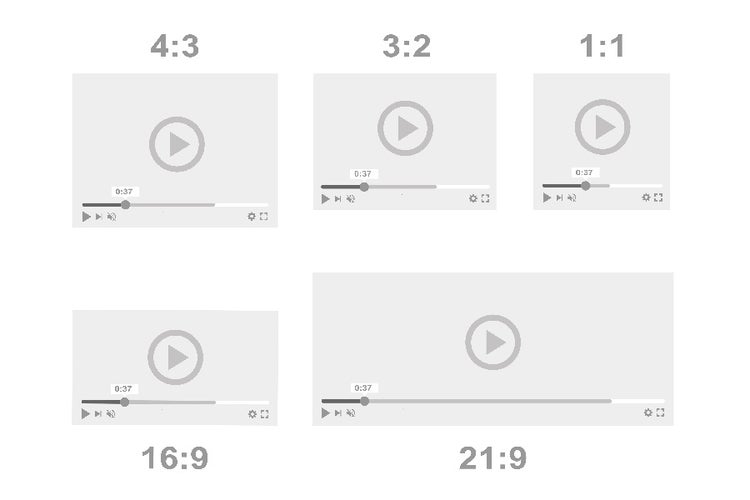
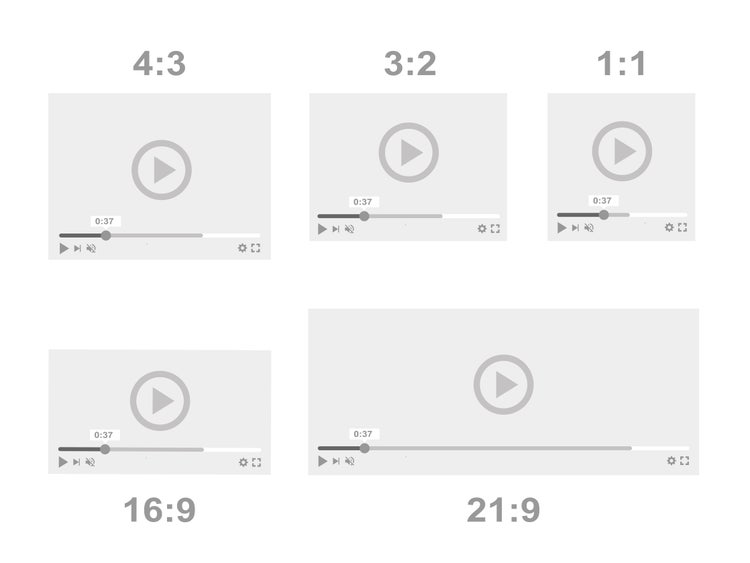
The 16:9 aspect ratio is the most widely used video format today. It is the standard landscape video size for televisions, computer screens, and online video players videos. This ratio offers a wide field of view and high-definition visuals, with resolutions typically including 1280×720 (HD), 1920×1080 (Full HD), and 3840×2160 (4K). It’s commonly used for YouTube videos, online courses and seminars, TV shows, and streaming services.
The 9:16 aspect ratio is designed for vertical viewing on smartphones. It fills the entire mobile screen, making it highly immersive and ideal for short-form content. This format has become essential with the rise of platforms like Instagram Reels, YouTube Shorts, and Facebook Reels. They work best for short, engaging content created for audiences who predominantly access social media via mobile devices.
The 1:1 aspect ratio creates a perfectly square video frame. While it is less dominant today than vertical formats and offers less visual flexibility than 16:9 and less immersion than 9:16, it is still widely used across social media feeds like Instagram and Facebook. Square videos are more of an aesthetic choice these days, and they are typically used for eye-catching advertisements and out-of-the-box layout ideas.
The 4:5 aspect ratio is a taller portrait format that is frequently used in social media platforms. It is particularly popular in scrolling feeds like Instagram, Facebook, TikTok, and YouTube Shorts. Videos in this format occupies the entire vertical screen, offering better visibility, cleaner framing, and higher engagement. They work well for a wide range of videos, including brand storytelling, product features, and educational clips.
The 21:9 aspect ratio is often referred to as cinematic frame size or ultra-widescreen. It is much wider than standard landscape formats and creates a dramatic, immersive viewing experience., making it a great option for films, trailers and teasers, and high-end brand videos. However, this also means that 21:9 videos are not ideal for most social platforms, as they often appear letterboxed or reduced in size. They are best used when visual impact is more important than reach or mobile optimisation.

Choosing the right video aspect ratio is crucial for social media success. Each platform favours a specific format based on screen orientation, user behaviour, and content discovery patterns. Using the wrong ratio can lead to cropping, black bars, or lower engagement.
Here’s a platform-by-platform guide to the best video aspect ratios and why they work.
The best aspect ratio for YouTube is 16:9. It works because YouTube is built around horizontal viewing, especially for long-form content. Most users watch YouTube videos on desktops, laptops, smart TVs, or in full-screen mode on mobile. The 16:9 landscape format fills the screen naturally across all these devices and ensures that are no visible black bars or other visual distractions. For Shorts, the 9:16 aspect ratio is a good choice to showcase clear clips and text without requiring viewers to rotate their phones.
For posts, Reels, and Stories, the best aspect ratio is 9:16. Instagram updated its post sizes in 2025 to transition to a taller, more immersive view. Since then, the interface has been designed so that vertical videos feel more native, seamless, and distraction-free. This means it prioritises full-screen vertical video across posts, Reels, and Stories and aligns with thumb-based scrolling behaviour.
Nowadays, Facebook feed consumption is primarily mobile-based, but users scroll more slowly than on short-form platforms. Because of this, taller videos in 4:5 aspect ratio stand out without forcing full-screen viewing. This offers better visibility in crowded feeds and more space for captions and overlays. Square videos in 1:1 aspect ratio also adapt well across placements, making them practical for campaigns targeting multiple audience segments.
Because TikTok is a fully vertical platform, videos that occupy the full screen (in 9:16 ratio) perform the best. They fill the whole screen to capture viewer attention in an instant, making them perfect for all kinds of videos: challenges, trends, meme-inspired clips, product demos, commentary, and more.
LinkedIn is a professional platform where content is consumed on both desktop and mobile. As a result, landscape and square videos perform more consistently than full vertical formats. If you’re posting webinars, leadership videos, or company updates, the 16:9 aspect ratio is recommended. For ads and quick announcements, the 1:1 works great.
Twitter’s feed displays videos inline within fast-moving conversations. Square videos take up more vertical space on mobile, while landscape works well for shared clips and news-style content. The flexible viewing across mobile and desktop means that either 1:1 or 16:9 can be used for Twitter announcements, commentary, brand updates, and event clips.
Creating videos in multiple aspect ratios requires both planning and flexibility. If you only design your content for one platform, repurposing it later can result in awkward cropping, cut-off text, or poorly framed subjects. To avoid this, aspect ratio should be considered before you even press record.
The easiest way to adapt content later is to prepare during production. Best practices include:
Resizing and adapting videos manually for multiple platforms can be time-consuming. Adobe simplifies this process by using AI-powered tools to help creators generate, edit, and reframe video content efficiently.
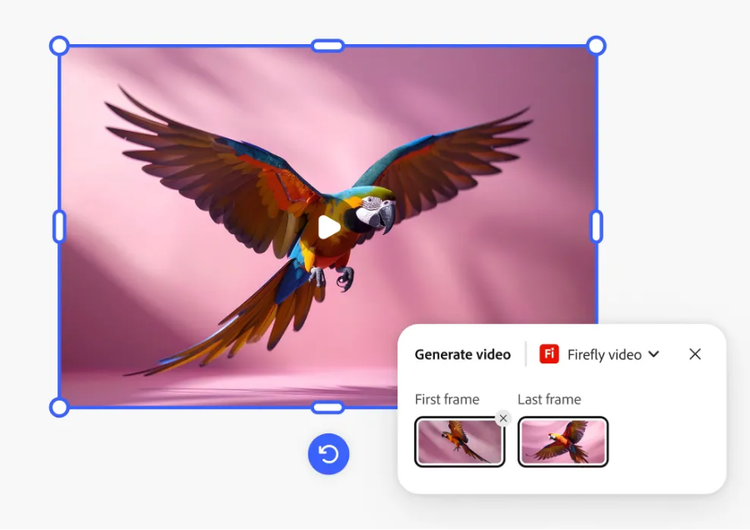
Creating platform-ready videos often requires more than resizing. Sometimes you need entirely new visuals to fit different formats or storytelling needs. Adobe Firefly’s AI video generator allows you to quickly create high-quality video clips from simple text descriptions or reference images.
Instead of relying solely on pre-recorded footage, you can generate custom visuals tailored to your campaign. Whether you need cinematic background footage, animated product shots, or atmospheric B-roll, Firefly adapts to your creative direction and produces results that feel polished and production-ready.
One of the most powerful ways to adapt aspect ratios is by expanding the frame rather than cropping it. With Generative Expand powered by Adobe Firefly in Photoshop, you can convert a vertical 9:16 video into a horizontal 16:9 landscape format in just a few clicks and without stretching or cutting off important elements.
Instead of zooming in or duplicating blurred backgrounds, Generative Expand will automatically create three realistic variations, extending the background to match the original scene. When you press Play, the expanded sides blend naturally with the footage, making it appear as if the video was originally shot in landscape.
One of the easiest ways to create platform-ready social videos is by using Adobe Express. With its powerful online social video maker, you can design eye-catching videos for any channel in just a few minutes and without needing complex software or advanced editing skills.
Instead of starting from scratch, you can use pre-designed templates, animated text, and music options that help you quickly produce scroll-stopping content. You can create vertical 9:16 videos for TikTok and Instagram Reels, square 1:1 videos for Instagram and Facebook feeds, or 16:9 landscape videos for YouTube, all optimised for the platform you’re publishing on.
Even experienced creators can run into issues when working with multiple video aspect ratios. These mistakes can reduce video quality, hurt engagement, and make content appear unprofessional. Here are some common pitfalls and how to avoid them: