JUMP TO SECTION
The five core categories of AI generated video
Example 1: AI generated videos for advertising
Example 2: Cinematic AI video content
Example 3: AI video generation for animation
Example 4: Fantasy andstylised AI video content
Example 5: AI generated videos with realistic avatars
What makes AI generated videos work?
AI generated video is reshaping how creators, teams and brands approach content production. Rather than relying exclusively on traditional filming and post-production, dynamic visuals can now be generated from text prompts, image references or structured storyboard concepts. This shift enables faster experimentation, more agile workflows and scalable creative output across platforms.
However, access to AI tools alone does not guarantee quality. Not every AI generated video feels cohesive or effective. The strongest examples share clear creative intent, deliberate pacing, visual consistency and structured messaging. Without these elements, even technically impressive visuals can feel fragmented or unfocused.
The following real world use cases explore how AI video is being applied across industries, alongside a breakdown of what makes each example work. By analysing structure, pacing and visual decisions, it becomes easier to understand how AI-generated video moves from concept to polished execution.
The five core categories of AI generated video.
AI generated video spans a wide range of creative and commercial applications, but most examples fall into several core categories. Each category reflects a different objective, audience expectation and production style. Understanding these distinctions helps clarify not only how AI video is used, but why certain structural and visual choices matter more in some contexts than others.
The five most common categories include:
- Advertising videos
- Cinematic storytelling content
- Animated videos
- Fantasy or highly stylised scenes
- Avatar-led presentations
While all these formats may use similar AI generation tools, they differ significantly in structure, pacing and creative intent. Advertising content prioritises clarity and product focus. Cinematic videos rely on atmosphere and deliberate movement. Animation depends on style consistency and character flow. Fantasy scenes emphasise visual imagination grounded in composition. Avatar-led presentations focus on clarity, delivery and communication.
Recognising these categories provides a framework for evaluating AI-generated video more critically. Rather than viewing AI video as one single format, it becomes easier to assess how well each example aligns its visuals, timing and messaging with its intended purpose.
Example 1: AI generated videos for advertising.
AI video tools are widely used to create product launches, teaser clips and campaign assets. A beverage advertisement generated against a clean studio background, for instance, may showcase condensation forming on a glass while soft lighting enhances texture and detail. These types of videos focus on clarity, visual polish and immediate audience attention.
What makes this type of AI video effective?
- Clear visual focus on the product
- Minimal distractions in the background
- Strong lighting and composition
- Short, attention-driven pacing
The structure is simple but intentional. Strong advertising videos introduce the product quickly, highlight key details and maintain visual consistency throughout. In advertising content, clarity and visual cohesion are essential for impact.


Prompt: Create a polished advertising video for a lemon and cranberry-flavoured beverage set against a clean studio background. Show light condensation slowly forming and dripping down the side of the glass.
Tool: Adobe Firefly Video model
Prompt: Create a minimalist, high-end lifestyle kitchen scene with soft morning sunlight. Include fresh croissants, a pitcher and two tumbler glasses filled with orange juice and a blue silk robe draped on a chair. Use a cinematic composition.
Tool: Adobe Firefly Video model
Example 2: Cinematic AI video content.
Cinematic AI-generated videos are often used to visualise story concepts, generate supporting footage or develop scene ideas before full production. A scene featuring a horse walking through a deserted western town demonstrates how AI can establish mood, depth and environmental storytelling.
These videos work because of:
- Controlled, deliberate pacing
- Cohesive colour grading
- Environmental detail
- Gradual, purposeful movement
Cinematic AI videos rely heavily on atmosphere. They feel immersive when visual tone remains consistent and motion unfolds naturally. Even short clips benefit from structured pacing and intentional scene composition.
Prompt: Create a realistic video of a horse walking slowly across a deserted, old western town. Show the horse moving calmly through the dusty street, with wooden buildings and weathered shop fronts in the background.
Tools and features: Adobe Stock, Adobe Photoshop, Harmonise, Start Frame, Adobe Firefly Video model
Prompt: Create a realistic video of a horse walking slowly across a deserted, old western town. Show the horse moving calmly through the dusty street, with wooden buildings and weathered shop fronts in the background.
Tools and features: Adobe Stock, Adobe Photoshop, Harmonise, Start Frame, Adobe Firefly Video model
Example 3: AI video generation for animation.
AI tools are frequently used to create animated content ranging from explainers to stylised character sequences. A cartoon superhero flying through clouds or a playful animated character reacting to an object can be generated and refined through motion and style adjustments.
Strong animated AI videos share:
- Distinct visual style
- Consistent character design
- Smooth motion transitions
- Clear narrative progression
Animation benefits from clarity in movement and expression. When motion speed, transitions and visual tone remain balanced, even short clips feel more polished and professional
Prompt: Create a cartoon superhero flying through the sky. Show the character soaring forward with arms extended, cape flowing behind them, against a bright sky filled with soft clouds.
Tool: Adobe Firefly Video model, Start Frame
Prompt: Create a cartoon mouse reacting excitedly to a cube of cheese. Show the mouse gesturing animatedly toward the cheese with expressive facial features that emphasise curiosity and delight.
Tool: Adobe Firefly Video model
Example 4: Fantasy and stylised AI video content.
Fantasy content allows AI video to explore more imaginative and visually complex scenes. A cinematic sequence showing a dog sitting on the moon looking toward a distant planet illustrates how AI can create environments that would be costly or impossible to film traditionally.
What makes stylised AI video content effective is not just the idea, but execution:
- Focused subject placement
- Balanced colour contrast
- Controlled camera motion
- A strong visual focal point
Even surreal or highly creative scenes benefit from structured composition and pacing. Visual logic helps maintain viewer engagement and ensures the content remains visually coherent.
Prompt: Create a cinematic scene of a dog sitting on the surface of the moon, gazing toward a distant gaseous planet in the sky.
Tool: Adobe Firefly Video model
Example 5: AI generated videos with realistic avatars.
AI generated avatar videos are widely used for training modules, presentations and customer communication. A realistic talking-head avatar delivering scripted narration allows organisations to scale educational or support content efficiently.
Effective avatar videos typically include:
- Natural facial movement
- Clear audio pacing
- Structured script delivery
- Simple background environments
These videos are most effective when clarity and communication remain the priority. Clean visuals, controlled pacing and structured delivery help maintain attention and understanding across longer viewing periods.
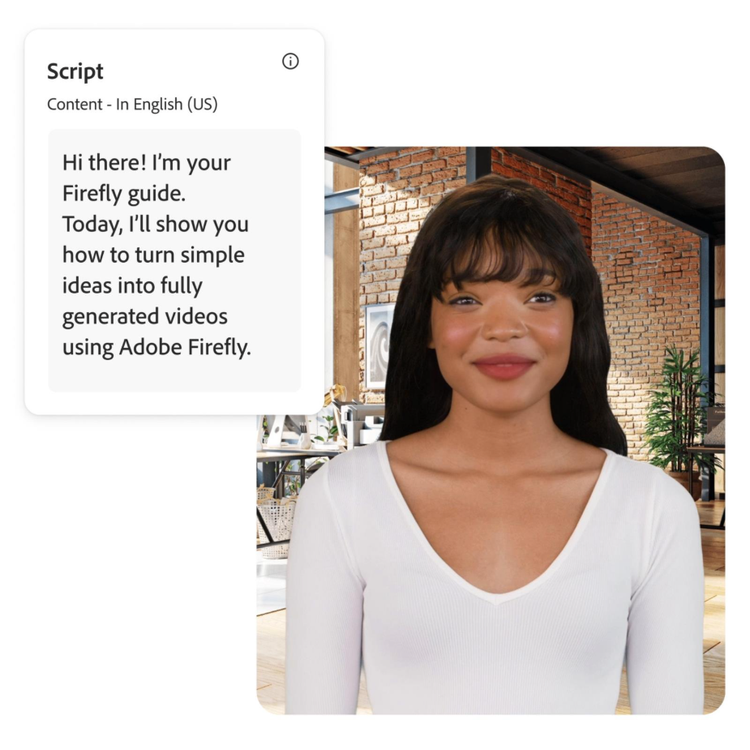
Tool: Text to avatar (beta)
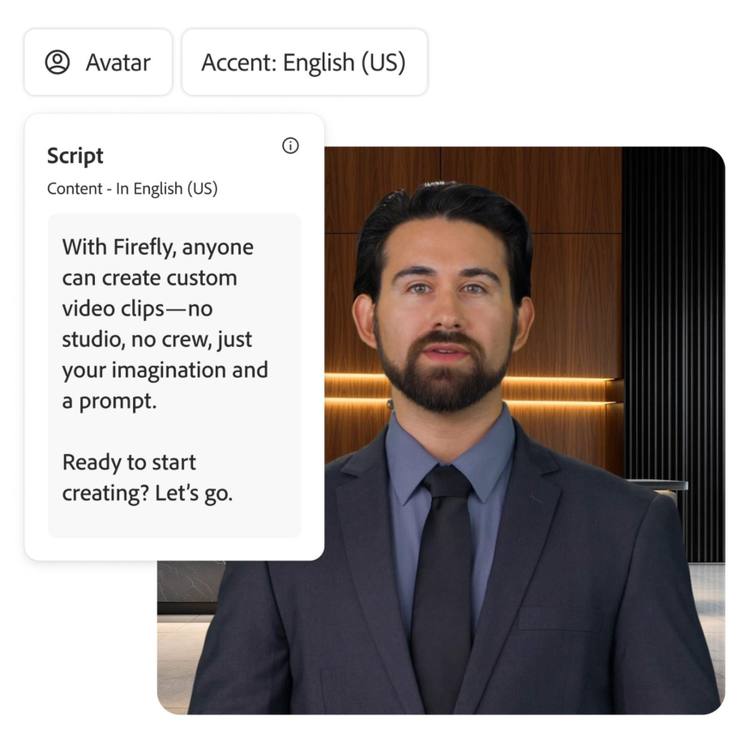
Tool: Text to avatar (beta)
What makes AI generated videos work?
Across all categories, several principles consistently shape successful AI video content.
- Clear structure and purpose
Every effective AI video begin with a defined objective. Whether the goal is to inform, promote, entertain or visualise an idea, purpose shapes pacing, visual style and editing decisions. - Intentional pacing
Short, purposeful scenes maintain viewer engagement. Even cinematic or longer-form content benefits from controlled timing and smooth transitions. - Visual consistency
Matching colour tones, lighting and composition across scenes creates cohesion. Consistency helps AI generated content feel more professional and less fragmented. - Alignment between visuals and message
Strong visuals alone are not enough. AI-generated videos perform best when imagery supports a clear narrative or message rather than existing purely for visual impact.
How to build an effective AI generated video.
Creating a strong AI generated video involves more than generating visuals. A structured workflow helps maintain clarity, cohesion and creative direction throughout the process.
Start by defining the goal of the video and the audience it is intended to reach. Gather reference material or develop a clear prompt to guide visual tone and style. Storyboarding key scenes can help establish pacing and narrative flow before generation begins, reducing the need for heavy revisions later.
From there, visuals can be generated using text to video or image to video tools, then refined and edited to improve timing, consistency and clarity. Many creators use platforms such as Adobe Firefly within this stage to experiment with scene variations, adjust visual tone or generate supporting footage as part of a broader workflow. The emphasis remains on testing and refinement rather than one click output. Final adjustments such as titles, voiceovers and sound design help reinforce messaging and strengthen overall impact.
The most effective workflows prioritise clarity and creative intent rather than simply exploring visual novelty. When structure, pacing and visual consistency guide decision making, AI generated video becomes a practical and scalable tool for modern content creation.
Frequently asked questions.
You may also like